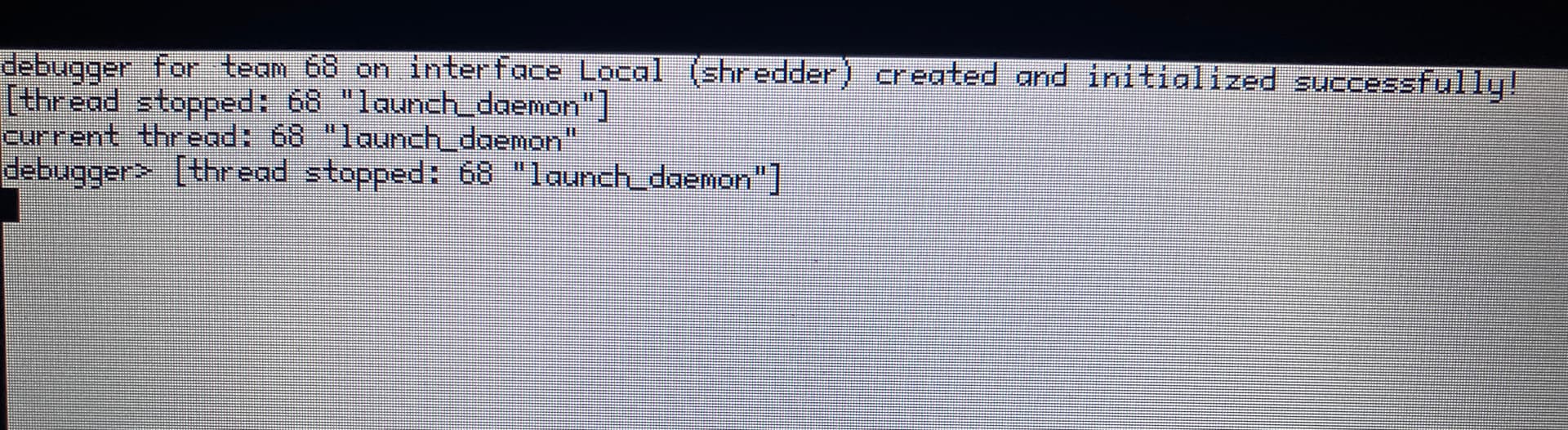
Do I need to re-install? (I am currently running the latest nightly on a Thinkpad X230. It was working fine until half an hour or so ago when the system crashed and would not respond to keyboard or trackpad input….)
I am getting this white screen with black text instead of the Haiku desktop immediately after the red rocket icon in the boot up sequence.
That is the debugger, lanch_deamon is crashing.
Sorry, as to why and how to fix it, i can not help you
type “bt” and open a ticket with the output 
1 Like
For those who do not know, what is bt?
backtrace;
You can read more about it here: Welcome to Kernel Debugging Land... | Haiku Project
2 Likes
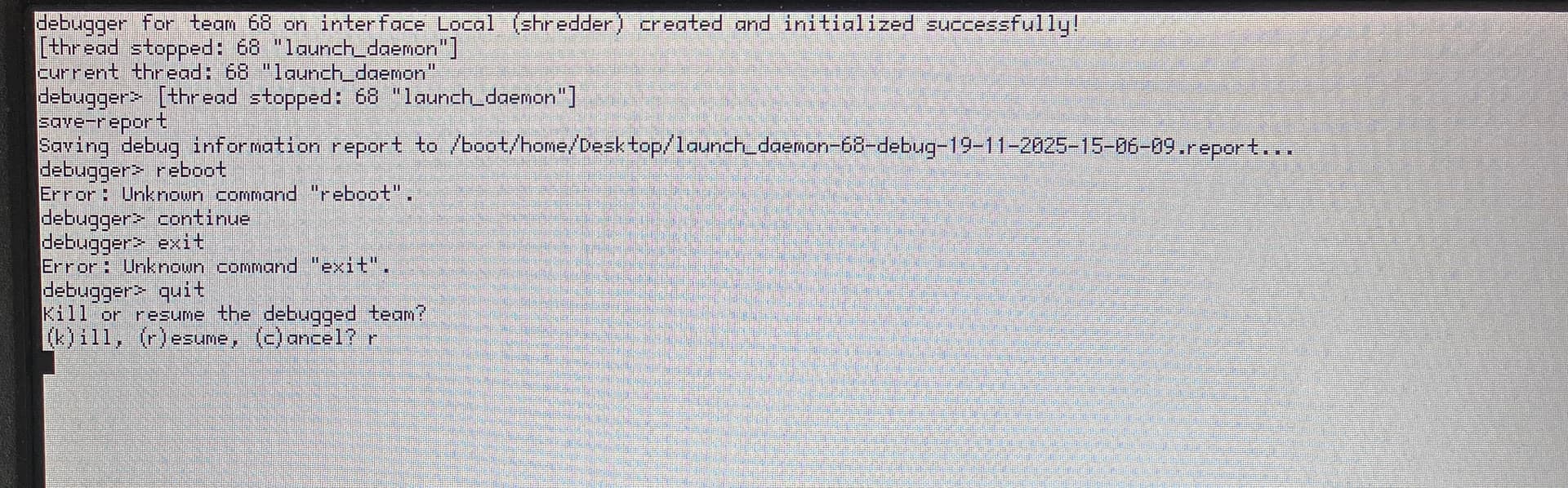
This is a userland Debugger prompt, not the kernel debugger. Instead of bt, just run save-report. This will save a debug report to your Desktop. After a reboot, the report should be there, and you can create a ticket and attach the report to it like any other crash.
2 Likes
I managed to have the debugger save-report but typing “reboot” or “exit” or “quit” doesn’t work, and a hard reset with the thinkpad’s power button brings up the white screen again. Is there some way to repair the launch_daemon?
1 Like
Without seeing the report I don’t know what the problem could be. Do you have a way to read the BFS partition and extract that file?
I booted up a live Haiku from a USB memory stick and mounted my Thinkpad’s internal SSD Haiku drive. Funny thing is, all my files seem to be there but there are no debug log files in the Desktop folder as far as I can see.
Is there some Tracker setting I need to activate first?
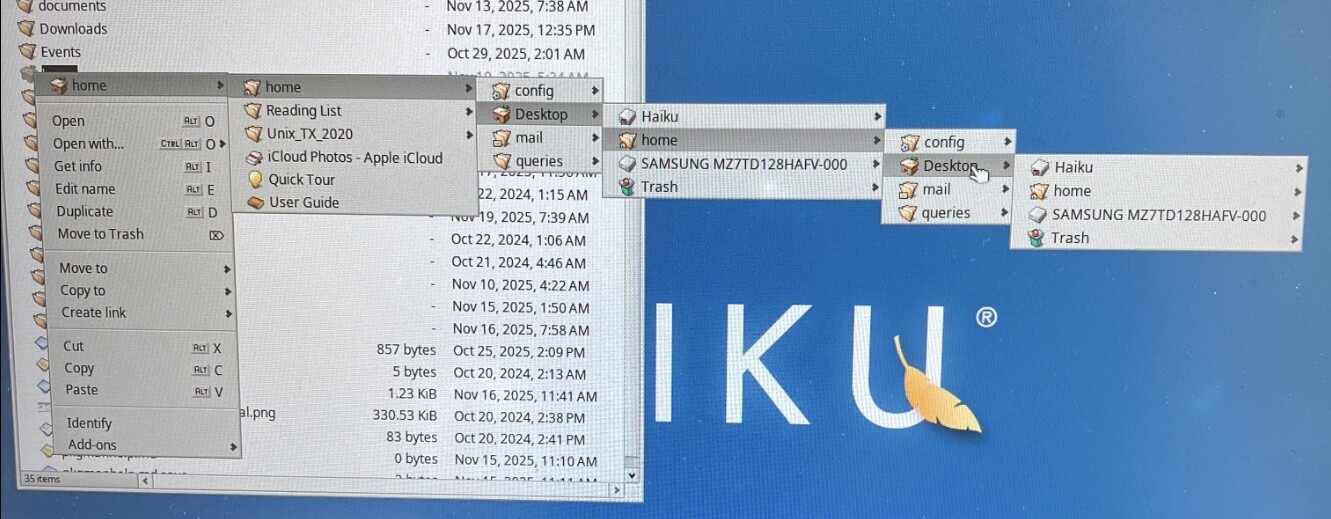
No, I don’t think so. Strange it doesn’t show up. Maybe the disk didn’t get synchronized before you reset the machine?
Does choosing kill produce any different result on the crash screen? Can you press the power button just once to get a clean shutdown?
We need that report file to figure out.
The kill command does not do anything perceptible and the window will not accept any input after either a quit>kill command or a quit>resume command.
A single press on the power button doesn’t have any perceptible effect either I’m afraid.
I looked again at the Desktop folder on the internal SSD’s Haiku drive and it seems that even though debugger reported that the save-report command had been carried out, the file was not actually saved to SSD.
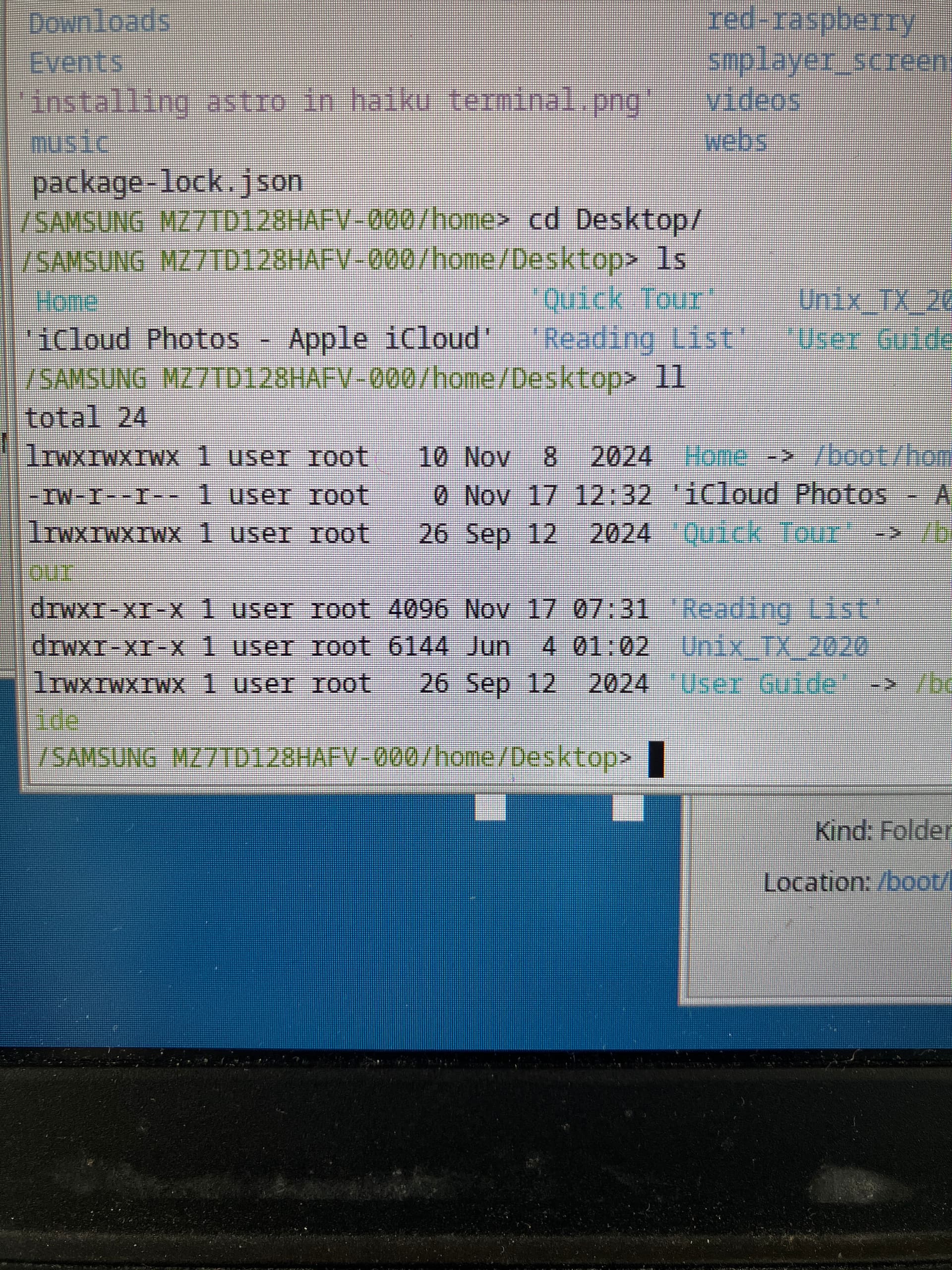
TIL that I can copy files off my Haiku SSD very easily by booting up Linux from my Thinkpad’s second SSD. So my data is now backed up and I’m ready to re-install Haiku.
One question that’s come to mind is whether I will lose the file attributes in my people files by copying them to Linux. Is there a way to format a usb memory stick to Haiku format so I don’t lose the attributes?
Also, I don’t suppose there is a way to reinstall Haiku so that I do not have to re-install all my apps by hand via HaikuDepot?
Yes,file attributes are lost by copying them to a Linux file system using Linux,since those aren’t supported there.
You can format an USB stick to BFS using Haiku,then it supports attributes.
I’m not sure,however,if they are properly copied if you use Linux to do your backup.
Better use Haiku to copy stuff on BFS partitions,then you can be sure that attributes don’t get lost.
You can also copy your system/packages directory to the backup and then copy it back to your newly installed Haiku,then you have all your applications again.
With the way Haiku packages works,it’s really as simple as that,you only need the HPKGs.
1 Like
That’s not correct, severall linux filesystems support extended attributes. Care has to be taken when copying however (I think cp might need a flag?).
They don’t support typed extended attributes. On Linux, all attributes are strings (no integers, booleans, …). So there will be some data loss. Some filesystems attempt to do a conversion (adding the type into the name usually), but they all use different conventions, and likely won’t restore things as they were when copying back to BFS.
If the save-report command doesn’t work, maybe you can still gather some other information, for example typing bt should give you a backtrace of the crash, which may be enough to find the problem on our side.
You can also try booting in failsafe mode or with the failsafe graphics driver to see if that helps. To access these options, repeatedly press spacebar just before the Haiku boot screen shows up.
I tried the save-report command again, and also tried the bt and some other commands just to gather some additional information. I then booted up a live Haiku from a USB memory stick and when I looked in the home directory of my Haiku installed SSD, I found that the report had indeed been saved to Desktop this time around. Here is what it said:
Debug information for team /boot/system/servers/launch_daemon (73):
CPU(s): 4x Intel Core™ i7-3520M
Memory: 15.70 GiB total, 602.14 MiB used
Haiku revision: hrev59155 Nov 18 2025 07:02:01 (x86_64)
Active Threads:
thread 91: main worker
thread 137: team 73 debug task
thread 73: launch_daemon (main)
state: Exception (General protection fault)
	Frame		IP			Function Name
	-----------------------------------------------
	0x7ffaaaed5880	0x1648c6b21bc	tls_get + 0xc
		Disassembly:
			tls_get:
			0x000001648c6b21b0: 64488b0425000000  movq %fs:0x0, %rax
			0x000001648c6b21b9:           4863ff  movsxd %edi, %rdi
			0x000001648c6b21bc:         488b04f8  movq (%rax,%rdi,8), %rax <--

		Frame memory:
			[0x7ffaaaed5878]  .Sk.d...   a3 53 6b 8c 64 01 00 00
	0x7ffaaaed58a0	0x1648c6b539e	BPrivate::Libroot::GetCurrentThreadLocale() + 0xe
	0x7ffaaaed58b0	0x1648c6b5424	__ctype_b_loc + 0x4
	0x7ffaaaed5910	0x1648c6a889e	put_string(char**, unsigned long*, char*) [clone .isra.0] + 0x5e
	0x7ffaaaed5970	0x1648c6a903e	put_parameter(char**, unsigned long*, driver_parameter*, int, bool) + 0x28e
	0x7ffaaaed59d0	0x1648c6a943c	get_driver_settings_string + 0x6c
	0x7ffaaaed5d20	0x19c50d1e42c	SettingCondition::Test(ConditionContext&) const + 0x21c
	0x303031203a72656c	0x203d203a4e52454b	?

	Registers:
		  rip:	0x000001648c6b21bc
		  rsp:	0x00007ffaaaed5878
		  rbp:	0x00007ffaaaed5890
		  rax:	0x7075727265746e69
		  rbx:	0x0000000000000066
		  rcx:	0x00007ffaaaed6008
		  rdx:	0x0000008c4bff5513
		  rsi:	0x00007ffaaaed5988
		  rdi:	0x0000000000000007
		   r8:	0x0000000000003d20
		   r9:	0x0000000000000005
		  r10:	0x0000000000000000
		  r11:	0x0000000000000005
		  r12:	0x0000000000000000
		  r13:	0x0000000000000000
		  r14:	0x0000000000000000
		  r15:	0x0000008c4bff5513
		   cs:	0x002b
		   ds:	0x0000
		   es:	0x0000
		   fs:	0x0000
		   gs:	0x0000
		   ss:	0x0023
		  st0:	0
		  st1:	0
		  st2:	0
		  st3:	0
		  st4:	0
		  st5:	0
		  st6:	0
		  st7:	0
		  mm0:	{0, 0, 0, 0}
		  mm1:	{0, 0, 0, 0}
		  mm2:	{0, 0, 0, 0}
		  mm3:	{0, 0, 0, 0}
		  mm4:	{0, 0, 0, 0}
		  mm5:	{0, 0, 0, 0}
		  mm6:	{0, 0, 0, 0}
		  mm7:	{0, 0, 0, 0}
		 ymm0:	{0, 0, 0, 0, 0, 0, 0, 0, 0, 0, 0, 0, 0, 0, 0, 0}
		 ymm1:	{0, 0, 0, 0, 0, 0, 0, 0, 0, 0, 0, 0, 0, 0, 0, 0}
		 ymm2:	{0, 0, 0, 0, 0, 0, 0, 0, 0, 0, 0, 0, 0, 0, 0, 0}
		 ymm3:	{0, 0, 0, 0, 0, 0, 0, 0, 0, 0, 0, 0, 0, 0, 0, 0}
		 ymm4:	{0, 0, 0, 0, 0, 0, 0, 0, 0, 0, 0, 0, 0, 0, 0, 0}
		 ymm5:	{0, 0, 0, 0, 0, 0, 0, 0, 0, 0, 0, 0, 0, 0, 0, 0}
		 ymm6:	{0, 0, 0, 0, 0, 0, 0, 0, 0, 0, 0, 0, 0, 0, 0, 0}
		 ymm7:	{0, 0, 0, 0, 0, 0, 0, 0, 0, 0, 0, 0, 0, 0, 0, 0}
		 ymm8:	{0, 0, 0, 0, 0, 0, 0, 0, 0, 0, 0, 0, 0, 0, 0, 0}
		 ymm9:	{0, 0, 0, 0, 0, 0, 0, 0, 0, 0, 0, 0, 0, 0, 0, 0}
		ymm10:	{0, 0, 0, 0, 0, 0, 0, 0, 0, 0, 0, 0, 0, 0, 0, 0}
		ymm11:	{0, 0, 0, 0, 0, 0, 0, 0, 0, 0, 0, 0, 0, 0, 0, 0}
		ymm12:	{0, 0, 0, 0, 0, 0, 0, 0, 0, 0, 0, 0, 0, 0, 0, 0}
		ymm13:	{0, 0, 0, 0, 0, 0, 0, 0, 0, 0, 0, 0, 0, 0, 0, 0}
		ymm14:	{0, 0, 0, 0, 0, 0, 0, 0, 0, 0, 0, 0, 0, 0, 0, 0}
		ymm15:	{0, 0, 0, 0, 0, 0, 0, 0, 0, 0, 0, 0, 0, 0, 0, 0}
Loaded Images:
ID Text Base Text End Data Base Data End Type Name
4352 0x29c83d7000 0x29c83ed000 0x29c83ed000 0x29c83ee000 lib /boot/system/lib/libz.so.1.3.1
4343 0x368db9d000 0x368dbd0000 0x368dbd0000 0x368dbda000 lib /boot/system/lib/libnetwork.so
4342 0x61692a8000 0x61695df000 0x61695df000 0x616960d000 lib /boot/system/lib/libbe.so
4340 0x9b8289f000 0x9b828be000 0x9b828be000 0x9b828bf000 lib /boot/system/runtime_loader
4356 0x11405c34000 0x11405d22000 0x11405d22000 0x11405d30000 lib /boot/system/lib/libssl.so.3
4353 0x14ed5eea000 0x14ed6000000 0x14ed6000000 0x14ed6001000 lib /boot/system/lib/libzstd.so.1.5.6
4349 0x15780844000 0x15780b81000 0x15780b81000 0x15780b95000 lib /boot/system/lib/libicui18n.so.74.1
4354 0x163be836000 0x163be842000 0x163be842000 0x163be843000 lib /boot/system/lib/libbsd.so
4346 0x1648c671000 0x1648c77b000 0x1648c77b000 0x1648c792000 lib /boot/system/lib/libroot.so
4345 0x16a3afd9000 0x16a3b20c000 0x16a3b20c000 0x16a3b222000 lib /boot/system/lib/libstdc++.so.6.0.32
4351 0x1980f2a4000 0x1980f494000 0x1980f494000 0x1980f4a8000 lib /boot/system/lib/libicuuc.so.74.1
4347 0x19823357000 0x19823376000 0x19823376000 0x19823377000 lib /boot/system/lib/libgcc_s.so.1
4341 0x19c50cf6000 0x19c50d33000 0x19c50d33000 0x19c50d37000 app /boot/system/servers/launch_daemon
4383 0x1a0bcd41000 0x1a0bcd49000 0x1a0bcd49000 0x1a0bcd4a000 add-on /boot/system/add-ons/locale/catalogs/plaintext
4350 0x1b3ba4ae000 0x1b3ba4ba000 0x1b3ba4ba000 0x1b3ba4bc000 lib /boot/system/lib/libicuio.so.74.1
4355 0x1cb740ac000 0x1cb744ca000 0x1cb744ca000 0x1cb7454e000 lib /boot/system/lib/libcrypto.so.3
4348 0x1ed284de000 0x1ed284df000 0x1ed284df000 0x1ed284e0000 lib /boot/system/lib/libicudata.so.74.1
4344 0x1f5d6fee000 0x1f5d7027000 0x1f5d7027000 0x1f5d702a000 lib /boot/system/lib/libbnetapi.so
4339 0x7fcfeaf00000 0x7fcfeaf08000 0x00000000 0x00000000 system commpage
Areas:
ID Base End Size (KiB) Protection Locking Name
9362 0x29c83d7000 0x29c83ed000 88 r-x none libz.so.1.3.1_seg0rx
9363 0x29c83ed000 0x29c83ee000 4 rw- none libz.so.1.3.1_seg1rw
9339 0x368db9d000 0x368dbd0000 204 r-x none libnetwork.so_seg0rx
9340 0x368dbd0000 0x368dbd2000 8 rw- none libnetwork.so_seg1rw
9341 0x368dbd2000 0x368dbda000 32 rw- none libnetwork.so_seg2rw
9333 0x42d6c5b000 0x42d6c9b000 256 rw- none rld heap
9337 0x61692a8000 0x61695df000 3292 r-x none libbe.so_seg0rx
9338 0x61695df000 0x616960d000 184 rw- none libbe.so_seg1rw
9334 0x6942c5b000 0x6942c5c000 4 rw-S none rld_debug
9436 0x8c4bfc8000 0x8c4c1a4000 1904 rw- none heap area
9439 0x8efc52f000 0x8efe28b000 30064 r–S none libicuuc.so.74 mmap area
9331 0x9b8289f000 0x9b828be000 124 r-x none runtime_loader_seg0rx
9332 0x9b828be000 0x9b828bf000 4 rw- none runtime_loader_seg1rw
9371 0x11405c34000 0x11405d22000 952 r-x none libssl.so.3_seg0rx
9372 0x11405d22000 0x11405d30000 56 rw- none libssl.so.3_seg1rw
9364 0x14ed5eea000 0x14ed6000000 1112 r-x none libzstd.so.1.5.6_seg0rx
9365 0x14ed6000000 0x14ed6001000 4 rw- none libzstd.so.1.5.6_seg1rw
9354 0x15780844000 0x15780b81000 3316 r-x none libicui18n.so.74.1_seg0rx
9355 0x15780b81000 0x15780b94000 76 rw- none libicui18n.so.74.1_seg1rw
9356 0x15780b94000 0x15780b95000 4 rw- none libicui18n.so.74.1_seg2rw
9366 0x163be836000 0x163be842000 48 r-x none libbsd.so_seg0rx
9367 0x163be842000 0x163be843000 4 rw- none libbsd.so_seg1rw
9347 0x1648c671000 0x1648c77b000 1064 r-x none libroot.so_seg0rx
9348 0x1648c77b000 0x1648c789000 56 rw- none libroot.so_seg1rw
9349 0x1648c789000 0x1648c792000 36 rw- none libroot.so_seg2rw
9344 0x16a3afd9000 0x16a3b20c000 2252 r-x none libstdc++.so.6.0.32_seg0rx
9345 0x16a3b20c000 0x16a3b21a000 56 rw- none libstdc++.so.6.0.32_seg1rw
9346 0x16a3b21a000 0x16a3b222000 32 rw- none libstdc++.so.6.0.32_seg2rw
9359 0x1980f2a4000 0x1980f494000 1984 r-x none libicuuc.so.74.1_seg0rx
9360 0x1980f494000 0x1980f4a7000 76 rw- none libicuuc.so.74.1_seg1rw
9361 0x1980f4a7000 0x1980f4a8000 4 rw- none libicuuc.so.74.1_seg2rw
9350 0x19823357000 0x19823376000 124 r-x none libgcc_s.so.1_seg0rx
9351 0x19823376000 0x19823377000 4 rw- none libgcc_s.so.1_seg1rw
9335 0x19c50cf6000 0x19c50d33000 244 r-x none launch_daemon_seg0rx
9336 0x19c50d33000 0x19c50d37000 16 rw- none launch_daemon_seg1rw
9468 0x1a0bcd41000 0x1a0bcd49000 32 r-x none plaintext_seg0rx
9469 0x1a0bcd49000 0x1a0bcd4a000 4 rw- none plaintext_seg1rw
9357 0x1b3ba4ae000 0x1b3ba4ba000 48 r-x none libicuio.so.74.1_seg0rx
9358 0x1b3ba4ba000 0x1b3ba4bc000 8 rw- none libicuio.so.74.1_seg1rw
9368 0x1cb740ac000 0x1cb744ca000 4216 r-x none libcrypto.so.3_seg0rx
9369 0x1cb744ca000 0x1cb7454c000 520 rw- none libcrypto.so.3_seg1rw
9370 0x1cb7454c000 0x1cb7454e000 8 rw- none libcrypto.so.3_seg2rw
9352 0x1ed284de000 0x1ed284df000 4 r-x none libicudata.so.74.1_seg0rx
9353 0x1ed284df000 0x1ed284e0000 4 rw- none libicudata.so.74.1_seg1rw
9342 0x1f5d6fee000 0x1f5d7027000 228 r-x none libbnetapi.so_seg0rx
9343 0x1f5d7027000 0x1f5d702a000 12 rw- none libbnetapi.so_seg1rw
9492 0x7f91dae34000 0x7f91dae79000 276 rw-s none main worker_91_stack
9330 0x7fcfeaf00000 0x7fcfeaf08000 32 r-xSk full commpage
9328 0x7fe42163b000 0x7fe42163f000 16 rw-k full user area
9329 0x7ffaa9ed6000 0x7ffaaaed7000 16388 rw-s none launch_daemon_73_stack
Protection Flags: r - read, w - write, x - execute, s - stack, o - overcommit, c - cloneable, S - shared, k - kernel
Semaphores:
ID Count Last Holder Name
654 0 0 some BBlockCache lock
655 0 0 token space
656 0 0 BLooperList lock
657 0 0 AppServerLink_sLock
658 0 0 some BLocker
659 0 0 some BLocker
660 0 0 Catalog
662 0 0 LocaleRosterData
663 0 0 some BLocker
674 0 0 DNS cache
675 0 0 file watcher
676 0 0 network watcher
677 0 0 volume watcher
678 0 0 BMessageQueue Lock
679 0 0 AppLooperPort
680 0 0 job queue
681 -1 145 have runnable job
rax should be a pointer but it contains ascii “purretni” which I guess is “interrupt” with swapped endianness. Probably something got corrupted or incorrectly initialized?
I checked the haiku files that I copied to the ext2 formatted drive of my Linux (FerenOS) installation by copying them over to my ‘live’ usb memory stick Haiku installation.
Well, the haiku file attributes had not made it over to the Linux file system and so the people files had lost their personal attributes, and my webpositive bookmarks that I’d dragged into a ‘reading list’ folder on my desktop would no longer open the bookmarked pages.
Looking on the bright side of things, it did make me realize that there were some aspects of the Haiku that I found useful and which a Linux installation could not reproduce!
I used Installer to install Haiku to a 128GB usb memory stick I had lying around and backed up all my home and system directory files from my SSD haiku installation.
Now I intend to do a clean install of Haiku stable to my SSD and copy all the files I need back from the backed up files. One question: which are the system related files I should not copy back from my backed up files? (I do not want to make the fresh install unstable by bringing back any potentially corrupted files…). Thank you!