Hi! I really like the mockups you’ve made, they’re very much in line with what I’d also like to have in my interface  .
.
There are some points that can be difficult to resolve (I know because I’ve tried), but it’s always worth having someone else give it a shot, as they might come up with different solutions that weren’t previously considered:
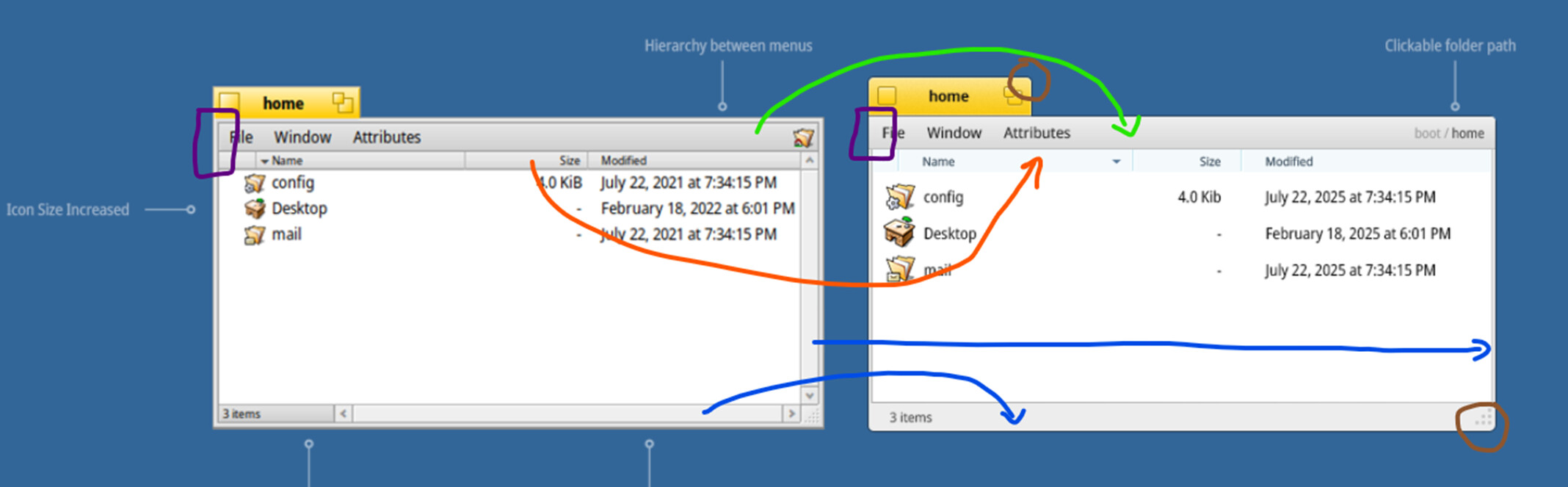
- Green: It’s hard to blend the gradient of the menu with the edge window, one part is handled by the decorator and the other by the control look. I haven’t been able to achieve a decent result working solely within the customization layer that Haiku provides.
- Purple: Same issue, the window border is part of the decorator, while the ends of the menu belong to the control look. As a result, it’s difficult to draw the end line of the menu within the decorator where the menu stops. What happend if the windows dont have a menu? …
- Orange: The problem here is that column headers are also buttons. So if you change the aspect to that light blue, all buttons will appear in that color.
- Blue: Since there’s no flag “should I draw this?” at the control look level, if you don’t draw anything, you’ll get an unrendered space. You could draw a rectangle in the background color for the “disabled” flag case, but even then, you wouldn’t be able to repurpose that area for anything else. The same applies to the scrollbar on the right… you could draw a rectangle using the control color.
- Brown: All of my attempts resulted in artifacts or KDLs. Maybe someone with solid Haiku knowledge can come up with a decent solution without needing compositing as discussed prev.
Pay special attention to the colors selected by the user—Haiku is extremely customizable in this regard. You should try to make any combination look good or simplify things directly within the decorator by ignoring the user’s color selections.
Be cautious with dark/light color themes—if you draw dark lines to identify controls against a dark background, they’ll be lost, and vice versa.
Get to work! and remember, the community is always there if you have questions.