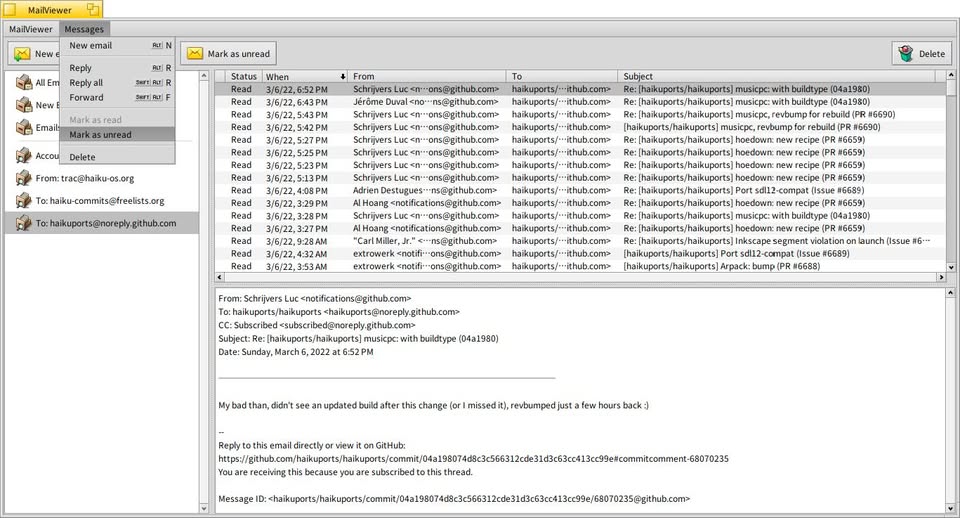
I’ve been quietly working on a little project I wanted to share a first glimpse of: a native three-pane mail viewer frontend that sits alongside Haiku’s Mail application and takes advantage of the mail_daemon.
The idea is simple: query-based mailbox views, live updates via node monitoring, tight Tracker integration, and the kind of snappy native feel we all came here for. No reinventing the wheel, just a comfortable reading environment that plays along nicely with the tools that Haiku already provides.
It’s still in development (Reply/Forward just started working recently, and there’s plenty of polish left), but it’s becoming something I actually enjoy using daily.
I will be posting more screenshots and details as development advances, but I thought I would plant the seed and see if there’s interest out there. If you’ve ever wished for a more “Haiku classic” mail reading experience that takes advantage of Haiku’s database-like file system, stay tuned.
Assuming GnuPG is available on Haiku, it may be possible in principle. Not a priority right now while I’m still working on more basic features, but signature verification could be an interesting thing to explore later. No promises though!
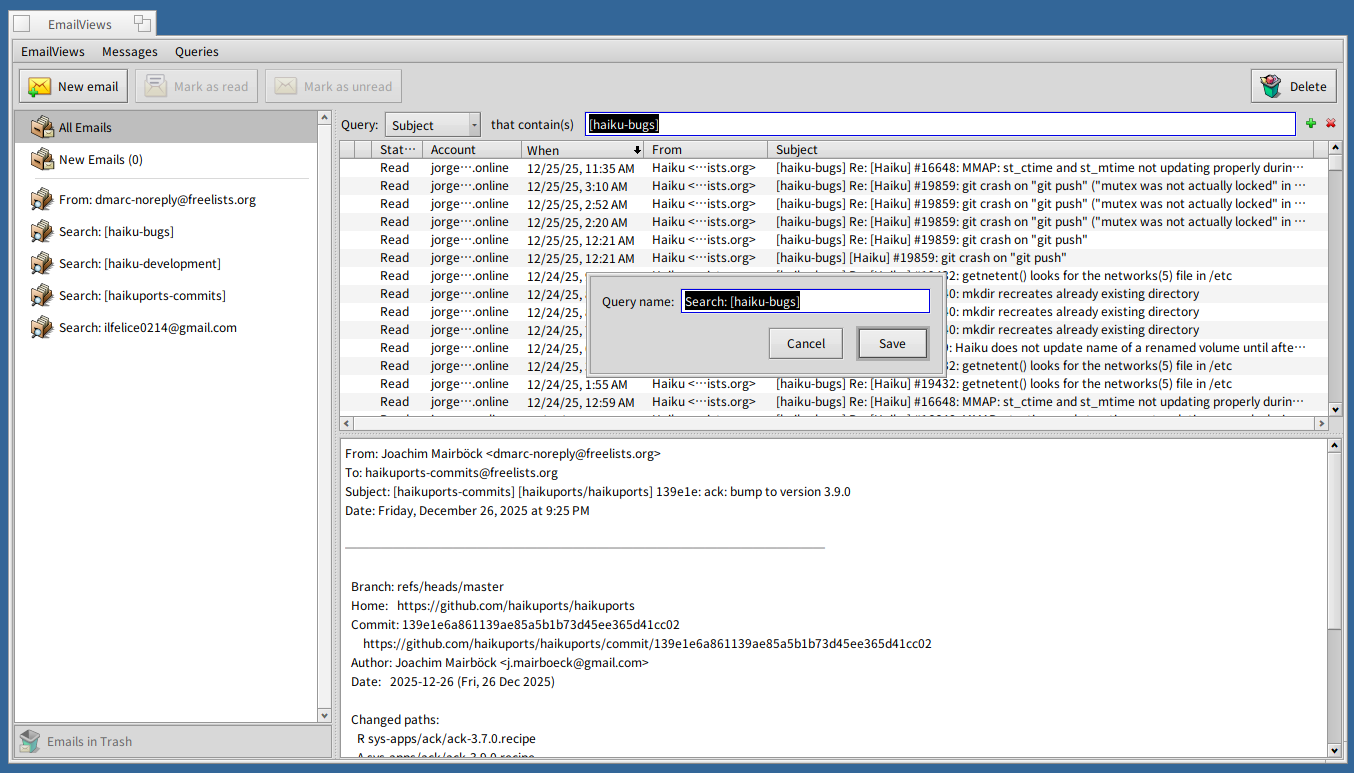
Made some more progress on the mail viewer, including several UI refinements and the ability to search messages by attributes from within the app and to save the resulting live query so that it can be used inside the app (on the left pane) and in Tracker. Here is a screenshot of the latest UI:
Interesting, though I wonder why this isn’t a continuation of Beam? It seems to have the same basic design
Edit: is there a chance you can split out some stuff from this? in essence maybe making the views replicants. I love the idea of a much better e-mail list viewer (the querry part) but would prefer e-mails to open in the existing email viewer and writer, i.e more integrated into haikus way of window management.
I would be happy to work on the querry view part if it can work in both modes, that as a standalone window would indeed be something that is really missing in the haiku base install (plus a imapfs)
This is a personal itch I am scratching…
I am a query junky, and have always longed for better native management of emails in Haiku that took advantage of BFS and its queries. This is the humble realization of that desire.
Beam is a full fledged email client. What I am working on is just a viewer that uses the mail_daemon/Mail Kit for message receiving/sending and parsing, and Haiku’s default Mail app for message viewing/composing.
I am not sure I understand the part of your message about replicants. Do you mean you would like to be able to drag-and-drop the query views from the app to the desktop (as a replicant)?
Ah okay, It looked to me like you are redoing the message viewing part aswell.
For my Part I also want a much better querry viewer, among other things one that is able to display email threads properly, to replace the tracker querry.
I don’t want a 3pane window however, hence my question if the querry view there could be split out, a replicant was just one suggestion on how it could be achieved on a technical level, but other solutions might work just aswell.
Replicant seems like the wrong way to do it. Doing it as a shared library or even just copypasting the code into another app will make your life much simpler.
Replicants are useful only if you need to embed the code in an application that has no knowledge of it (like desktop replicants in tracker). Doing a mail client where the mail client doesn’t know about its message list, which is its core feature, would be very weird and unpractical.
What you would like is a Tracker-like interface, but tailored specifically to handle emails? Am I understanding you correctly?
The 3-pane layout was a deliberate choice to make the app feel immediately familiar to most users (even newcomers), while still fully embracing Haiku’s live query paradigm instead of relying on the usual static folders.
I am also hoping that the app can serve as a nice showcase for the power of our database-like file system, one of the things that sets Haiku apart.
(And yes, I personally happen to like the 3 pane window as well )
Replicants and drag-and-drop are on my radar, but I don’t have anything concrete planned yet at this stage.
hmm, not as such. I want a replacement for the e-mail querry view (when i click the new email icon in deskbar), but I don’t want it to look like tracker, maybe a 2 pane view (left side folders/tags/querries right side emails). or something. Important to me would be the mails still opening in a seperate window.
With an imapfs we might be able to have querries a bit faster on it, but since imap actually has folders it makes sense to me to display the folders natively (maybe in a tree view) but also display querries alongside it.
Anyhow, if that is too far off your design I can also build this later, but I think we might be similar enough here in ideas (just with a different pane design)
hmm, not as such. I want a replacement for the e-mail querry view (when i click the new email icon in deskbar), but I don’t want it to look like tracker, maybe a 2 pane view (left side folders/tags/querries right side emails).
Ah, I think I understand now. Well, my app’s third pane (the preview pane) can be hidden, which means you could use it with two panes, left pane for queries and right pane for the message list. So it’s not that far from what you want… But…
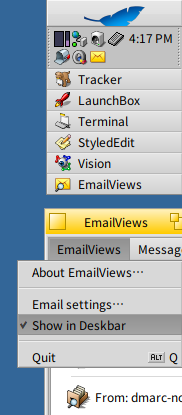
The app does not (yet) have a Deskbar replicant you can click on to open it. This is something I did not give too much thought to, but I will look into it as it sounds interesting (no promises).
You can put anything in the mail_daemon’s Deskbar tray replicant’s context menu by putting links/queries/folders/apps/whatever into “/boot/home/config/settings/Mail/Menu Links”
You can set the behaviour of a simple click on it by creating a link /boot/home/config/settings/Mail/mailbox pointing to a link/query/folder/app/whatever.
Thank you for the message. I don’t have a public repository for the app’s code. And since this is still work in progress, I don’t know if or when I will release the code. I have to think about it.
I will call for testers at some point in time; when that happens, I will announce it on the forums.