I wonder whether any of you Haikers on the board have had success connecting from haiku to a NAS running TrueNAS Community Edition? I’ve been trying to mount my SMB share unsuccessfully (perhaps Haiku’s SMB version is the v1 which is deprecated?) and I have not had success with accessing the NAS via FTP either.
I have read that some of you have fallen back to the SneakerNet tech of USB flash drives for file sharing on their network but am wondering whether there is some good way to make LAN file sharing work. Thanks for your help!
1 Like
Yes, unfortunately it is samba v1.
2 Likes
No, TrueNAS isn’t the right partner for that. You could host a container with a retro file-sharing solution – or better yet, a simple container with basic SMB v1 – on Unraid.
2 Likes
You can use NFS4, assuming you are compfortable with the downsides of that protocol (mainly No user auth, only machine auth based on ip)
1 Like
How would I use NFS4 to connect to my NAS? I’ve tried installing libnfs and libnfs_tools from HaikuDepot, and tried typing in this to Terminal but only get an error:
# mount -t nfs4 -p 192.168.100.40:my_share /boot/home/Desktop/my_share
mount: The mount point ‘/boot/home/Desktop/my_share’ is not accessible
Mine looks like: mount -t nfs4 -p “server:/volume1/sharename” /boot/home/sharepoint
I’d say check the NFS settings on your NAS and see if it tells you the path to use, which may include something like “volume1” or something similar. And maybe the quotes are necessary? It works for me after trying many different things, so…
You need also to give the correct NFS rights for your local IP machine from your NAS settings
The folder you specify has to exist. Did you mkdir -p /boot/home/Desktop/my_share before trying to mount there?
2 Likes
I hadn’t realised I needed to make the mount directory in advance! I’ve now done mkdir -p /boot/home/Desktop/my_share and now I no longer get the mount: The mount point ‘/boot/home/desktop/my_share’ is not accessible error but now the error message is mount: Invalid Argument.
I’ve tried it both with and without quotation marks, and also both including and not including the /mnt directory before /my_share.
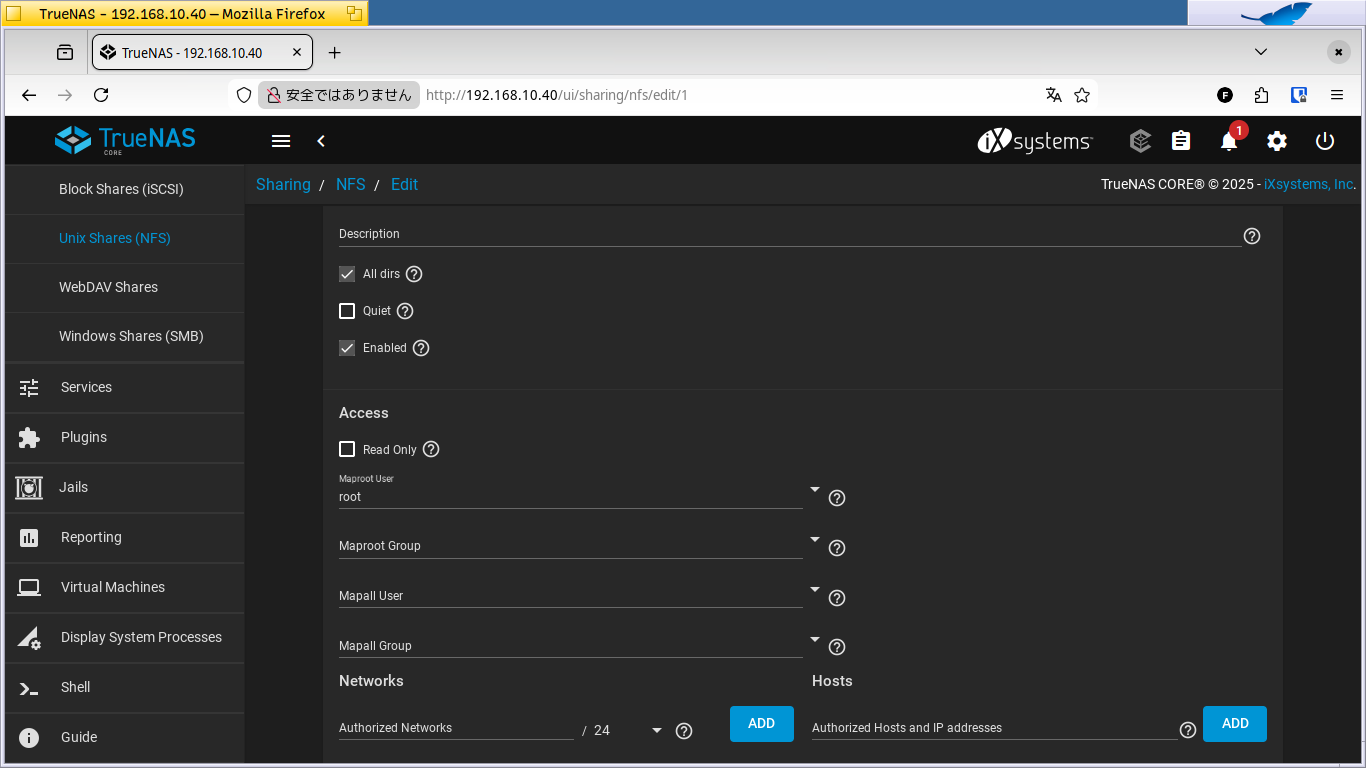
I wonder whether anyone here can advise me on any other changes I should make to the NFS settings on my TrueNAS?
1 Like
I don’t have a TrueNAS, but a Synology Diskstation. I had a quick websearch and from a quick glance of one result - no idea how useful or correct - a typical mount line for Haiku would be:
mount -t nfs4 -t "192.168.100.40:/mnt/my_share" /boot/home/Desktop/my_share
Also, make sure you mount an actually shared folder. For example, my mount line for my Synology NAS is:
mount -t nfs4 -p "192.168.178.12:volume1/music" /DiskStation
I cannot mount just the “volume1” root and navigate from there, I have to mount the actually shared folder.
I created this dialog using hdialog (->pkgman install hdialog), to easy mounting different shared folders:
#!/bin/sh

opt1="homes"
opt2="downloads"
opt3="videos"
opt4="audio"
opt5="cancel"

answer=$(hdialog --title "Mount NAS" --radio "Choose a shared folder:" "$opt1" "$opt2" "$opt3" "$opt4" "$opt5")
if [ $answer == "cancel" ] ; then
	exit -1
fi

mkdir -p /DiskStation/$answer
mount -t nfs4 -p "192.168.178.12:volume1/$answer" /DiskStation/$answer
Please note that I’m quite unexperienced in all things network. I may be doing it all wrong or needlessly convoluted. 
I appreciate any corrections…
1 Like
Thanks for this information. I’ve tried formulating the mount command in various ways but so far, I get errors like mount: invalid argument mostly.
I think that most likely I need to research the correct way to configure a NFS4 share from TrueNAS first as that might be what I have not got right.
1 Like
Maybe give a look at TrueNAS system log to see if there is any messages related to your rejected attempt to mount a NFS share from Haiku.
2 Likes
One of the TrueNAS web pages should show the full path of the NFS export. Either further up the page in your screenshot or in the main file sharing page. I’m not sure because your web interface looks a bit different than mine.
If you’re using ZFS with TrueNAS then the ZFS pool name and any parent datasets will also be in the path of the NFS export. For instance, on Haiku I can use the following command because I have a ZFS pool named tank …
mkdir -p /yoshi/Movies
mount -t nfs4 -p yoshi:/mnt/tank/Media/Movies /yoshi/Movies
2 Likes
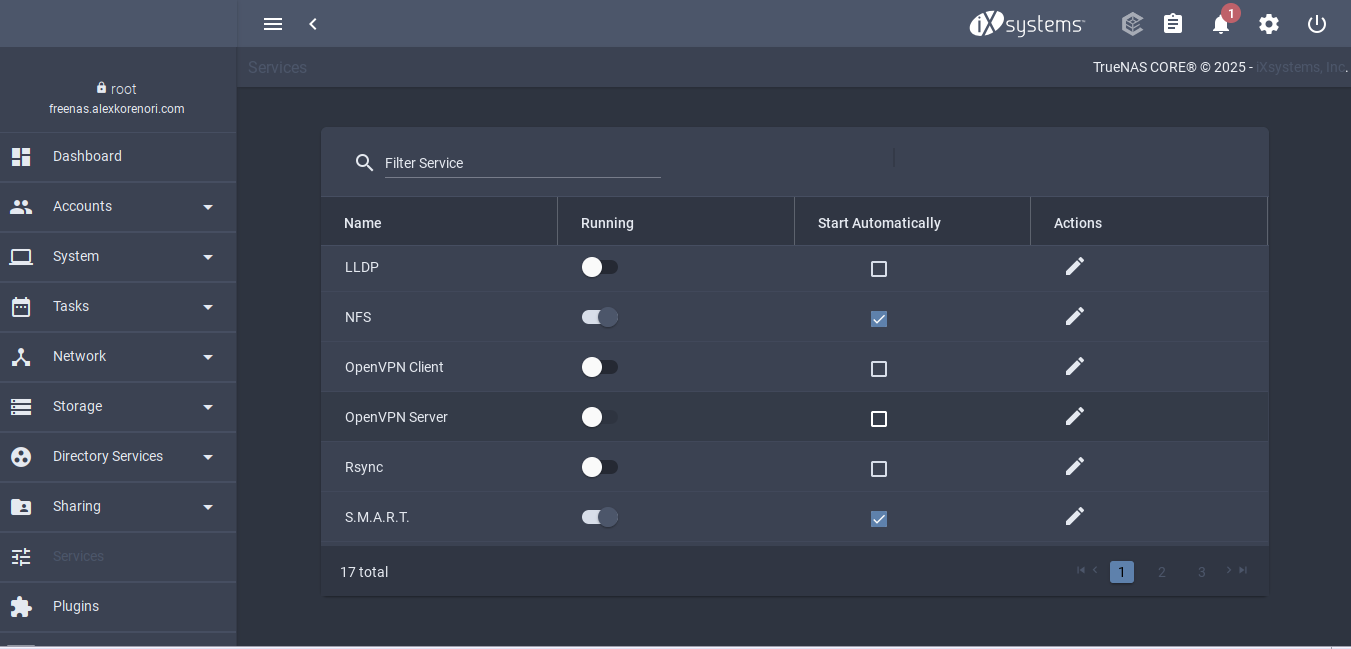
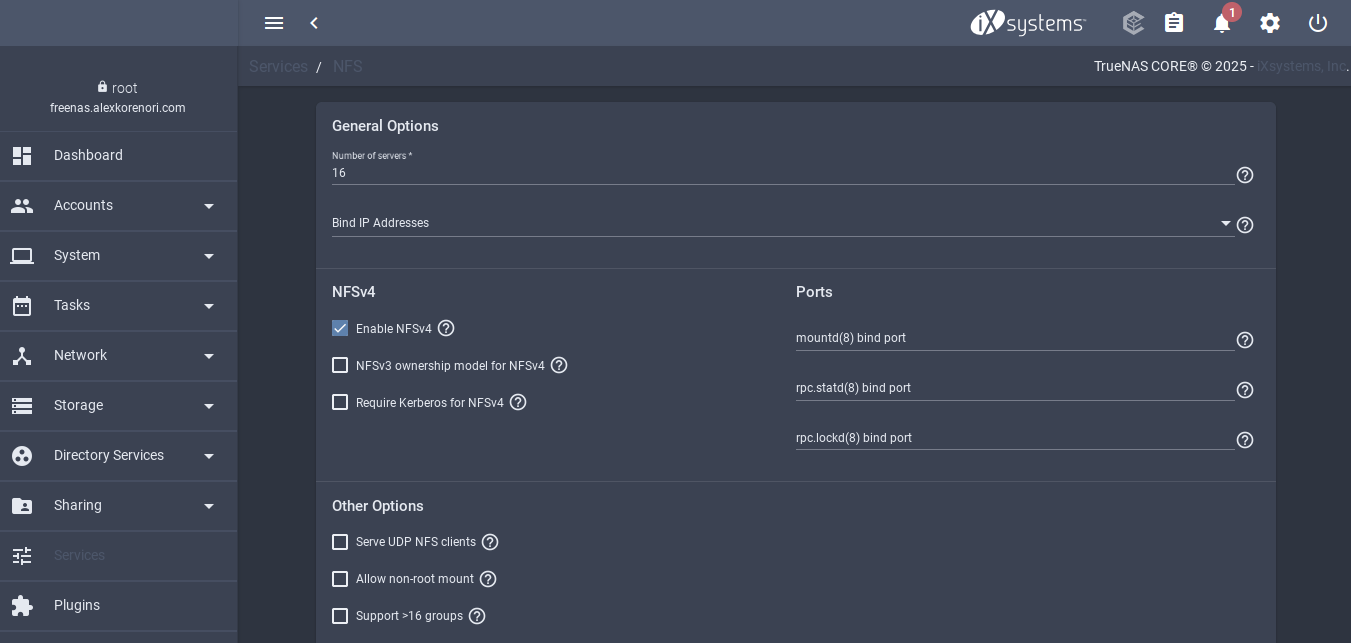
Thanks everybody, for your kind advice! I looked up in duckduckgo about how to set up a NFS4 share in TrueNAS, and found that I just needed to toggle on an Enable NFSv4 switch in the Services panel. Once that had been done, the following mount command worked like a charm!
~> mount -t nfs4 -p “192.168.10.40:/mnt/my_share” /boot/home/Desktop/my_share
Oh well, basically if I’d RTFM before starting to fiddle about with this and that I probably could have gotten NFSv4 sharing to TrueNAS working without all the drama… My apologies!
But if I hadn’t heard from @nephele that might I use NFSv4 sharing instead of SMB I would never have got this far, so thanks again everyone, for all the helpful advice here on the Haiku Forum. 
5 Likes