Backing up from Haiku to a ZFS formatted TrueNAS using LuckyBackup?

Thanks to a lot of help from my Haiku friends on this forum, I am now able to mount a large share from my TrueNAS Core network drive using nfs4.

So I’m wondering how best to use this as a destination drive for regular backups of data from my Haiku laptop.

I guess I need to find a simple way of zipping up People and audio files containing Haiku attribues before using LuckyBackup or rsync to make incremental backups to my TrueNAS once I’ve got it mounted to Haiku’s desktop? Is there a recommended way of automating as much of this as possible?

1 Like

rsync has some supports about extended attributes (xattrs option), maybe it could be explored, in particular when zfs is used.

1 Like

The very best way to backup, in my opinion, is to use rsync. Since you’re using ZFS, you’re good. If you were using FATxx, then you’d get issues with permissions not being preserved.

The way it’s done, is that hardlinks are used to link to files that are exactly the same as they were before. So you get backups in each their own folder, which is named by date.

I think this is the original article I read about it. I followed it (on Linux) and it’s been working well for years.

(I’m currently on Linux, and I’ll have to save this, before I can switch to Haiku to make a test, but I’ll try and make a simple and easy example with some explanation).

Edit: Currently I can’t boot Haiku, I need to keep my computer turned off for a while, because the NVMe (without heatsink) gets too warm. I’ll return later. :slight_smile:

1 Like

Thanks for the article link!

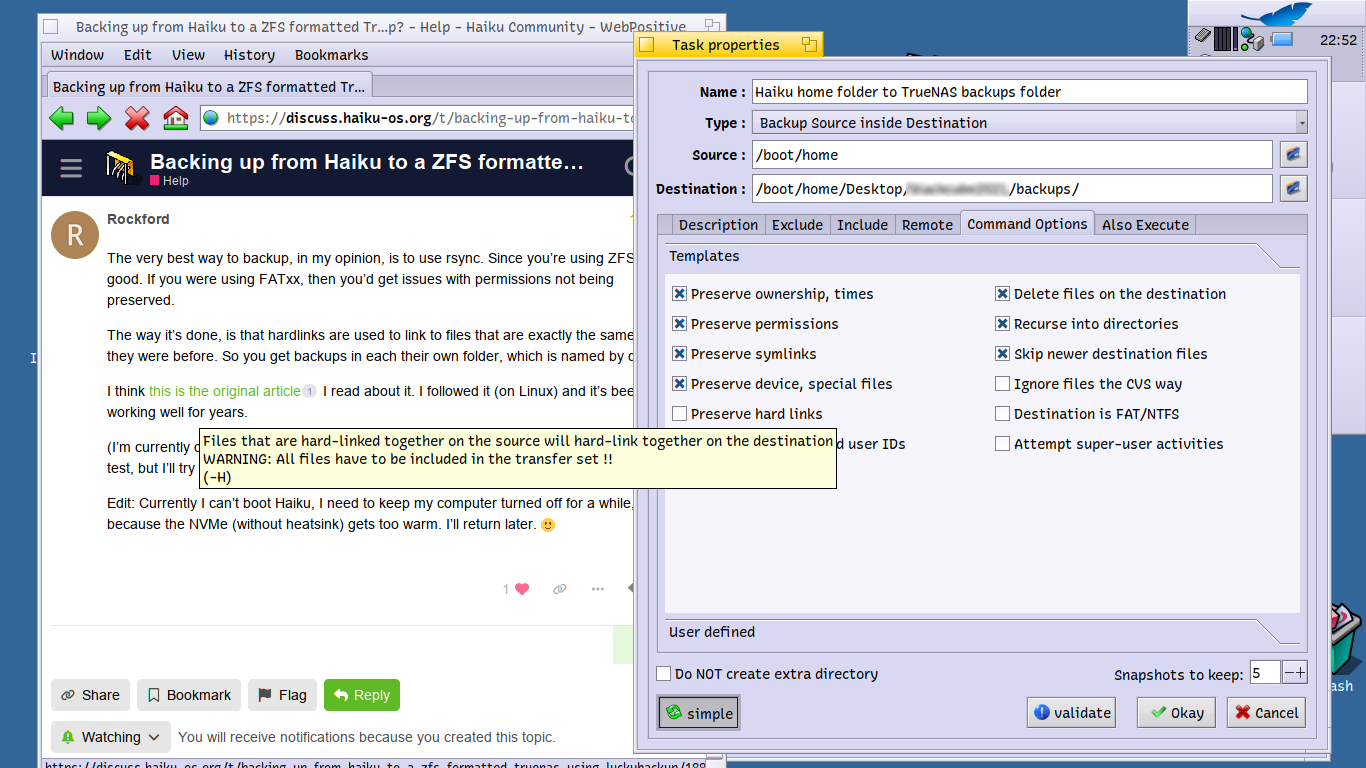
I’ll study it and then try to see if I might not be able to reproduce its methods using LuckyBackup (a GUI wrapper around rsync). There’s an option to “preserve hardlinks” there so it might actually work the way that the article explains.

I won’t be able to use cron to automate the process like I would with rsync, so after I get used to taking regular Haiku snapshots manually using LuckyBackup I might learn enough to start using rsync without the GUI…

2 Likes

you can try to add --xattrs in the Options > User Defined to see if it will succeed to somehow save attributes. I’m not sure the rsync binary on Haiku is able to support BFS attributes, though, so maybe it’s useless.

Edit: it seems it does.

I think it might be cool to have a special folder in Haiku where you could just drop scripts or links to apps, and then have BFS metadata fields that control when these are to be run by a system daemon.

Triggers could include “system startup”, “before shutdown”, “user logon”, “network connection established”, “new email”, “new file in folder” (plus a field which folder to watch), as well as more conventional ones like “date” for a one-fire event at a specific time and “time interval” to run in specific intervals, such as a backup script.

Like a better version of Cron in the form of a BFS-flavored autostart-type folder. Tracker could then have some form of dedicated UI to make it really easy to use.

1 Like

We already have a descriptor language for system services and jobs, using attributes wouldn’t really improve that imo.

What’s kind of missing is a good UI to manage these, but maybe not in tracker :slight_smile:

1 Like

Edit: First you may need to go to the HaikuDepot and install rsync.

I wrote a script and tested it. You’ll need to modify the paths inside the script to your own needs, because my setup is different from yours. :wink:

Here’s the script:

#!/bin/bash

if [ "${1:+x}" != "x" ]; then
  echo "argument must be source directory" >>/dev/stderr
  exit 1
fi

set -o errexit
set -o nounset
set -o pipefail

SRC="$1"
if [ "$1" != "/" ];then SRC="${1%%/}"; fi

readonly NAS="/Haiku-data"

readonly SOURCE_DIR="$SRC"
readonly BACKUP_DIR="$NAS/Haiku-backups/$SRC"
readonly DATETIME="$(date '+%Y-%m-%d_%H-%M-%S')"
readonly BACKUP_PATH="${BACKUP_DIR}/${DATETIME}"
readonly LATEST_LINK="${BACKUP_DIR}/latest"

options=(
#       -aAXv --delete
        -aXv --delete           # -A (ACL) is not supported on Haiku
        "${SOURCE_DIR}/"
        --link-dest "${LATEST_LINK}"
        --exclude=".cache"
        --exclude=".DS_Store"
        "${BACKUP_PATH}"
)

mkdir -p "${BACKUP_DIR}"
rsync "${options[@]}"

rm -rf "${LATEST_LINK}"
ln -s "${BACKUP_PATH}" "${LATEST_LINK}"

The easiest way to install the script, would be to copy it into the non-packaged/bin/ directory after changing the NAS path:

chmod +x DoBackup

cp -RPp DoBackup ~/config/non-packaged/bin/

Then you can try it out. First create a test-folder for holding the files to backup:

cd
mkdir Documents
cd Documents
echo "hello" >testfile

Then back up the Documents folder by switching to your home directory, then issue the DoBackup command:

cd
DoBackup Documents

Now change the file in the Documents folder and back it up again …

cd $HOME/Documents
echo "I just added this line" >>testfile
cd
DoBackup Documents

Now go to the NAS/Haiku-backups/Documents and see; there are two folders with each their own timestamp and one symbolic link named “latest”

The ‘latest’ is just a symlink to the last backup you made

The folders are incremental backups and thus they use very little space.

Edit2:

–link-dest is the secret behind the incremental backup; this is where rsync is putting the new files.

-A is for ACL (access control lists) and is not available in Haiku.

-a is for archiving

-X is for xattrs

-v is verbose, so you can see what’s going on.

–delete means that files should be deleted when you delete them. This is not as destructive as it might sound, because you’ll still have the files in the dated folders. Try it out with a test-directory (eg. delete the ‘testfile’ in the Documents folder, then make a backup and look at the contents of /NAS/Haiku-backups/Documents/latest …

2 Likes

PixelLoop has a point - I really loved the “auto” folder on the Atari. :slight_smile:

The suggestion is simple and it would be easy to understand for most NewBe’s , but I think it would require having one parent-folder, which is watched by the application that does that scheduling.

Several formats of folders inside could be allowed:

  • Friday
  • Weekly
  • Daily
  • Monthly
  • mm-dd

-You should be able to come up with more, which makes sense.

However, I’m not saying this is the best way to do it. It was fairly uncomplicated under Mac OS X to go and place a file inside one of those folders, in order to run it automatically. Still it wasn’t “everything I needed”.

Mac OS X had such a wonderful feature, that you could watch a folder, but the problem with that, was that once you rebooted the system, it forgot everything about it. :rofl:

1 Like

An enterprising scriptologist could create a script that’s launched on boot-up, i.e. put in ~/config/settings/boot/launch. This script would query a previously indexed attribute like “META:job” which holds the instruction when to start the script/app that the attribute was attached to. Parse the instruction, compute the time to trigger, sleep til then, and launch the thing.
Now you just need a nice little app to set&add the META:job attribute in a user-friendly way…

1 Like

Looks like too much work to use attributes for this. Not only that, now I just have to convince you to unzip a file in your system to hopefully run something before you even have a chance to look at what it contains.

I see cronie is in haikuports. That, the launch dir and the (launch_daemon) launch/user_launch directories should be more than enough.

1 Like

It was planned for launch_daemon to have time based events like the cronie and at daemons, it’s just that nobody has gotten around to writing the code. From the launch_daemon introduction article

Implement time based events (like cron), as well as delayed application start (ie. launch this script in 5 seconds, this will also be used to delay restarting a service that stopped running)

Thanks for the rsync script! I haven’t tried it out yet but I did make an initial backup using the rsync GUI wrapper, LuckyBackup.
The good news is that it was able to make a backup of my Home folder to a backup location on my TrueNAS using nfs4. The bad news, to be expected really, is that the files once copied to the TrueNAS’s ZFS filesystem seems to have lost the Haiku attributes. I guess I should take some backups to the NAS but other backups to my BFS formatted external hard disk drives too, so I’ll be able to have a fairly recent set of People files and music files!

2 Likes

I’ll give you a tip, which I’ve used for years.

Try not just running the script as it is, but instead open an editor in the terminal and type the script in yourself; this way you’ll learn while typing and without “only reading” it. It’s much more efficient reading code this way, because your brain is forced to receive it in order to output it to the fingers and then you’ll be reading the output while you type it. So you will be …

1: reading

2: processing

3: typing (the brain is also “chewing” on the code here)

4: proof-reading

-So it’s somewhere between 3 and 4 times as efficient as just reading; more if only skimming the code.

basically rsync is just like “cp”, but it’s better at preserving attributes and it’s also better than scp when copying over network (it checks file size, date and checksums). Also if a transfer is incomplete, the file you’re attempting to transfer will be left with its temporary name (starting with a dot). This means if you see the full filename, you’ll have a fully transferred file.

-If you want to preserve all attributes, I think “tar” would work.

Please confirm this before you start using it for backups. You can make a test-folder…

Compress (-p flag is for preserving permissions --xattrs for extended attributes):

tar --xattrs -cpzf ~/myarchive.tar.gz myfolder

decompress into a newly created folder:

cd;mkdir test;cd test
tar --xattrs -xpzf ~/myarchive.tar.gz

-If the Haiku attributes are preserved (which I’d expect the -p and --xattrs flags to include), then you can use tar for backups on non-BeFS file systems.

The -z flag is for compressing using gzip. You could use -j for bzip2 (slower but compresses better).

The -c switch is for compressing.

The -x switch is for eXtracting.

The -f switch is for specifying an archive filename immediately after -f.

You can even tar-compress an entire partition or a whole block-device if it’s not mouted (without using dd):

tar --sparse -czf /backups/myvolume1.tar.gz /dev/sdX

(where X is the device number)

In that case, you won’t get a file-by-file backup, but a full binary backup of your volume. It will pay to fill the volume’s unused space with zeros before making such a backup.

-However, always be careful when you’re working with something inside /dev/, because it’s entire partitions you can easily mess up.