Just wanted to share a screenshot. This is my favorite guitar app that natively uses jackd and all the linux alsa libs and tons of other linux libs. With the help of AI, I’ve managed to get it to build the GUI at least, and the goal is to have it use Haiku Media Kit, with all the effects. Fingers crossed I don’t hit any major road blocks as I so much love to have this on Haiku to play guitar
Hi yes! The metronome is definitely audible along with both the speed and volume controls that adjust it. What is not working is sound input from mic. I can get SoundRecorder to record mic input, so I know that at least works. But I have no way to passthrough or monitor the live mic. I’ve unmutted all outputs in media preferences, and checked cortex and still can’t get mic monitoring to work. It’s unbelievably frustrating. This may be problematic for me moving forward with rakkarrack as I can’t even test if the mic works unless I record something with SoundRecorder. Suggestions/advice welcomed.
I definitely plan on putting this on my public GitHub repo.
The build is pretty easy, but currently I would like to add a clean shutdown before I upload it. Would definitely help for testing and debugging as it currently spawns multiple rakkarrack nodes without a clean shutdown.
Current plans are to add a clean shutdown before I upload it to github. Should be simple enough I hope. Not sure it will be tonight or over the weekend or next week as I have some other priorities at the moment.
I’m very excited there is possibly an easy fix. I can hear the audo switching modes when different presets are selected. I am thinking of looking at SoundRecorder source next to see if any thing might be helpful.
Well, SoundRecorder app relies mostly on BMediaRecorder, which is provided by the Media Kit.
This object allow to register “hooks” callbacks, the main one being receiving the audio data with the negociated audio format from the connected input source.
As often with media kit, the most complex part is elsewhere, in the connection/disconnection/format negociation between the default input audio media node and this BMediaRecorder.
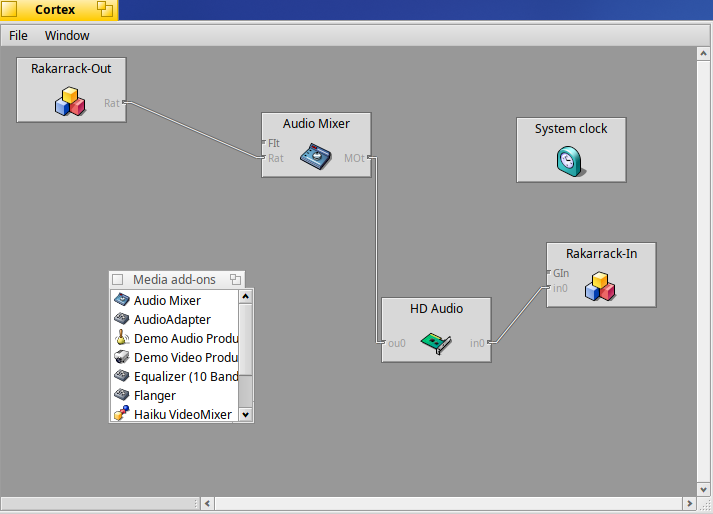
Don’t forget to install/check Cortex app to visualize the connected graph of media kit nodes, each node inputs and outputs, to have a better view of what happen, live, when, for instance, SoundRecorder is started, when it start to record the selected input audio source (I guess it’s HD audio (input line or mic)), when it stops, etc.
As a fellow guitarist, that would be super cool to have! Looking forward to check it out.
I ported PowerTab some time ago, but never created a package for it.
For anyone interested in the rakarrack port I’ve created a public github repo for the rakkarrack port here.
Currently has these main features:
Metronome beeping
Turn on Metronome: Click the Sw button to the right of “Put Order in your Rack”, then you have to change to a preset that isn’t broken: Preset 4 “Go with Him” is not broken. Then turn on metronome. You should hear the beeping audio. Volume and speed controls work.
Media Node Input0 connects to the mic output. You can actually play your guitar and hear it in real time.
Rakarrack-in Rakarrack-out nodes are created
Shutdown working. All nodes should disappear from Media Preferences when the app is shutdown.
What is not working:
The raw mic data from input0 doesn’t talk to rakarrack.
Some presets will not load due to a missing Echotron .dly file
A clean build. Please excuse the mess as this is a port in progress
Dropping BSoundPlayer usage for the input part was the right move, as it couldn’t have worked at all: BSoundPlayer is a Media kit output only object ;-). You can remove the BSoundPlayer * inPlayer variable, BTW.
ConnectInputToPlayer() is still there, but I failed to see where it was called, if ever.
Regarding the new RakInputNode class:
it should report (AddNodeKind) a node kind of B_BUFFER_PRODUCER, not B_PHYSICAL_INPUT, as it’s not a physical input, the node producing the mic in audio is.
while it declare it accept any kind of raw audio format (wildcard), on HaikuRecordAudio callback, via RakInputNode::BufferReceived(), it assumes it’s a float stereo format, which may not be the case.
the connection between this RakInputNode ‘Guitar In” destination and the HD audio node “in0” source seems to not being done by the code. Do you do it currently manually via Cortex app?
To have a better understanding, you can use debugger app to see what happens, but if you don’t feel like using a debugging tool yet, then simply insert some printf() to output on console some useful messages reporting where is the code in the haiku-specific lines of code, dumping the current values of variables at hand, etc.
In order to see these log messages, you will need to start the app from the Terminal.
Thanks! These are really great tips. ATM the rakkarrack-out node is just talking to itself. For example, while playing the metronome I can turn up the reverb and it effects the metronome with reverb which shouldn’t. I will definitely look into all your suggestions and see what I can do. Appreciate ya!
Great news. The rakarrack port for Haiku is firing on all cylinders now!
All presents work and sound amazingly great!
Clean, crisp, and low latency guitar sounds!
Newly added.
A new haiku.make file which adds a beautiful clean build and install.
I want to thank phoudoin for all the pointers and tips. Without their help, this project would not have come to fruition. And all the likes and commits. Thank you! Makes me happy.
Be sure to check out the Octaflange preset. OMG totally amazing. Way better sound on Haiku than Linux ever had with jack!
We needs a small demo video!
And a .hpkg file so that people could try it too!
I didn’t look at your latest changes, but I suspect some hardcoded settings may still be there and potentially won’t work with people having/wanting to use audio input from another physicial device than the very generic HD Audio one. So, maybe, in this area some improvement may be needed later.
Otherwise, impressive result! I hope it gives you some opportunity to learn a bit about developing using Haiku C++ API. Not myself a musician, but I’ve always find out that musicians fluent in using some electronic and/or software in their gear setup are already big geeks, and knows quite intuitively how to learn very technical stuffs.
Good advice! I hope to load up haiku beta on qemu and give a test build. Probably will find out how many pkgs I need to add to the list, haiku_devel probably one of those.
The current “setup” allows the user to define buffer and freq settings during the build. Default is 16 buffers and 48hKz frames. In my experience so far higher frames like 96kHz causes too much latency / playing guitar in water. I am real happy at 16 buffers and no crackles or jitters. The effects come through amazing and in my experience with linux, the effects sound way, way better in Haiku. I don’t know if its because I optimized some code or what, but I am loving it!
I could try to make a hpkg file, it would be hard coded in at 48kHz and 16 buffers. I don’t think it will be problem but the thing is, my latest build script trys to detect the users cpu and add the best optimized flags. So if I do a hpkg, it will be hardcoded with xeon haswell flags. To my experience this would not work with a user on a celeron cpu.
If I do successfully build on qemu, then that would be the ideal place to make a hpkg