My adventure writing a display adapter driver

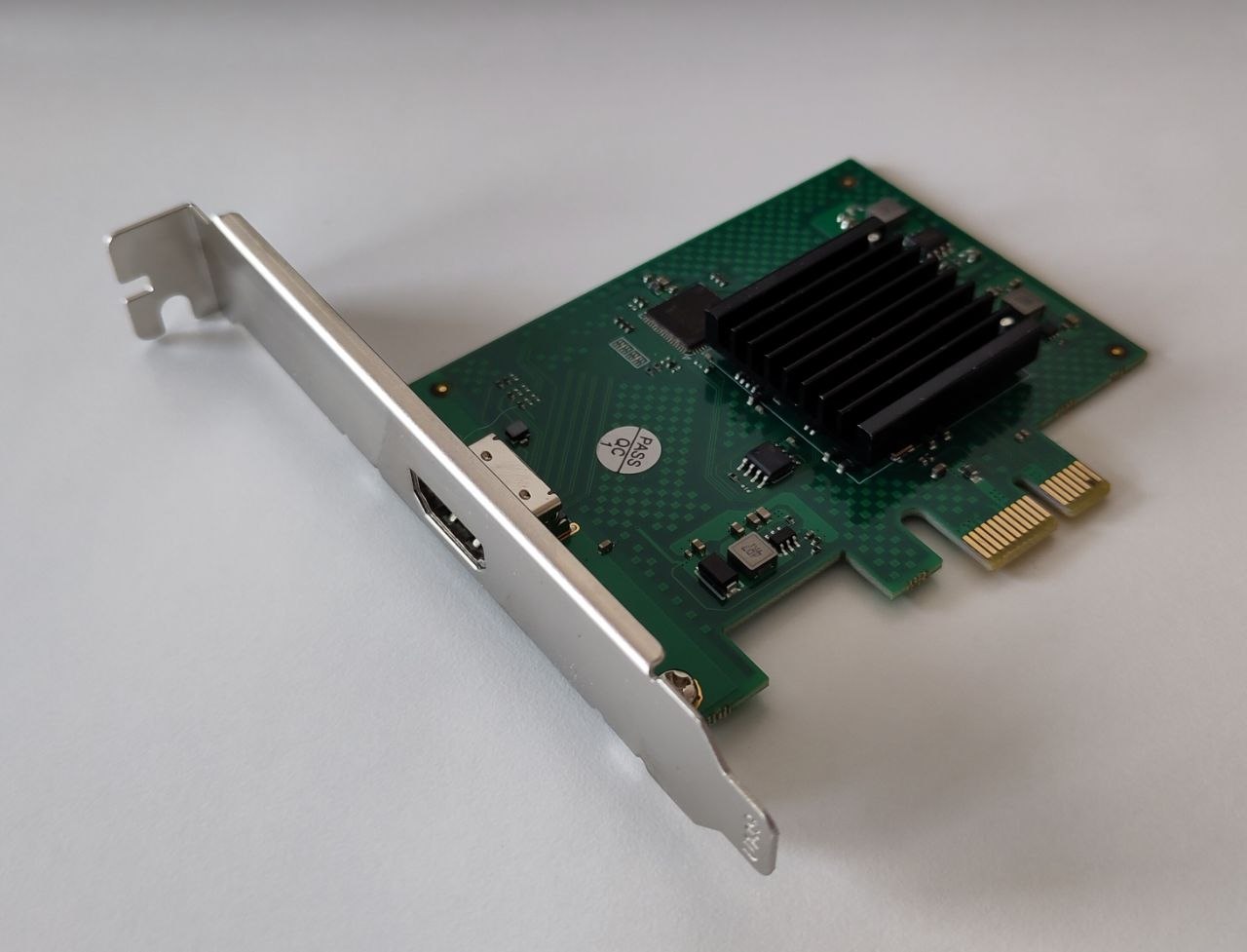
I always loved devices that do things in a different way or prefer power saving and doing few things instead of consuming huge amounts of Watts. That’s why one day, surfing on amazon I found a pciexpress 1x video card which I never heard of: a Silicon Motion sm750.
That’s a 2D only video card, designed for embedded and industrial devices.
My first thought was: Haiku surely will use a framebuffer/vesa driver for it…
My second thought was: what if I write down a video card driver for it?..
My third thought was: I’ll need some specifications for it, surely it should be hard to find a datasheet for it… and then… I WAS WRONG.

I found a datasheet for this card! and my brain just got crazy… I couldn’t be helped, my desire was strong and even without noticing I triggered that button and then…
Look here! Something just appeared on my desk (ok this is my bed not my desk, forgive my narrative imagination):
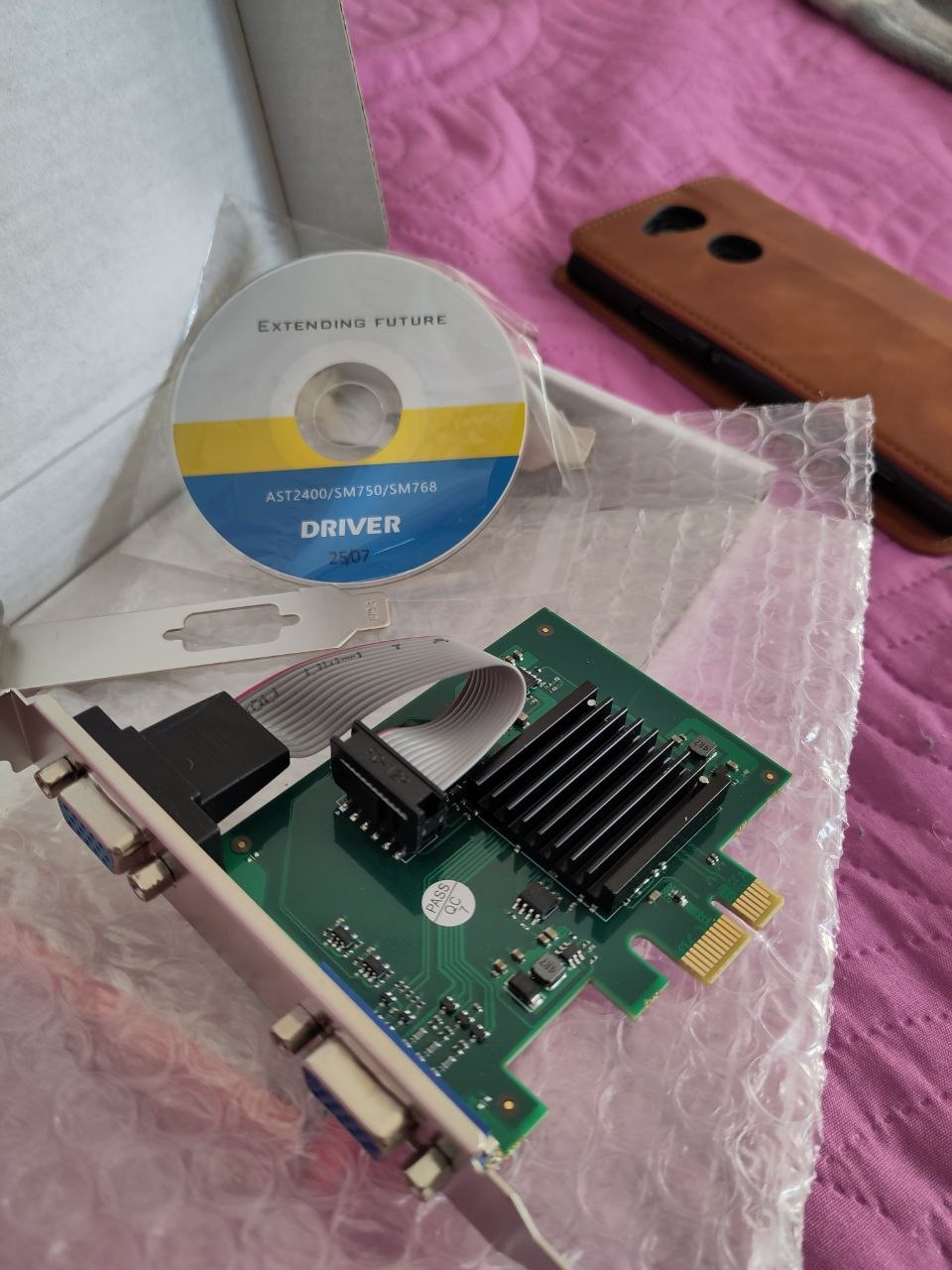
I used 2 PCs to write down the driver. The main one was an old Via Nano x2 with 8 GB of ram (funny the idea of using and old pc to develop new drivers) and the second one a more recent (still not new) AMD holding the SM750 card, it helped a lot having an integrated serial port on both machines, available at boot time (not an usb adapter).
I plugged it in on a pci-express slot and removed a far newer card from my second PC. As you can see the card comes with 2 VGA connectors. Reading the datasheed I discovered that the Silicon Motion chip has 2 "paths:

  • one that handles the crts (the one I got)
  • the other that handles LCD panels, which integrates some other layers (video, ZV, Video alpha..)

both are merged at the end.
So with the help of an AI I started writing down. I preferred not using an AI agent and using instead the web browser chat because I wanted to learn the most and control all the errors AI spitted out.
Sometimes the AI suggested me wrong code or insisted me on adopting conceptual errors. But hey! it’s a tool, the developer is in charge of knowing what to do. Second, those errors taught me a lot of things.

Back to the driver:
Thanks the fact that the card is simple enough, I was able to handle it, except for:

  • the integrated I2C, which later I learnt it was notoriously broken for that chip and nobody tries using it
  • the integrated GPIO which seems locked. I was able to change the direction bits for some of them but not the ones I was interested in for the simulation of a i2c.

In the end with that card I was not able to detect the CRT supported resolutions and retrieve the EDID, after several attempts (quite a month) I gave up. Nor was possible to get the vesa edid. The only data I could get from the system was the framebuffer resolution at boot time.
That was used as the default resolution but, as I was able to make the pll work flawlessy, my heart was crying for not giving the possibility to change resolutions (and color depth)…

so I decide to give a table of some default vesa resolutions…
Ok my heart is not crying anymore :slight_smile:

Interesting thing:
Hardware cursor
At some point I implemented part of the hardware cursor, everything worked except but I realized that the cursor was still drown by software functions. So I realized I was missing an Accelerant function: the set_cursor_bitmap
after writing down that function I saw a wonderful thing but a big problem:

  • The cursor would not flick or create artifacts anymore when over Iceweasel (FANTASTIC!)
  • The cursor would not change when drag’n’dropping files (OH NO! ANNOYING!)
    The quality of the cursor is not on pair with the software rendered (shades of gray, antialiasing etc.), but with the 3 registers for the cursor colors available on my video card I was able to draw a nice cursor. Result? If you don’t know it’s not software rendered (with all those nice features), you’ll not notice that.
    But the annoying part is that drag’n’drop is not working at all, showing me the normal cursor while dragging a file. I don’t know if it is intentional, but I thing is an haiku app_server missing behavior not giving a specific hardware cursor bitmap when dragging, or maybe it’s me missing something…

I managed to implement the haiku memory manager for the unused VRAM (the card has only 16MB, at least the one I own, but the specifics say there are some of 64 MB)
Now I’m trying to understand how to manage video/overlay layer, this will be a future implementation, maybe, who knows…

At this point I was super excited and I thought what if… I buy another small video card maybe a another one pcie 1x ?
looking here and there I found one on Amazon:
the vendor specified amd firepro blablabla port HDMI etc… My consciousness: “It should already work on haiku available drivers”, by my evil side said: “Naaaaah, buy it!”…
Well I’m prone to my evil side, and I bought it.
Some days passed and the card showed up on my desk (again, you know it’s my bed :smiley: )

I open the box and… SURPRISE!!!

The card was not an AMD at all!
this was the sister card of my sm750, using the PANEL/LCD path!
What a LUCKY situation. Being victim of a scam, but receiving a gift instead!
Even luckier that my code was written keeping in mind of this optional card and the driver worked without any further change!
MOREOVER I found out that the HDMI card retrieves the EDID from the boot, so now I can change through the supported resolutions of my monitor. Triple strike!

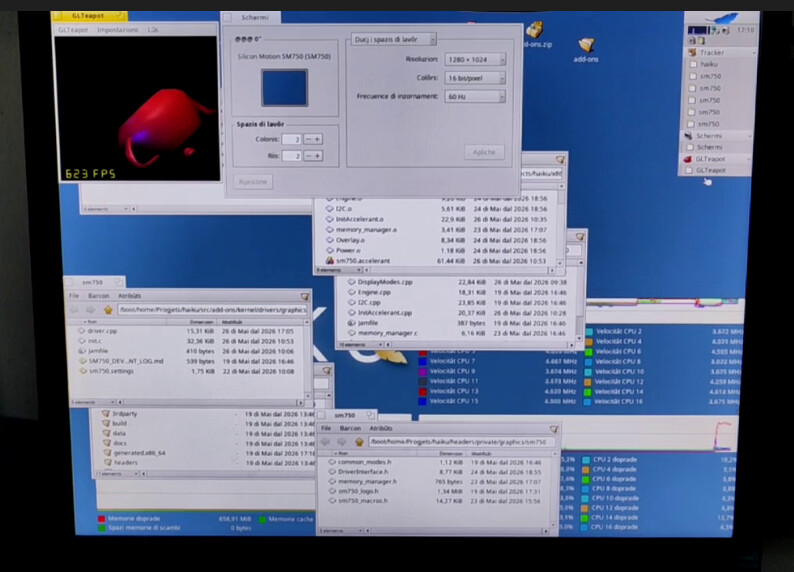
and then… what’s the most important test to run under Haiku?

The Teapot

I fixed an AI conceptual error in my driver and than run the most significant test:
Thanks for reading

21 Likes

Great read! Thank you for sharing your adventure! :slightly_smiling_face:

6 Likes

Yes, it is known app_server bug that I also observed with NVIDIA hardware cursor. Hardware cursor support is not well tested because most upstream Haiku drivers do not support it.

6 Likes

Thank you for this feedback!

1 Like

Actually I think most drivers support it, except the two for modern video cards (Intel and AMD) where no one has gotten to adding the code yet.

So, measuring by the number of machines, it ends up being a pretty low number. But by the number of drivers, it’s actually the majority supporting it.

2 Likes

This is very cool

1 Like

None of accelerants in Haiku repo implement B_SET_CURSOR_BITMAP hook. Some of accelerants implement B_SET_CURSOR_SHAPE hook that support only legacy BeOS black-white cursors that are not used for default Haiku cursors with semi-transparency and used only in some BeOS-era 3rd-party applications like WonderBrush.

Drag bitmap seems work fine with B_SET_CURSOR_SHAPE hook, but not with B_SET_CURSOR_BITMAP hook.

5 Likes

Very cool! Which exact cards are they?

Also, just a side comment, but I really like using Supermicro motherboards (example: https://www.ebay.com/itm/267681883440) for OS and driver development because they have a dedicated IPMI network and you can redirect console output over that. You can also remote reboot it, and attach an ISO as a virtual CD-rom so you don’t have to keep burning USB sticks. (and some of them have legacy PCI slots still)

I think it’s like this one…

1 Like

I bought this one

and this one

Thank you for the mobo hint, I’ll surely consider it!

1 Like

Yes that’s exactly the problem, I couldn’t say it better than you.

When I was implementing the hooks I realized taht no drivers at all in the haiku ecosystem use B_SET_BITMAP_CURSOR.
That’s the reason I was really surprised when I saw that it resolved the artifacts present when moving the mouse within Iceweasel boundaries & co. But nobody uses it!
I thought it was a stylistic choice not implementing it (antialiasing, sub-pixel, alphas and such), but it’s a shame not to use an ubiquitous hardware feature that saves the system from having to write graphics in software.
Or at least it should be up to the user to choose whether to use a fast hardware bitmap cursor or a well-crafted software one. (An option in input preflet? which changes the specific driver settings file in config/settings/kernel maybe)

If only that annoying file dragging bug didn’t exist, nothing would stop me/us from using it.

No, it’s just that no one got around to implementing it. Patches welcome, as usual :slight_smile:

1 Like

I am quite surprised that you first claimed “Actually I think most drivers support it” and then “No, it’s just that no one got around to implementing it”. You were involved in developing Intel GPU drivers so you should know exactly do hardware cursor work or not.

I have a rule of steel that every code I write must be tested (at least manually), otherwise it is more like pseudocode/draft rather than real code. It is not that hard to identify is hardware cursor actually used or not.

1 Like

Let me quote myself so we can check that. Bold addedd for clarity.:

I also was wrong about the old cards, which implement a different type of hardware cursor (I forgot about that difference). You already corrected me on that, so I don’t think I need to write anything more about it? Or do I need to apologize for being wrong about that and acknowledge that you know better?

This kind of remark is quite agressive, which will produce nothing useful here. Nobody is the the boss of nobody here, pointing weakness, errors, lack of correct memory is only fueling relation degradation within this community.

He said “I think”. By definition, it’s not a claim, otherwise he would have use “I know” or “I’m sure that…”, aka an authority argument.

No, @PulkoMandy don’t SHOULD know better. He’s a volunteer contributor like many others, and no one has any position to enforce what he should or should not do or be regarding Haiku project.

Everybody have a right to be wrong, to be tired, in a bad day, bad mood or, just, simply, forgot and not have enough time to double check before replying. It’s open source community, could we try to restrain to project into this space passive agressive remarks so are already polluting professional space sometimes?

Please, let’s try to stay on the kindly, empathic side as much as possible.
Thanks.

6 Likes

I do not think it works in that way. In order to achieve some result, you should to do some work for it. Laws of nature itself enforce it. Haiku will not complete by its own without someone doing work and doing it right. No any kind of insult is intended.

I personally do not have any enforcement power here, it is quite opposite, you and PulkoMandy have it and you can ban people anytime, reject contributions etc..

Issue is Haiku is an voluntary-based project, and therefore people don’t have to do some work for it, people do want (or not) to do some work for it.

People, most of them, already have another project like a paid job where they have to do work because someone else enforce it on them in exchange for money.

Haiku is not a paid job. Well, except for the single dev being actually paid for it :wink:

I saw no insult, but I saw a bit agressive remark loaded with some frustration or something like that on the lack of correstness.

And regarding your last remark, I fail to see how I may have one bit of enforcement power regarding Haiku or this forum. And even if I had, I don’t want it. I’m here to share, to join, to exchange, not to give orders, to enforce, I’ve my day job for that already.

Anyway, I’ve made my point, subject closed from my side.

4 Likes

I recently resigned from my moderator and admin role on this forum.

I have no more than one vote in developer discussions. I cannot ban people on my own.

I don’t take it badly, my first comment wasn’t wrong on the part that x512 pointed out (that there is no hardware cursor in Intel graphics), but it was wrong in another aspect (other graphics drivers do implement hardware cursor, but a different format of them). And more importantly, my comment wasn’t really necessary in this discussion.

Maybe we can forget about all that.

How is the developent of the driver going? Do you plan to publish or upstream it? (the latter may depend on how you used LLMs, from what you describe and the rule in place for Haiku, I think it would be OK?). Do you need help with code review or with figuring out the alpha blended hardware cursor? (although maybe x512 looked deeper into the app_server side than I did).

6 Likes

Thanks for getting us back on topic! I am also curious if the driver will be published.

I am interested in the hardware cursor and how to get that to work. I’ve been working on the Radeon_HD driver (though it’s LLM driven work, so I doubt it can be upstreamed) but haven’t gotten to the cursor yet.

1 Like

Thank you for bringing back the discussion to the topic.
There are some things I should take care and that (for now) don’t work at all like the video overlay or things not implemented (video alpha layer). But the most important functions are in place. And seems stable on my machine. There’s also a logo showing up at the end of the kernel driver loading before the accelerant takes the command (that logo is not obviously distributed due to licensing reasons with the Silicon Motion logo, but soon I’ll replace it with a distibutable handcrafted logo) like it happened long time ago with Nvidia driver in BeOS (if my memory doesn’t trick me).

I developed it with an AI chat bot, support so I knew from the start it would not be integrated in Haiku, I’m fine with it, but the code is available on my haiku fork at the branch SM750: GitHub - tmtfx/haiku at SM750 · GitHub
So if anyone needs it, he can download and compile on his own, or maybe I can distribute the driver and the accelerant already compiled…

For what concerns Hardware cursor bitmap I noticed a little offset of the hotpoint when mouse changes to I-beam, i need to investigate this as well.

For now I’m looking for a solution for the dragging problem:
As a lot of cards don’t support a rich palette for mouse cursor (3 bits sometimes), and as far as I have tried, if we try to draw the alphablended bitmap the resulting image is a cursor with a violet icon shape.
So I thought: what if we disable hardware cursor only when we drag items? Is it feasible or acceptable?
A second solution is to convert to black and white the icon
A third solution could be not using the bitmap of the icon at all and use a fixed black and white mouse pointer (that idicates a drag operation)

3 Likes