MidiMonitor2 and midi_server / usb_midi driver enhancement project

Hello, I am new to the community threads here. I am an old BeOS fan, and programmer of several old-school BeOS midi apps. With my AI agentic tools that I use mainly for work, I decided to rewrite and update my old software for Haiku (I will save the debate for the use of AI agents for another thread, where I talk about my use with Haiku). My initial goal was just to rewrite my apps to use the MIDI Kit 2 instead of the original that my apps used. Easy peasy right?

The first issue I had in updating my tools, is that I had no midi devices that were compatible with Haiku. The devices I had readily at hand included the Yamaha UX-256, which worked with a server app under BeOS, but that was never compatible with Haiku, and the MidiSport UNO and MidiSport 2x2, neither of which ever had working drivers on BeOS, partly due to proprietary firmware. Regardless I needed to get something up and running to get my apps updated. So, the ncc-usbmidi project was born. The idea being that with the midi_server handling class compliant USB MIDI devices, I could write a daemon that would handle non-class compliant devices, such as the ones that I owned.

So, I got to work with Antigravity/Gemini helping me with planning and scripting, and Claude helping with coding and debugging, and we wrote a script to download the midiman firmware from the Linux project, and send out the appropriate firmware, and Claude even helped me patch the 2x2 firmware to change some timing issues we were encountering between it and Haiku. And then it came time to test it all, and I opened mMonitor and couldn’t make out much more than Active Sensing signals, which I couldn’t filter, but I didn’t seem to see much other MIDI data (i.e. Note On/Off data). So, I went to my trusty Midi Monintor 1.0 app for BeOS by Bill Thibault. There was only one issue, other than that it was a little buggy under Haiku - it was a MidKit1 app and could not talk to my MidiKit2 daemon at all. But luckily there was source code, and with agentic help, I was able to quickly upgrade that app to use the MidiKit2. With the original owner’s permission, I released the repo as MidiMonitor2 under the MIT license: GitHub - dcbeckman/MidiMonitor2: Adapting my favorite Midi Monitor for the BeOS, Bill Thibault's "MidiMonitor 1.0" into a MidiKit2 compliant application for Haiku OS and BeOS. · GitHub With this app now “working” with my app I still was not able to see any real midi messages. So, I figured I would plug in a class compliant USB MIDI device, but I did not receive notes there either, although it did show up as a MIDI endpoint, but using it’s really ugly device path instead of a proper name. After more analysis, I realized to get what I wanted, I was just going to have to rewrite the midi_server, and I did. We cleaned up a bunch of bugs and now we have pretty names for the midi endpoint names.
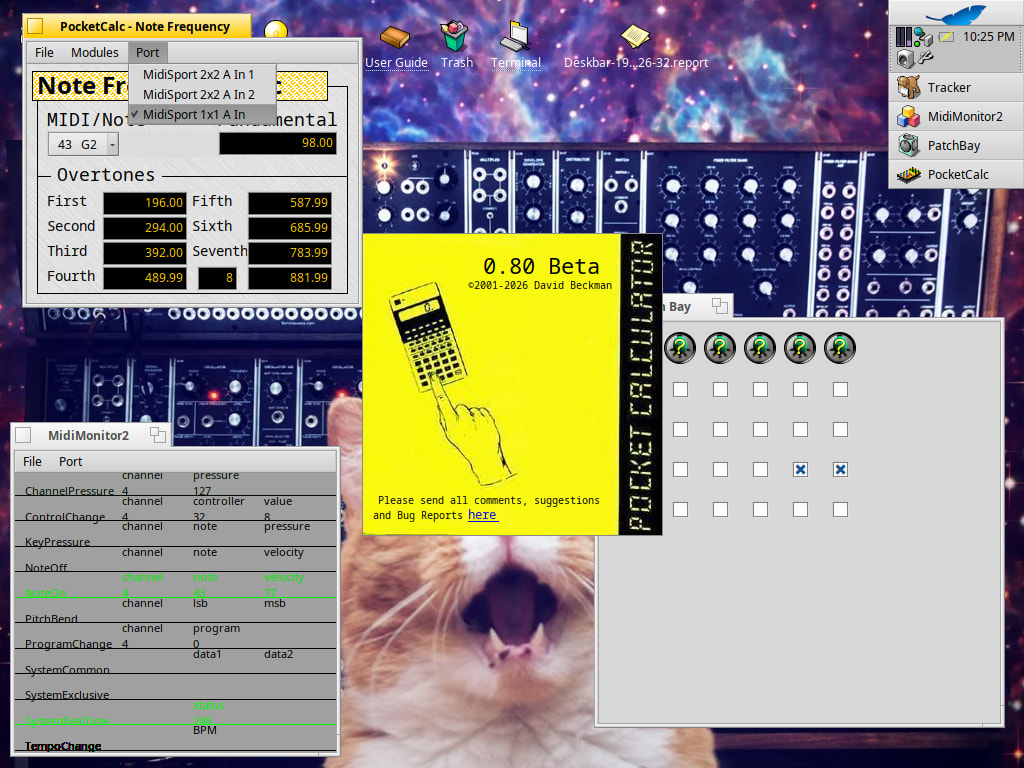
We cleaned up a lot of errors that we were having with plugging devices while other were initializing and got those sorted out, but the midi_server replacement will crash the USB if unplugged. To fix that, we may need to look into the USBKit and usb_raw next, or as AI suggests, we might be able to rewrite usb_midi instead to get rid of some the issues there. To be continued…

17 Likes

When I was trying to port rakarrack to Haiku, I used my usb midi dongle to test the MIDI in/out notes. Lucky for me and thankfully with the help of AI, all I had to do was switch a very, very tiny dip switch on the dongle to have Haiku register it as a compatible USB MIDI device. From there, I was able to get MIDI working in rakarrak for guitar playing on Haiku. Feel free to browse the MIDI code rakarrack-haiku…maybe something useful.

2 Likes

Sorry, I thought I had already made MidiMonitor2 public. It is now public on GitHub.

1 Like

For sure, the midi_server could be improved, in particular in these areas:

  • add support, via some ioctl opcode, for custom, user-friendly port naming from midi port(s) driver(s).
  • add support, via another ioctl opcode, for custom (vector) icon from midi port(s) driver(s)

Currently, it uses the path of each midi port(s) discovered under /dev/midi/* as endpoint name and use a common, generic vector icon for all ports, I agree.

And similarly the usb_midi driver could be improved, too:

  • use USB vendor descriptors info to give and report a more user-friendly port(s name(s) (while keeping the ability to support multiples instances of same device.
  • expand support to somehow proprietary midi USB devices, to support beyond USB midi class compliance. Issue is often due to firmware, which can’t be embedded in open source projects freely, but is required to be loaded, via a propriotary way over USB, before the device could actually start.

I find it crazy that, while MIDI is a very simple protocol using very simple stream of bytes for each port that multiple variant of very similar drivers have to be done just because vendors don’t care one bit to follow basic specification and cut their cost by not putting some ROM in their devices. In the end, each port of any MIDI box is just sending or receiving a MIDI stream of bytes, so while some boxes may needs a firmware to work, and therefore something must manage that firmware loading, the userland interface of each port should works with a basic read/write (or read only / write only in case of unidirectional midi ports) bytes on a single devfs entry, like /dev/midi/usb/.../<port>.

I guess having an usb_midi driver including support for Midisport 2x2 or even 4x4 boxes exposing “M-Audio Midisport NxN port A” up to “M-Audio Midisport NxN port D” (for a 4x4) will be more user-riendly, but what when multiple identical devices are connected? Do like Windows does, append a #1, #2… in the name?

The midi_server itself is quite simple, it mostly does the following:

  • track apps registering with the Midi Kit 2
  • track Midi Kit 2 endpoints and connections between endpoints.
  • acts as the system MIDI patchbay between these apps and theirs endpoints
  • detect and expose as endpoints any MIDI physical ports published by any kernel driver under /dev/midi/* (okay, without an user friendly name).

Most of these tasks rely in fact on code in (shared) libmidi2, aka the Midi Kit 2.

Lastly, as one of the developers (hi @Pete Goodeve BTW!) who worked on Haiku’s midi_server and usb_midi driver code 15+ years ago, at a time when the first USB midi devices where following the class specs, I find your title a bit downplaying the time previously invested by the developers to code those, code which was the basis of what AI knows about MIDI API in Haiku and without which these today power tools, nowhere available 10-15 years ago when that code was written, would have no example and no stats to base theirs responses and generations on.

Surely, we would be nowhere without their good work. As it is under MIT license, there is no theft here, just their good work being continued in a sense. My current midi_server fixes the naming issues, and handles multiple devices, currently giving every device an A, B, C etc, as you can see in the screenshot. I think I want to scrap that though and go with the first device not having anything, and further devices having #2, #3, etc. Or better yet, in a situation like this, where you a dealing with a DIN MIDI interface, name the Midi endpoints after the actual device, and that’s where my 25 year old, BeOS SynthScan project comes into play. My server also does the byte conversion for the MidiSport as it is not class compliant and I will probably add the same for my UX-256 today. Of course, these are user land daemons, but that is no worse than I had with the UX-256 under BeOS. It is looking like I will have dig deeper into usb_midi though in order to get more stability (i.e. unplugs not crashing the USB bus), as well putting the non-standard midi methods directly in the kernel driver, and not run through a daemon.

I realize this code can’t just be plugged back into the Haiku source, but if any Haiku devs want to take a look at the repo, feel free to message me. I am keeping it private atm and am ok with shipping it as a midi_server replacement, if not the real thing.

1 Like

I mean, it’s certainly not violating the “spirit” of the license, but very clearly the license text which requires attribution :wink:

2 Likes

I’m glad you managed to make your equipment work, but obviously if you want to contribute back to haiku what’s really needed are smaller patches which implement or fix specific issues. Of course a full rewrite of a component (any) isn’t completely off limits, but a full rewrite isn’t needed most of the times

1 Like

I also think my headline sounds like, “Hey, look at me, I used AI to rewrite 15 years of work in 5 days”. Really, I just wanted a working device and to fulfill my vision of how it should behave. The only reason I got into the rewrite is because it seemed like more sense to have one midi_server, rather than one for class compliant devices and another ncc-usbmidi daemon for other devices.

2 Likes

Just wanted to say, thanks for posting this! I had a similar experience altering the usb_audio driver so I could get my Focusrite Scarlett devices to finally work in Haiku (which I did in a couple of evenings, thanks to Sonnet). I was starting to get tempted to look at usb_midi myself too! But I only have an M-Audio Oxygen controller and some rack devices that can communicate over MIDI, no actual synthesizer to really test things with. Though I also have MidiSport UNO here too, in addition to the MIDI built-in to the Focusrite.

Anyway, just wanted to give some encouragement, because I know there isn’t a lot of it. I think it’s great that we can finally patch all the broken things - and it’s intriguing that so many of us seem to be focused on audio and synthesizers! Over on Hacker News there have been stories of people finally making firmware patches for bugs in decades old synth hardware. It’s nice seeing people help old devices find new life.

Since we’re in the verboten proprietary area - while it’s probably easier to keep working from Antigravity, have you tried asking the AI to build you a Claude Code agent that actually runs on Haiku? I managed to get something simple working, so I could have agentic self-building happening on Haiku itself. The downside is having to pay API fees, but once you’ve figured out how to call the AI and implement tool use, a whole world opens. Build a couple of your own functions as “tools” and you’ll have AI playing your synthesizers live from Haiku in no time!

4 Likes

I thought about doing the Claude API route myself, but found an awesome workaround on the cheap. To let Claude control my Haiku box through SSH. I wrote more about my process here: My Haiku Agentic Programming Workflow - Software / Proprietary & Other - Haiku Community

Yeah, that’s what I felt indeed. Sorry for overreacting, I fully understand the need to have a working MIDI hardware, and while during long times Haiku didn’t have that much developers workforce available for that, AI is changing this situation, and I’m glad it allow you to finally being able to use Haiku with your MIDI hardware.

To be fair, it was +15 years ago, but it didn’t took 15 years to wrote. The main issue at time was very few people were both owner of USB midi device and developer, things stay largely frozen… until Haiku got new attention in the recent couple of years, plus the AI change.

Back to main topic : midi_server is not dedicated to only class compliant devices, as it rely on drivers publishing “devices” under /dev/midi/*. It turns out that currently, out of the box, Haiku includes only one driver doing that, and it’s the usb_midi driver which implements only support for class compliant USB MIDI devices.

Alas, the most used and sold devices are not class compliant, or worse, they are, like my old Roland UM-2, but they don’t even care to report as compliant via USB descriptors because they sold them with dedicated drivers for Windows and Mac because at that time these OSes didn’t had (yet) generic USB midi devices driver.

The midi_server could be improved to support devices support directly from userland code, like using BUSBDevice API from USB kit to communicate with an USB Midi device, I discourage it due to performance impact, because for each read / write of MIDI messages, you will need to send an ioctl() command to trigger a transfer, meaning each one will trigger a kernel round trip cost.

From my point of view:

  • either usb_midi should be enhanced to support mostly class compliant devices, via some quirks code
  • or new drivers supporting specific MIDI devices must be written in order to publish for each port an entry below /dev/midi/*, /dev/midi/usb/* for USB devices. The current midi_server will get those automatically, in only rely on read/write on these devfs entries to read/write MIDI messages.
4 Likes

You are totally good. I didn’t word it the best. Again, it was not so much me bragging as it was me trying to convey that what started as a “3 hour tour” became a 5 day rabbit hole of research, debugging and AI babysitting. I couldn’t believe I really just spent 5 days on this project.

As for other device support, right now it is a user land daemon and I am sure there will be a performance hit. It was still worth implementing the current design, because this may be the only way to get it running under BeOS, incase dropping in a new usb_midi driver isn’t feasible under BeOS. Regardless rewriting usb_midi driver is probably the next frontier. I don’t like calling them quirks because it reminds me of the ALSA implementation, but yes that is exactly what they are.

My bad, I though it was the name of the port, as from memory Midiman names their ports with letter on their devices.

Regarding MidiMonitor2, I just push a Pull Request to fix warnings and switch it to use makefile-engine.

I didn’t remember if the original Thibault’s MidiMonitor had an app icon, but it will be great to have one, I can try to add one, a vector one (like a magnify glasses over midi official icon?) .

I failed to find Bill Thibault MidiMonitor on the web, so I dunno where to looks for what it looked at this time.

You are right. I didn’t even notice that. Could be even more of a reason for me to use the #2, #3 system for additional devices. Although if I can figure out a way to name the ports even more dynamically, I would like to call them by the actual end device name.

Midi Monitor 1.0 never did have a logo. Most of my apps did, and I will have to work on some SVG upgrades for them soon. But if you would like to contribute an icon for MidiMonitor2, that would be awesome.

1 Like

Maybe you can find something here: https://hvif-store.art/

Or ask @zuMi nicely to create one for you :slight_smile:

3 Likes

A “request icon” thread would be ideal, so that someone interested in contributing could notice such a request, take on the task by replying to such thread, so that more people don’t work on the same task without knowing it, while with knowledge they may collab; I am surprised that no one has ever opened one

5 Likes

It’s often made directly in the Playground or Software/* threads themselves.

But, yes, it’s a good idea to have a topic dedicated for requests icons (and potentially other visual stuffs) that could centralized them all.

2 Likes

I don’t think that’s going to work because of licensing concerns. What would possibly work is a clean room implementation. For that one you would need to document the changes in detail, and publish that documentation so that someone from Haiku devs can implement these changes from scratch.

1 Like

Have you any idea or hint? i did some sketches but aint sure about which direction is better

3 Likes

There are definitely ways to avoid licensing issues. First, I was very careful not to include any firmware with the project. There is a separate Python script that downloads firmware and does patching where necessary. As for merging the code back into Haiku, I don’t think this should be nearly as difficult as everyone makes it out to be, but I also haven’t done it.

My proposal for an eventual merge into Haiku:

  1. An audit of the code first to ensure that the code doesn’t diverge from the Haiku source in ways that are unnecessary to achieve the same outcome. Coding style would also be enforced at this level and restructured as necessary.
  2. A 2nd audit using the source scanning tools Aikido, FOSSology, and ScanCode. This is what the big companies use for code and licensing compliance to keep themselves out of trouble, and they all have free tiers that would work for us. Our main concern, wouldn’t be so much about containing proprietary code, as neither I or the AI have that code. Aikido is the only service I believe that can detect proprietary code and also patented procedures. Our main concern would really be to keep viral open source licenses, like GPL, out of our source. MIT and BSD licenses would generally ok to use source code from directly, but if the AI included their code, we would absolutely need to be able to identify it and attribute the code in our project to the original authors.
  3. The last stage, after being approved by Haiku, one of their engineers will hand code any changes directly to the project.

Maybe I am being overly optimistic, having never done it. But this seems very doable.

5 Likes