Those are pretty. My initial thought for a MidiMonitor2 icon was a DIN plug or socket, with like an oscilloscope screen as the sub icon. I think the 2nd icon works better for the app, just because the TRS audio jack is throwing me off on the 1st icon. The first icon would be great for an updated Patchbay app that does both MIDI and Audio. I know Cortex can be used for Audio, but it would be neat to have a similar interface as the MIDI patchbay.

 That is pretty darn sweet.
Ok, it’s been 6 days since my initial post. Lots of progress being made.
- I have now rewritten the usb_midi driver so that the legacy MidiSport 1x1/Uno and MidiSport 2x2 drivers, as well as about a hundred Yamaha MIDI devices are now supported by the kernel driver. I felt pretty comfortable from my documentation that the Yamaha devices should be pretty straightforward, so I implemented the whole vendor family in the driver. The legacy Midiman devices though have taken some tinkering to get right, so I only added the models that I was able to test to the kernel driver. Support for legacy 4x4, 8x8, and Keystations is dependent on a daemon “driver” until it is tested successfully, and then the logic can be migrated into the kernel driver.
- Changed duplicate device names to use #2, #3, etc. and also added a conf setting to set alpha or numeric port numbering. MidiSport devices have been set with the flag at alpha, the default is numeric, as that is the most common. As always, 1x1 devices do not show a port number.
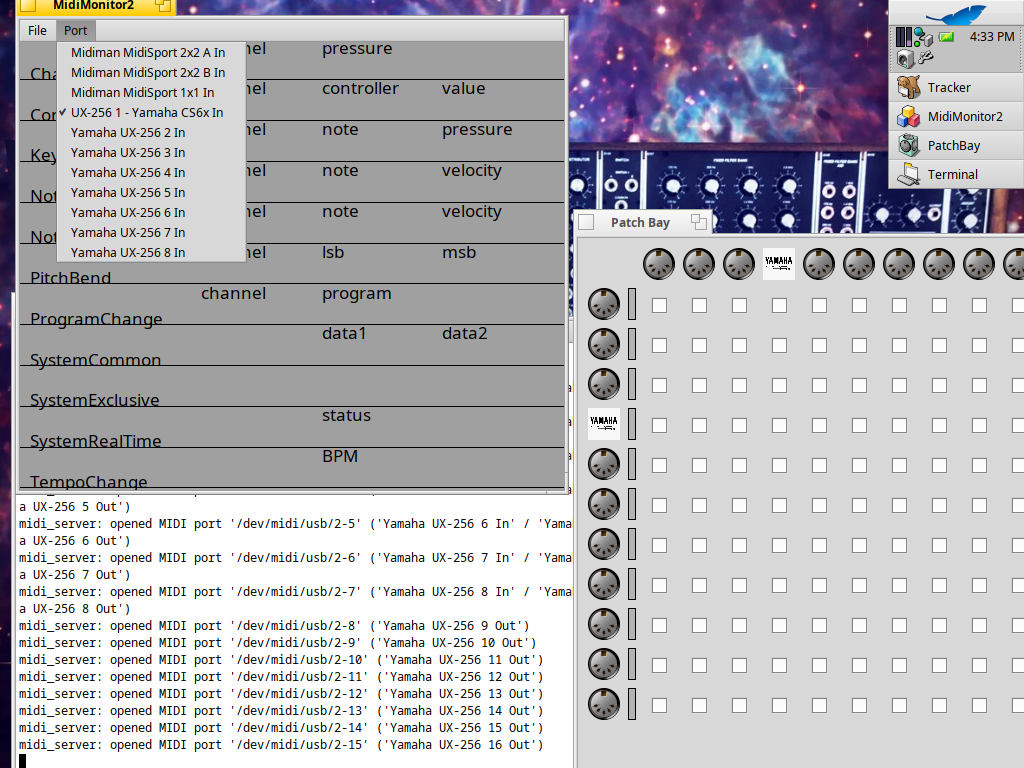
- Two new features as seen in the screenshot:
- Per port device naming is now configurable - note the “Yamaha CS6x” actual device name
- Per port icons are now enabled - note the Yamaha CS6x icon. I also added functionality to convert PNG files for easy user modification, but obviously, they do not look very good compared to HVIF.
Note sure what to touch on next. Perhaps Roland/Edirol drivers.
5 Likes
Well, as I’ve a Roland UM-2, I will be interested 
How do you expose the following:
- user being able to customize the name per port?
- devices which needs a firmware to be laoded into device before being able to use it? Does the firmware is loaded from an external file (it’s better for licensing issue that it’s not embedded in source code)
Is it via a kernel driver settings file loaded by your rewritten usb_midi driver?
Regarding supporting custom vector icons, I guess loading it from .iom file could be added.
Right now, it is all in a conf file that is read by the midi_server. May go to JSON when I start implementing real instrument definitions. But honestly, I feel like a conf is easier to read and edit by a human than JSON.
Devices that need firmware are handled by a .py script and are not actually part of the actual program/driver. This is similar to the way that the MacOS MidiSport project functions. Technically, the MidiMan legacy firmware that I currently support was all freely released by MAudio for the Linux driver project. The MacOS driver also supports some middle of the road devices that were not included in the Linux project, and it extracts those from the DMG for the official driver. To support those devices, I could likely follow the same example. Any other devices that need firmware could be handled the same way. I figure users can run it themselves by agreeing to download it and patch (if necessary). It then just becomes a tool for the user to use, and is not part of the software. Allthough we likely can call the script from our midi_server when it is detected that firmware is needed, again I would prompt the user if they intend to download the driver, and another confirmation if it needs patching. The idea is that it is a user run tool to gather the appropriate files - they are never packaged.
I can add support for any image format in the translation kit. Trying to keep it native, so def don’t want any library dependencies. But .iom is not currently supported in the translation kit. I thought you could export from Icon-O-Matic to HVIF though? HVIF was the original format supported by the midi_server, and probably the best for vector icons on Haiku.
3 Likes
Well, regarding allowing the user to (re)define itself the name of a midi port (a BMidiEndpoint behing, in Midi kit lingua) I guess Patchbay, which is de facto the out of the box “Cortex” like app of the Midi2 kit, could be enhanced to offer this feature, via some contextual menu for instance. IIRC it has already a settings file, some adding the storage of this extract info (/dev/midi/usb/… => “My Custom port name”) there will make sense.
I will try to see if I can do that, actually.
Regarding icons format, I guess it could be exactly the same : PatchBay could offer this option directly. BMidiEndpoint icon, if any, is actualy part of the endpoint “properties”, which is a BMessage, so it’s easy to add support to override a given endpoint icon with a custom one.
Or tint them with some custom colors for instance.
I don’t think this user customization feature should be managed by low level code like usb_midi, or even midi_server. Because depending of the needs, with same hardware configuration, the needs to have semantical names and/or icons could be different from a session to another.
But that’s very good ideas of improvement.
2 Likes
Currently I have a format for USB devices, and another format for DIN devices behind an interface. I could make both of those string formats user configurable, but I am really liking the defaults as seen in the picture. I could add another conf setting, that completely overrides the port sting. Then you could name it whatever you like.
I am pretty sure a BMessage is exactly how the adapted midi_server changes icons. The translation kit helps with getting the files into the proper format for the BMessage.
I was kind of saving saved setups for my next project. Still not sure if it should live in the midi_server replacement or my next project, which will also incorporate my SynthScan code. Saved setups will obviously be a thing. I guess for an immediate fix, the main confs file can be for basic device functionality/setup, with the relevant devices for the setup taken and copied to a specific setup conf that can be launched by restarting the server from the command line with the setup name as an argument.
1 Like
I take back the comment on the “audio jack” throwing me off, as I was today years old when I discovered that 1/8" TRS to DIN for MIDI was actually a thing on some devices. 
A couple of updates. After adding support for Roland/Edirol MIDI interfaces, I took a little break from usb_midi. I started adding saveable user configurations to Patchbay and modernized my SynthScan app.
While that project is underway, I just couldn’t help myself from messing with usb_audio and I am currently trying to get my Pioneer DDJ-SR to work under Haiku, and now I am deep into trying to fix Isochronous timing issues in the UHCI driver. Already added functionality to have 24-bit audio in 3byte chunks, as it was assumed in the original USB Audio that bytes would be in either 2 byte or 4 byte chunks. Apparently 3byte chunks are more common to 24-bit audio than one might think. For a lot of people, they would have been fine with the device reverting to 16-bit 2-byte chunks, but the DDJ-SR only does 24-bit 44.1k. Weird right? But it forced the issue of not being able to use the device under Haiku. No clue if this will be successful or not. But if so, I imagine trying to get EHCI working next could be in the cards.
1 Like
Now that I am diving into USB Audio and the USB stack, I would love to see your changes to get your Scarlett working. Send me your GitHub name so I can give you repo access to my project.
2 Likes
I just remembered these posts as I was looking into the Haiku docs for the MIDI 1.0 compliant sticker for the MIDI API(s) , USB MIDI, and MPU-401 module… good to see some focus on this…
1 Like
Oh, this is one of the initial threads on the matter. But the current project thread is here:
I finally released packages for all Haiku platforms and am close to feature parity on the Renku fork. So hopefully I can get back to MIDI features soon. Although there is still a lot of audio work to do, including shifting focus to multitrack recording features and latency reductions.