libclc that is a part of LLVM is needed to compile NVK Vulkan driver, this library is currently not included in HaikuPorts.
There are hpkg files available at X512’s GitHub repo for the driver which is the easiest way to get it going. You need to install the libglvnd and nebula packages from the links below:
https://github.com/X547/nvidia-haiku/releases/download/v0.0.1/libglvnd-1.7.0-4-x86_64.hpkg
https://github.com/X547/nvidia-haiku/releases/download/v0.0.2/nebula-0.0.2-1.x86_64.hpkg
When installing with pkgman it will give you the option to remove mesa which you will have to select to install the nebula package.
Note that only HDMI out works until a new release comes out.
5 Likes
I see, will a build with working be shared or will I have to wait until the next release?
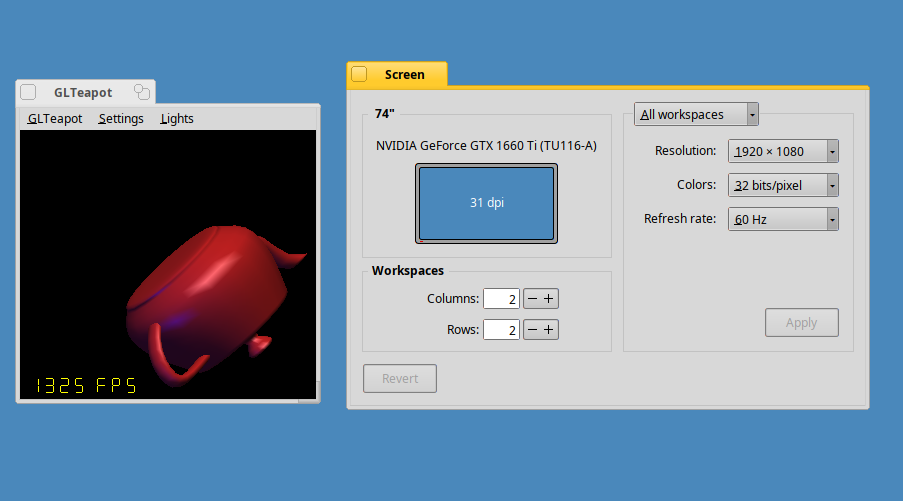
This is an incredible job… I installed the packages and everything works great… Assault Cube, TuxRacer, and SuperTuxKart with the graphics maxed out, no lag. If only the Firefox port were smoother, I would use Haiku 90% of the time.
15 Likes
Hey, now that you got nebula installed, you should try my projectm visualizer music app.  You can turn on SDL Visualizer window in the config menu near the bottom. Be sure to set the audio preferences Input to use the Front Speaker so the visuals dance to the music
2 Likes
Great work, I am amazed if this GPU is the future for HAIKU.
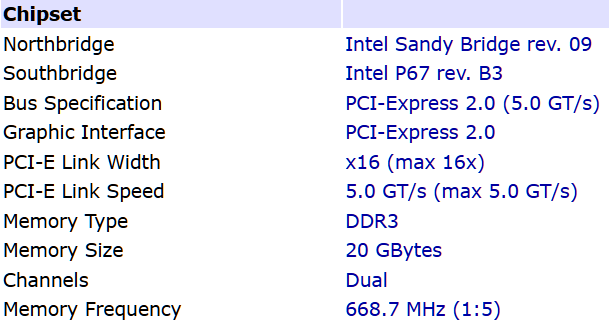
Would this Card work on my Mainboard? Anybody know if this PCI 3.0 would run on my system:
Which is PCI-Express 2.0 and not PCIe 3.0!
I am confused and need help with this question.
Thanks all for looking into it!
1 Like
The card would work fine, just it would run at PCI Express 2.0 speeds and not 3.0 speeds due to the slot on the motherboard. Generally newer PCI Express card revisions will work on older slot revisions as they are backward compatible.
1 Like
Just a quick success report:
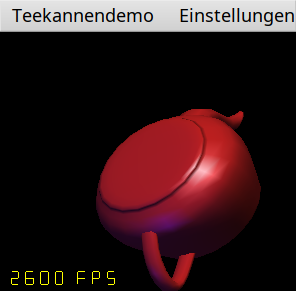
I tested Nebula/NVIDIA on a Lenovo ThinkPad P53 with an NVIDIA Quadro RTX 4000 Mobile (TU104GLM, PCI ID 10de:1eb6) running Haiku nightly hrev59783.
The driver initializes successfully, HDMI output works, and I was able to run OpenGL applications and UZDoom. The system is stable and overall desktop responsiveness, especially in Floorp, feels noticeably better than before. For web browsing I use Floorp, but I should mention that I also reduced Floorp’s resource usage significantly by disabling various background features and keeping the browser setup very lightweight. Even taking that into account, the system feels noticeably smoother with Nebula enabled.
The only issue I encountered is that my Intel AX200 Wi-Fi adapter currently fails to initialize due to a firmware loading error, but this appears unrelated to the NVIDIA driver.
Thanks for the great work - it’s impressive to see modern NVIDIA hardware running on Haiku.
Greetz
Lenovo ThinkPad P53
Core i9-9880H
64 GB RAM
NVIDIA Quadro RTX 4000 Mobile (TU104)
External monitor via HDMI at 2560x1440
Haiku hrev59783
Nebula 0.0.2
5 Likes
Geez. I install the driver and Nebula, but my GL Teapot just crashes. I guess I’m missing something, but I don’t know what. The screen preferences say it’s using the nVidia driver.
1 Like
I had that happen with my GTX 1650 the first time I installed the driver and rebooted but then I rebooted again and the issue never came back, just the ‘normal’ crash after closing apps like GLTeapot in this release of the driver.
What model of card do you have?
It is an RTX 2070. I’ve rebooted a few times, but it’s always the same. SDL games don’t crash but show an error. I don’t remember the error. Something about not being able to create a surface, I think. When I get a chance I’ll try running one and see what it says.
2 Likes
This is encouraging… does it work on the built in display too?
The internal display in the Lenovo ThinkPad P53 is an embedded DisplayPort (eDP) connection so will not work with the current release of the driver. Only HDMI works with the current release.
1 Like
Hi,
try running GL Teapot from the terminal. Since Mesa is being uninstalled, a library might be missing.
It says:
/boot/system/demos> GLTeapot
VideoStreamsWsi: vkEnumerateInstanceExtensionProperties
VideoStreamsWsi: vkEnumerateInstanceExtensionProperties
MESA: error: ZINK: vkCreateInstance failed (VK_ERROR_INCOMPATIBLE_DRIVER)
GLTeapot: ../haiku-git/src/system/libroot/posix/pthread/pthread_mutex.cpp:96:status_t __pthread_mutex_lock(pthread_mutex_t*, uint32, bigtime_t): mutex->owner == -1
Kill Thread
I guess it’s low on ZINK.
1 Like
I worked out why GLTeapot crashes before launching with that error. Turns out that the Wayland package also needs to be installed to make 3D apps like that work for some reason.
I had the same issue on a fresh install of nightly that I was testing just now to see if I could reproduce the error. I recalled I had installed Iceweasel after the reboot after I first installed the driver a few months ago and went through the dependencies of Iceweasel to confirm it was Wayland that was needed. Here’s me thinking it was the reboot when it was actually Iceweasel installing Wayland that made it work.
1 Like
Oh. Huh. I’ll try installing it and see if that gets it all working, then. Thanks!
Yep, that did the trick. Which is kind of a shame because I didn’t want all that stuff installed. Oh well. I guess I can play games now and use my emulators.
Thanks!
1 Like
Thanks for testing. It looks like NVK driver depends on libwayland-client.so (to implement Wayland WSI), but it is not declared as dependency in HPKG. It is possible to implement Wayland WSI as separate Vulkan layer add-on that may be better idea.
7 Likes
It explains the mixed success other people have been getting, with some having that same error in the past when testing. I also noticed the Vulkan package also needs to be installed too as it calls libvulkan.so but is also not a dependency of the nebula hpkg. I got an error about being unable to load libvulkan.so when running apps like GLTeapot on a fresh install of nightly until I installed the Vulkan package.
Excellent work on the driver though, been using it without issue for the last 4 months. For me it has made Haiku a daily driver now as I can use my 4K monitor at full resolution, and the hardware 3D acceleration is a great addition to have on the OS.
7 Likes