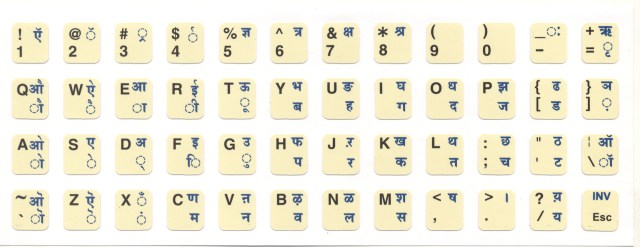
If I give the keymap.out file of this keyboard, can somebody include it as Keymap-hindi in the keymap, as there are for other languages? Of course, this can be edited, corrected if needed
But, reference is the InScript layout….available over web
If I give the keymap.out file of this keyboard, can somebody include it as Keymap-hindi in the keymap, as there are for other languages? Of course, this can be edited, corrected if needed
But, reference is the InScript layout….available over web
Sure, we can do that. If you don’t want to upload a patch to gerrit yourself it’s best to open a ticket at the bugtracker and attach the keymap
Tricky sometimes. When you move to a position with another font (or in general, style) -and that might be just the no space between two characters, if you’ve done some editing- what you type is in that other font. I’ve also seen the issue when undoing an erase of a block with several formats. The latter at least sounds like a real bug.
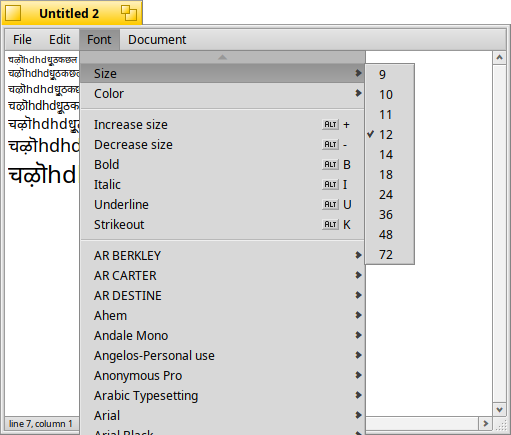
Not a lot, but there’s some. Select you text and press Alt-+ or Alt-- to increase/decrease size. You have those and a few sizes at the top of the Font submenu.
Is this satisfactory, for Hindi input? The code block has the combining forms for various vowel sounds, but – maybe this is what damoklas was talking about - LibreOffice would need to know to superimpose font glyphs, to properly attach a following vowel to a consonant.
As far as I understand, after some research, OpenType fonts have/may have special tables for generating Devanagari ligatures. And LibreOffice supports such ligatures since version 6. So when typing Devanagari text (with basic devanagari characters), those (additional) ligatures should be formed automatically (if the font have such tables).
Thanks…Size adjustment under font types…should have looked properly
There are a few characters on InScript keyboard, not found in CharacterMap under Devanagari
You might, or might not, find clues in https://en.wikipedia.org/wiki/Devanagari. I see there’s some mention of constructing “tra” from other parts, which looks like one of your missing characters, but I don’t really know what they’re talking about. Ideally I guess, these characters exist in some other Unicode block and it’s just a matter of finding out what the UTF-8 codes are. If you can import UTF-8 text with these characters, it would be theoretically possible to just observe the answers to that question right there in the file, but it would take some UNIX-y folderol in Terminal.
No, that’s not how this works.
Devnagari uses ligatures. We kind of forgot about that in latin alphabets, but two letters (separately encoded in UTF-8) are rendered as a single symbol in the font. Imagine if everytime you wrote “et” it was automatically displayed as “&” but still encoded as two characters.
There is no dedicated UTF-8 encoding, from UTF-8 point of view it’s two characters. It’s up to the font rendering engine to do the work of figuring out how to draw them together. And currently the engine in Haiku app_server doesn’t do it.
So this will only work in applications that do the rendering themselves and don’t rely on app_server.
Ah, reading it again I see that tra there was an example of the combined forms with ra, the R character that would normally only occur in its full form between vowels. One of dozens of such combined forms, inasmuch as this combination has to be resolved for every consonant. Maybe I’m mistaken about the missing character on key [6], if as presented it’s just about those 3 missing characters.
Today, there was an update to harfbuzz package…..I am wondering….if it will help me with my typing in Devanagari script….