They are not necessarily empty, they can contain a picture that will be shown in the People app.
But vcard could be made to work at all, as long as it doesn’t break that existing usage
They are not necessarily empty, they can contain a picture that will be shown in the People app.
But vcard could be made to work at all, as long as it doesn’t break that existing usage
Yeah, I remember that as I was the one who added the support for picture to People files.
I think a quick check that the content is a VCARD + a checksum computation on the content and comparing it with a META::CHECKSUM attribute (if any) could let People app directly detect that the file is a vcard format and extract (first time) or update (checksum has changed) the attributes by parsing the VCARD format without risking integrity issue between the attributes side and the VCARD file content side.
At least, that’s what I’ve in mind.
Initially I was thinking about doing that via DataTranslation, but IIRC translation kit doesn’t support attributes, only converting from a BPositionIO, but maybe it’s still possible when it’s a BFile, I dunno.
Later on, if this idea stick to the wall, we can even plan to do the reverse also automagically: on a “pure” People file, aka a file with only attributes (+ eventually an image as file content), to convert the attributes into a VCARD format written in the content part of the file, so that way People file will be both attributes/query aware files à la BeOS and VCARD file too.
Hmmm…I wonder if your download zip file is somehow corrupted. Did you download it again to check? I downloaded it on a Windows PC to test and it opens right up.
I should elaborate…windows explorer opens the zipped file so I can extract it to read it with Notepad. On Haiku PC, it downloads and Ark opens it with no issues.
I think vcard can contain a picture as well, so maybe it can replace the current picture content altogether for newly created/modified files.
Data translations can work, you get a BPositionIO but you can try casting it to BFile to get access to attributes if available?
Let me see if I understand you: will every vCard file that comes into Haiku system, it will be given the same attributes like a Person file based on its metadata contents? If so, that would be good and the Person or Peeps app will be able to digest it?
I downloaded this file more than 6 times. I used Expander to unzip it
Every time same message is displayed
Webpositive is my browser. just to check, used iceweasel to download the file from above link. It downloaded and opened without issues
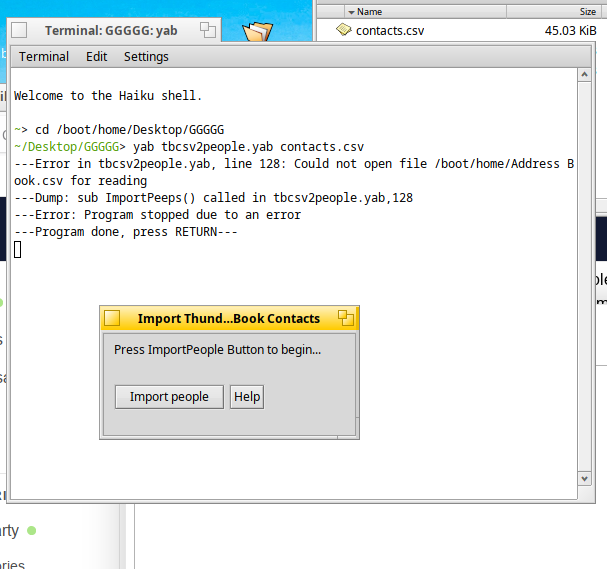
But the program does not work. Please see the attached screenshot of the terminal.
My contacts.csv fileisfrom gmail…will thiswork only for contacts.csv from thunderbird?
That makes sense that it cannot find that file if does not exist on your system.
From above, I stated: “Using the ‘gmailcsv2people.yab’ program as a template, I made modifications to the program that will import a Thunderbird CSV Export file and create Person files. Read the instructions within the program file before proceeding”.
Did you read how to use this script? If your CSV file has a different filename change the name in the Yab script. Then try again.
Also, I use IceWeasal as my main browser. Strange that WebPositive is mangling the zipped file during download.
Well, if won’t be that magic at soon as a vCard file “comes” into Haiku.
What I propose is the following:
But it will only happen if/hen the file is opened by the People app. Not fully automagical, but enough to make the end user being able to import vcard without noticing the conversion happening in background, plus the new feature of being able to share a Person file with someone else using a different OS who will then receive a file which will be directly a valid vCard file.
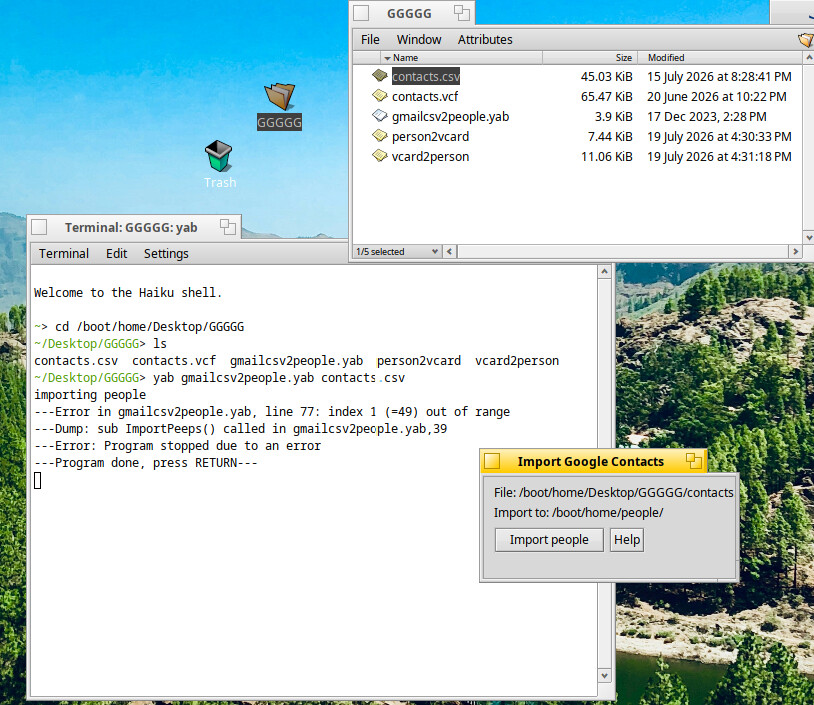
I edited your script to point at my contacts.csv file. It complained of Mr.peeps in line…removed it…later, the program worked
But, whatever I try, it will import only six contacts…
I cleaned up the .csv file as you have remarked in the script…yet, 6 contacts are all I get
But, thanks anyway…I have some vague idea on what to do next…will report back here later
I do not remember if I mentioned issues with extended characters (á, é, í, ó, ú, ü, ñ). I converted mine to the standard Latin unmarked character and updated the CVS file until I found the offenders causing the Yab script to error out. As mentioned in the script also mentions other characters to cleanup.
Once all the People files were created, I updated the ones with extended characters.
It is a conversion issue with Yab interpreter that it burps on extended characters…legacy of the DOS days I think.
Howdy,
This little utility app I just released might come in handy for those who want to import their contacts into Person files:
It is able to import vCard contacts to Person files. Tested with Gmail and iCloud contacts.
Enjoy! 
Howdy,
First version released.
Well…I tried many attempts to duplicate a similar error in my input data file.
I introduced a dummy record containing different characters, with double-quotes, single-quotes, and extended characters. Cannot get a error message such as yours.
However, I remember seeing something similar when I was performing test runs when I was mapping the meta-file elements per the Person meta data spec. This kind of error occurred when data bled over into the next column of a different data type, such as letter characters were copied into a numeric-only column–for example. This occurred because of a comma that existed in a textual column, such a last name with a suffix separated by a comma–like “Lastname, Jr.”. Cannot have that extra comma–this is a common shortcoming for CSV files being used for data ingestion.
I am not a YAB programmer…maybe a YAB programmer can assist further with your data issues in your data file. I so apologize now that I cannot assist you further.
Of course, you can try the AI-generated program that has been identified to be available. I personally do not use AI generated software, unless it has been vetted by a professional AI programmer [they are slowly entering into the IT markets now as they are finally graduating from certified universities]. Where I work, AI is not permitted due to the nature of our data and its data security–no cloud tech is allowed.