Can extended attributes be attached to arbitrary files?

Hi people,

I have recently installed Haiku on a VM to experience the future that wasn’t, but might be someday. So far I’m having fun with the different UI paradigm. The core feature that made me take the leap however, was metadata.

Specifically, extended attributes attached to (but not contained in) arbitrary files. Some of my sample usecases are:

  • Storing the URL I got a file from
  • Writing notes for a PDF paper I read
  • Attach a note to a folder saying what should and shouldn’t be stored in it
  • Adding extra information about a document’s version to help disambiguate between several (in the absence of version control)
  • Adding a “real” written-on date, separate from “Modified on”
  • etc… basically anytime a file gets a name_with_underscores, its typically crying for a place to store some metadata

I, however, am unable to do this - I can’t display arbitrary columns in Tracker, for one. And from some reading it seems that it is not possible for arbitrary filetypes. This sounds like a terrible oversight, since the metadata facility I and people in general would want, is for our own organisational purposes, so not really part of the file itself.

Having an ontology like Dublin Core would be next level, but I’m getting ahead of myself.

Can someone confirm?

2 Likes

You can add custom attributes to whatever file/folder you like (edit: if that recides in a volume with a filesystem with support for extended attributes, of course).

I’ve just tested by adding a “MY_CUSTOM_ATTRIBUTE” (content set to “Hello world”) to a “test” folder. I did it via the addattr command (“add-attribute”), like so:

addattr MY_CUSTOM_ATTRIBUTE "Hello world" test

There are a bunch of attribute related commands:

> ls -1 /bin/*attr
/bin/addattr
/bin/catattr
/bin/copyattr
/bin/listattr
/bin/resattr
/bin/rmattr

Example usage:

> listattr test
File: test
        Type       Size  Name                                
----------------------------------------------------------
 MIME String        31  "BEOS:TYPE"
    Raw Data        24  "_trk/pinfo_le"
        Text        12  "MY_CUSTOM_ATTRIBUTE"

67 bytes total in attributes.
>
>  catattr MY_CUSTOM_ATTRIBUTE test
test : string : Hello world

With respects to showing custom attributes in Tracker… that’s currently more convoluted. I’ll defer to the following explanation by @humdinger, a while ago:

Which attibutes are displayed is stored for each folder in its attribute _trk/columns_le. New folders inherit the settings of their parent.

There’s no easy way to change the displayed attributes for all folders in the system. If you’re familiar with scripting, you could create a script that copies the _trk/columns_le using the command copyattr.

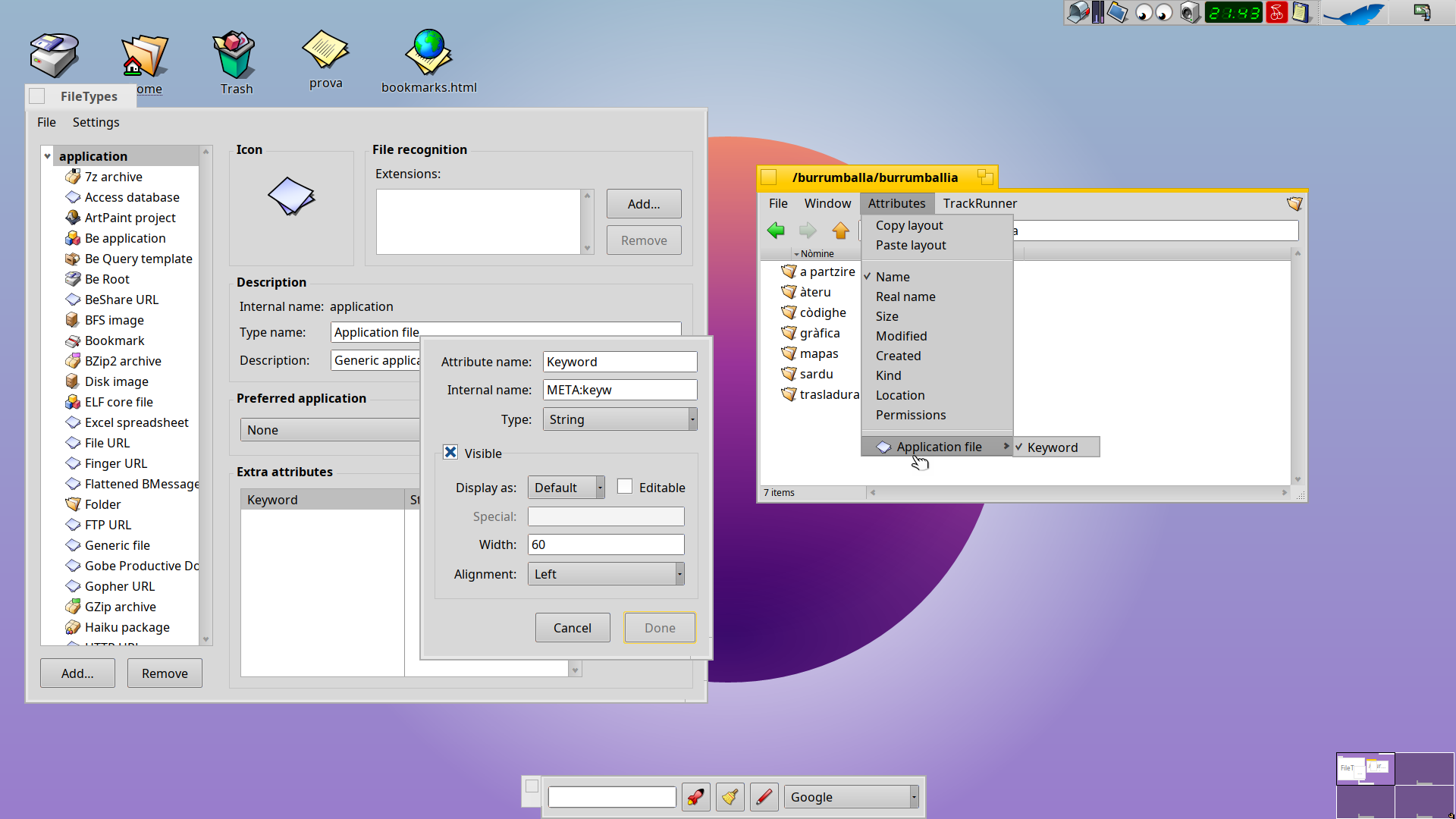
If it’s only a few folders, you can use the “Copy/Paste attributes” from the Attributes menu of the Tracker window.


Others surely will chime in with more info.

Edit: I remember adding colums to Tracker while experimenting with a similar setup to Scott Hacker’s “TrackerBase” (around 20 years ago :frowning: ), but can’t recall how I did it now. (TrackerBase repo on GitHub).
2 Likes

Thanks! Yes I did experiment with it on the terminal, and it did work. But lack of Tracker support makes it seem like its not Haiku’s intended usecase :frowning: That’s why I wanted to understand if there’s intent behind it. Windows and Linux also do support arbitrary extended attributes, but it is the second class status given to them that has doomed us into the likes of document_v2_withBetterFormatting_insertedPics_final_xxyyzz.docx in the first place.

(Aside, the META: attributes in attributes page in the user guide look promising to map onto standardised ontologies. Any plan for ontologies in general in Haiku?)

Happy to wait for more inputs.

While you wait for better answers, perhaps youll find the following of interest (also note the use of custom colums in Tracker on the first screenshot):

Edit: BTW, welcome to the forum @gormilind!

1 Like

We inherited Tracker from BeOS, and while there were some updates to it, it looks like this part was not improved yet (or possibly we accidentally made it worse).

Also, Haiku is an operating system - it provides the framework and a few building blocks. And it’s up to application developers to build whatever they want with it. SEN (from the linked thread) seems to be a great example of that, and maybe some of its improvements can be reintegrated into Tracker?

2 Likes

If you want to display your specific attributes in the Tracker , you just need to create a dedicated FileType.

It’s the method I’ve used when investigating the powerful usage of attributes under Haiku

see : Generic people app

3 Likes

Or edit an existing one, of course.

Apart from the Attributes page you linked from the user guide, you may also want to have a look at Filetypes, Attributes, Index and Queries workshop.

1 Like

WebPositive already does it, META:url, so if you want to see it , add it to extra attributes of a generic file using file type preflet and showing it in the wanted folder (as written above, this is not applied to every folder, but you can copy+paste the layout) from the attributes menu

adding a new extra attribute to application super type, it will be available for every mimetype in every folder, it can be done for each super type (audio/* has set the standard MEDIA attributes, you can set your preferred extra attributes such Media:label, Media:producer…), or you can create a new, custom, file type, eg a Movie entry for you collection, media/x-mydvd, and set every attribute do you like,year of the movie shoot, year of the Media release, cast, director, light director, sound director, producer, ID, shelf, and if you set them to be editable, you can change their values from the tracker (not the most pleasant way to do, actually)

you can use the UI with filetypes preflet, or setmime cli command

3 Likes

The filetypes are “registered” in the mime_db, and they are a fill attribute aswell.

iirc there is some way to tell the OS that for a specific filetype you want specific attributes to be visible, but I don’t know by heart how to do this. It is done for e-mail folders for example (attributes for subject, to:, from:. etc.)

Also worth noting that besides displaying and even editing arbitrary attributes in columns in Tracker, you can also create indexes for them via the CLI (mkindex), for fast Queries across all files with those attributes.

1 Like

thanks for the nice plug, @BiPolar :smiling_face_with_sunglasses: and welcome @gormilind, you might want to checkout SEN once the preview is out before the end of the year, you might like what you see.

What SEN does is “just” adding relations and deep linking to the mix, Haiku/Tracker already provides a very nice semantic, data-centric environment.

Tracker will automatically display columns for custom attributes IF they have the “display” attribute set (part of the configuration you set up with the FileTypes preferences app) AND if you select them in the View menu, which can get a bit cumbersome if you have custom file types with a lot of custom attributes…

This comes in handy with SEN and its relations, which are also managed as normal file types so you can have relation properties displayed as normal detail columns in Tracker (e.g. a page number for a document reference, a label or role).

This is a unique feature of Haiku and Tracker, no other OS supports this level of custom metadata and indexed queries. Only MacOS does, to some extent, but Finder does not support displaying custom attributes!

Since you mention ontologies and Dublin Core, you will be pleased to hear that I work in semantics and try to model SEN’s relations and additional file types according to common best practices, but at the same time I don’t want to draw in all the formalism and over specialization from full blown ontologies out there, as the target audience and requirements are quite different for a local system.

I need to write up some more docs and finally do some presentational videos when I am done wrapping up the tech preview, in the meantime you can have a look at the project web site:

and the Substack blog intro post:

Feel free to reach out if you want to know more, either here for Haiku specifics, or to me via DM for SEN. Happy to have a chat and nerd out.

4 Likes