Is there a way to change the default shortcut of switching Workspaces?
You can add new ones, but you can’t change the existing ones.
The Shortcuts preference app can be set up to call the Workspaces app from the command line to do that. (There are also some external command line apps for this.)
Here’s a pic of my preferences app using workpacesctl:
https://forge.full0fstars.net/Public/workspacesctl/src/branch/main/shortcuts.png
1 Like
Unfortunately I don’t have workspacesctl command in /boot/system/bin
There isn’t also one in HaikuDepot.
workspacesctl is an app I wrote for this before the builtin Workspaces app could do all this. I still use it, but you should probably just use the builtin Workspaces app. 
You can run it from Terminal by hand first to explore what the arguments do.
root@morgiana ~:Workspaces --help
Usage: Workspaces [options] [workspace|direction]
where “options” are:
–notitle title bar removed, border and resize kept
–noborder title, border, and resize removed
–avoidfocus prevents the window from being the target of keyboard events
–alwaysontop keeps window on top
–notmovable window can’t be moved around
–autoraise auto-raise the workspace window when mouse is at the screen edge
–help display this help and exit
-i display workspace layout and exit
“workspace” is the number of the Workspace to which to switch (+|-|0-31)
and “direction” is the direction of the Workspace to switch to (left|right|up|down)
So, for example, to switch left use the command "Workspaces left’.
Wow!
You didn’t mentioned it’s your own program.
Look at the screengrab. It works from Shell but woun’t work as a shortcut.
I need it under LAlt + Space
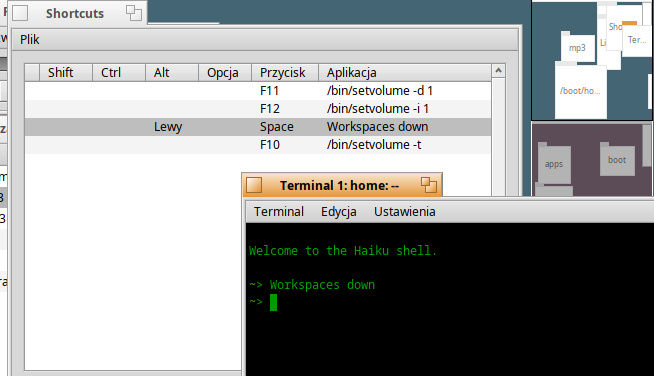

Ah; there’s probably no command $PATH when it’s running as a Shortcut; try the full path to the command:
/boot/system/apps/Workspaces left
Sorry. Forgot to mention that full path won’t work as well.