Hello all,
ifconfig /dev/net/my_network_adapter/0 scan
can show the Wi-Fi signal strength value. As far as I know it is dimensionless, but what is its maximum? For example, if it’s 30, is signal weak, good or excellent?
I assume these numbers come from wpa_supplicant directly, or the driver.
Normally this is to be interpreted as negative decibel signal loss
That is a value of 30 is -30dB
The maximum value in such a system would be 0, representing no signal loss at all
Sadly I can’t tell you if this is actually the case, as I don’t know for sure where the number comes from 
You can probably run wpa_supplicant in a Terminal directly after quiting it with launch_roster to see if it’s terminal output matches this
It’s not dimension less. It’s a dBm unit.
Aka the decibel (logarithmic) compared to a signal power of 1mW (milliwatt).
Expressed technically as a positive value, but it should be read as -N dBm, as in the context of a signal receiver, it measures the loss (an absolute +30 dBm equal 1 watt).
-30dBm for a Wifi signal is a very good measure.
A wifi signal lost power very quickly just by distance and obstacles. Wifi transceivers are very very sensitive devices able to detect and works just with few nano watts of power signal, or even less.
Edit: sorry @nephele, didn’t saw you already replied.
ifconfig /dev/net/iprowifi3945/0 scan
name                             address              signal  auth
haiku-top                        01:d0:19:a6:88:42        30  WPA
ArcorInternet123                 00:20:12:a4:29:e1        15  WPA
Could you please tell me from which router the signal is stronger, from haiku-top or ArcorInternet123?
The second one.
But it doesn’t matter much.
It’s only when the loss is more than -70dBm that you will start to see observable impact. As I said these days most Wifi transceivers are perfectly able to work with a very weak signal power because they’re still able to detect the variations needed to decode it anyway.
Choose the one that make more functional sense to you, in both case the bandwidth will be great anyway.
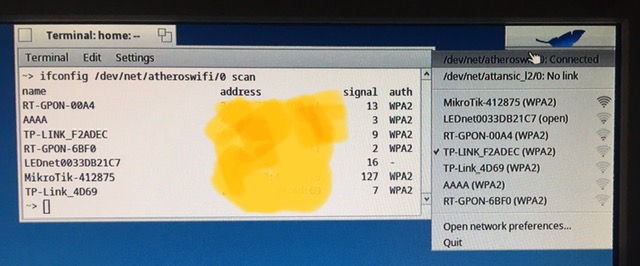
A MikroTik router from (I guess) my neighbor quite disagree with you
So, it is opposite - the higher the value, the stronger the signal.
So you mean the way signal strength is shown in Haiku is wrong, reversed?
I have NetBSD on the same machine. It shows via wlanctl and ifconfig quite similar
to Haiku picture. Topic is over.
I make not much sense that your WiFi interface get more signal power from your neighbor wifi router , which I guess is at least behind a wall from your place, than from your own router in the same place.
What does output iw tool on Linux, if you have ability to test that?
Should we show this value as a negative number?
To show where, if you are asking me? I’d left it the way the ifconfig shows it - minimal or no signal is 0 and maximal as 127 or sort of.
Actually, ifconfig just display the value the device driver reports in the RSSI field.
This field is supposed to be expressed in dBm, aka signal strength expressed as a proportion of 1mW, in the decibel logarythmic scale.
But it turns out that some don’t do that and instead express it as a ratio scaled on the 7bit of that this signed field.
Last but not least, this RSSI value is supposed to be combined with the noise level value, also in dBm, but currently it’s not taken into account, either because no driver report it or because we considered that it doesn’t matter…
Which ends in conflicting and confusing units…
1 Like