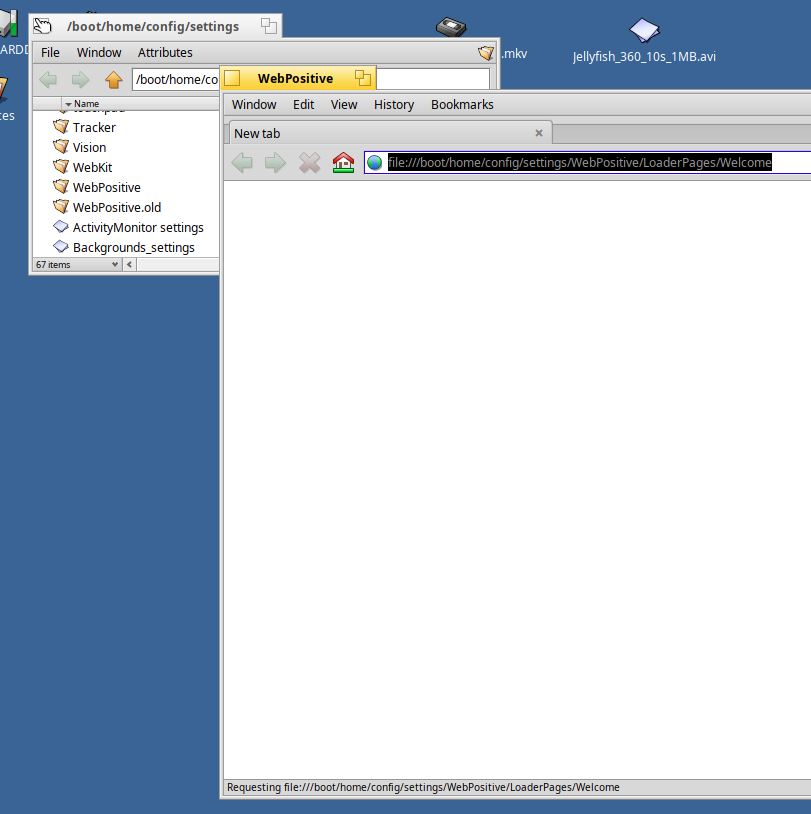
I noticed that my webpositive is no longer loading any sites. It just sits at trying to load the default Welcome page. I cant cancel it. If I enter a new address, nothing changes and it still shows trying to load the Welcome page in the status bar.
Is anyone else seeing this?
Is it the browser? Are you connected to the internet? For now, have you tried using Firefox or any other browsers or are you on the 32-bit version? I’ll try my best to help you out
Yes, its webpositive the browser. It opens and just hangs on trying to load the welcome page. Doesnt do really anything besides that. I can interface with the application but the page never changes from that. 64bit nightly. Yes, I have internet and dns is working too.
Is there some sort of clear settings or similar for webpositive?
If you want to try resetting it to the default settings then renaming the WebPositive folder in home/config/settings will force it to create a new folder with the defaults.
Another thing to try if that doesn’t work is to try booting the VM with the latest nightly ISO and see if WebPositive works there. I can confirm that WebPositive works fine on a x86_64 nightly VM running hrev60136 on my Linux server as I am using it to write this post.
Sometimes it did for me as well - until I had not noticed there were another instance of Webpositive with the all pages with, which I had closed the browser (explicitly that one with those tabs earlier, or with the shutdown process).
Since then I just check that how many Webpositive windows are running, and close the independently opened with Welcome page only -
With these symptoms, I think you should open a report in the Haiku Bug Tracker, and for now, use an alt browser like Firefox or Falkon. The devs over at the bug tracker are really helpful too : D
It actually didnt exist. After renamed my old WebPositive folder it didnt re-create the LoaderPages folder or its contents. Copying that folder over did not resolve the issue however.
Running from the commandline with a different website does not change its behavior.
Firefox works fine.
Maybe I should reload this VM. Its from 2023, but up to date running nightly.