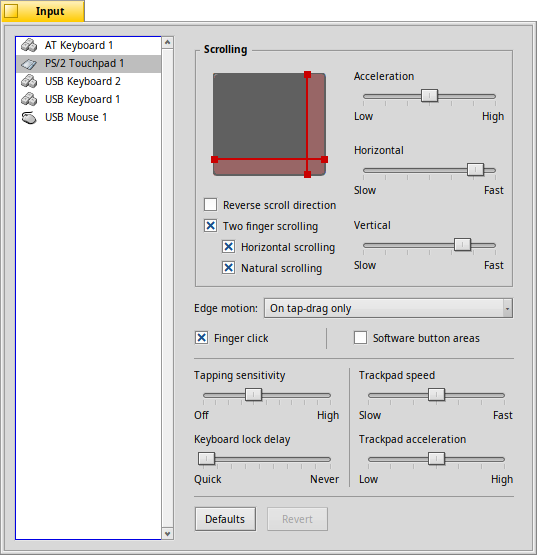
Same as a few years back, I need a touchpad prefs screenshot.
My touchpad isn’t recognized as such by the Input preferences. Therefore I can’t take a screenshot of them for the User Guide. I’m looking for someone with a correctly recognized touchpad on a nightly Haiku. The prefs panel needs to show the newly added Edge motion setting.
The system should use Haiku’s default theme with a font size of 10pt, the prefs should be the active window and no mouse pointer in the shot, please.
One’s for the scrolling acceleration (the one in the box with the bold “Scrolling” label), the other for the touchpad acceleration.
WRT the layouting, I’d expect the sliders in the scrolling box to get wider to fill the space between them and the touchpad representation to their left.
As my touchpad isn’t supported (other than as mouse) I’ll have to guess.
I’d say the acceleration in the “Scrolling” box is the acceleration of the scrolling when doing 2-finger scrolling or using those scrolling areas. The other “acceleration” controls the mouse pointer.
What does the “Natural scrolling” setting under “Two-finger scrolling” do?
I assume it results in your finger not moving the scrollbars (= move down to move a list down), but the list itself (= move down to move a list up, like scrolling on a phone).
If that’s it, I wonder what’s the difference to the general “Reverse scroll direction” setting.
There is no difference they both do the same thing in a slightly different layer, I brought up this confusion in the review but it was not adressed iirc
edit: it seems currently one only affects 2 finger scrolling and the other edge scrolling
Thanks for checking.
I can’t imagine people using one scrolling mode for “Edge area scrolling” and another for 2-finger scrolling. It gets weirder when people - as I assume everyone does - remove the edge-scrolling areas when their 2-finger-scrolling is active.
I can’t test the different setting, but I’ll open a ticket to remove the checkbox for the 2-finger scrolling mode.
I’ve created #19929 Touchpad scrolling direction options for further discussion. I don’t think I have much to contribute there, because a) my touchpad isn’t recognized and b) I’ve never really used a touchpad because I’ve been using a mouse since forever.
If you're using single finger scrolling with the above mentioned scrolling areas, activating *Reverse scroll direction* will make scrollbars behave like scrolling on a smartphone: you move the finger up to have the contents scroll down.
*Two finger scrolling* enables vertical and optionally also *Horizontal scrolling* on supported devices. Moving two fingers in parallel vertically or horizontally to scrolls the contents.
With *Natural scrolling*, this works just like on a smartphone. Disable the checkbox and directions reverse.
*Edge motion* controls how the system reacts when your finger hits the edge of the touchpad.
*Disabled*
Deactivate edge motion detection. Like with a mouse reaching the edge of the desk, you'll have to lift the finger and move it back to the touchpad center.
*On tap-drag only*
By tap-dragging you can drag a file without using the physical click buttons of the touchpad: You tap a file and, without lifting your finger, start dragging the file around. With this setting activated, once your finger reaches an edge of the touchpad, the mouse pointer keeps moving.
*When dragging*
Same as the previous setting, but also works when dragging with the physical click buttons.
*Always*
This will always continue moving the mouse pointer when your finger hits the touchpad edge, even if you're not dragging anything.
With *Finger click* active, you can simulate different clicks with your fingers (if your device supports that):
1 finger = left-click
2 fingers = right-click
3 fingers = middle-click.
You can disable the *Software button areas* if you're comfortable with those "finger clicks", and get more surface area to use on your touchpad.


 (PS also no functional touchpad and happy mouse user)

