When I try to access an ftp volume, Dolphin and Krusader show up an error message: “Can’t connect to a local password server”.
What should I do?
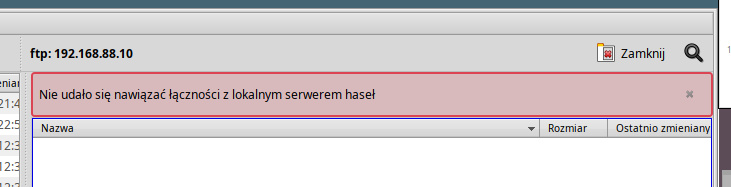
I guess the (haiku)ports of these KDE softwares are not complete regarding the API used by KDE apps for storage/retrieval of secrets, passwords, keys etc, which leads to this error.
You can open a issue ticket on HaikuPorts, indicating this error so that someone can look how to fix it.
2 Likes
So far I haven’t been able to connect anything on the KDE side, looking at the questions in the KDE forum it’s even an issue there for some, patches welcome? 
Have to mention I didn’t check FTP there though.
probably Dolphin et all use kwallet? maybe the api can be re-implemented onto our passwords?
One should have an option in app settings to whether use password manager or not.
I really don’t need any passwords anywhere in Haiku at all, unless I explicitly decide I could use one somewhere.
At least for NeoChat and Tokodon I know they use Haiku’s keystore, could be Dolphin uses kwallet.
Is there a native two-panel file manager with FTP support?
I have tried Genesis but it seems to lack that feature.
Ticket added. My very first one.
I was hoping that there is any other two-panel file manager with FTP support on HaikuDepot, bot it seems there isn’t.
1 Like
An Haiku strength is that windows can interact. Would it be possible to join a Tracker and FTPpositive window? For that kind of things, perhaps we are also lacking a Tracker pure tree view. Or an external thing like Seeker but no files only the tree.
1 Like
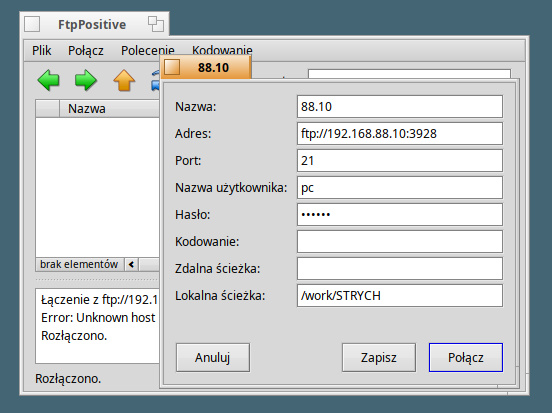
Just my luck. FtpPositive is also refusing to cooperate: ‘unknown host’. Unless I’m doing something wrong?
I’d prefer a two-panel file manager, but if none of them work with FTP, I’d at least like FtpPositive to work…
That’s because you use an URL in the address field, while FtpPositive is a FTP client, it doesn’t expect an URL, it expect in address field to have ony an address.
It should be either an IPv4 address (I doubt FtpPositive supports IPv6 yet) or an FQDN hostname like “test.rebex.net” for instance - it’s one public free/test FTP server available online for testing as listed on Free Public FTP Servers.
And the port number in its port field, not in an URL.
Retry after having edit as follow:
- Address: 192.168.88.10
- Port: 3928
But are you sure the FTP server is actually listening on port 3928, instead of the default port 21 ? If it still doesn’t work and returns a different error like Unreachable or Disconnected, retry with port set to default value, 21.
Yes, because I use Cx File Explorer - an android app on my phone. It sets a temporary ftp account on my phone to make it ftp accessible. This app passes the url ftp://192.168.88.10:3928, a fixed user name, and a temporary password.
You were right wit the url. Now it works… almost:
Welcome in FtpPositive
Connecting to 192.168.88.10 (3928)
220 File Manager ready
USER pc
331 Password required
PASS ********
230 Access granted
CWD
501 Syntax error
PASV
227 Entering Passive Mode (192,168,88,10,155,107).
LIST -alL
150 Opening ASCII mode data connection for LIST
226 Data transmission succeeded
XPWD
550 Unsupported command
Error: Operation now in progress
Well, issue is FTP is a fragile protocol, in particular because the LIST command to get details was never standardized, and depending on FTP server implementations, some support different set of arguments.
Some advanced Ftp clients have smart discovery feature, where they try multiple variants when a server reject one, but it doesn’t seems FtpPositive has such feature.