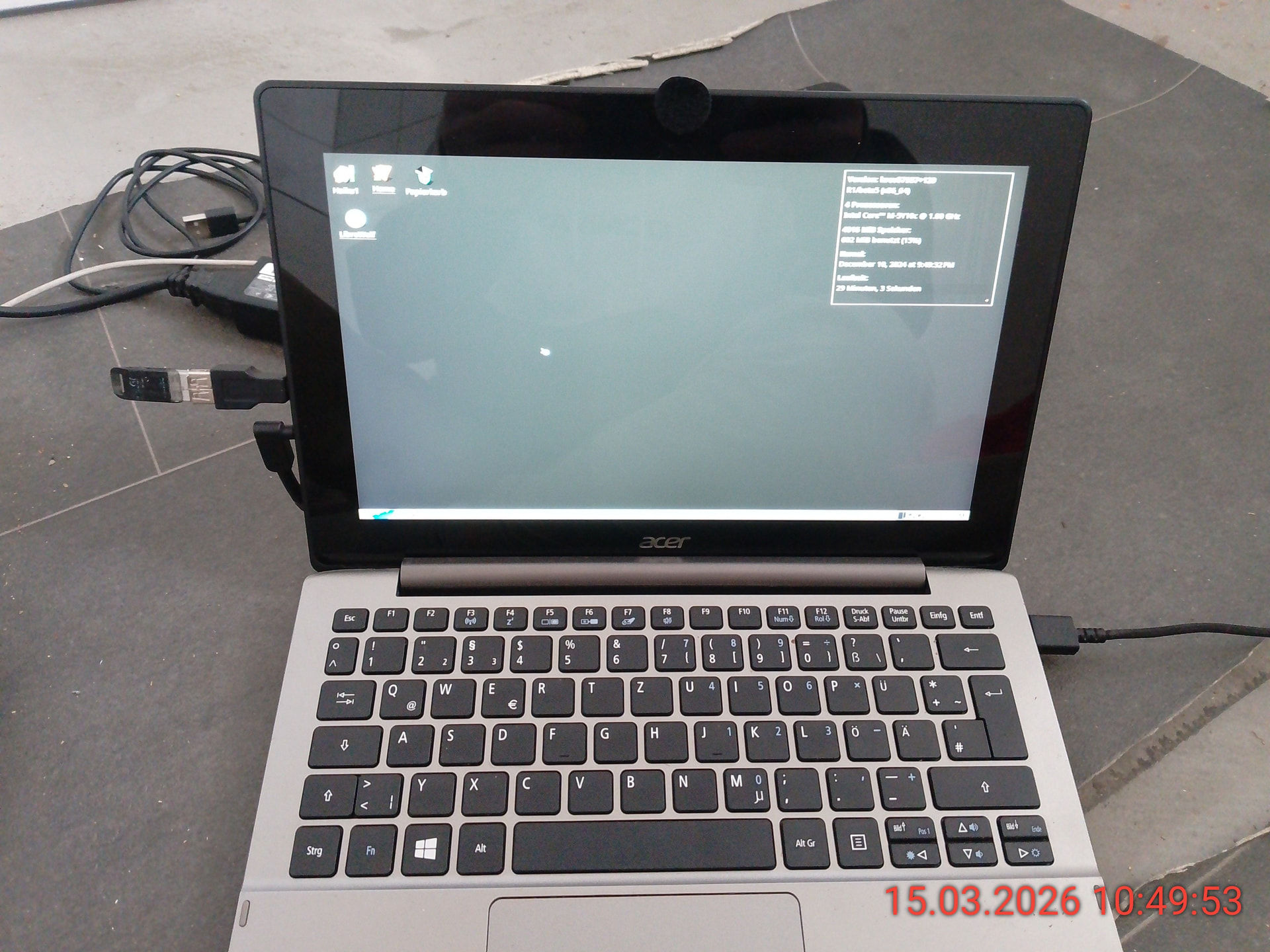
Tablet Acer SW5-173 and Haiku

Hi, I have no programming experience whatsoever, but I have an old Acer tablet. Currently, I’m only working with it via USB stick, but I could also install it on the SSD. My question is, does anyone have a link or tutorial for touchscreen drivers? I’m missing them, but it works fine with the docking station. Haiku ist Future Plz make good Operation System but Mac, Windows, is not more my Favo Have Fun Haiku on Acer Aspire Switch SW5-173

Ps Hat wer Ahnung vom Importieren von Touchscreen Treiber auf ein Acer SW5-173

There are no third-party drivers that you can simply install to make it work.
All available input device drivers are already included with the Haiku system.
Some people have reported that their touchscreen works,for many others (including my devices) it doesn’t work,that depends on the used technology.
Often touchscreens are connected using i2c,for which Haiku has only experimental support that is disabled by default and you can only enable it by recompiling Haiku.
To get some more information about the hardware in your device,please open the Terminal,type listdev and post the output here.
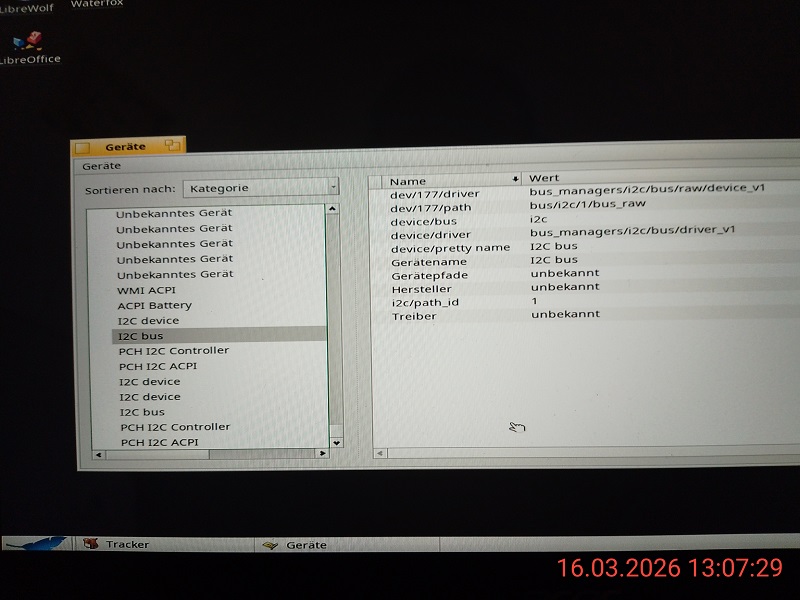
Additionally,you can open the Devices application and show screenshots of the information shown for the devices you see in the “Input device controller” category.
If the touchscreen isn’t shown there at all,there’s a good chance that it is i2c since I think i2c devices generally don’t show up there yet.

2 Likes

ok first BIGTHX for Help and Iformation so on my Tablet dont work the driver of I2C but look self

and ~> listdev

device Bridge (Host bridge) [6|0|0]
vendor 8086: Intel Corporation
device 1604: Broadwell-U Host Bridge -OPI

device Display controller (VGA compatible controller, VGA controller) [3|0|0]
vendor 8086: Intel Corporation
device 161e: HD Graphics 5300

device Multimedia controller (Audio device) [4|3|0]
vendor 8086: Intel Corporation
device 160c: Broadwell-U Audio Controller

device Signal processing controller [11|80|0]
vendor 8086: Intel Corporation
device 1603: Broadwell-U Processor Thermal Subsystem

device Serial bus controller (USB controller, XHCI) [c|3|30]
vendor 8086: Intel Corporation
device 9cb1: Wildcat Point-LP USB xHCI Controller

device Hub (Unused, Full speed (or root) hub) [9|0|0]
vendor 0000: Unknown
device 0000: Unknown

  device Hub (Unused, Full speed (or root) hub) [9|0|0]
    vendor 0bda: Realtek Semiconductor Corp.
    device 5401: RTL 8153 USB 3.0 hub with gigabit ethernet

     device Human Interface Device (Boot Interface Subclass, Mouse) [3|1|2]
       vendor 06cb: Synaptics, Inc.
       device 2991: Unknown

  device Mass Storage (SCSI, Bulk-Only) [8|6|50]
    vendor 0781: SanDisk Corp.
    device 5591: Ultra Flair

  device Wireless (Radio Frequency, Bluetooth) [e0|1|1]
    vendor 8087: Intel Corp.
    device 0a2a: Bluetooth wireless interface

  device Video (Video Streaming) [e|2|0]
    vendor 0bda: Realtek Semiconductor Corp.
    device 5640: Unknown

  device Video (Video Streaming) [e|2|0]
    vendor 1bcf: Sunplus Innovation Technology Inc.
    device 2c81: Unknown

  device (Unknown) (255:6:80) [ff|6|50]
    vendor 0bda: Realtek Semiconductor Corp.
    device 0129: RTS5129 Card Reader Controller

  device Hub (Unused, Full speed (or root) hub) [9|0|0]
    vendor 0bda: Realtek Semiconductor Corp.
    device 0401: Unknown

device Communication controller [7|80|0]
vendor 8086: Intel Corporation
device 9cba: Wildcat Point-LP MEI Controller #1

device Multimedia controller (Audio device) [4|3|0]
vendor 8086: Intel Corporation
device 9ca0: Wildcat Point-LP High Definition Audio Controller

device Bridge (PCI bridge, Normal decode) [6|4|0]
vendor 8086: Intel Corporation
device 9c96: Wildcat Point-LP PCI Express Root Port #4

device Network controller [2|80|0]
vendor 8086: Intel Corporation
device 095a: Wireless 7265

device Bridge (ISA bridge) [6|1|0]
vendor 8086: Intel Corporation
device 9cc7: Wildcat Point-LP LPC Controller

device Mass storage controller (SATA controller, AHCI 1.0) [1|6|1]
vendor 8086: Intel Corporation
device 9c83: Wildcat Point-LP SATA Controller [AHCI Mode]

device Serial bus controller (SMBus) [c|5|0]
vendor 8086: Intel Corporation
device 9ca2: Wildcat Point-LP SMBus Controller

device Signal processing controller [11|80|0]
vendor 8086: Intel Corporation
device 9ca4: Wildcat Point-LP Thermal Management Controller
~>
Welcome to the Haiku shell.

~> listdev

device Bridge (Host bridge) [6|0|0]
vendor 8086: Intel Corporation
device 1604: Broadwell-U Host Bridge -OPI

device Display controller (VGA compatible controller, VGA controller) [3|0|0]
vendor 8086: Intel Corporation
device 161e: HD Graphics 5300

device Multimedia controller (Audio device) [4|3|0]
vendor 8086: Intel Corporation
device 160c: Broadwell-U Audio Controller

device Signal processing controller [11|80|0]
vendor 8086: Intel Corporation
device 1603: Broadwell-U Processor Thermal Subsystem

device Serial bus controller (USB controller, XHCI) [c|3|30]
vendor 8086: Intel Corporation
device 9cb1: Wildcat Point-LP USB xHCI Controller

~> evice 9ca4: Wildcat Point-LP Thermal Management Controller|6|1]ouse) [3|1|2]

sry the long post xD have fun i will try it
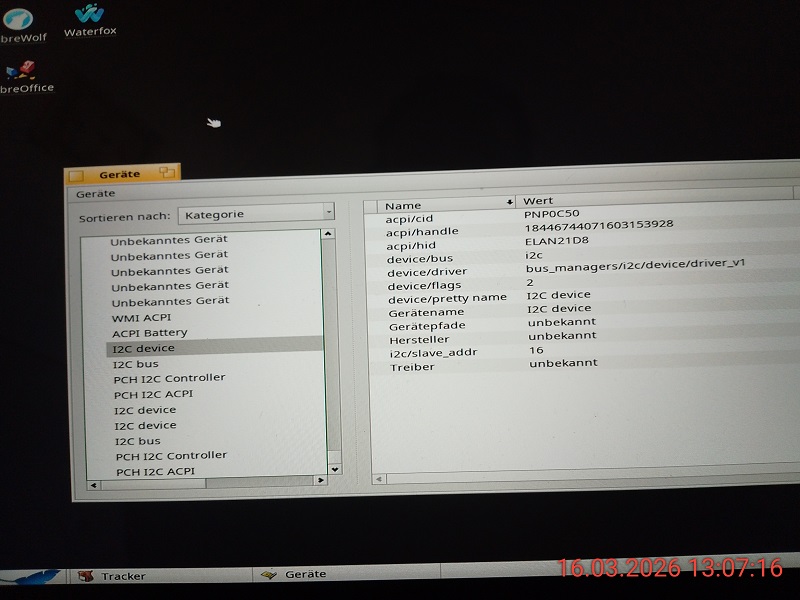
The I2C device from your second screenshot seems to be your touchscreen.
The acpi/hid value indicates that it’s a ELAN touchscreen,and it seems we have a driver for it.
You can see the source code here: https://grok.nikisoft.one/opengrok/xref/haiku/src/add-ons/kernel/drivers/input/i2c_elan/
You could try adding ELAN21D8 to the list of supported devices in Driver.cpp,recompile haiku.hpkg and see if it works then,or if any other changes are needed.
Honestly,I’m not sure if that driver is even finished and working on any device,but that it exists means it’s worth a try,what could possibly go wrong?

2 Likes

Awesome! Okay, thanks for the homework. I’ll test it and show you how it works. I’ve found some links, but my English isn’t good enough for reading, so I’m currently testing other things. I don’t know much about it, but I’ll give it a try.

https://xdaforums.com/t/touchscreen-working-on-freebsd.597200/

I tried to find drivers and somehow convert them to Haiku, but without success xD, so have fun BIGTHX for Helping i give feedback BB

The device from your link is a PCI touchscreen.
Porting the driver for it to Haiku wouldn’t help you at all with your own device.
Also,Haiku and FreeBSD are quite different,we only have a compatibility layer for network drivers,but not for anything else.
You can’t simply convert a driver,that would be more like a complete rewrite.
Anyway,we already have the i2c_elan driver that should fit with your hardware more or less and can probably be extended/modified if it doesn’t work as is.

1 Like

Yes, you’re right. I have absolutely no idea about programming or anything like that, but I’m playing around with it and will try to learn, even if it takes me a lot of time. There are so many websites for learning. I’ll definitely get back to you when I’ve converted and integrated everything. Let’s see what comes of it. Thanks so much for all the info! Can you speak German? xD Let’s make an FAQ for dummies like me. I’ll go read and test it out

Yes,I can speak German,but I don’t think language-specific details on developer stuff like drivers makes a lot of sense.
That documentation takes a lot of time to write and we’re at a point where even the English documentation is sometimes incomplete or hard to find.
If you need a German FAQ for users (not technical details,but how to get different tasks done on Haiku),I can recommend the knowledge base at BeSly:

1 Like

ok ich werde lernen xD

ok i will learn but im old my brain is oha Bro egal so i need to try drivers and give you feedback ey the old besly webside i find cooler the ne webside of besly have to big header on 11,6 zoll inch display xD sry and thx for you support regads feedback coming soon …