I’m trying to see if a .sh file will run on Haiku. I know Haiku has a bash-like shell, but I’m not sure which commands are supported natively. I want to test a simple script that prints a message and maybe calls a small program. I’m also curious if execution permissions (chmod +x) work the same way as on Linux. Finally, I want to confirm if I can use a .sh launcher to organize assets and data like I do in my zip-folder idea.
I was pretty sure it’s a normal Unix shell, thus being compatible with sh. But I tested it anyway. The following commands all work as expected (like they work on Linux for example)
chmod +x examplefile
echo Hello
less examplefile
ls -l
1 Like
2 Likes
So could I potentially use the .sh file as a launcher for another app?
Yes…I use shell scripts to startup and shutdown posgreSQL database. And also to start one or two PC games. Bash is native in Haiku.
1 Like
This is actually so helpful thank you so much
bash is the default shell. Here is a script I use to start a Java program
#!/bin/sh

# who am i?
_script=“$(readlink -f ${BASH_SOURCE[0]})”

# Delete last component from $_script

_base=“$(dirname $_script)”
cd $_base
_runme=$_base/Pixelitor.jar
java -jar $_runme &
But if you prefer zsh or fish, they’re available too.
The one thing to look out for is that we don’t have a /usr directory. so if your borrowed-from-linux script doesn’t work, that is probably where the problem lies.
1 Like
They do, but it’s a bit of trickery. Apart from SSH accounts, Haiku doesn’t actually have that distinction between local user, group user and everybody else, so what does chmod 755 actually do? Easiest way around that is to just use the mnemonics like chmod +x.
Or you can rightclick on the file in Tracker, select Get Info, then choose the second tab
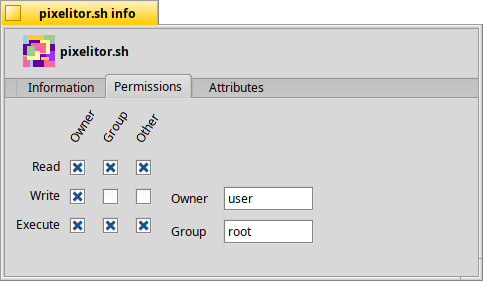
2 Likes
You can also put some scripts call in /boot/home/config/settings/boot/UserBootscript so that it will start every time the system is booting
Scripting with unique Haiku commands is very powerful under Haiku that’s why a dedicated category is available on Haiku Insider
2 Likes
UNIX shell scripts are supported not noly by a UNIX shell, bash (or sh), but also by all the other commands that would commonly be used in shell scripts - awk, expr, cut, tr, etc. In this respect, you can safely treat it as a UNIX platform.
What’s different, or anyway might be the first thing you’ll notice, is the directory layout.
1 Like
The short answer is yes. And with tools like ‘alert’, ‘notify’ (both built in..), ‘hdialog’ and ‘TrackRunner’ (both available in HaikuDepot) shell scripting is very powerful and clean in Haiku and integrates seamlessly into the desktop.
Have fun playing, we’re all here to help 
1 Like
Huh? It behaves exactly as it should behave. The only notable difference is that you are typically the root user.
1 Like
In the trivial sense that it adds a specified attribute to a file, yes it does. But it is POSIX cruft. It dates back to the days of mainframes with dumb terminals.
Even on Linux boxes, which typically have one user plus root, it is a bit of an overkill. But on Haiku? Great, I can authorize other users in this group to execute this application. Oh, wait. There are no other users. And no groups either.
One day, we may make Haiku multi-user: there are certainly enough fans of the idea, and then the system will be ready for it. I get that. But where we stand now, there’s not much point in learning the finer details of chmod, just do chmod +x and be done with it.
2 Likes
there is the most part of what you should find in others OSes, plus some specific commands for haiku
There are: the owners of various system services that need to be somewhat insulated from one another, preferably without the added complication of containers. For example a SSH daemon, web server, databases and so on. And that “cruft” is a very simple system that works well enough.
That is wrong. These posix file permission bits exist and work. You can add a user and then ssh over if you want, and the permission flags will be respected.
If people talk about multi-user, they mean this in the physical sense, i.e My siblign using my computer, having their own desktop etc.
Posix users are sometimes used for this on linux, but they are also used for a whole lot of other stuff, so this doesn’t really map well.
It used to map well for big unix servers, root was the system files, each user over some terminal line had their own stuff in their homedir and could assign what permissions others can have. In such a context the group also isn’t “audio” but “class 7b” 
Yes, guys. I already stipulated that there are edge cases for the extreme techies, and I mentioned SSH specifically.
No need to repeat what I already stated. “ssh in” is very, very far from a typical use case. For the 1% who need it, it is crucial. For the 99%, not really.
Anyway, I wasn’t about to start a campaign for the removal of POSIX attributes. Sorry if it came through like that. They are here, in Haiku, and we have to deal with them. My comment was simply that we (well, 99% of us) can deal with them at a high level of abstraction. That is all.
1 Like