Apologies if this is not the appropriate place to post this.
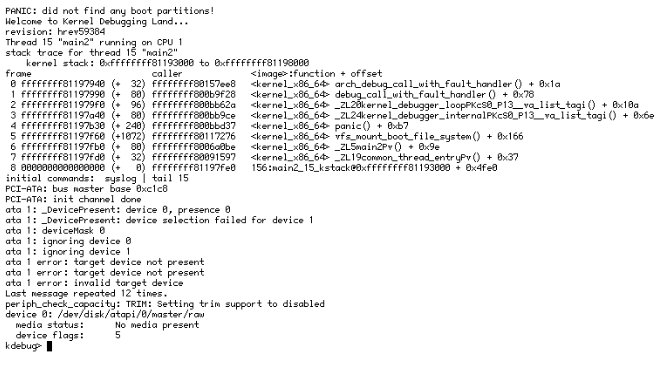
I’m running Haiku in QEMU/KVM. After updating from hrev59371 to hrev59384, the VM no longer detects the disk at boot and panics with: “did not find any boot partitions”. ATA fallback shows presence 0 / No media present.
I’ve reverted to a backup qcow2 to restore normal boot. I saw that virtio-blk was disabled in default images recently ( Making sure you're not a bot! ) is this behavior expected for existing VMs still using virtio-blk?
Create a virtual disk that doesn’t use virtio, then boot to a previous state. Use Installer to create new partion scheme and new partition on the newly created drive, format and install. This will duplicate your existing install. Once the install finished you can reboot. It should boot directly on the new drive. You can then remove safely the old drive and storage.
2 Likes
Yeah, I just reconnected the same virtual disk using a different virtual hardware interface by switching the disk bus from VirtIO to IDE.
Yes, as mentioned in the ticket, currently using virtio-olk leads to crashes and corruptions. As we get ready for a beta release, we have temporarily disabled it to not ship known-broken code in a release with a risk of data loss. It will come back when it’s fixed.
2 Likes
Note that virtio-scsi is different than virtio-blk, and that the Haiku driver for it is still enabled, as it doesn’t have the problems the virtio-blk driver apparently does. The buildmaster VMs for HaikuPorts builds use this and it works fine.
1 Like