Attempting to install Haiku r1/beta5 on an HP Compaq 6710b.
Hardware (output from Linux lscpu/lsusb/lspci):
kami-kun@hpcompaq-rpd:~ $ lscpu
Architecture:                    x86_64
CPU op-mode(s):                  32-bit, 64-bit
Byte Order:                      Little Endian
Address sizes:                   36 bits physical, 48 bits virtual
CPU(s):                          2
On-line CPU(s) list:             0,1
Thread(s) per core:              1
Core(s) per socket:              2
Socket(s):                       1
NUMA node(s):                    1
Vendor ID:                       GenuineIntel
CPU family:                      6
Model:                           15
Model name:                      Intel(R) Core(TM)2 Duo CPU     T7250  @ 2.00GHz
Stepping:                        13
Frequency boost:                 enabled
CPU MHz:                         1999.345
CPU max MHz:                     2001.0000
CPU min MHz:                     800.0000
BogoMIPS:                        3989.90
Virtualization:                  VT-x
L1d cache:                       64 KiB
L1i cache:                       64 KiB
L2 cache:                        2 MiB
NUMA node0 CPU(s):               0,1
Vulnerability Itlb multihit:     KVM: Mitigation: VMX disabled
Vulnerability L1tf:              Mitigation; PTE Inversion; VMX EPT disabled
Vulnerability Mds:               Vulnerable: Clear CPU buffers attempted, no mic
                                 rocode; SMT disabled
Vulnerability Meltdown:          Mitigation; PTI
Vulnerability Spec store bypass: Vulnerable
Vulnerability Spectre v1:        Mitigation; usercopy/swapgs barriers and __user
                                  pointer sanitization
Vulnerability Spectre v2:        Mitigation; Retpolines, STIBP disabled, RSB fil
                                 ling
Vulnerability Srbds:             Not affected
Vulnerability Tsx async abort:   Not affected
Flags:                           fpu vme de pse tsc msr pae mce cx8 apic sep mtr
                                 r pge mca cmov pat pse36 clflush dts acpi mmx f
                                 xsr sse sse2 ht tm pbe syscall nx lm constant_t
                                 sc arch_perfmon pebs bts rep_good nopl cpuid ap
                                 erfmperf pni dtes64 monitor ds_cpl vmx est tm2
                                 ssse3 cx16 xtpr pdcm lahf_lm pti tpr_shadow vnm
                                 i flexpriority vpid dtherm ida
kami-kun@hpcompaq-rpd:~ $ lspci
00:00.0 Host bridge: Intel Corporation Mobile PM965/GM965/GL960 Memory Controller Hub (rev 0c)
00:02.0 VGA compatible controller: Intel Corporation Mobile GM965/GL960 Integrated Graphics Controller (primary) (rev 0c)
00:02.1 Display controller: Intel Corporation Mobile GM965/GL960 Integrated Graphics Controller (secondary) (rev 0c)
00:1a.0 USB controller: Intel Corporation 82801H (ICH8 Family) USB UHCI Controller #4 (rev 03)
00:1a.1 USB controller: Intel Corporation 82801H (ICH8 Family) USB UHCI Controller #5 (rev 03)
00:1a.7 USB controller: Intel Corporation 82801H (ICH8 Family) USB2 EHCI Controller #2 (rev 03)
00:1b.0 Audio device: Intel Corporation 82801H (ICH8 Family) HD Audio Controller (rev 03)
00:1c.0 PCI bridge: Intel Corporation 82801H (ICH8 Family) PCI Express Port 1 (rev 03)
00:1c.1 PCI bridge: Intel Corporation 82801H (ICH8 Family) PCI Express Port 2 (rev 03)
00:1c.2 PCI bridge: Intel Corporation 82801H (ICH8 Family) PCI Express Port 3 (rev 03)
00:1c.4 PCI bridge: Intel Corporation 82801H (ICH8 Family) PCI Express Port 5 (rev 03)
00:1d.0 USB controller: Intel Corporation 82801H (ICH8 Family) USB UHCI Controller #1 (rev 03)
00:1d.1 USB controller: Intel Corporation 82801H (ICH8 Family) USB UHCI Controller #2 (rev 03)
00:1d.2 USB controller: Intel Corporation 82801H (ICH8 Family) USB UHCI Controller #3 (rev 03)
00:1d.7 USB controller: Intel Corporation 82801H (ICH8 Family) USB2 EHCI Controller #1 (rev 03)
00:1e.0 PCI bridge: Intel Corporation 82801 Mobile PCI Bridge (rev f3)
00:1f.0 ISA bridge: Intel Corporation 82801HM (ICH8M) LPC Interface Controller (rev 03)
00:1f.2 IDE interface: Intel Corporation 82801HM/HEM (ICH8M/ICH8M-E) SATA Controller [IDE mode] (rev 03)
02:04.0 CardBus bridge: Ricoh Co Ltd RL5c476 II (rev b6)
02:04.1 FireWire (IEEE 1394): Ricoh Co Ltd R5C832 IEEE 1394 Controller (rev 02)
10:00.0 Network controller: Intel Corporation PRO/Wireless 3945ABG [Golan] Network Connection (rev 02)
18:00.0 Ethernet controller: Broadcom Inc. and subsidiaries NetLink BCM5787M Gigabit Ethernet PCI Express (rev 02)
kami-kun@hpcompaq-rpd:~ $ lsusb
Bus 004 Device 001: ID 1d6b:0002 Linux Foundation 2.0 root hub
Bus 007 Device 001: ID 1d6b:0001 Linux Foundation 1.1 root hub
Bus 006 Device 001: ID 1d6b:0001 Linux Foundation 1.1 root hub
Bus 005 Device 002: ID 08ff:2580 AuthenTec, Inc. AES2501 Fingerprint Sensor
Bus 005 Device 001: ID 1d6b:0001 Linux Foundation 1.1 root hub
Bus 002 Device 001: ID 1d6b:0002 Linux Foundation 2.0 root hub
Bus 003 Device 001: ID 1d6b:0001 Linux Foundation 1.1 root hub
Bus 001 Device 002: ID 03f0:171d HP, Inc Bluetooth 2.0 Interface [Broadcom BCM2045]
Bus 001 Device 001: ID 1d6b:0001 Linux Foundation 1.1 root hub
I boot off of the DVD and the boot process reaches the point where the rocket icon lights up, implying the system has started. But I immediately get dropped to a KDL with the error:
PANIC: Fatal exception "NMI Interrupt" occurred! Error code: 0x0
I would attach the syslog, but the keyboard doesn’t work after the panic and so I can’t soft reboot to save the syslog out. I have, however, attached a video of the error occurring while booting in verbose mode. (Sorry for the sub-optimal quality, I tried to get the camera to focus as well as I could.)
Video of the problem happening
UPDATE: I also have a high-detail photo of the panic message here:
https://files.catbox.moe/ytoy5f.jpg
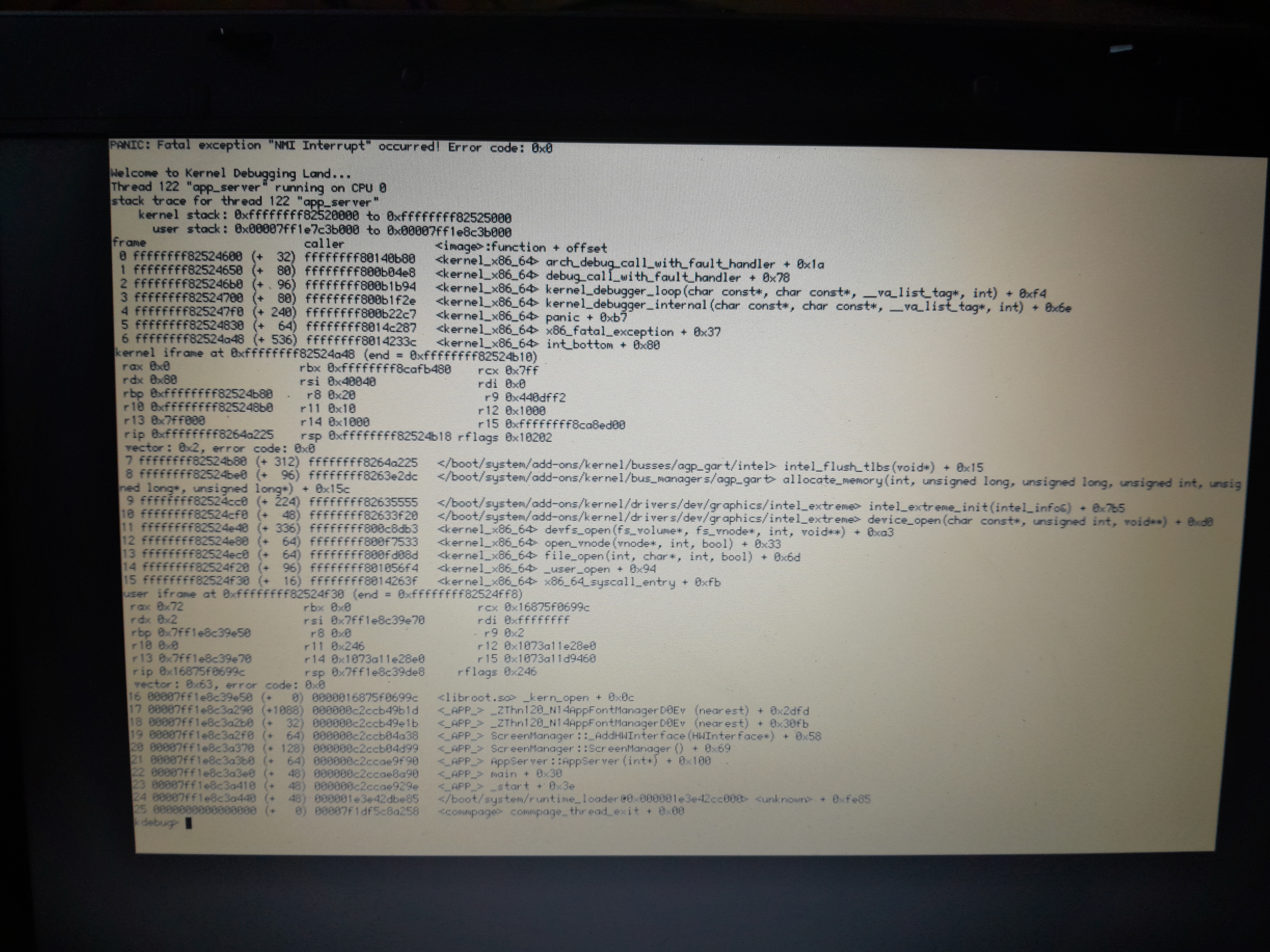
Also note that this problem happens on both the 32- and 64-bit versions, and the latest nightly images (hrev59080). Safe mode does not help.
Any help would be appreciated.
Diolch,
-Kami-kun =)