It would be nice to have a preference for the NumLock state at startup.
I discovered that you can actually achieve this by using a DeskCalc replicant and activating it in DeskCalc’s settings, but it’s not a very obvious way of doing it. This should be a setting - in the ‘Keyboard’ preference panel?
Even worse, 17 years later, there’s no Keyboard prefs any more…
I agree, there should be a setting in the Keymap prefs for this.
If you don’t mind getting your hands bloody in the guts of the system, you can export your current keymap, set the LockSettings line to LockSettings = NumLock and save it back.
Described in the Keymap prefs topic of the User Guide.
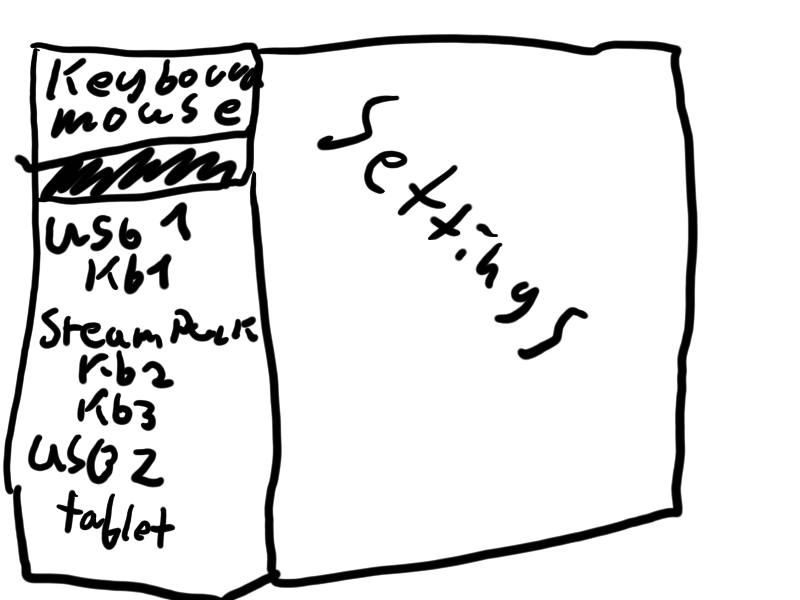
I do wonder if we could re-order input prefs a bit.
Currently it lists all devices as a flat list, I would like if we could order them by their connection, and then maybe have a “default” setting that applies to all i.e
Maybe the NumLock setting is a “keyboard” setting. Though it’s currently handled by the keymap file. I’m not sure.
I do know that I’m not a big fan of the Input preferences, which may be related to how my hardware is detected. I’m on a notebook with external mouse. The trackpad isn’t recognized, but works. The Input prefs show no Trackpad, one AT keyboaard, two USB keyboards, one PS/2 mouse and one USB mouse. Very weird. Fortunately, after once setting the mouse speed etc. I never have to open it again…
Maybe because of my Input prefs issues, I canvery well imagine a settings panel in the Keymap prefs, similar to the “Modifier keys”, for “Lock settings” to configure CapsLock, ScrollLock and NumLock.
I agree that it makes sense to have it in Keymap preferences.
If the setting can already be set by manually editing the keymap file,the functionality is already there and only needs to be added to the preferences GUI,which should be a rather easy change.
the keymap settings are also something that should be per-device. So I’d agree the setting is OK semantically there, but it still doesn’t solve the “how to set keyboard layouts differently”… which is one of the major reasons why the input preferences was redesigned.
As for your categorization issue, my proposal aims to fix this a bit. To explain a bit more when you connect a usb device it may offer severall descriptors that is functions that the device may have. For example a gaming mouse may offer a descriptor for mouse, and an additional one for keyboard for special buttons or so. Currently the input prefs make it impossible to see which of these corresponds to what. So you would just see 2 usb keyboards where you only have one physically.