I am a Virtual DJ user, and not too familiar with Mixxx, but does anyone know if controller MIDI mapping is supported in the Haiku version? I poked around but nothing is sticking out to me and the directions I found don’t seem to line up - the is no Controller option under Options.
1 Like
Did you check first that in Mixxx Preferences window there is at least one MIDI “port” enabled ? With a Controller mapping selected?
I dunno if it’s supposed to work, but Mixxx rely on libportmidi, and the Haiku support in libportmidi doesn’t seems to do anything specific so MIDI events should be received and mapped to controls.
1 Like
Did the initial port for Mixxx as per request for a user in IRC, from my memory he was able to hook up external hardware to play around with it, on the MIDI part I’m clueless however.
Maybe someone with more knowledge for this can skip in.
I may did a quick try later. I just checked and my two USB midi ports are visible and listed in the Mixxx settings as possible MIDI controller ports.to.listen for events.to map to DJ actions.
But I’ve to hook something to check if it actually does something. Mixx seems to have a mapping for using a simple MIDI keyboard as a MIDI controller device, and have a “learning” wizard allowing user to press something on his MIDI “controller” device (and therefore sending some MIDI event) and mapping it to some Mixx action.
But by reading libportmidi support for haiku, I think it should works, yes.
At least the part about detecting and listing MIDI ports is working.
1 Like
I did the test, it works.
But if your midi port(s) is/are not connected at Mixx startup time, it doesn’t dynamically detect that MIDI ports are now available and therefore doesn’t show up in Preferences window.
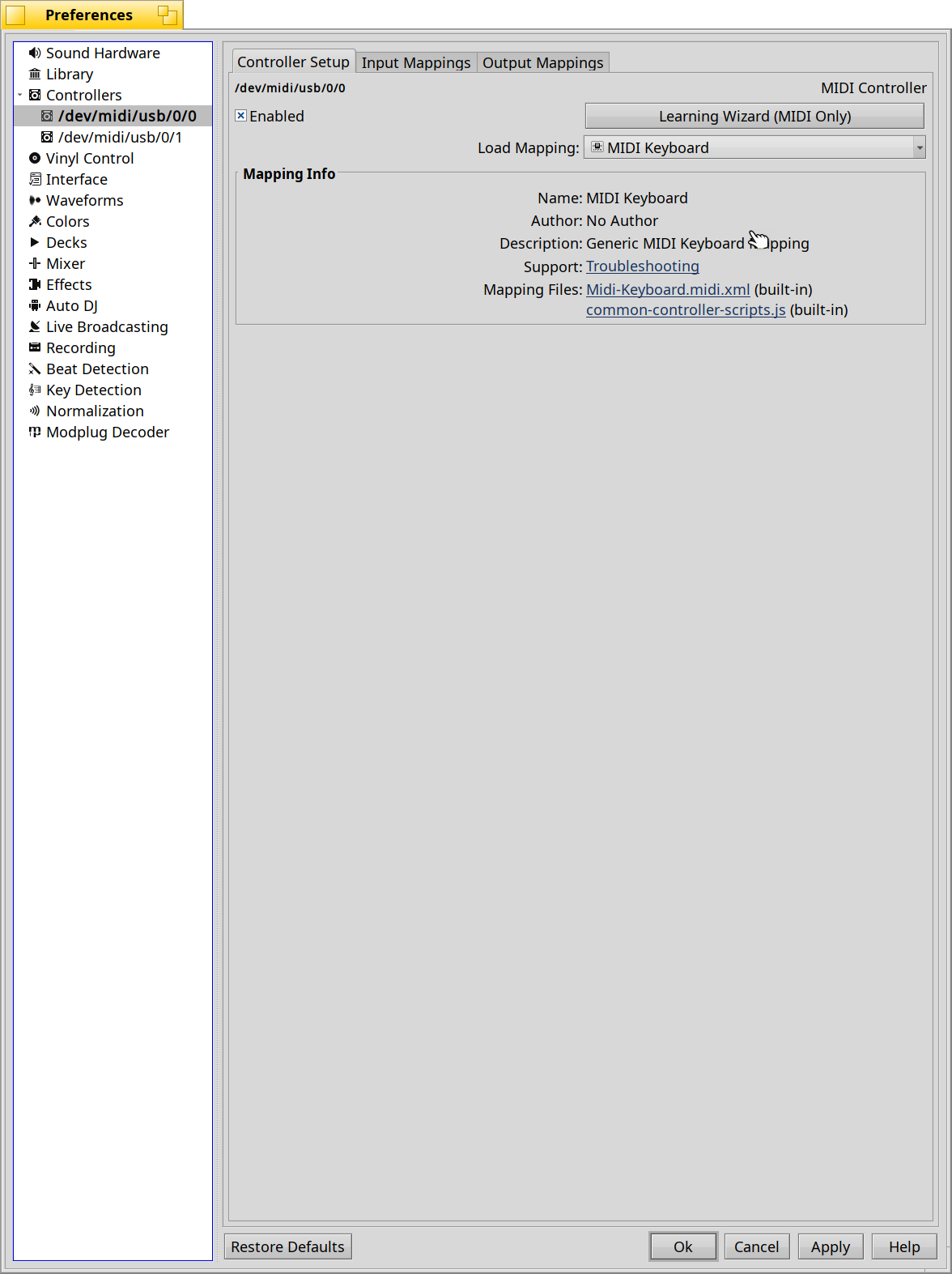
In my case:
- my USB midi box (a Roland UM2 dual ports) was connected (visible in Patchbay app)
- at startup of Mixx, I go to Preferences (Ctrl+P)
- Under Controllers, I enabled first port (it’s not easy to know which one is an Input or an Output port currently as the midi_server name the endpoints /dev/midi/usb/*, which is not user-friendly - but your modified version should show you a better name @dcbeckman , right?)
- I click on Load Mappings and select “MIDI keyboard” (because I don’t have anything else)
- to check it was woirking, I then click ‘Learning Wizard’, select a random Control (Transport > Play, for instance), then “Learn” and pressed a key on my midi keyboard.
- It was successfully detected!
It’s not a definitive test, as I’m not understanding well all the Mixx features lingua, but I guess if I succeed to trigger a reaction from Mixx while pressing a key on my keyboard, it’s a good start.
2 Likes
Thanks so much. I didn’t see the Preferences area. Always confusing when there is also a separate Settings section that is minimally helpful. I was able to load a mapping for my RMX2. Got several crashes when I first tried to run it a few weeks ago, but with my updated drivers I now have audio and midi working for it, and so far it seems stable.
1 Like