Looking for testers: index_server revival (Spotlight-like search for Haiku)

some of you might remember index_server from Clemens Zeidler’s GSoC project back in 2010 — a background service that watches your files and keeps them indexed, kind of like Spotlight on macOS. It got mostly abandoned after that, but I worked on it six yers ago nearly got it to a working stage (except of recursivly scanning the own index :-D)…
I’ve been picking it back up these last weeks with the help of ai… and wanted to share where it’s at.

What it does right now:

  • Watches your volumes and analyzes files as they change

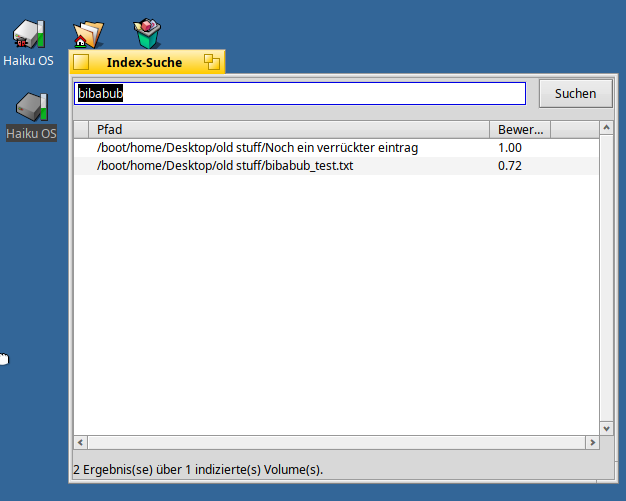
  • Full-text search over file content (not just filenames) via CLucene, with a small standalone search app

  • Thumbnails for images (including our own HVIF icons) that show up directly in Tracker’s icon view

  • EXIF data for photos, audio tags, media codec/duration info — all written as normal BFS attributes, so they show up in Tracker too

  • Mail body content is searchable as well

  • A settings preflet for exclude paths and enabling/disabling individual analysers

I spent the last weeks and some money on ai… chasing down a bunch of real bugs (a few actual crashes, some silent indexing failures, non-ASCII filenames not working, thumbnails not showing at certain icon sizes, that kind of thing), so I think it’s in decent enough shape now for a first proper round of testing outside my own VM and my own real installation.

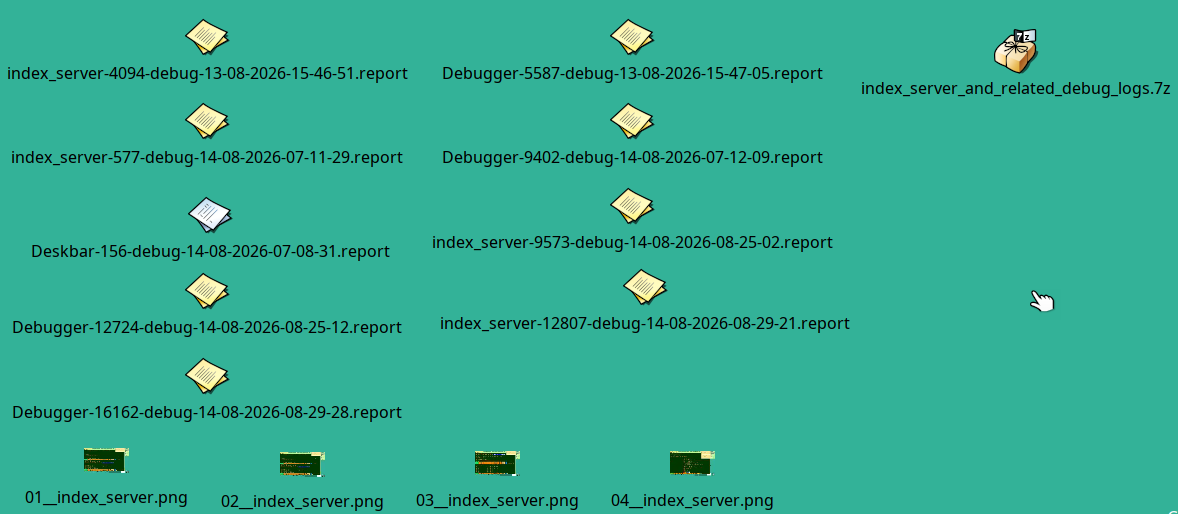
This is a debug build — full debug symbols, and it logs everything to ~/config/var/log/index_server/index_server.log so if something breaks I actually have a chance of figuring out why. If you hit a crash, Haiku’s debug_server will offer to save a report on your Desktop — please grab that too if you can.

Would really appreciate anyone willing to install it and just… use your Haiku like normal for a while and see what happens. Especially interested in:

  • does it survive being left running for a long time

  • how it handles a first full scan of a “real” (i.e. messy, years-old) home directory

  • anything that crashes or seems to silently not index stuff it should

Download + install instructions + full changelog: https://github.com/Paradoxianer/haiku/releases/tag/index-server-debug-1

(fair warning, first backlog scan of a big volume can take a while — there’s a progress notification so you can see it’s actually working)

Thank you .. looking forward to your opinion…
One of my most loved examples … Just to give you a glimpse what it would be able to Install tesseract orc translator and it should be able to even search for text in images … :slight_smile:

8 Likes

Great stuff!

Does the index server have an API that apps can use to query a specific file type (I am interested in email files) and get back the results for processing in the app?

1 Like

At the moment it comes with a index searcher but this app work this way that it sends a BMessage with a "query" string (plus optional "maxResults") to the index_server and get back matching entry_refs + scores. so no “filter” if the file is a e-mail type…

3 Likes

@Paradoxon

Thank you for the reply! Keep up the good work!

Ahoy @Paradoxon !

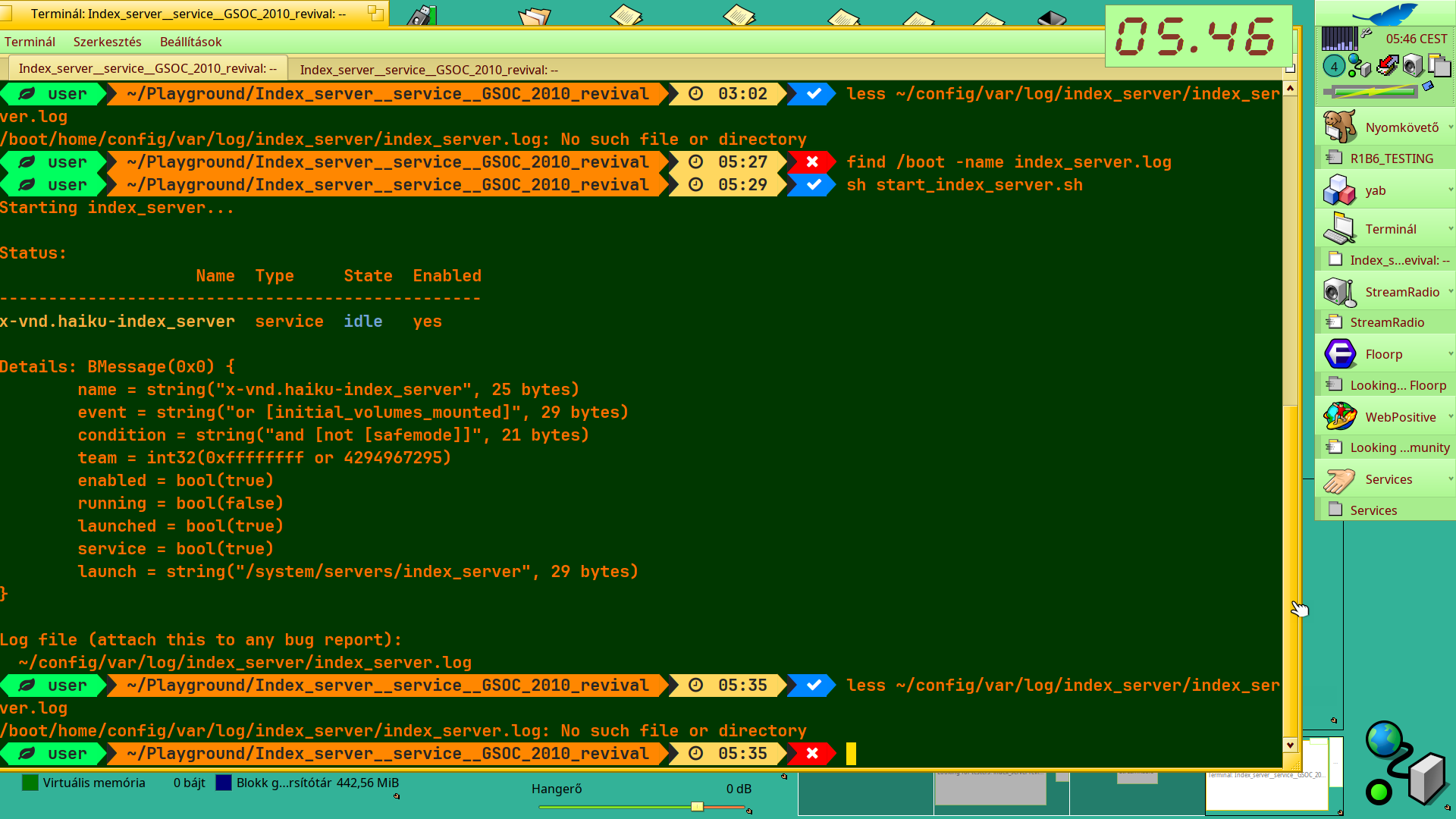
Downloaded, installed, but seems launching has some issue, at least for first try →

   user  ~    04:09    cd Playground/Index_server__service__GSOC_2010_revival/
   user  ~/Playground/Index_server__service__GSOC_2010_revival    04:10    ls -l
total 1178
-rw-r--r-- 1 user root 1198541 aug.   10 04:07 index_server_debug1.0.0debug11x86_64-0.hpkg
-rw-r--r-- 1 user root     709 aug.   10 04:07 start_index_server.sh
   user  ~/Playground/Index_server__service__GSOC_2010_revival    04:10    pkgman install --help
Usage: pkgman install <package> ...
Installs the specified packages. A <package> argument can be a search
string by which the package is looked up in a remote repository or a
path to a local package file. In the latter case the file is copied.

Options:
  --debug <level>
    Print debug output. <level> should be between 0 (no debug output,
    the default) and 10 (most debug output).
  -H, --home
    Install the packages in the user's home directory. Default is to
    install in the system directory.
  -R, --no-refresh
    Do not refresh the repository caches.
  -y
    Non-interactive mode. Automatically confirm changes, but fail when
    encountering problems.

   user  ~/Playground/Index_server__service__GSOC_2010_revival    04:11    pkgman install ./index_server_debug1.0.0debug11x86_64-0.hpkg -H -R
The following changes will be made:
  in home:
    install package openssl3_man-3.5.7-1 from repository HaikuPorts
    install package index_server_debug-1.0.0~debug1-1 from local file
Continue? [yes/no] (yes) : 
  100% openssl3_man-3.5.7-1-any.hpkg [506,09 KiB]
Validating checksum for https://eu.hpkg.haiku-os.org/haikuports/master/x86_64/current/packages/openssl3_man-3.5.7-1-any.hpkg...done.
[home] Applying changes ...
[home] Changes applied. Old activation state backed up in "state_2026-08-10_04:12:36"
[home] Cleaning up ...
[home] Done.
   user  ~/Playground/Index_server__service__GSOC_2010_revival    04:12    ls -l
total 1178
-rw-r--r-- 1 user root 1198541 aug.   10 04:07 index_server_debug1.0.0debug11x86_64-0.hpkg
-rw-r--r-- 1 user root     709 aug.   10 04:07 start_index_server.sh
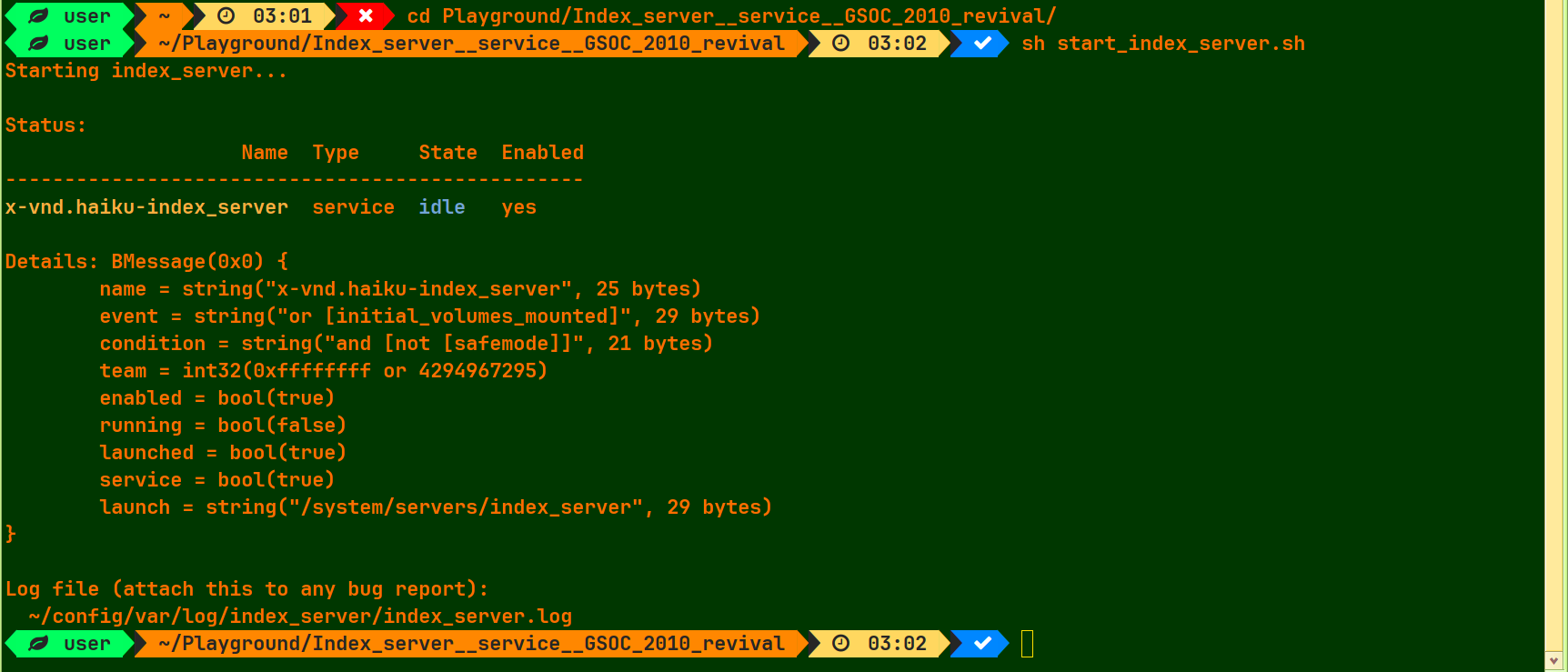
   user  ~/Playground/Index_server__service__GSOC_2010_revival    04:12    sh ./start_index_server.sh
Starting index_server...
launch_roster: Starting job "x-vnd.haiku-index_server" failed: Name not found
   user  ~/Playground/Index_server__service__GSOC_2010_revival    04:14     sh ./start_index_server.sh
Starting index_server...
launch_roster: Starting job "x-vnd.haiku-index_server" failed: Name not found
   user  ~/Playground/Index_server__service__GSOC_2010_revival    04:20    sh start_index_server.sh
Starting index_server...
launch_roster: Starting job "x-vnd.haiku-index_server" failed: Name not found
   user  ~/Playground/Index_server__service__GSOC_2010_revival    04:20    

So, there is a Hungarian saying as .. the Hungariaqn justice is tree (event/probation) and one more is the encore !.. Now I spared this attempt.
As you can see the one difference is I installed it in my home directory .. should I reinstall under system package directory ?

:cowboy_hat_face:

I need to Check this .. at my Installation.. IT should Work Like any other hpkg but in will Look into it (the sh File ist Just a helper Script to Install IT.

Ahoy @Paradoxon !

You can stop investigating why had not worked the launcher script immediately after installimg the service package …
Right now I came back, as I used to use history to re-run my daily check command line.
I met with the start script, and thought : I give it a chance to make an attempt.
Actually it worked – I suggest to add a reboot among instructions right after the package installation.
It seems the service name might required it to be known systemwide.

Sorry for not tried the reboot at first time - I thought about this service as just a normal Haiku app installation.
Moreover you also had not mention this in the instruction :wink:

Tell me what you need me - if there is beyond what you wrote earlier or on the github page.

Today and maybe tomorrow I will be away and wont bring with me any laptop, I think.

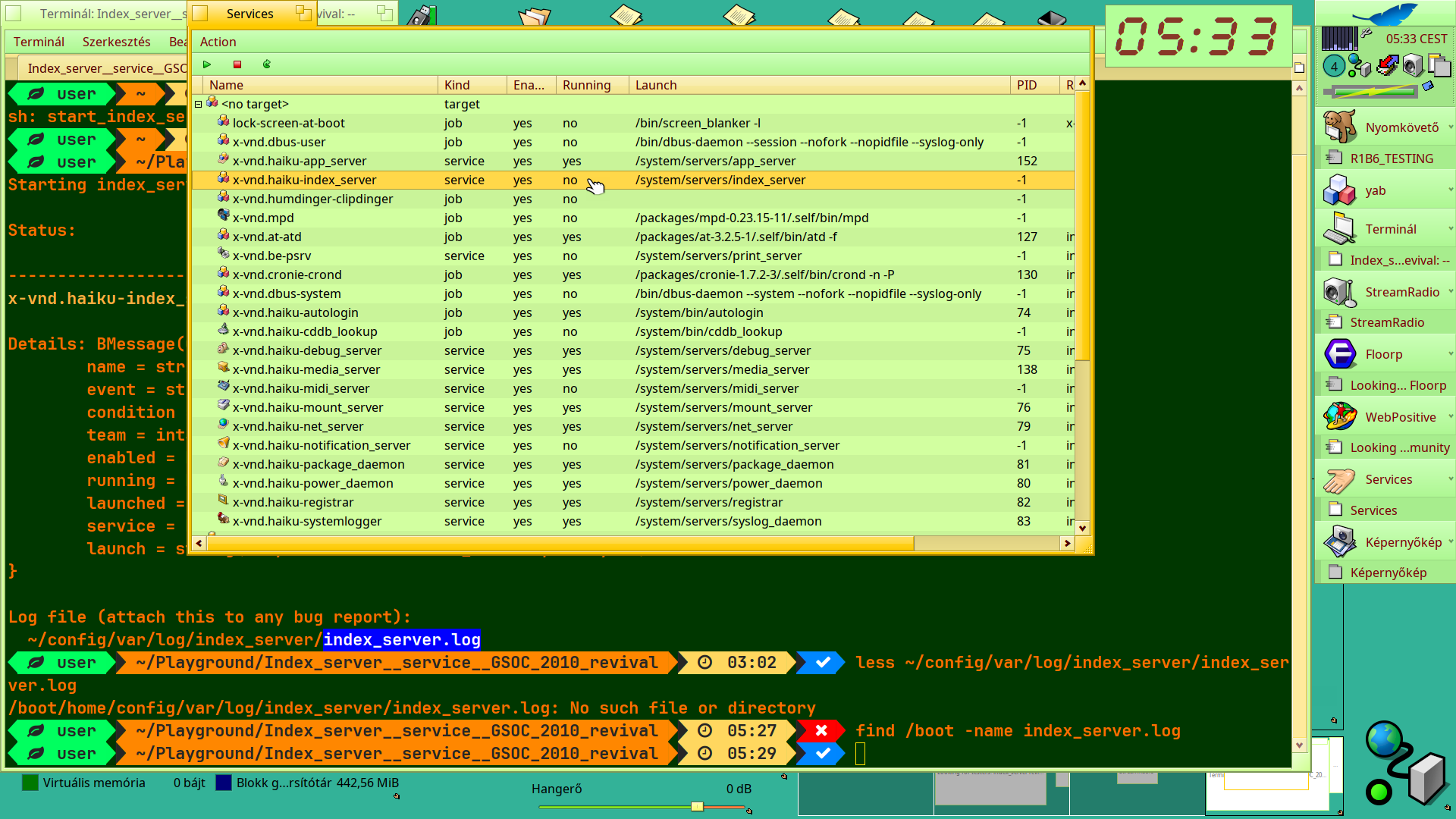
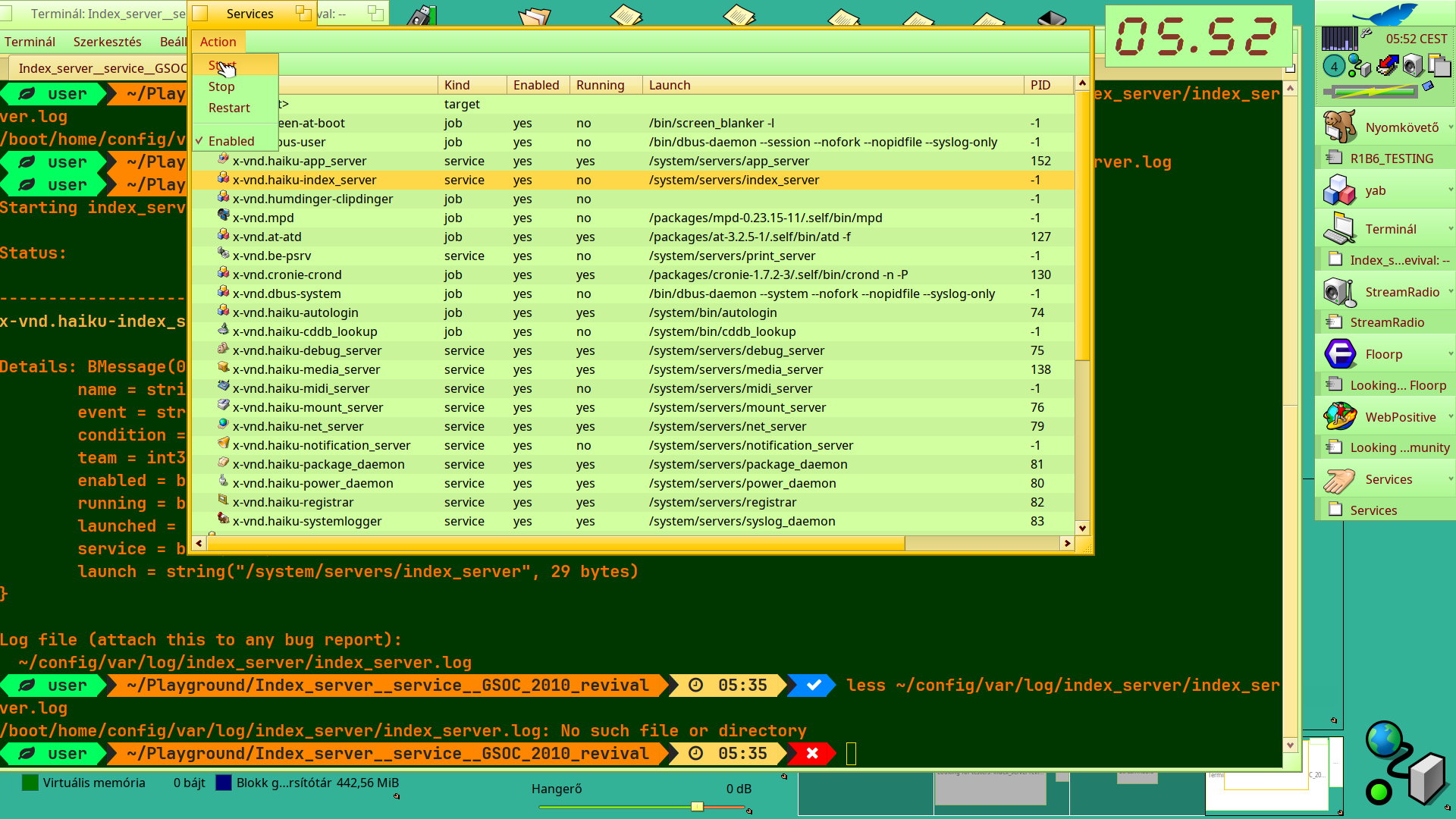
Well, seems I was happy too early. service
→ installed
→ enabled
→ but CANNOT be LAUNCHED ! :((

Failed to start with Services app (of X512’s utility package).

   user  ~/Playground/Index_server__service__GSOC_2010_revival    05:29    ps index_server
   user  ~/Playground/Index_server__service__GSOC_2010_revival    05:29    ps
Team                                                  Id #Threads  Gid  Uid 
kernel_team                                            1       64    0    0 
/boot/system/servers/launch_daemon                    71        2    0    0 
/boot/system/servers/debug_server                     75        2    0    0 
/boot/system/servers/mount_server                     76        1    0    0 
/boot/system/servers/net_server                       79        4    0    0 
/boot/system/servers/power_daemon                     80        2    0    0 
/boot/system/servers/package_daemon                   81        2    0    0 
/boot/system/servers/registrar                        82        6    0    0 
/boot/system/servers/syslog_daemon                    83        2    0    0 
/boot/system/servers/launch_daemon user               87        2    0    0 
/boot/system/bin/atd -f                              127        1  106 1004 
/boot/system/bin/crond -n -P                         130        1    0    0 
/boot/system/servers/media_server                    138        4    0    0 
/boot/system/servers/app_server                      152       63    0    0 
/boot/system/bin/sshd -D                             187        1    0    0 
/boot/system/servers/input_server                    191       19    0    0 
/boot/system/servers/media_addon_server              217        9    0    0 
/bin/yab /boot/home/config/settings/boot/launch/FineDigiClock.y   329        3    0    0 
/boot/system/bin/einsteinium_daemon                  362        2    0    0 
/boot/system/bin/einsteinium_engine                  388        1    0    0 
/boot/system/apps/Terminal                           639        7    0    0 
/bin/bash -l                                         645        1    0    0 
/boot/system/data/deskbar/menu/Applications/StreamRadio   820        6    0    0 
/boot/system/apps/Floorp/Floorp                      992       75    0    0 
/boot/system/apps/Floorp/Floorp -contentproc -parentBuildID 202  1059        4    0    0 
/boot/system/apps/Floorp/Floorp -contentproc -childID 1 -isForB  1075       31    0    0 
/boot/system/apps/Floorp/Floorp -contentproc -childID 2 -isForB  1117       31    0    0 
/boot/system/apps/Floorp/Floorp -contentproc -childID 3 -isForB  1119       31    0    0 
/boot/system/apps/Floorp/Floorp -contentproc -childID 4 -isForB  1123       32    0    0 
/boot/system/apps/Floorp/Floorp -contentproc -childID 5 -isForB  1213       31    0    0 
/boot/system/apps/Floorp/Floorp -contentproc -parentBuildID 202  1270        3    0    0 
/boot/system/apps/Floorp/Floorp -contentproc -childID 6 -isForB  1318       22    0    0 
/boot/system/apps/Floorp/Floorp -contentproc -childID 7 -isForB  1355       22    0    0 
/boot/system/apps/Floorp/Floorp -contentproc -childID 8 -isForB  1393       22    0    0 
/boot/system/apps/WebPositive                       1569       16    0    0 
/boot/system/Tracker                                5926       15    0    0 
/boot/system/Deskbar                                5993        8    0    0 
/bin/find /boot -name index_server.log              6491        1    0    0 
/bin/bash -l                                        6513        1    0    0 
/bin/ps                                             6532        1    0    0 
   user  ~/Playground/Index_server__service__GSOC_2010_revival    05:29    ps|grep index
/bin/grep --color=auto index                        6549        1    0    0 
   user  ~/Playground/Index_server__service__GSOC_2010_revival    05:30    ps|grep index
/bin/grep --color=auto index                        6850        1    0    0 
   user  ~/Playground/Index_server__service__GSOC_2010_revival    05:37    tail -100 /var/log/syslog
2026-08-12 05:29:03 KERN: slab memory manager: created area 0xffffffffe0001000 (265782)
2026-08-12 05:29:03 KERN: check_sense: encountered DEFERRED ERROR - bye, bye
Last message repeated 1 time
2026-08-12 05:29:05 KERN: slab memory manager: created area 0xffffffffe2801000 (265979)
2026-08-12 05:29:05 KERN: check_sense: encountered DEFERRED ERROR - bye, bye
2026-08-12 05:29:06 KERN: slab memory manager: created area 0xffffffffe3001000 (266112)
2026-08-12 05:29:06 KERN: check_sense: encountered DEFERRED ERROR - bye, bye
Last message repeated 1 time
2026-08-12 05:29:07 KERN: slab memory manager: created area 0xffffffffe3801000 (267023)
2026-08-12 05:29:08 KERN: check_sense: encountered DEFERRED ERROR - bye, bye
2026-08-12 05:29:09 KERN: slab memory manager: created area 0xffffffffe4001000 (267174)
2026-08-12 05:29:09 KERN: check_sense: encountered DEFERRED ERROR - bye, bye
2026-08-12 05:29:10 KERN: slab memory manager: created area 0xffffffffe4801000 (267295)
2026-08-12 05:29:10 KERN: check_sense: encountered DEFERRED ERROR - bye, bye
2026-08-12 05:29:11 KERN: slab memory manager: created area 0xffffffffe5001000 (267410)
2026-08-12 05:29:11 KERN: check_sense: encountered DEFERRED ERROR - bye, bye
Last message repeated 1 time
2026-08-12 05:29:13 KERN: slab memory manager: created area 0xffffffffe5801000 (267528)
2026-08-12 05:29:13 KERN: check_sense: encountered DEFERRED ERROR - bye, bye
2026-08-12 05:29:14 KERN: slab memory manager: created area 0xffffffffe6001000 (267649)
2026-08-12 05:29:14 KERN: check_sense: encountered DEFERRED ERROR - bye, bye
2026-08-12 05:29:15 KERN: slab memory manager: created area 0xffffffffe6801000 (267780)
2026-08-12 05:29:15 KERN: check_sense: encountered DEFERRED ERROR - bye, bye
2026-08-12 05:29:16 KERN: slab memory manager: created area 0xffffffffe7001000 (267891)
2026-08-12 05:29:16 KERN: check_sense: encountered DEFERRED ERROR - bye, bye
2026-08-12 05:29:17 KERN: slab memory manager: created area 0xffffffffe7801000 (268027)
2026-08-12 05:29:17 KERN: check_sense: encountered DEFERRED ERROR - bye, bye
Last message repeated 1 time
2026-08-12 05:29:19 KERN: slab memory manager: created area 0xffffffffe8001000 (268148)
2026-08-12 05:29:19 KERN: check_sense: encountered DEFERRED ERROR - bye, bye
2026-08-12 05:29:20 KERN: slab memory manager: created area 0xffffffffe8801000 (268269)
2026-08-12 05:29:20 KERN: check_sense: encountered DEFERRED ERROR - bye, bye
2026-08-12 05:29:21 KERN: slab memory manager: created area 0xffffffffe9001000 (268499)
2026-08-12 05:29:21 KERN: check_sense: encountered DEFERRED ERROR - bye, bye
2026-08-12 05:29:22 KERN: slab memory manager: created area 0xffffffffe9801000 (268880)
2026-08-12 05:29:22 KERN: check_sense: encountered DEFERRED ERROR - bye, bye
Last message repeated 1 time
2026-08-12 05:29:24 KERN: slab memory manager: created area 0xffffffffea001000 (269062)
2026-08-12 05:29:24 KERN: check_sense: encountered DEFERRED ERROR - bye, bye
2026-08-12 05:29:25 KERN: slab memory manager: created area 0xffffffffea801000 (269193)
2026-08-12 05:29:25 KERN: check_sense: encountered DEFERRED ERROR - bye, bye
2026-08-12 05:29:26 KERN: slab memory manager: created area 0xffffffffeb001000 (269330)
2026-08-12 05:29:26 KERN: check_sense: encountered DEFERRED ERROR - bye, bye
2026-08-12 05:29:27 KERN: slab memory manager: created area 0xffffffffeb801000 (269560)
2026-08-12 05:29:27 KERN: check_sense: encountered DEFERRED ERROR - bye, bye
Last message repeated 1 time
2026-08-12 05:29:29 KERN: slab memory manager: created area 0xffffffffec001000 (269682)
2026-08-12 05:29:29 KERN: check_sense: encountered DEFERRED ERROR - bye, bye
2026-08-12 05:29:30 KERN: slab memory manager: created area 0xffffffffec801000 (269815)
2026-08-12 05:29:30 KERN: check_sense: encountered DEFERRED ERROR - bye, bye
2026-08-12 05:29:31 KERN: slab memory manager: created area 0xffffffffed001000 (269946)
2026-08-12 05:29:32 KERN: check_sense: encountered DEFERRED ERROR - bye, bye
2026-08-12 05:29:32 KERN: slab memory manager: created area 0xffffffffed801000 (270077)
2026-08-12 05:29:33 KERN: check_sense: encountered DEFERRED ERROR - bye, bye
Last message repeated 1 time
2026-08-12 05:29:34 KERN: slab memory manager: created area 0xffffffffee001000 (270210)
2026-08-12 05:29:35 KERN: check_sense: encountered DEFERRED ERROR - bye, bye
2026-08-12 05:29:35 KERN: slab memory manager: created area 0xffffffffee801000 (270331)
2026-08-12 05:29:36 KERN: check_sense: encountered DEFERRED ERROR - bye, bye
2026-08-12 05:29:36 KERN: slab memory manager: created area 0xffffffffef801000 (270458)
2026-08-12 05:29:37 KERN: check_sense: encountered DEFERRED ERROR - bye, bye
2026-08-12 05:29:37 KERN: slab memory manager: created area 0xfffffffff0001000 (270589)
2026-08-12 05:29:38 KERN: check_sense: encountered DEFERRED ERROR - bye, bye
Last message repeated 1 time
2026-08-12 05:29:39 KERN: slab memory manager: created area 0xfffffffff0801000 (270720)
2026-08-12 05:29:40 KERN: check_sense: encountered DEFERRED ERROR - bye, bye
2026-08-12 05:29:40 KERN: slab memory manager: created area 0xfffffffff1001000 (270851)
2026-08-12 05:29:41 KERN: check_sense: encountered DEFERRED ERROR - bye, bye
2026-08-12 05:29:41 KERN: slab memory manager: created area 0xfffffffff1801000 (270983)
2026-08-12 05:29:42 KERN: check_sense: encountered DEFERRED ERROR - bye, bye
Last message repeated 1 time
2026-08-12 05:29:43 KERN: slab memory manager: created area 0xfffffffff2001000 (271114)
2026-08-12 05:29:44 KERN: check_sense: encountered DEFERRED ERROR - bye, bye
2026-08-12 05:29:44 KERN: slab memory manager: created area 0xfffffffff2801000 (271245)
2026-08-12 05:29:45 KERN: check_sense: encountered DEFERRED ERROR - bye, bye
2026-08-12 05:29:45 KERN: slab memory manager: created area 0xfffffffff3001000 (271366)
2026-08-12 05:29:46 KERN: check_sense: encountered DEFERRED ERROR - bye, bye
2026-08-12 05:29:46 KERN: slab memory manager: created area 0xfffffffff3801000 (271499)
2026-08-12 05:29:47 KERN: check_sense: encountered DEFERRED ERROR - bye, bye
2026-08-12 05:29:47 KERN: slab memory manager: created area 0xfffffffff4001000 (271519)
2026-08-12 05:29:47 KERN: slab memory manager: created area 0xfffffffff4801000 (271538)
2026-08-12 05:29:47 KERN: slab memory manager: created area 0xfffffffff5001000 (271549)
2026-08-12 05:29:47 KERN: slab memory manager: created area 0xfffffffff5801000 (271570)
2026-08-12 05:29:47 KERN: slab memory manager: created area 0xfffffffff6001000 (271583)
2026-08-12 05:29:47 KERN: slab memory manager: created area 0xfffffffff6801000 (271624)
2026-08-12 05:29:47 KERN: slab memory manager: created area 0xfffffffff7001000 (271641)
2026-08-12 05:29:47 KERN: slab memory manager: created area 0xfffffffff7801000 (271652)
2026-08-12 05:29:48 KERN: slab memory manager: created area 0xfffffffff8001000 (271663)
2026-08-12 05:29:48 KERN: check_sense: encountered DEFERRED ERROR - bye, bye
2026-08-12 05:29:48 KERN: slab memory manager: created area 0xfffffffff8801000 (271674)
2026-08-12 05:29:48 KERN: slab memory manager: created area 0xfffffffff9001000 (271687)
2026-08-12 05:29:48 KERN: slab memory manager: created area 0xfffffffff9801000 (271706)
2026-08-12 05:29:48 KERN: slab memory manager: created area 0xfffffffffa001000 (271717)
2026-08-12 05:29:48 KERN: slab memory manager: created area 0xfffffffffa801000 (271728)
2026-08-12 05:29:48 KERN: slab memory manager: created area 0xfffffffffb001000 (271739)
2026-08-12 05:29:49 KERN: check_sense: encountered DEFERRED ERROR - bye, bye
2026-08-12 05:29:53 KERN: Last message repeated 4 times.
Last message repeated 56 times
2026-08-12 05:33:41 KERN: Last message repeated 2 times.
2026-08-12 05:33:45 KERN: Last message repeated 4 times.
   user  ~/Playground/Index_server__service__GSOC_2010_revival    05:38    ps|grep index
/bin/grep --color=auto index                        8460        1    0    0 
   user  ~/Playground/Index_server__service__GSOC_2010_revival    05:42    

Second attempt with launch script … FAILED again

the launch script starts it in the background the first time.. if you reboot it will be automatically loaded by the launch demaon..
You can check if it has been running either by trying a search with… the App “IndexServerSearch” in you App Menu…

hmm its strange that ps cant find it :frowning:
Or also the settings (in the settingsmenu) for the index server shows if it runs… if it worked correct you should have now e.g. tumbnails for your pictures / Icons and so on… also you sould be ablte to “instant” search for text in files… with IndexServerSearch

can you try to start it from the terminal and past the output or the logfile it created here ?

Well I upgraded to hrev59964 in my Nightly and that turned my install into a Live/ Installer USB - and made Write Protected after reboot my main BFS DATA Pendrive … just before I went to my travel. :((
I got back now, so first I try to restore my Haiku Nightly.
Otherwise you could see I tried to launch the service with script andf with X512’s ‘Servic es’ utility as well .. more times. Failed at all attempt : the service enabled, but launch had not started.
And if you write the sysntax of a manual start .. I assume . like ‘service index_server start’ or similar it can be - I would try after or meanwhile I’m working on my issues above.
Actually I’m in Linux Mint anyway, so I switch to Haiku maybe in the evening/night (CEST). I’m a bit tired physically.

Sorry to hear about the pendrive — that sounds like a rough way to start a trip. Take your time, the testing can wait.

On the manual start: Haiku has no service command, that’s a Linux thing. Two options:

Just run it directly — simplest for testing (either from terminal or tracker):

/boot/home/config/servers/index_server

Run it from a Terminal without backgrounding it, then you see the output right there.

One downside of installing it in home, launch_roster will not start it automatically index_server from the /boot/home/config Place…

to use the settings just start
/boot/home/config/prefrences/IndexServerSetting

to use the search just start

/boot/home/config/apps/IndexServerSearch

i tried to fix some of the crahes you all reported here and some more i found on vm or real metal :slight_smile:
you can download the latest version… here

Verry important: I needed to change the place of the index so a whole rescan is necessary… (go to settings and press Rescan → akknowledge the dialog)

Hint: best to be installed in /boot/system/packages :slight_smile: after installation. For the first start just run the server from

/boot/system/servers/index_server

after this the launch_roster should restart it wehn its crashed or on boot :slight_smile:

Ok , my issue related to another one person as well (#20232) – so, usb_disk mode sense revert happened in hrev5996 that way the regular usage from CD-ROM layout settings of Live Installer to a writable installed Haiku … after revert the mode sense worked the quite opposite after that as regularly should do.
The rw installed pendrive became CD-ROM mode again and became write protected.
Also all my BFS drive mounted in this Haiku instance “became” read-only .. like Write Protected drives.
So, I had to downgrade to a Haiku version - in my case 5th August hrev59956 non-CD(-ROM) mode and upgrade to the fix ( hrev59972 ).
That worked now – I’m in Haiku Nightly and after my lunch I try out what you wrote.

1 Like

It did the trick - at least it launched.

   user  ~    17:44    /boot/home/config/servers/index_server

On another Terminal tab →

   user  ~    16:32    ps|grep index
/boot/home/config/servers/index_server              4094       13    0    0 
/bin/grep --color=auto index                        4934        1    0    0 
   user  ~    17:45    

Now ,it had launched I got notifications about some indexing, and thumbnailing started for several BFS drives mounted those partitions and pendrives as well.
Then soon .. just once the the whole service stopped working …

   user  ~    17:44    /boot/home/config/servers/index_server
Kill Thread                /boot/home/config/servers/index_server
   user  ~    17:46    

… so I would rather download and install your new version.

Unfortunately, it seems that it was justified not to install the index_server_debug package in the Haiku system, but under my home directory …
I listened to you actually, and …
Now the system does not load, it just stops at the package loading icon, the Haiku menu generation also just spins and spins, but the usual long minutes were not enough to finally get me in and reach the state before the installation.
If I somehow manage to get my system back, I will never put it among the system servers again by installing it in my one and only Haiku Nightly instance. This is not a VM, so I cannot just start it cleanly from a saved virtual disk.
Now I am writing from my Linux, because I have already gotten frustrated with testing.

i am verry sorry to hear this…
did you tried booting in safe mode?
(press shift or on efi space) and select safemode
if you could sent me the syslog from /boot/sytem/var this would help a lot

i am verry sorry to hear this…
did you tried booting in safe mode?
(press shift or on efi space) and then select safemode
if you could sent me the syslog from /boot/sytem/var this would help a lot

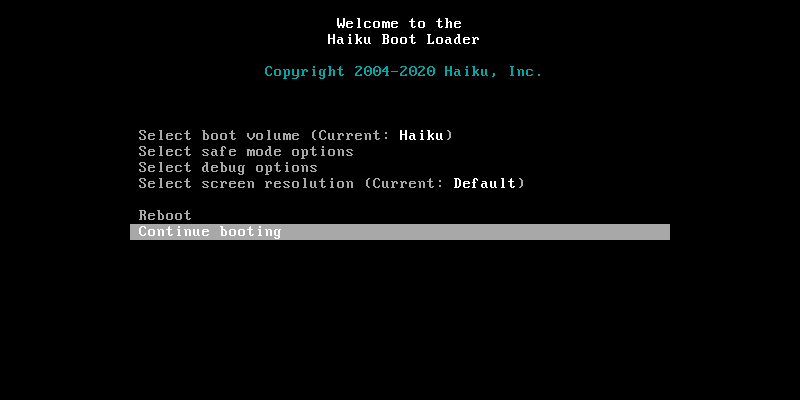
for safe_mode… in boot menu
Navigate to the Blacklist

  • In the main boot menu screen, select Select safe mode options and press Enter.

  • Inside that menu, scroll down and select Blacklist entries (or “Disable components”).
    Isolate and Disable index_server

  • You will see a list of packages. Scroll to find and select the isis package.

  • Inside the isis package list, locate the path to the server (e.g., servers/index_server).

  • Press Spacebar to place a checkmark or cross next to it, which marks it as disabled.

  • Press Escape to back out to the main menu

Boot with Safe Mode (Optional Emergency Backup)

    • If the blacklist step alone doesn’t break the lockup, go back to Select safe mode options and toggle Safe mode to Enabled.

    • Why this works: Enabling Safe Mode systematically blocks the launch of almost all third-party servers, daemons, and background scripts.

Fire Up the System

    • Select Continue booting.

I wrote here about it : never got in … to select anything -

thats so sad that you have so much trouble with haiku…

the boot menu is before any thing is loaded right before your computer / haiku starts into load process press shift or spacebar (keep it pressed) adn follow the instructions … from above..

it then should look like this..

The boot menu is before anything (also index_server) is loading … so its accessable as soon as haiku is prober installed…

Ok , I resolved the Haiku issue again - I removed your service from system.
I think quite good if I help you in findings during this phase until your SW still not reliable.
My nightly used as kinda daily driver Haiku as I want to benefit from brand new developments.

Right, I reinstalled the service under my home, and started with direct launch.

First and most important finding :
the 644 permission for the service’s logfile resulted in empty log !!
Just as I changed to 664 , then the log content started to be written there

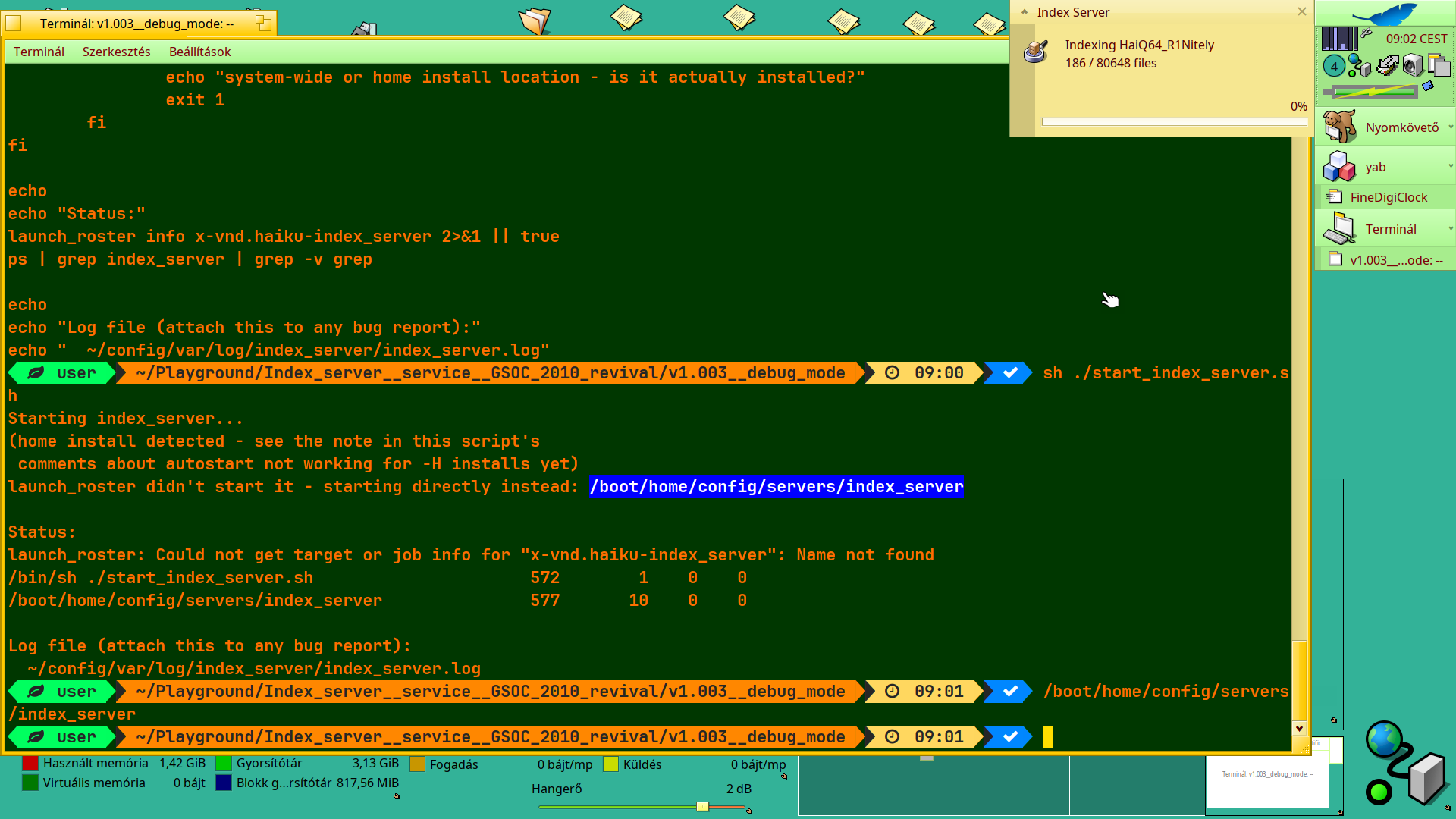
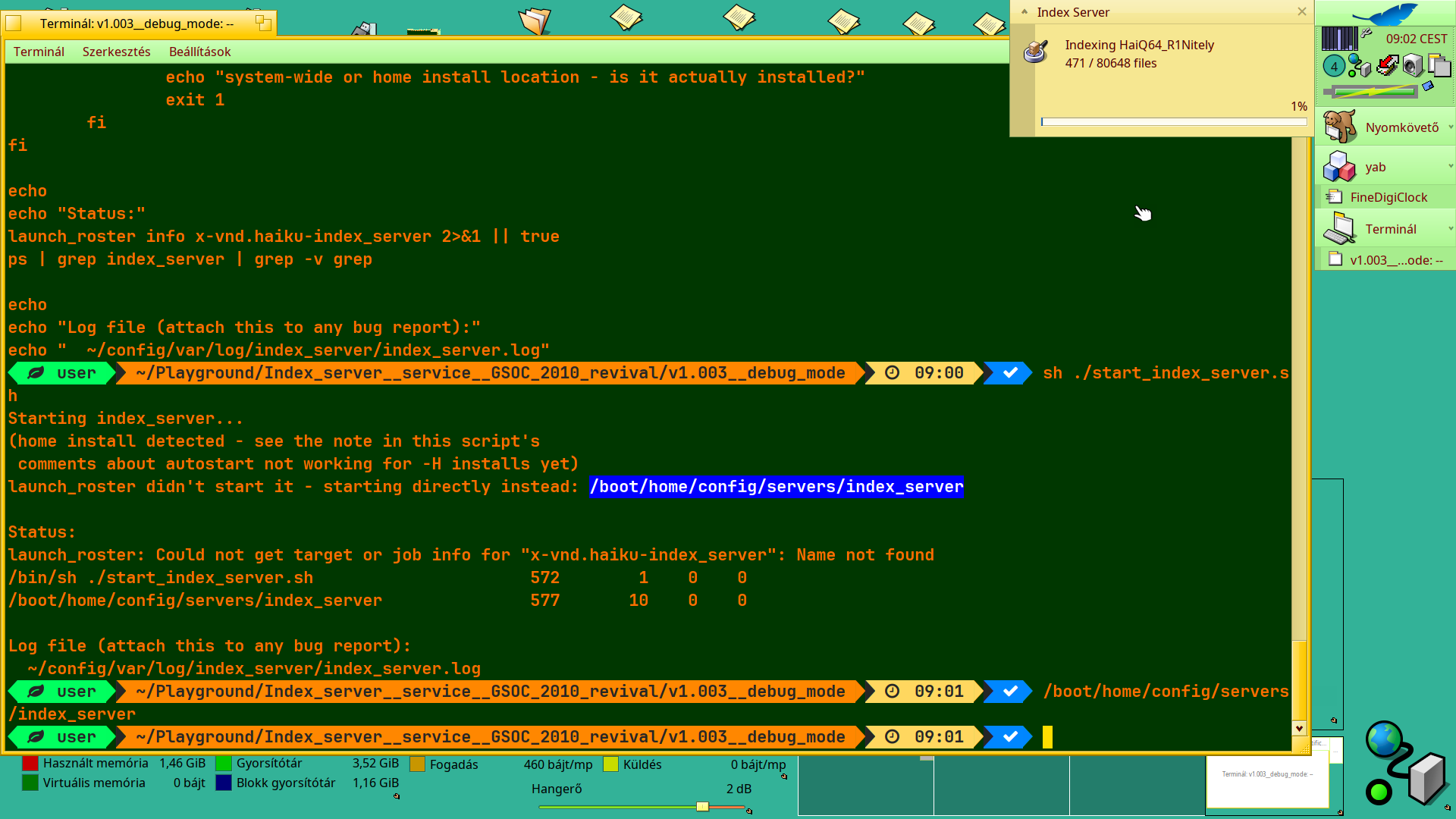
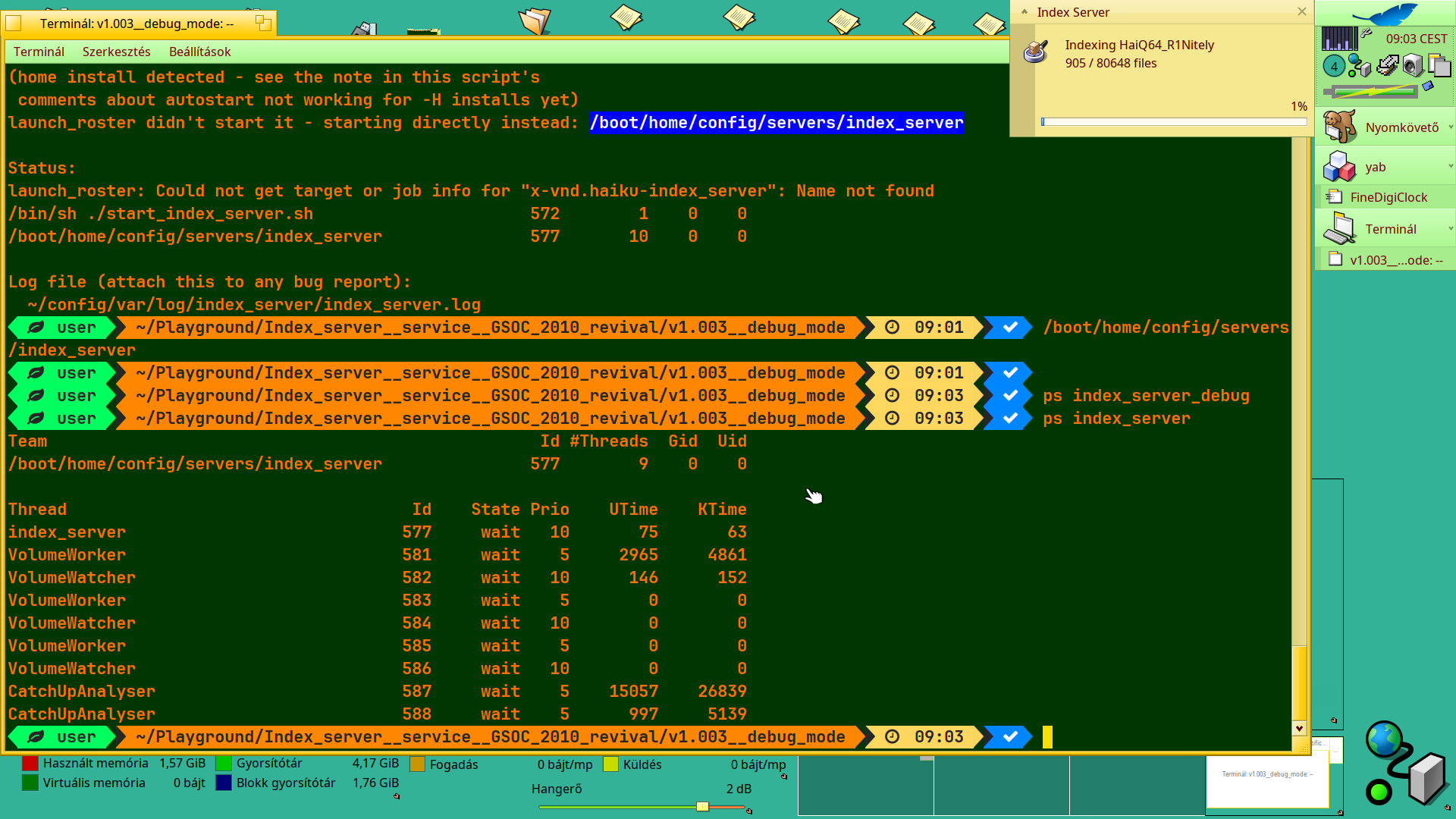
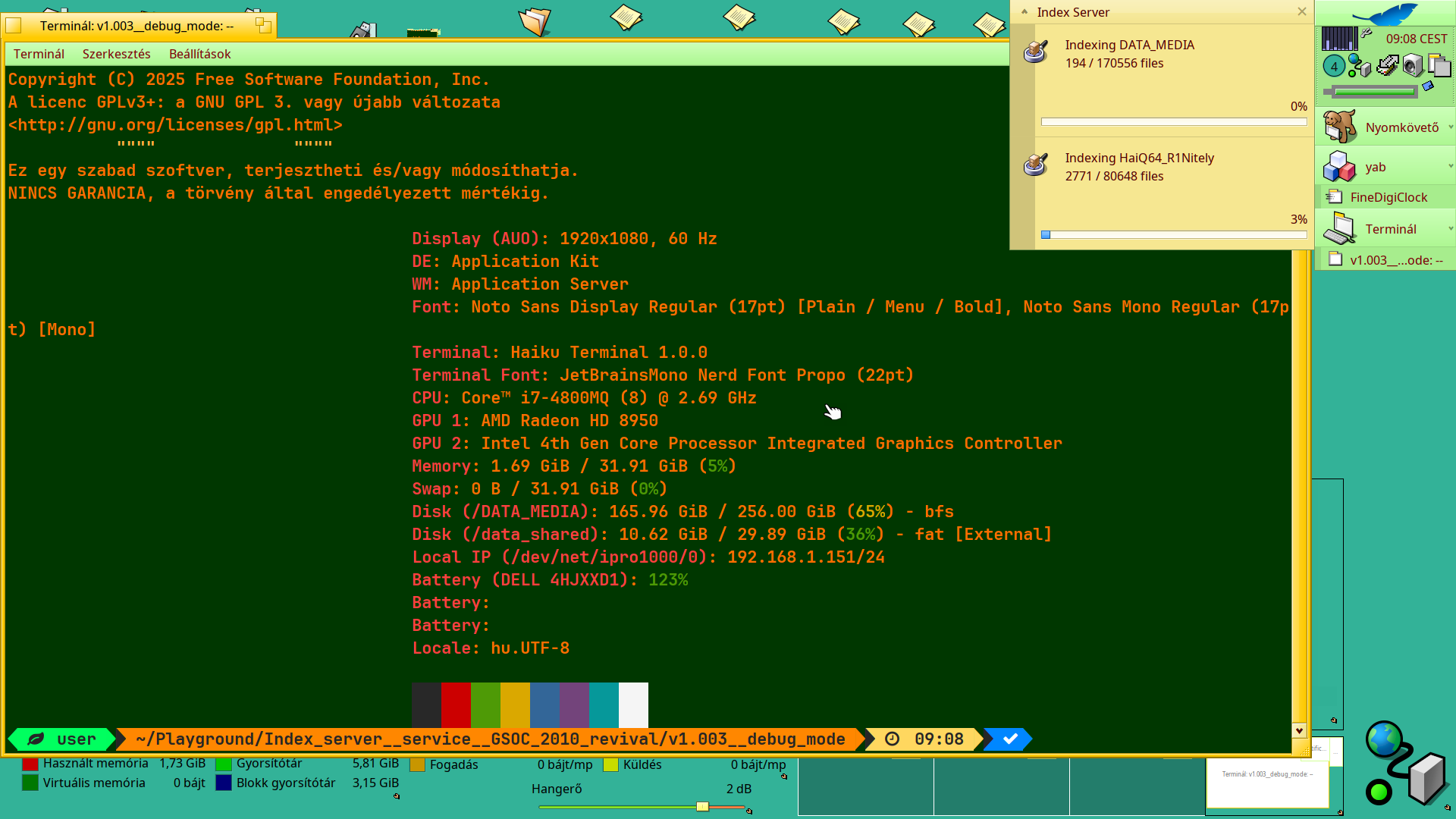
Now my states - as I documented - first with screenshots :

Finally , HERE will come my next activities in the terminal.
I restarted the service many times - besides it loads my machine heavily - other programs annoyingly slow launching … sometimes Deskbar does not work as expected : does nothing when I want to reach the menu part .. so sometimes I just killed to have access back to programs.

   user  ~/Playground/Index_server__service__GSOC_2010_revival/v1.003__debug_mode    09:08    ps index_server
   user  ~/Playground/Index_server__service__GSOC_2010_revival/v1.003__debug_mode    10:17    cat start_index_server.sh
#!/bin/sh
# Starts index_server right after installing it - a fresh pkgman install
# alone does NOT start it, since the launch job triggers on
# "initial_volumes_mounted", an event that already happened at this boot
# before the package existed. Without this, a system-wide install would
# otherwise just sit there until the next reboot.
#
# Run this once after installing index_server_debug*.hpkg:
#   sh start_index_server.sh
#
# If you're updating from an earlier debug build: also open Index Server
# Settings and click "Reindex Everything" once - the full-text index
# storage location changed, and the new location starts out empty.

set -e

echo "Starting index_server..."
launch_roster start x-vnd.haiku-index_server >/dev/null 2>&1 || true
sleep 2

if ! ps | grep -q '/servers/index_server$'; then
        # launch_roster start is a known no-op here more often than not (see
        # issue #63) - a *system-wide* install (no -H) not starting is just
        # that quirk and this direct launch is a full workaround. A *home*
        # (-H) install additionally can't autostart at all: Haiku's
        # system-mode launch_daemon, the one "initial_volumes_mounted" jobs
        # run under, never scans a user's own package data for job
        # definitions - only a system-wide install's. This direct launch
        # still starts it right now either way, but a home install will need
        # this script run again after every reboot until that's fixed
        # properly upstream.
        BINARY=""
        if [ -x /boot/system/servers/index_server ]; then
                BINARY=/boot/system/servers/index_server
        elif [ -x "$HOME/config/servers/index_server" ]; then
                BINARY="$HOME/config/servers/index_server"
                echo "(home install detected - see the note in this script's"
                echo " comments about autostart not working for -H installs yet)"
        fi

        if [ -n "$BINARY" ]; then
                echo "launch_roster didn't start it - starting directly instead: $BINARY"
                # Redirected so this script (and any terminal/SSH session running
                # it) doesn't end up waiting on the backgrounded server's own
                # stdout/stderr to close.
                "$BINARY" >/dev/null 2>&1 &
                sleep 2
        else
                echo "Couldn't find the index_server binary in either the"
                echo "system-wide or home install location - is it actually installed?"
                exit 1
        fi
fi

echo
echo "Status:"
launch_roster info x-vnd.haiku-index_server 2>&1 || true
ps | grep index_server | grep -v grep

echo
echo "Log file (attach this to any bug report):"
echo "  ~/config/var/log/index_server/index_server.log"
   user  ~/Playground/Index_server__service__GSOC_2010_revival/v1.003__debug_mode    10:17    less ~/config/var/log/index_server/index_server.log
   user  ~/Playground/Index_server__service__GSOC_2010_revival/v1.003__debug_mode    10:19    ls -l ~/config/var/log/in
dex_server/index_server.log
-rw-r--r-- 1 user root 0 aug.   14 09:01 /boot/home/config/var/log/index_server/index_server.log
   user  ~/Playground/Index_server__service__GSOC_2010_revival/v1.003__debug_mode    10:19    chmod 664 /boot/home/config/var/log/index_server/index_server.log
   user  ~/Playground/Index_server__service__GSOC_2010_revival/v1.003__debug_mode    10:19    sh ./start_index_server.s
h
Starting index_server...
(home install detected - see the note in this script's
 comments about autostart not working for -H installs yet)
launch_roster didn't start it - starting directly instead: /boot/home/config/servers/index_server

Status:
launch_roster: Could not get target or job info for "x-vnd.haiku-index_server": Name not found
/bin/sh ./start_index_server.sh                     9568        1    0    0 
/boot/home/config/servers/index_server              9573       10    0    0 

Log file (attach this to any bug report):
  ~/config/var/log/index_server/index_server.log
   user  ~/Playground/Index_server__service__GSOC_2010_revival/v1.003__debug_mode    10:20    tail -f ~/config/var/log/
index_server/index_server.log
FullTextAnalyser: identified Microsoft.VisualC.dll as "Egyszerű szövegfájl" (translator 22)
FullTextAnalyser: identified System.Threading.Tasks.Dataflow.dll as "Egyszerű szövegfájl" (translator 22)
FullTextAnalyser: identified Microsoft.VisualBasic.dll as "Egyszerű szövegfájl" (translator 22)
FullTextAnalyser: identified System.Net.Http.WebRequest.dll as "Egyszerű szövegfájl" (translator 22)
FullTextAnalyser: identified System.ServiceModel.Web.dll as "Egyszerű szövegfájl" (translator 22)
FullTextAnalyser: identified System.ServiceModel.Routing.dll as "Egyszerű szövegfájl" (translator 22)
FT: document added, retries: 0
FullTextAnalyser: identified Microsoft.CSharp.dll as "Egyszerű szövegfájl" (translator 22)
FullTextAnalyser: identified System.ServiceModel.Internals.dll as "Egyszerű szövegfájl" (translator 22)
FullTextAnalyser: identified System.ServiceModel.dll as "Egyszerű szövegfájl" (translator 22)
FT: document added, retries: 0
FullTextAnalyser: slow Translate() (3631 ms, waited 0 ms for sTranslatorLock)
FullTextAnalyser: slow entry (3634 ms, indexed): System.ServiceModel.dll
slow analyser (3634 ms): FullTextAnalyser on System.ServiceModel.dll
FullTextAnalyser: identified System.ServiceModel.Discovery.dll as "Egyszerű szövegfájl" (translator 22)
FullTextAnalyser: identified System.ServiceModel.Activation.dll as "Egyszerű szövegfájl" (translator 22)
FT: document added, retries: 0
FullTextAnalyser: identified System.Security.dll as "Egyszerű szövegfájl" (translator 22)
FullTextAnalyser: identified System.Runtime.Serialization.Formatters.Soap.dll as "Egyszerű szövegfájl" (translator 22)
FullTextAnalyser: identified System.Drawing.Design.dll as "Egyszerű szövegfájl" (translator 22)
FullTextAnalyser: identified System.IdentityModel.dll as "Egyszerű szövegfájl" (translator 22)
FullTextAnalyser: identified System.EnterpriseServices.dll as "Egyszerű szövegfájl" (translator 22)
FT: document added, retries: 0
FullTextAnalyser: slow Translate() (1996 ms, waited 0 ms for sTranslatorLock)
FullTextAnalyser: slow entry (2000 ms, indexed): System.EnterpriseServices.dll
slow analyser (2000 ms): FullTextAnalyser on System.EnterpriseServices.dll
FullTextAnalyser: identified System.Dynamic.dll as "Egyszerű szövegfájl" (translator 22)
FullTextAnalyser: identified System.Drawing.dll as "Egyszerű szövegfájl" (translator 22)
FullTextAnalyser: identified System.IdentityModel.Selectors.dll as "Egyszerű szövegfájl" (translator 22)
FT: document added, retries: 0
FullTextAnalyser: identified System.dll as "Egyszerű szövegfájl" (translator 22)
FullTextAnalyser: identified Microsoft.NuGet.Build.Tasks.dll as "Egyszerű szövegfájl" (translator 22)
FullTextAnalyser: identified System.DirectoryServices.Protocols.dll as "Egyszerű szövegfájl" (translator 22)
FT: document added, retries: 0
FullTextAnalyser: slow Translate() (2223 ms, waited 0 ms for sTranslatorLock)
FullTextAnalyser: slow entry (2227 ms, indexed): System.DirectoryServices.Protocols.dll
slow analyser (2227 ms): FullTextAnalyser on System.DirectoryServices.Protocols.dll
FullTextAnalyser: identified System.DirectoryServices.dll as "Egyszerű szövegfájl" (translator 22)
FullTextAnalyser: identified System.Design.dll as "Egyszerű szövegfájl" (translator 22)
FullTextAnalyser: identified System.Net.Http.Formatting.dll as "Egyszerű szövegfájl" (translator 22)
FullTextAnalyser: identified System.Net.Http.dll as "Egyszerű szövegfájl" (translator 22)
FullTextAnalyser: identified System.Net.dll as "Egyszerű szövegfájl" (translator 22)
FullTextAnalyser: identified System.Messaging.dll as "Egyszerű szövegfájl" (translator 22)
FullTextAnalyser: identified System.Management.dll as "Egyszerű szövegfájl" (translator 22)
FullTextAnalyser: identified System.Json.Microsoft.dll as "Egyszerű szövegfájl" (translator 22)
FT: document added, retries: 0
FullTextAnalyser: identified System.Json.dll as "Egyszerű szövegfájl" (translator 22)
FullTextAnalyser: identified System.IO.Compression.FileSystem.dll as "Egyszerű szövegfájl" (translator 22)
FullTextAnalyser: identified System.IO.Compression.dll as "Egyszerű szövegfájl" (translator 22)
FullTextAnalyser: identified CustomMarshalers.dll as "Egyszerű szövegfájl" (translator 22)
FullTextAnalyser: identified System.ComponentModel.dll as "Egyszerű szövegfájl" (translator 22)
FullTextAnalyser: identified System.Web.Razor.dll as "Egyszerű szövegfájl" (translator 22)
FullTextAnalyser: identified System.ComponentModel.Annotations.dll as "Egyszerű szövegfájl" (translator 22)
FT: document added, retries: 0
FullTextAnalyser: identified System.Linq.Expressions.dll as "Egyszerű szövegfájl" (translator 22)
FullTextAnalyser: identified System.Web.Mvc.dll as "Egyszerű szövegfájl" (translator 22)
FullTextAnalyser: identified System.Collections.dll as "Egyszerű szövegfájl" (translator 22)
FullTextAnalyser: identified WindowsBase.dll as "Egyszerű szövegfájl" (translator 22)
FullTextAnalyser: identified System.Collections.Concurrent.dll as "Egyszerű szövegfájl" (translator 22)
FullTextAnalyser: identified System.Web.Mobile.dll as "Egyszerű szövegfájl" (translator 22)
FullTextAnalyser: identified System.IO.UnmanagedMemoryStream.dll as "Egyszerű szövegfájl" (translator 22)
FT: document added, retries: 0
FullTextAnalyser: identified System.Web.RegularExpressions.dll as "Egyszerű szövegfájl" (translator 22)
FullTextAnalyser: identified System.Web.Http.WebHost.dll as "Egyszerű szövegfájl" (translator 22)
FullTextAnalyser: identified WebMatrix.Data.dll as "Egyszerű szövegfájl" (translator 22)
FullTextAnalyser: identified cscompmgd.dll as "Egyszerű szövegfájl" (translator 22)
FullTextAnalyser: identified System.Web.Http.SelfHost.dll as "Egyszerű szövegfájl" (translator 22)
FullTextAnalyser: identified System.Xml.Serialization.dll as "Egyszerű szövegfájl" (translator 22)
FT: document added, retries: 0
FullTextAnalyser: identified Commons.Xml.Relaxng.dll as "Egyszerű szövegfájl" (translator 22)
FullTextAnalyser: identified System.Web.Http.dll as "Egyszerű szövegfájl" (translator 22)
FullTextAnalyser: identified System.Xml.Linq.dll as "Egyszerű szövegfájl" (translator 22)
FullTextAnalyser: identified Accessibility.dll as "Egyszerű szövegfájl" (translator 22)
FullTextAnalyser: identified System.Diagnostics.Tracing.dll as "Egyszerű szövegfájl" (translator 22)
FullTextAnalyser: identified System.Linq.Expressions.dll as "Egyszerű szövegfájl" (translator 22)
FullTextAnalyser: identified System.Linq.dll as "Egyszerű szövegfájl" (translator 22)
FullTextAnalyser: identified System.Windows.Forms.DataVisualization.dll as "Egyszerű szövegfájl" (translator 22)
FT: document added, retries: 0
FullTextAnalyser: slow Translate() (2457 ms, waited 0 ms for sTranslatorLock)
FullTextAnalyser: slow entry (2460 ms, indexed): System.Windows.Forms.DataVisualization.dll
slow analyser (2460 ms): FullTextAnalyser on System.Windows.Forms.DataVisualization.dll
FullTextAnalyser: identified System.Net.Sockets.dll as "Egyszerű szövegfájl" (translator 22)
FullTextAnalyser: identified System.IO.dll as "Egyszerű szövegfájl" (translator 22)
FullTextAnalyser: identified System.Windows.dll as "Egyszerű szövegfájl" (translator 22)
FullTextAnalyser: identified System.Globalization.dll as "Egyszerű szövegfájl" (translator 22)
FT: document added, retries: 0
Catch up: 200/79236
FullTextAnalyser: identified System.Web.WebPages.Razor.dll as "Egyszerű szövegfájl" (translator 22)
FullTextAnalyser: identified System.Dynamic.Runtime.dll as "Egyszerű szövegfájl" (translator 22)
FullTextAnalyser: identified System.Web.WebPages.dll as "Egyszerű szövegfájl" (translator 22)
FullTextAnalyser: identified System.Xml.dll as "Egyszerű szövegfájl" (translator 22)
FT: Commit
FT: document added, retries: 0

   user  ~/Playground/Index_server__service__GSOC_2010_revival/v1.003__debug_mode    10:21    

Here you are** YOUR DOWNLOADS

  1. Debug logs**

https://xtn.sh/rlAg/index_server_and_related_debug_logs.7z

  1. Service log

    xtn.sh - Easy and fast file sharing from the command-line.