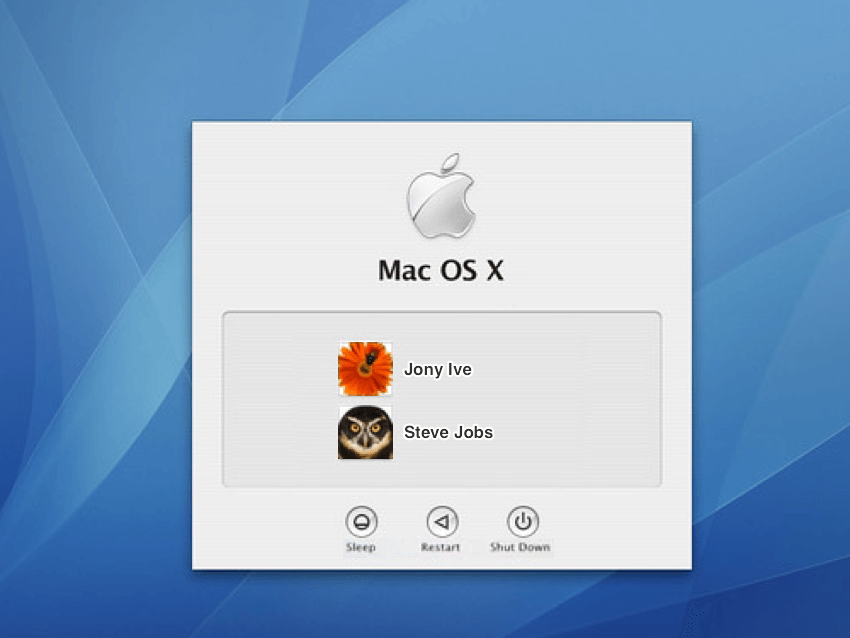
Since the plan or the end goal is to have multi user system anyways. I wonder what do we have for ideas? When it comes to a login screen also, feel free to post some concept art to this thread
1 Like
Maybe make a login screen look like one of the beos windows or maybe have more like a simple logging screen that goes with the theme of things. Nothing fancy or you can have a lobbying screen with like a profile photo
I imagine it would just be a simple window with a couple of labels and text boxes, a couple of buttons, including possibly one to restart.
1 Like
I just had an idea on the rest of the screen. Making the Desktop wallpaper visible, but blurred out in the background.
There’s an idea
Is it? I don’t think that is neccesarily agreed 
5 Likes
I do apologize i thought i heard another another developer say something else
The screensaver password screen is perfectly fine as login screen.
It’s too easy to circumvent currently from a security standpoint,but the GUI is fine as-is.
Besides that,I’m really not a fan of the multi-user idea as I have zero use for it on a personal computer that nobody else will ever use,but some basic login protection would be nice.
4 Likes
Multi user profiles adds a whole level of complexity to Hahiu. Base user accounts, the. Admin accounts all have to logically co-exist and, for the single user OS users like myself, typing sudo for every basic command gets really depressing.
Instead, allow profiles but skip the Admin stuff all together. If you system accidentally gets wiped by the other profile, it literally takes 5 seconds to reinstall Haiku anyways. Just my opinions
I think your use case would be covered by simply working with an admin account. If the system does not enforce a password and if it provides an option for auto login on boot, it would behave the same as current Haiku.
One thing I think would be cool is that if our multi-user solution could one day be extended into a mixture of an enterprise management platform and parental controls. Something like Active Directory/LDAP and user home on network servers, just done the Haiku way.
Then you could log into any computer in your home or office, and all your desktop, files and settings would be there, loaded live from your NAS. Or you could install an application on all computers in your home at once from a centralized management application, but only give access to it to certain users or during certain times. For instance, say you wanted to install a game on all your Haiku home computers in one go, but limit the kids’ account’s access to certain hours. Or have an account for guests with use of the Terminal, printers and the ability to change the desktop wallpaper disabled, and the system set to reset to the previous state on logout.
Or managing the browser’s ad blocker addon filter lists and default search engine settings once for all users and computers. Or adding a shortcut to the web interface of your self-hosted media server to the Desktop of everyone in the family.
Of course this would co-exist with the option for traditional local-only accounts like we have them now.
I know Haiku is not going to be used in enterprise environments any time soon, but now that many of us have more than one computer per person at home, I can totally see these types of traditional IT department management features being handy with an LDAP server on a family NAS as well.
Well, obviously you can boot into something else to get around it (and disk encryption is necessary to prevent booting around any login control).
Do you know of any ways around it without booting a different partition?
I have it in autostart on my laptop and most times that works,but sometimes it just doesn’t automatically start at all (maybe 20% chance or so).
So just reboot the laptop often enough and at some point you can use it as if there were no password prompt at all.
Here is how I envision the login process in Haiku: the application server starts up and launches a login screen in the screensaver, and all further actions are blocked (or something similar) until authentication is entered.
1 Like
On system start, before showing desktop and in continuity with boot logo, you have a black screen where you are asked for username and pasword. Once the system started, you’re not allowed to change user and screensaver locking can do the trick. If there’s only one user defined then you can activate autologin to bypass first login. Ideally, the setting should appear where you are defining users.
Yow.
I also have it on auto-start on my laptop but I haven’t ever had it fail to run.