Is there a way to put a password at Haiku startup for securise a minimum the computer and hard drive access?
1 Like
I don’t know if it’s possible but I will tell you how I simulate it.
My Thinkpad supports various levels of firmware passwords and I have activated them. They protect hard disk as well, unless someone gets it out of the computer!
So, when computer turns on it asks for password before doing anything. It’s good enough for me.
For locking it when Haiku is active I use screensaver with a password.
4 Likes
Umm I wouldn’t suggest this lol  Some laptops with EFI will store the password and won’t forget – so probably risky for sure.
A less secure (but less risky) idea would probably be to just turn on hot corners in ScreenSaver and have Haiku lock the screen – or script the screen saver to start (with the lock enabled in the prefs) in the user script. But yeah, Haiku could totally use a lock screen in Beta 3 or R1 or whatever.
2 Likes
Great idea! I’d forgotten about the Thinkpad’s BIOS level passwords! I’ve now turned on the boot time password so that at least that together with the screensaver password will provide basic protection when I’m out and about with my Haiku laptop…
BTW you mention that the hard disk passwords will protect the disks only as long as the disks are not taken out of the computer. Is that so? That’s a bit worrying, but I suppose that as long as whoever steals the computer does not know that the disk is formatted for Haiku, the data will be safe?
Plug a disk in a linux computer, launch gdisk (depending of the size of the disk, you may have to try fdisk), see what it says. You should have now the partition table with format of each partitions even hidden ones.
If it is an Haiku disk, there is also a good chance that you don’t need that intel and you can directly mount partitions read-only. Build the bfs fuse module and you can even write.
And it is even easier with a Windows disk.
The only thing that can protect a disk is disk complete encryption. But anyway if the person has direct access to your hardware, it’s only a matter of time before they are accessing data.
Now, some data are also crypted by software which is delaying access a bit more.
3 Likes
Ooops! OK, remind me to delete all my saved passwords from my Haiku browsers, and not to stay logged in to my webmail accounts!!! I guess there’s something to be said for running Win11 Pro on my laptops just to get the benefit of bitlocker’s full disk encryption…
This conversation is confusing two things:
- Disk encryption and network firewalls that will keep the crew from “Mission Impossible” from your data.
That is a tough one and up to the devs who work close to the machine. Until then, run Haiku as a VM with OpenBSD or QubesOS as the host OS.
- Preventing toddlers, casual passers-by and your crazy nephew from messing with your machine and viewing your collection of, shall we say, artistic nudes while you are getting coffee.
Piece of cake. BIOS passwords have been mentioned and that is a good option. Or you can do it within Haiku (or both!).
First setup your screensaver to require a password after a short interval (i.e. 30 seconds).
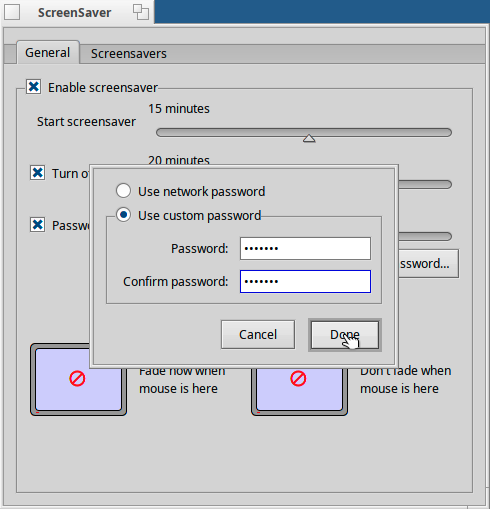
Now add one line to the end of /boot/home/config/settings/boot/UserBootscript
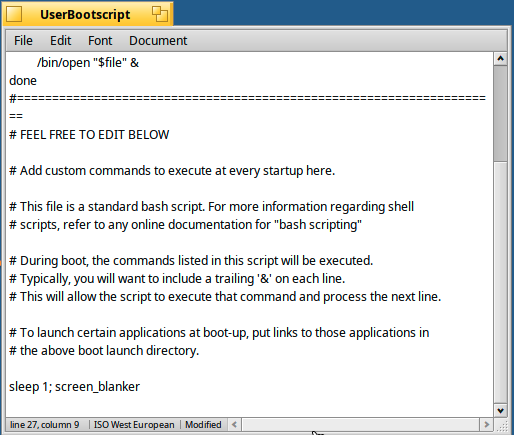
Do not add a trailing ‘&’
6 Likes
The screensaver is not a security feature. Don’t treat it as such
1 Like
Actually I implemented the launch_daemon to be able to use the Login application of DiskEncryption post package management.
Not sure if that still works, but it did at some point. DriveEncryption itself is currently broken, though, unfortunately.
3 Likes
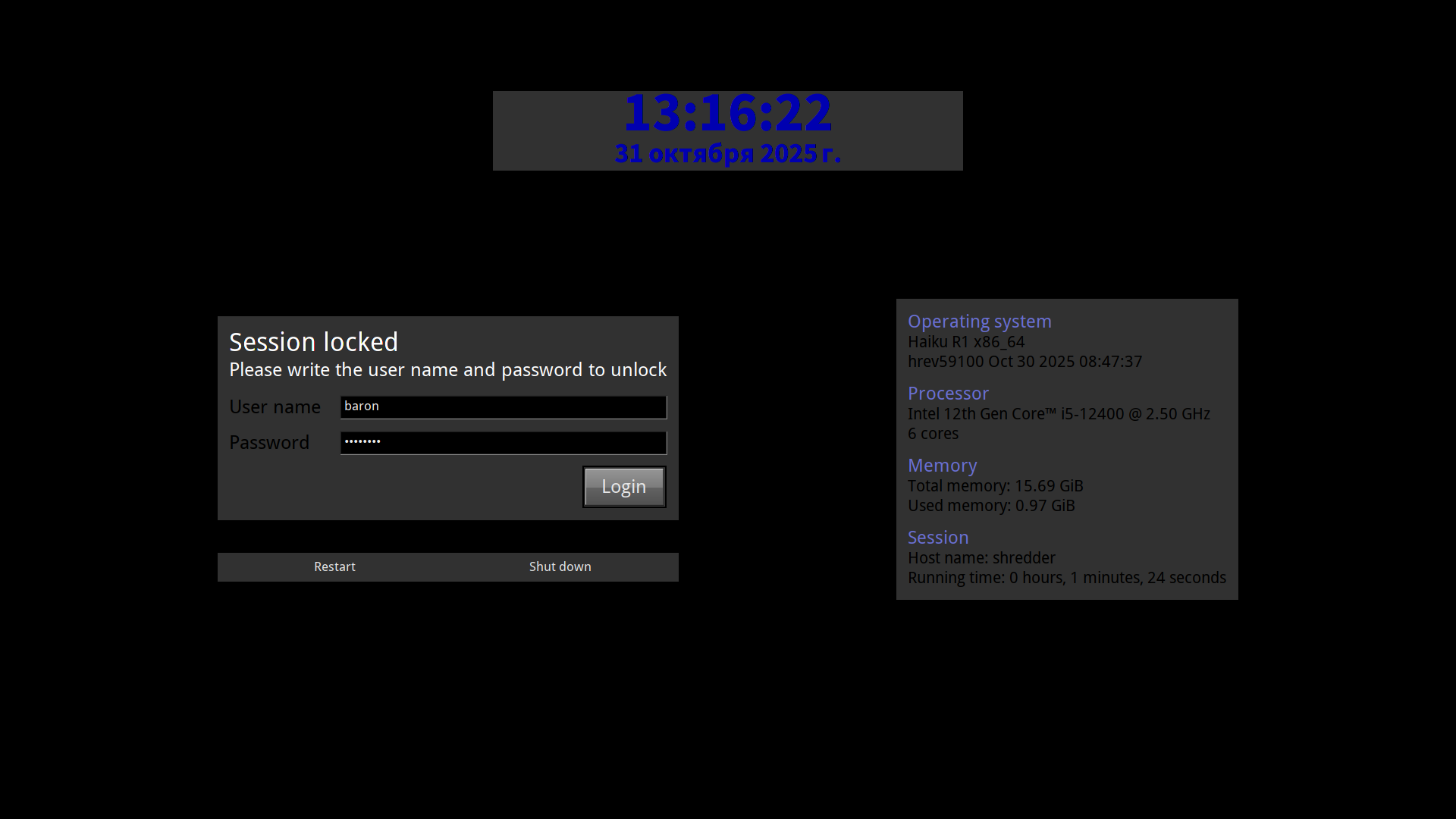
is it possible to use when boot up
1 Like
Yes!
/boot/home/config/settings/boot/launch
ok thank you
Thanks. Good idea about setting the screen saver to activate at 30s!
I assume all those lockers and screensavers are not safer than in Windows 95, as they can be defeated by pressing Ctrl-Alt-Del and killing the corresponding app.
2 Likes
They are indeed not, @nephele just repeated it few posts above.
I think that in matter of security the feeling is as much important than the security itself. In fact, erratic behaviour of someone feeling not secure or inconsiderate actions of someone feeling too secure, can compromise security of an otherwise secure place. There’s no reason that it doesn’t apply to computer security.
I believe that a good start would be that most day to day operations should be made “non-root” somehow and when a higher privilege operation is needed a password should be asked through terminal or a window prompt.
1 Like
Oh dear. That’s not good at all.
I’ve now decided to set a long random character password as a primary password for the password manager on my Haiku Floorp browser and to diligently log out of web mails and other critical web apps every time I leave the computer.
Even then all the personal files remain totally unprotected. What would really be a good protection would be if veracrypt could be made to work on Haiku…
Do you guys really think someone is going to break into your house and steal your computer just to read your emails?
While it’s not entirely impossible,I’d say it’s extremely unlikely,except maybe if you have highly confidential government or military data on your computer.
I’d be way more worried about the data safety and data protection directly at the services I use.
Is your email provider a EU company where the GDPR applies?
Does it store your emails encrypted in a way even the provider can’t read them,like Tuta or Mailbox?
No? - Then that is the right thing to be deeply worried about.
1 Like
what do you consider “higher privilege”? For me, it’s accessing my personal data (scaned invoices, medical info, pictures, whatever). But I don’t want a password prompt everytime an application wants to access such files.
4 Likes