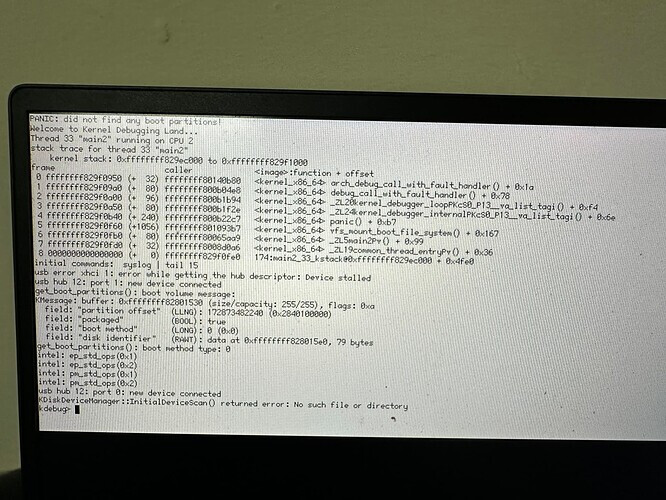
I am very interested in getting a look at Haiku, as I am building a PC of Distros and Haiku is based on BeOS, which of course, doesn’t exist any longer. I’m getting the same Kernel Panic as noted in this thread. I am using Ventoy to boot the ISO file.
While I am a newbie to Haiku, I am wondering if the ISO MUST be burned to a USB stick as opposed to using Ventoy.
If I can safely use Ventoy, then how do I resolve the kernel panic? The Lenovo x-12 Detachable Gen 1 is a Surface Pro clone from 2021. It has an 11th Gen, Core Intel i5-1130G7 processor, 8GB of RAM and a 2TB NVMe SSD (Corsair MP600 Core Mini), on a standard NVMe controller (Intel PEG60-9A09).
I am trying to multi-boot Haiku along with Windows and about 19 Linux distros. (its something to play with…), but having never worked with BeOS or Haiku before, I’m struggling to
Read the full panic error message (a boot device can’t be found) - the text is TINY!
Resolve the panic.
I want to at least look at the OS before installing it, and the panic prevents both.
I’m not fully Linux savvy, so go easy on me. ;o) However, I’d like to see if I can’t get the error resolved and then get the OS/Live DVD to boot.
Booting with Ventoy requires a kind of indirection since you can’t boot the normal way from a partition but have to have a bootloader that supports a filesysytem to read the partition, mount the image file, load the kernel from that and start that way.
Haiku does not support this, hence “burning” the iso normally is required.
Edit: as a side note, you can partition your usb drive as having one efi partition, one haiku and one whatever ventoy needs, and then have a boot menu like rEFind to either boot ventoy or Haiku
So I went and (finally) burned a copy of Haiku to a USB stick. I tried with both Rufus and balenaEtcher on Windows. It creates 2 partitions on the stick, one is the ESP with EFI and Keys folders. The other is not readable by Windows.
I tried botting from it and get the same results - the kernel panic saying it cant find a boot volume.
I’m wondering if this isn’t an issue with the hardware I’m working with, though it shouldn’t be. I can try to get the media to boot on a different PC. If I get a kernel panic from it on different hardware, I can try a different USB stick or burning to an actual DVD and try to boot from a portable DVD drive. Barring that, I’m not certain what else I can do.
Without the machine in front of me, I would bet on it being either the usb drive, or the usb controller in the machine isn´t completely recognized by Haiku.