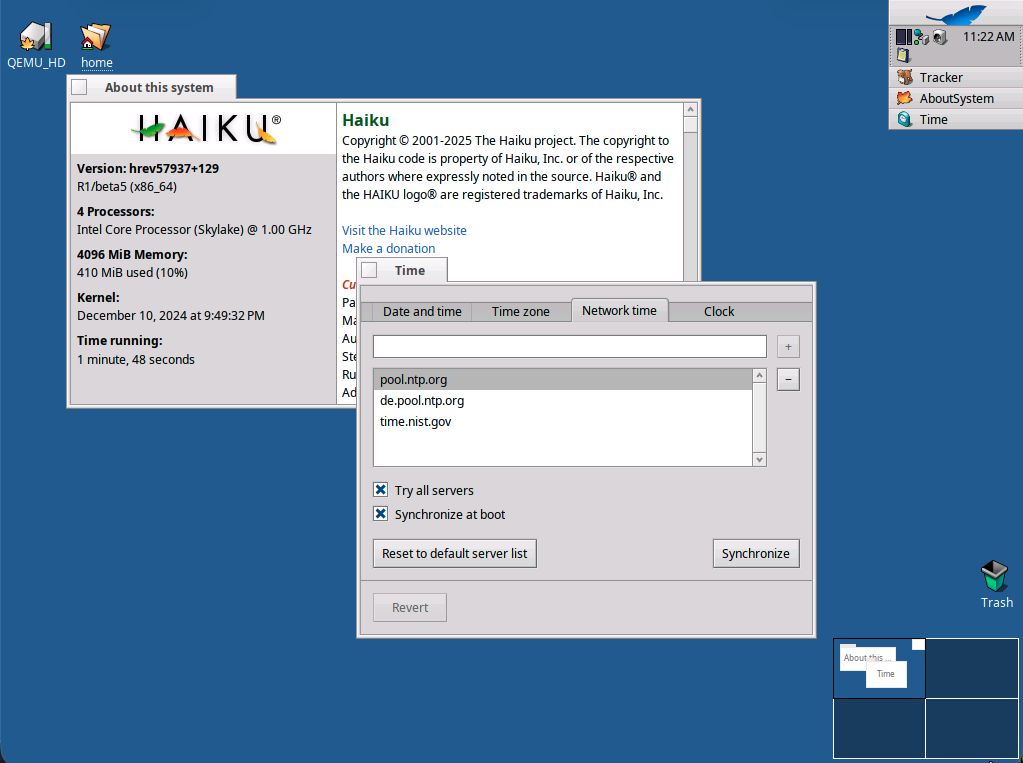
I reinstalled Haiku again after a long time away One problem I had in the past and still now is that when I run Haiku in qemu/kvm, the time falls out of sync when a snapshot is saved or I just put my laptop to sleep, I would have to manually resync. I figured I could install ntpd, but I didn’t immediately see that, so I used cron and just have it run Time –update every minute.
Are there any other ideas on how to automatically sync, like with the basic install? I think though that my solution is OK for whatever I am doing.
Not sure that I see the problem. Assuming you have beta5 and that your networking is up, ntp is right there in the Time Preference Try adding different servers.
It does connect fine when I do manual synchronization and at boot time, but there are cases where it loses sync like if I have the VM running but put my laptop to sleep for some time and then come back to it. It would require or manual sync each time. I assumed there is an NTP daemon to do that work ported to Haiku first. So far, my cron solution is OK, but I have to sit with it a little.
This isn’t a VM-only issue; I’m experiencing significant clock drift running bare metal. Clicking the sync button the Time preferences does work, but it does not seem to be syncing regularly on its own.
I think the NTP may only be syncing at boot time?
There’s no ntpd process running that I can see.
(I was going to post asking about this, but found your post in a search for “ntp”.)
There is an open ticket that definitely seems relevant:
Yes, at boot time with the possibility of doing it once with the button. So you can to set time right after install or daylight saving changes and not use ntp. At least, in a virtual machine, your host is already synchronising so it shouldn’t be needed to do it.
It would be interesting to know if people experiencing that drift are using similar hardware or features like power saving.
So the network settings in the Time preferences is not intended to be used to maintain time sync, but only to sync when manually pushing the sync button or (optionally) at boot?
That is (pardon the pun) not in sync with how other OSs do it.
If that’s actually the intention, it’s not clear; to me, at least, the implication of having network time settings at all is that it would maintain the time sync on its own.
Haiku UI is intended to be simple and not expose settings you shouldn’t need in a normal situation.
IMHO, a continuous sync is hiding the problem under the carpet; the clock shouldn’t drift.
By default, most systems only sync at boot and sometimes after resuming of some power saving states.
Power saving is something Haiku has still to improve and perhaps a sync after power saving will be added in time. Don’t ask me when, not tomorrow for sure.
For desktop systems that don’t run continously (like in the night) the “once a boot” is effectively the same as daily for each day you use the computer, I guess this is mainly where Haiku is coming from… though note that sync on boot is also broken (potentially only on some setups)
Clocks drift. That is an inherent property of them. Therefore it is common that an OS applies a drift correction (basically a scale that maps CPU/RTC time with a correction factor to SI-time).
In order to do this, you need to look at the reference clock once in a while (I have seen things like one check every 2^(10+n) seconds). And then calculate your local drift from that.
I’m not sure if Haiku already has an API for drift correction, but it should not be forgotten IF work is done in this area. It nicely reduces the error with only a low number of requests.
Yeah; on my laptop, for example, the Haiku never connects the wifi automatically at boot so obviously network time sync at boot would never happen.
As long as we’re talking how to improve that: running a time sync on network connect would be a good thing (and not really add much traffic) even if Haiku didn’t want to run a sync daemon all the time.
EDIT: I just checked it by manually syncing time, and my laptop gained 6 minutes overnight sitting on my desk doing nothing. You can maybe see why I’d want a continuous sync daemon running on this thing.
It’s just coming from the 1990s with slow modems and non-permanent internet access, which would have made the typical continuous sync with NTP not really workable. And then it settled for “good enough”. A few seconds of drift a day is fine for most desktop computer usage, especially if it resyncs at the next boot. This saves network and CPU activity.
Is there a need for better synchronization for some usage of a desktop machine, or is it just a “other OS don’t do it this way” problem?
Sync once after connecting to the network sounds like a good idea.
That solves the wrong time if your Wifi doesn’t auto-connect or also if you need to manually make another connection for whatever else reason.
Maybe a “Sync time now” menu item could be added to the context menu of the Deskbar clock,so you can fix the time more easily when it drifted too much.
Adding a permanent network connection that,on most machines,isn’t even needed does not sound like a good idea to me,however.
I don’t want this to become another Windows that permanently causes background traffic for various reasons.
That will only connect to devices in the local network,right?
That’s fine for me,but external traffic that isn’t caused by direct user interaction should be kept to a minimum.
This has became interesting. When I saw this problem in my Haiku installation in my VM, I learned a bit about clock drift
Clocks do drift for sure. I don’t expect Haiku to do what server OSs do, just something good enough (where I don’t go back to my VM later after my laptop wakes up to see it still thinks its yesterday) But from this thread, maybe there is some obvious problems outside even just good-enough solution.
I don’t know much about this, but there is a guest daemon for qemu that, as one feature, syncs with the host time. I saw this on my VPS in Hetzner. Could that help? (I see there is no port though.)
Given that I have seen many other systems fall into the same hole, I would say it the other way around: “other OS also don’t fully solve this”-type-of-problem
 One problem I had in the past and still now is that when I run Haiku in qemu/kvm, the time falls out of sync when a snapshot is saved or I just put my laptop to sleep, I would have to manually resync. I figured I could install ntpd, but I didn’t immediately see that, so I used cron and just have it run