I need help step by step to setup dual boot with my existing win10. I tried other OS on my ASUS Taichi 21 laptop, not sucessful as Taichi has some restrictions or need some setup which I do not know, if someone can help with all required steps so taht I can Install Haiku…
1 Like
Install Haiku to an SSD Drive with USB Cable…
If you want to start Haiku plug it in…
If you want to start Win10 plug it out…
That works!
Without refind
1 Like
I use Grub2Win, https://sourceforge.net/projects/grub2win/ to dual boot with Windows. it works with Windows 10 and 11
2 Likes
Dual booting with W11 through EFI (boot menu).
1 Like
During install of Win 10 and Haiku to my Lenovo X1 Gen9 i took some notes. Maybe it is useful for you.
UEFI Install
- create Partitions in Windows and format as exfat with letter
- from Haiku USB: delete the first partition then create a new one and format as befs. Then the next one (if needed).
- install Haiku from USB Stick
- mount efi folder
- rename Microsoft to _Microsoft
- move old boot folder out of efi folder
- copy refind folder to efi folder
- rename refind folder to Boot
- in Boot rename refind_x64.efi to bootx64.efi
- new folder HAIKU, copy BOOTX64.EFI from USB stick
- rename refind.conf-sample to refind.conf
- insert to refind.conf:
}
menuentry “Windows” {
loader \EFI\_Microsoft\boot\bootmgfw.efi
icon \EFI\BOOT\icons\os_win.png
}
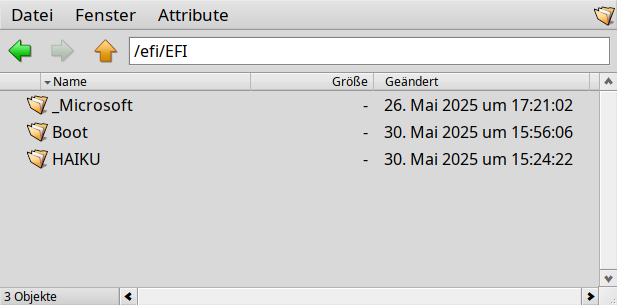
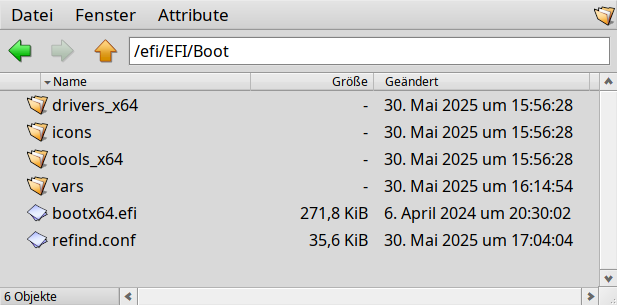
3 Likes
It is very useful for me…
I will try later, thank you very much.
The main problem that you can encounter is if the laptop has secure boot enforced. Settings to enable/disable it being inexistant. Sometimes settings are greyed and you need to add a password to make them available.
Otherwise, it is still possible to use secure boot and there are signatures available to “bless” the bootloader. Unfortunately some BIOS are simply not allowing it.
Generally, if you can manage to boot from installation drive, it is possible to install and make a dual boot using one of the methods above.
These are my methods using Linux as host to work around not having a TPM Secure boot supported motherboard. It does take a little time and some basic knowledge of using qemu and dd command line tool.
- Install win11 to raw image using qemu roughly 30G image
-(This will have TPM enabled) - Copy image using dd to real drive
- Resize to occupy full size of real drive
-(NTFS gparted tools required) - Test by booting into BIOS and making the new win11 disk primary
-(Win11 may complain your account is not verified at first but this will go away overtime)
-(TPM being non-existent on motherboard is not a problem)
Now for Dual Booting.
- Enter BIOS and change your primary boot drive to another drive that has a EFI bootloader and that uses refind uefi as the boot manager.
-(This can be Haiku/Linux/or other etc…)
2, Refind EFI looks like this
/efiboot/EFI/BOOT/<refind stuff goes here> (BOOX64.EFI, vars, icons, drivers_x64, refind.conf etc… )
/efiboot/EFI/Haiku/<Haike bootloader goes here> See UEFI Booting Haiku | Haiku Project for more details
1 Like