Hi all!
I’ve just installed Haiku as a QEMU/KVM virtual machine on a work PC. It’s behind a firewall and we have to access the net through proxy servers. To do so, we have to place and enable our corporate CA certificate; without it, I cannot yet update Haiku nor install packages…
Thanks in advance.
nephele
September 8, 2025, 11:00am
2
If i remember correctly you have to put them in
and then run “openssl rehash”
2 Likes
Thanks @nephele , I’ll try this at work tomorrow!
Kazuyoshi
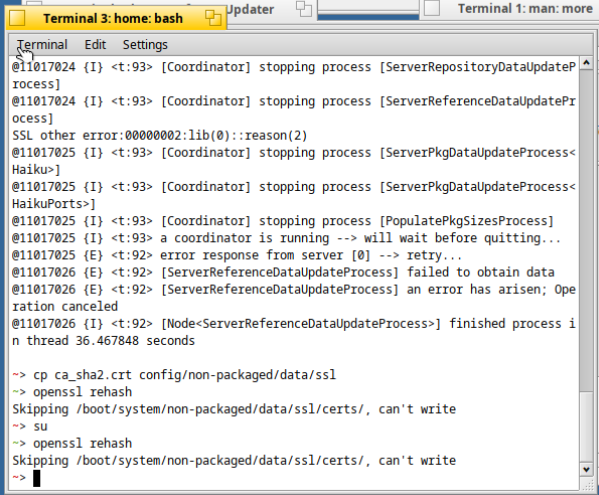
This resulted in…Skippking /boot/system/non-packaged/data/ssl/certs/, can't write
Well, I’m very new to Haiku (I’m a linuxer for 30 years) and I don’t know well its file systems. What did I do wrong?
Thanks
1 Like
nephele
September 9, 2025, 4:16am
5
looks like i missed the “certs” subfolder in my instruction, try creating it and moving the certificate into it instead
1 Like
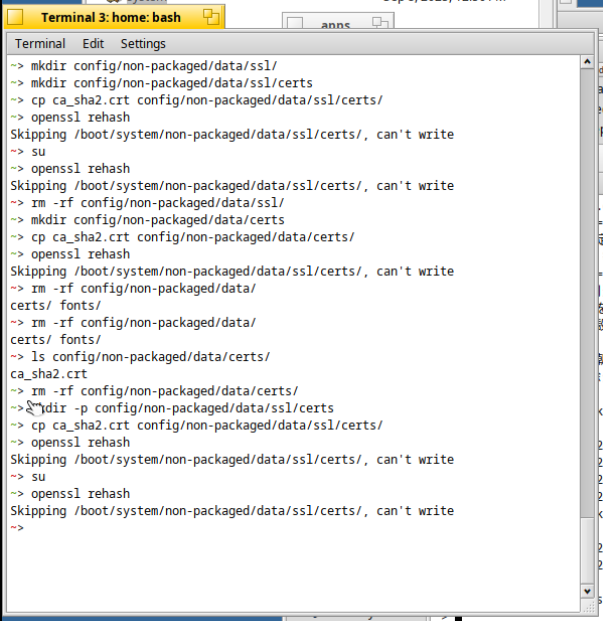
Succeeded in doing openssl rehash after doing mkdir -p /boot/system/non-packaged/data/ssl/certs/!SoftwareUpdater nor HaikuDepot… sigh…
curl works with the certificate by setting proxy and cacert in ~/.curlrc…
Kazuyoshi
1 Like
nephele
September 9, 2025, 10:23am
9
The certificate is only for validating (or allowing) TLS interception, it won’t make any services try to use a proxy as you probably want.
I’m not sure if there is a way to configure this for the network kit at the moment