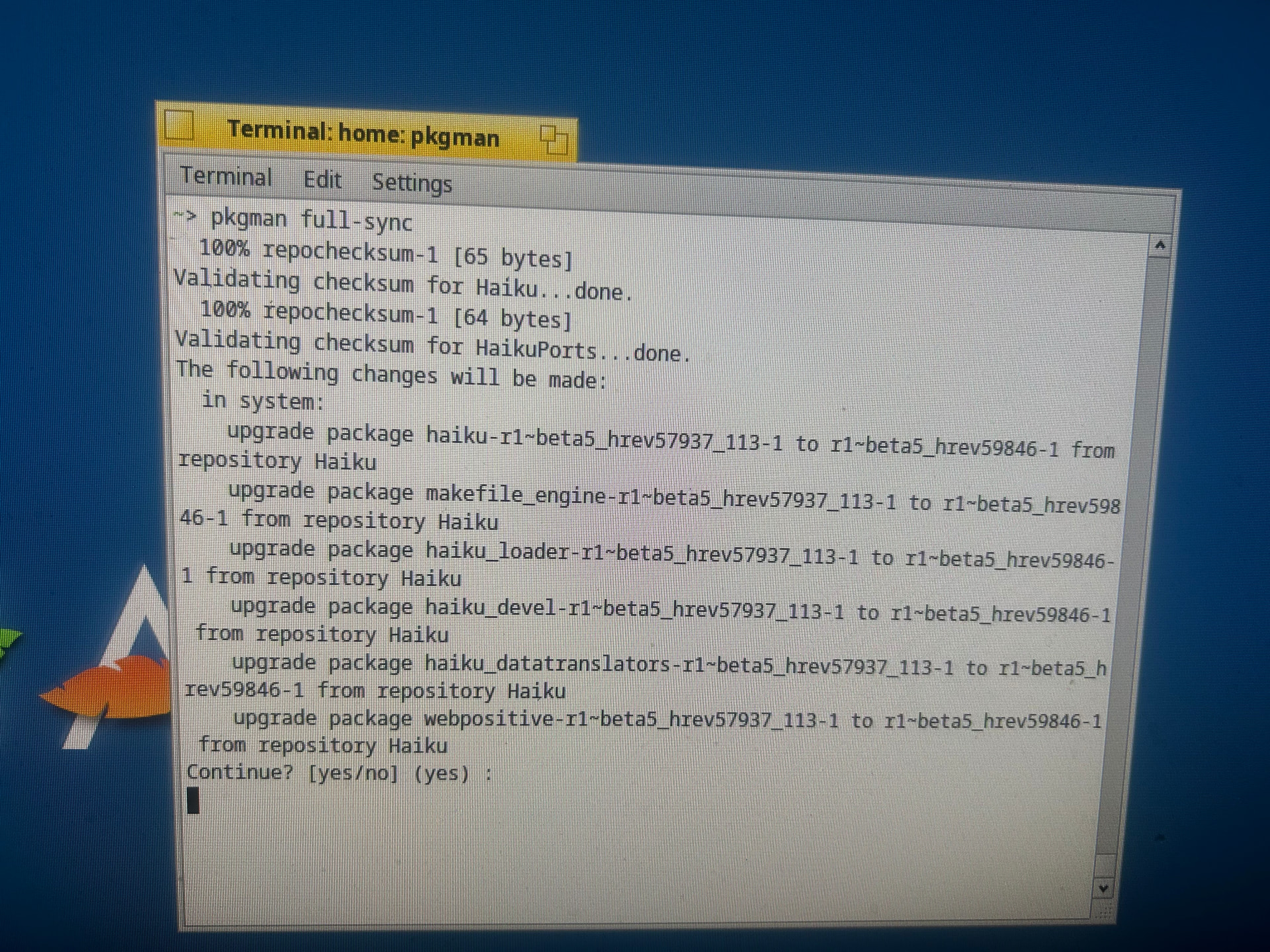
Hello, I just got Haiku and tried to get some packages, but both pkgman and HaikuDepot get stuck at downloading packages. I live in Russia and neither haiku-os.org home page nor the official eu mirrors load for me. I already found a good mirror for HaikuPorts but I don’t see any mirrors for the Haiku repo. Are there any?
2 Likes
Hello, I live in Russia too. Based on your screenshot, your machine sees both repos and updates are ready to install. Press Enter (or type yes) and see if updates got installed.
The screenshot is taken after I pressed enter. It gets stuck and doesn’t output anything
Ahoy @townscaper ,
If command ping -c3 eu.hpkg.haiku-os.org successfully works, like this way for me
user ~ 19:50 ping -c3 eu.hpkg.haiku-os.org
PING ingress.ams3.haiku-os.org (206.189.242.242): 56 data bytes
64 bytes from 206.189.242.242: icmp_seq=0 ttl=49 time=38.204 ms
64 bytes from 206.189.242.242: icmp_seq=1 ttl=49 time=39.763 ms
64 bytes from 206.189.242.242: icmp_seq=2 ttl=49 time=39.308 ms
--- ingress.ams3.haiku-os.org ping statistics ---
3 packets transmitted, 3 packets received, 0.0% packet loss
round-trip min/avg/max/stddev = 38.204/39.092/39.763/0.655 ms
user ~ 19:51
then I would check traceroute eu.hpkg.haiku-os.org command, to reach the digitalocean domain, like for me
user ~ 19:46 traceroute eu.hpkg.haiku-os.org
traceroute to ingress.ams3.haiku-os.org (206.189.242.242), 30 hops max, 40 byte packets
1 192.168.1.1 (192.168.1.1) 2.269 ms 1.943 ms 5.362 ms
2 lo1.bsr0-ferenc.net.telekom.hu (145.236.238.163) 3.884 ms 2.653 ms 3.153 ms
3 * * *
4 91.120.208.103 (91.120.208.103) 14.875 ms 11.211 ms
91.120.208.123 (91.120.208.123) 10.967 ms
5 62.159.61.98 (62.159.61.98) 16.004 ms 14.626 ms 15.075 ms
6 vie-sb5-i.VIE.AT.NET.DTAG.DE (62.156.131.66) 20.215 ms
80.156.162.179 (80.156.162.179) 16.586 ms
vie-sb5-i.VIE.AT.NET.DTAG.DE (62.156.131.66) 16.379 ms
7 80.156.161.47 (80.156.161.47) 17.501 ms
win-bb1-link.ip.twelve99.net (62.115.114.184) 46.580 ms
80.156.161.47 (80.156.161.47) 18.246 ms
8 win-bb2-link.ip.twelve99.net (62.115.114.182) 46.493 ms
win-bb1-link.ip.twelve99.net (62.115.114.184) 48.035 ms 48.507 ms
9 ffm-b5-link.ip.twelve99.net (62.115.136.219) 26.502 ms 27.816 ms
ffm-b5-link.ip.twelve99.net (62.115.141.149) 27.103 ms
10 digitalocean-ic-393157.ip.twelve99-cust.net (62.115.203.107) 25.987 ms 25.340 ms 26.531 ms
11 * * digitalocean-ic-393157.ip.twelve99-cust.net (62.115.203.107) 28.210 ms
12 * * *
13 * * *
14 * * *
15 * * *
16 * * *
17 * * *
18 * * *
19 * * *
20 * * *
21 * * *
22 * * *
23 * * *
24 * * *
25 * * *
26 * * *
27 * * *
28 * * *
29 * * *
30 * * *
user ~ 19:52 traceroute 206.189.242.242
traceroute to 206.189.242.242 (206.189.242.242), 30 hops max, 40 byte packets
1 192.168.1.1 (192.168.1.1) 2.628 ms 1.777 ms 1.866 ms
2 lo1.bsr0-ferenc.net.telekom.hu (145.236.238.163) 2.593 ms 2.616 ms 2.453 ms
3 * * *
4 91.120.208.123 (91.120.208.123) 9.953 ms
91.120.208.127 (91.120.208.127) 10.314 ms 11.285 ms
5 62.159.61.98 (62.159.61.98) 14.959 ms
80.156.161.104 (80.156.161.104) 17.808 ms
62.159.61.98 (62.159.61.98) 14.535 ms
6 vie-sb5-i.VIE.AT.NET.DTAG.DE (62.156.131.66) 17.119 ms
80.156.162.179 (80.156.162.179) 15.386 ms 16.863 ms
7 80.156.161.47 (80.156.161.47) 18.356 ms
win-bb1-link.ip.twelve99.net (62.115.114.184) 46.406 ms
80.156.161.47 (80.156.161.47) 18.304 ms
8 win-bb2-link.ip.twelve99.net (62.115.114.182) 48.023 ms
win-bb1-link.ip.twelve99.net (62.115.114.184) 49.900 ms 48.979 ms
9 ffm-b5-link.ip.twelve99.net (62.115.114.91) 27.400 ms
ffm-b5-link.ip.twelve99.net (62.115.141.153) 26.887 ms
ffm-bb1-link.ip.twelve99.net (62.115.137.202) 51.533 ms
10 digitalocean-ic-393157.ip.twelve99-cust.net (62.115.203.107) 26.845 ms
ffm-b5-link.ip.twelve99.net (62.115.136.219) 28.394 ms
ffm-b5-link.ip.twelve99.net (62.115.141.149) 28.123 ms
11 * digitalocean-ic-393157.ip.twelve99-cust.net (62.115.203.107) 26.472 ms 26.475 ms
12 * * *
user ~ 19:54
As you can see, the traceroute nowadays does not work till target URL, but the digitalocean domain is quite enough.
If it works, then …
… before issue a pkgman full-sync command, as you did, I rather issue a simple
pkgman update command …
If you would do a full-sync as well, then this way :
pkgman update && pkgman full-sync
which means : if the pkgman update runs successfully, then execute pkgman full-sync …
I recommend this way, as there can be more reason why your package update seems stalling …
The first part is about LAN/WAN connection checking, after the target host available then see if a simple update works or not.
Otherwise you can check the ‘Softwareupdater’ program as well, if you would do it on GUI.
1 Like
@KitsunePrefecture I’m from Russia myself. The problem is that Haiku domains, even on many telecom operators, either partially work or don’t open at all (let’s say like mine), and I have to use blocking bypass programs to make it all work
Right, this way I suggested to check network availability first, as here on the forum I also red some posts when the issue was within LAN due to network setup and settings locally, and sometimes as the actual network carriers do the connection for their subscribers.
Ok, I get it
I wonder who’s paying for the alternate operating system denied messages? Just as systemd was getting embedded.
EDIT: I get a traceroute to a full 30 hops indicating * * * and no functioning automation of updates. A manual amount of wget is required.
Thanks for the suggestions. The ping command works, but it looks like the traceroute command doesn’t. Here’s the output:
~> traceroute eu.hpkg.haiku-os.org
traceroute to eu.hpkg.haiku-os.org (206.189.242.242), 30 hops max, 40 byte packets
1 * * *
2 * * *
3 * * *
4 * * *
5 * * *
6 * * *
7 * * *
8 * * *
9 * * *
10 * * *
11 * * *
12 * * *
13 * * *
14 * * *
15 * * *
16 * * *
17 * * *
18 * * *
19 * * *
20 * * *
21 * * *
22 * * *
23 * * *
24 * * *~> traceroute 206.189.242.242
traceroute to 206.189.242.242 (206.189.242.242), 30 hops max, 40 byte packets
1 * * *
2 * * *
3 * * *
4 * * *
5 * * *
6 * * *
My connection seems fine and only the haiku repositories don’t work, a mirror of HaikuPorts I added downloads packages normally. The repo slowly loads in a usual browser but doesn’t let me download anything
@mickplay Can you recommend me some bypass programs? I couldn’t find any that can run on haiku directly.
Well, if you see my traceroute output,
the first IP is my router’s dns resolver
the second is my network provider server IP
In this case somehow your local setup/settings should be checked/fixed first.
I dunno whether your router or other network device would hide the IP against traceroute or it is possible at all, but strange if that does not show anything at all.
If your network carrier firm hide their server IP or not I dunno at all, but it is missing as well.
So this way eu.hpkg.haiku-os.org totally unknown for your computer for the first sight. However as you use the IP address instead .. that also shows that your network provider do not find where to get a path toward the target network, the Haiku server.
Strange. As if you use ping, that use UDP protocol, just as traceroute by default, that works, and name resolved and not blocked.
Don’t you have a firewall in your LAN ?.. I am not a network specialist, so I’m just guessing what can block traceroute to work as ping.
For your ISP - they can block UDP protocol that way that works for only specific commands - as I knew about it here.
Also there was an interesting switch to traceroute, that changes the traceroute method from default UDP packet checks to ICMP echo checks this way
user ~ 23:57 traceroute -I eu.hpkg.haiku-os.org
traceroute to ingress.ams3.haiku-os.org (206.189.242.242), 30 hops max, 48 byte packets
1 192.168.1.1 (192.168.1.1) 1.994 ms 1.897 ms 1.759 ms
2 lo1.bsr0-ferenc.net.telekom.hu (145.236.238.163) 2.565 ms 3.322 ms 2.793 ms
3 * * *
4 91.120.208.103 (91.120.208.103) 12.490 ms 10.211 ms 10.533 ms
5 62.159.61.98 (62.159.61.98) 14.896 ms 26.366 ms 15.001 ms
6 80.156.162.179 (80.156.162.179) 21.327 ms 16.172 ms 16.402 ms
7 win-bb1-link.ip.twelve99.net (62.115.114.184) 46.674 ms 46.933 ms 47.189 ms
8 ffm-bb1-link.ip.twelve99.net (62.115.137.202) 50.902 ms 50.966 ms 49.497 ms
9 ffm-b5-link.ip.twelve99.net (62.115.141.149) 53.352 ms 35.685 ms 27.653 ms
10 digitalocean-ic-393157.ip.twelve99-cust.net (62.115.203.107) 25.573 ms 24.840 ms 25.108 ms
11 * * *
12 * * *
13 * * *
14 * * *
15 * * *
16 * * *
17 * * *
18 206.189.242.242 (206.189.242.242) 39.717 ms 38.262 ms 38.503 ms
user ~ 00:00
This way I could finally get the target host with ‘traceroute -I' command. Oh, yeah !!!
( It is upper ‘i’, not lower ‘l’ as I first thought ! On the site it was written with different font, so this way I applied this warning to differentiate it).
Here’s the output:
~> traceroute -I eu.hpkg.haiku-os.org
traceroute to ingress.ams3.haiku-os.org (206.189.242.242), 30 hops max, 48 byte packets
1 * * *
2 * * *
3 * * *
4 * * *
5 * * *
6 * * *
7 * *
~>
I’m not sure if the issue is even related to my router or network settings - the haiku website doesn’t load on cellular connection too
Well, then you may hope in someone who has better network knowledge – especially in Russian ISPs practice – also reads this, but for me it is very strange that any dns resolver in your LAN or even your ISP does not appear in the traceroute command output.
Thanks for your help
I will continue looking and hopefully find a mirror since that looks like the easiest solution
Okidoki.
However for Haiku images there are mirrors (some), for Haiku package repos none. That you wrote about Haikuports mirror … that I do not understand. That is also in the same domain as the Haiku repo, and there is no another one.
Of course there are other package repos, but that for other developers’ repositories, not Haikuports repo and the containing software packages.
If you would share with me what you mean on Haikuports mirror, it would be appreciated - we can always learn new things.
It’s an unofficial mirror of the HaikuPorts repo. I found it on the russian haiku fandom page. The link is Index of /haiku/
I see this way - thanks.
1 Like
Try yandex mirrors (32 bit in my case. For 64 bit replace _gcc2 with _64 in URLs). I am on hrev59846 nightly build and EU mirrors seems to work. I too had troubles accessing repos when I installed R1beta5.
The yandex mirror updates packages, but the build there is pretty old. I’m installing libglvnd for the nebula driver, which requires haiku>=hrev59183. I tried using mirror.yandex.ru/mirrors/haiku/master/x86_64/current since this mirror has the right version, but installing any package there gives a checksum error
I can’t offer anything, I just enable blocking bypass on the any device and just share the Internet