For me even openarena does not start, even the Window does not show Up on my gtx 1650
Maybe I missed Vulkan WSI add-on in driver distribution. It is a bit patched compared to previously published version.
3 Likes
That’s a generic Mesa 25 issue I think, I had the same issue while testing it with the VESA driver.
1 Like
Are the PR’s merged yet?
1 Like
I am just vibecoding for refactoring the freebsd amdgpu driver to be a more agnostic abstracted one bassed on this driver strcuture, on the userland, i can get some test passed but there are not any gl/zink/vulkan support yet, this is just a hobby project but maybe someone can find it interesting
5 Likes
Has anyone had a chance to test the x512 nvidia drivers on the RTX 3050 OC?
Supportable per: GitHub - NVIDIA/open-gpu-kernel-modules: NVIDIA Linux open GPU kernel module source
No mentioned of it tested yet with @x512 driver variant.
Someone tested a 3050, it seems they got the same crash I got on my 3060.
1 Like
This guy posted 6 PR on the X512 github project but… they are not merged as it seems.
olatignies is working on such a driver based on the Linux one. This maybe is of his interest , you can ask because probably nothing is loose It can help with the Code.
Well, it is a bit of D-I-Y and elbow grease at this point:
- pkgman full-sync (get a clean current packaging setup)
- Merge @dodo75 patches into nvrm SDK. Recompile. (skip this if just testing current drivers)
- pkgman install libglvnd/ and nebula driver. (mainly, uninstall all mesa 22.x packages)
- Execute: GLInfo (Result: zink Vulkan 1.4…(MESA NVK)
- Execute: Haiku3D, GLife, GLTeapot (Result: no issues?)
Usually, the driver or libglvnd/mesa is conflicting with older mesa-22 package installation. Or, a dependency is missing.
The new driver patches will help test VRAM/DP issues…
NOTE: I think @x512 also uses riscv64 for his testing…. and @3dEyes uses AMD Ryzen….
2 Likes
Uploaded version v.0.0.2.
It added missing Vulkan WSI add-on and modesetting tool. This might fix OpenGL application crashes.
11 Likes
Thanks it seems like openarena at loading the program is with white screen and nothing more. But for the rest seems like GLTeapot is working after closing is crashing but is and advance.
1 Like
Had to install Mesa 25 from Haikuports, and get a crash on GLTeapot on exit, but man it flies now!
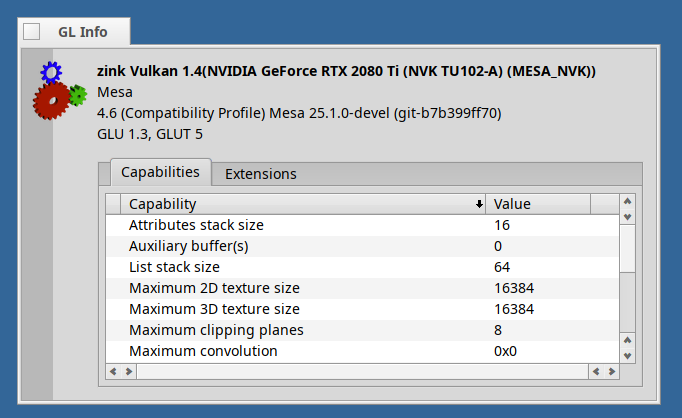
Card (RTX 2080 Ti) is correctly identified in screen prefs, though it also has the DPI calculation out - says 62 dpi and 72”, but my screen is 28”.
Great work!
4 Likes
mmm i can’t install mesa 25 because it’s not in the repository but i’ve installed the 0.0.2 driver from the github of x512 
1 Like
Same as me 78” in a 24” dispaly but don’t worry about that, this is minor.
i am without mesa 25 and glteapot does not crash launches but crashes on exit.
1 Like
Nebula package already includes the Mesa 25.x components. Mainly ensure the Mesa 22.x packages are uninstalled for testing purposes..
Something like:
- pkgman full-sync
- pkgman install libglvnd
- pkgman uninstall mesa*
- pkgman install nebula
2 Likes
Well that mesa 22 is needed to be removed from the repos , because on a software update it causes trouble.
1 Like
I’ve installed nebula-0.0.2, but I still have an error below.
Any idea how to solve it ?
GLInfo
VideoStreamsWsi: vkEnumerateInstanceExtensionProperties
VideoStreamsWsi: vkEnumerateInstanceExtensionProperties
VideoStreamsWsi: vkCreateInstance(0x301e515000)
MESA: error: ZINK: vkEnumeratePhysicalDevices failed (VK_ERROR_INITIALIZATION_FAILED)
MESA: error: ZINK: failed to choose pdev
GLInfo: ../haiku-git/src/system/libroot/posix/pthread/pthread_mutex.cpp:96:status_t __pthread_mutex_lock(pthread_mutex_t*, uint32, bigtime_t): mutex->owner == -1
1 Like