Hello guys, I try to keep forum requests specific, but this is query is an example of what we in the UK call the “How long is a piece of string?” variety. Apologies if it tests anyone’s patience.
I was an early adopter of the netbook form factor and over the past decade my daily drivers have been a series of cheap, small laptops running various lightweight Linux flavours, most recently Q4OS (Debian branch) on an Asus E210M. I’m reorganizing my workflow and the reduced task list for the netbook makes Haiku a better fit for my needs than the increasingly turgid Debian.
I’d actually checked off every task on a migration list for Haiku=>Asus but fell at the last hurdle: there’s no Haiku eMMC driver! The Asus is a non-starter, and so are the obvious alternatives like the HP Stream 11, all of which seem to have eMMC SSDs.
I can’t be the first forum member to have hit this sticking point. Can anyone recommend suitable hardware? Wishlist is: cheap; light; good battery life; 10 or 11” screen; keyboard, trackpad, WiFi and all ports work with Haiku. Best, NP.
Maybe, install Haiku to a USB drive, & use that on the netbooks that you have, it will be a little bit slower to boot, but should run just fine, once booted….
Good (lateral) thinking, camtaf, but no – simplicity is of the essence here, and I specifically need the option of putting the netbook to sleep and bagging or pocketing it without worrying about ext’l devices. I’d consider swapping out an SSD (if anyone can point me at a netbook with an eMMC that isn’t soldered to the board). I even considered a Toshiba Libretto which turned up locally, but older laptops tend to suffer from degraded and hard-to-replace batteries. NP
I’ve run 32-bit Haiku (I think it was Beta 4 at the time) on an Acer Aspire One A110L. Yes, the original one. Sorry, I don’t have that little thing anymore. Whatever trickery Acer used to make the soldered-on emmc look like a hard drive worked with Haiku.
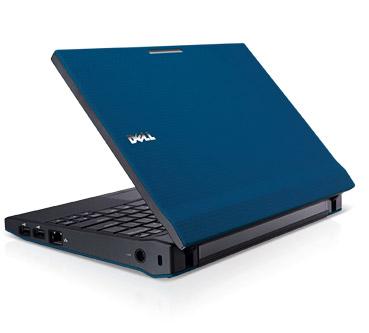
Another small computer I ran Haiku on was the Dell Latitude 2120. Bit too chunky to be called a netbook. But being made for the educational market it was indestructible. I had to give it back when I retired and I really, really miss that little thing. It comes with a spinning HD that can be swopped out for an SSD. You can still get replacement batteries for it.
Thanks, guys, esp Michel. I will have a good look for the Latitude. This probably isn’t the place for amusing Asus eMMC anecdotes but I will mention that one of my early Asusses had a phantom 8Gb of disk space that showed up under various utilities but remained stubbornly inaccessible for use as actual storage throughout the three or four years I had the computer, presumably because the hardware interface imposed some kind of limit on addressing. My impression is that the company is using its SSDs in a less Wild West fashion these days but your post has inspired me to give Haiku a chance. I’m some way from actual experimentation but I will post my findings on this thread when I get around to the migration. NP.
Thanks Cocobean. I’ll press on because have little to lose in this particular transaction – I want to step away from Q4OS and, if I’m going to experiment with a wholly unfamiliar OS, I might as well do so on a machine with whose quirks I am thoroughly familiar. The only pressing concern is the obvious one: if the installer can’t detect the SDD as a viable target for BFS formatting (seems likely) will the existing disk setup be left unmolested? This isn’t a dealbreaker but reinstalling Debian would definitely be a retrograde step. NP.
PS One for Michel – the Dell Lat 2200s were around for ages and there were several different configs. You wouldn’t know if the SSD ones were eMMC-equipped, would you? My guess is not, but you never know. NP.
Nope, the Lat 2120 mentioned in your earlier post. (It’s four or five posts up on this thread.) Sorry for the misquote; I’m trying to get the new Windows machine configured as I type and it’s taking up most of my available (decreasing number of) processor cycles. NP
OK, I don’t know, but generally speaking, spinning rust drives were replaced by SATA SSDs: That’s what I did with mine. so the timeline for netbooks is
Back in the mid - late noughties I was having to travel quite a lot, and bought an EEE PC. It was great for keeping up with emails and was OK for minor web-surfing when web-sites were much more basic than they are now and phones were primitive.
Once, while on holiday in Prague, I was unexpectedly asked to revise the company’s budget. It was murder trying to deal with big spreadsheets on that tiny screen, but I managed it.
So, a great machine for travelling, but not ideal for real work. At home I had a desktop PC with a large CRT screen, which was in due course upgraded to an LED monitor, and then a laptop followed.
So I think you might consider getting an oldish (and therefore cheapish) Thinkpad for home with Haiku on it, and using a Windows/Linux netbook purely for travel. Keep your data in the cloud.
I think you’ll be delighted with the extra power and larger screen size that a 14” or 15” laptop will provide. Nowadays I do very little travelling, but when I do I use the phone for emails and the web.
Thanks, Pulkomandy. It’s painful to give up the sleep capability but I guess I can live without if Haiku boots as fast as they say. Good luck with your eMMC driver efforts. NP.
Thanks also Michel and Sebrof. It’s always useful to hear about other computing setups. My own, previously Linux-exclusive, has been up for grabs since video involvements forced a climbdown (Windows PC, Nvidia card). That was an embarrassing development, but it freed up the netbook for Haiku, plus I’m backing the ZeroWriter project (https://zerowriter.ink/). So it’s all change here.
I just replaced the HDD with an Intel SSD, re-installed and now the machine wont boot (doesn’t find an operating system). Looking into issues around it. its an old Intel 180GB SSD I had in a drawer for years, installation went fine… I used to fic this back in the OS/2 days with a fdisk /newmbr.
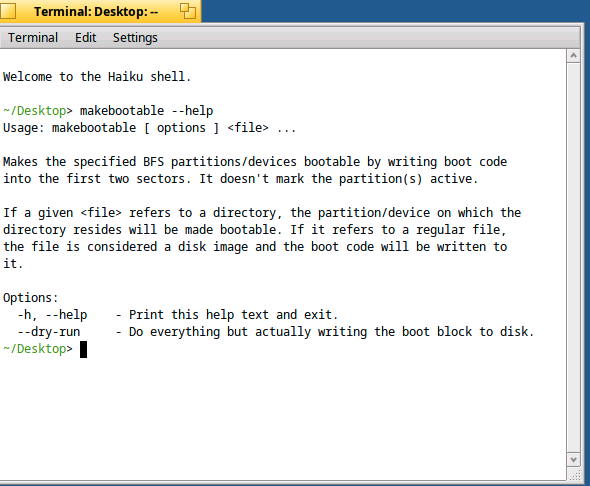
So boot from CD or USB disk, mount the SSD, then use makebootable to write the boot blocks to it.
If that doesn’t work for you, install the Haiku boot menu with /boot/system/apps/Bootmanager, with just one entry and the shortest time-out available, it will force a boot. I have that setup on my machine.
All that is assuming you are booting via BIOS, not UEFI, which should be the case on a laptop of that vintage. In fact, check if there is an EFI partition left on the SSD and get rid of it.
no, it’s not. That is not what makebootable does. The equivalent to fixmbr is writembr. I don’t understand why people keep suggesting makebootable for this…