[GSoC 2026] Implement UFSHCI driver

Hello Haiku Community,

My name is Matei, and I am a first-year Computer Science student. I am deeply interested in operating systems and have been active in various OSDev communities for several years.

After hearing about GSoC, I started browsing the participating organizations and immediately clicked on the “Operating Systems” category. I was honestly surprised to see it listed and was quite excited. I was already familiar with most of the organizations in this category, including Haiku, but I found it particularly interesting because of its focus on personal computing.

My Background and Skills

  • Solid experience in C, with knowledge of C++
  • Familiar with Java and C#, although I have used them less frequently in the past 2-3 years
  • Knowledge of x86_64 and AArch64 assembly
  • Experience with QEMU and GDB
  • Experience with build systems such as Make and Meson, as well as an OS bootstrapper called Chariot
  • Wrote an operating system from scratch (see below)

I am currently developing a hobby OS from scratch called LykOS. It currently implements basic kernel functionality such as physical and virtual memory management, a VFS with RAMFS, ELF loading, support for kernel modules, and a driver system (PS/2, AHCI, NVMe), among other features.

After reviewing this year’s GSoC ideas, the projects that interest me most (in order) are:

  • Universal Flash Storage support
  • Multiple monitor output in app_server

Over the next few days, I plan to explore the internals of the Haiku kernel to gain a better understanding of how its components interact.

I would love the opportunity to contribute to Haiku. I believe it would be a great learning experience for me, as it aligns perfectly with my interests. I am very eager to learn and contribute wherever I can.

A few questions:

  1. Which of the two projects do you think would fit my background better?
  2. Which parts of the codebase should I study first for each project?
  3. Is there a bug or feature ticket related to the area I want to contribute to that currently needs attention? I would like to work on one as my required code contribution.

Best regards, Matei

5 Likes

Wellcome Matei, hope you will have a fun during build and exploring Haiku internal source codes. Any of them that is suitable for you is also suitable for rest of Haiku.

1 Like

Hello,

The ufshci project will be relatively straightforward: there is a specification for the hardware, you implement it, you test against qemu. The commands are from SCSI, which we already implement and use in several other drivers.

A starting point for it would be looking at the existing mass storage drivers in src/add-ons/kernel/drivers.

The multi monitor support project is not so much “ready to code”. You will have to take a lot more decisions, starting by deciding on a configuration where you can even test this at all. Are you interested in getting a single videocard driver to set up two independant video outputs? In setting up two videocards at the same time? In ignoring the hardware side of things, and setting this up purely in software using test_app_server? In that latter case, the work would focus more on API design and a little bit of user experience. Things like making sure maximized windows occupy only one output and not both, that centered windows are centered on one specific screen, etc. If you are more interested in drivers, it really depends which hardware (or emulated hardware) you plan to work with. I know mainly about Intel graphics, where things tend to change with each new CPU generation, and the setup is quite complicated to bring up a display. Expect to dig into other operating systems sourcecode to understand what they do, and a lot of work investigating minor steps of the video mode setting process that may not work right.

I will let other comment on the s atus for other drivers, maybe @X512 for current NVidia cards where he ported parts of the Linux driver to Haiku, @rudolfc for older NVidia devices, or @kallisti5 for AMD ones. I also heard of Redox OS managing to set up multiple displays with an UEFI framebuffer driver, but I didn’t manage to set that up on my own machine.

I don’t know if QEMU even supports a “multiple display outputs” setup, and if that could be useful for testing.

Personally, I would say that it’s a good project if you want the whole experience of operating system development, as it can potentially involve all levels of the software stack. But also that this makes it quite large, and you can expect to not have everything working by the end of GSoC (which is fine, the work can continue later with you or someone else, or be another GSoC project next year).

So, for this project you may look at src/add-ons/accelerant, src/add-ons/kernel/drivers/graphics, and src/servers/app. That’s a lot of code overall. Rudolf’s documentation on videocard drivers is also relevant: Writing Video Card Drivers In BeOS | Haiku Project

And, of course, Leo Schwab’s Adventure in Graphics Drivers is a great read to know how it feels to write graphic drivers

1 Like

For NVIDIA GSP driver it is quite trivial to setup multiple screens output or handle display hot-plugging using NVKMS ioctl API. Driver itself already do all low-level hardware display management stuff. I already managed to do it with test code that produce some v-sync synchronized full-screen animation on multiple screens (no app_server involved).

You can attach multiple different GPUs in QEMU, for example simple-framebuffer and ATI. Also VirtIO GPU supports multiple screens

2 Likes

Hi @theokeist,

Thank you for the warm welcome! I hope my interest in OS development will prove useful for Haiku :slightly_smiling_face:

Hello,

Thanks for the detailed explanation. After reading this, I think I’m more interested in the UFSHCI project. I’ve already found some specifications online and will start going through them.

The multi-monitor project sounds really interesting as well, but since it’s broader and not quite “ready to code”, I think I’d be better off focusing on the storage driver for GSoC.

For the required contribution before applying, I assume it should be unrelated to the UFSHCI project, since that’s planned for the summer. If so, could you suggest an issue I could start with?

Thanks,
Matei

1 Like

If you feel you’re already ready to set up the skeleton for an UFSHCI driver, that works fine. You can always adjust your project timeline in GSoC to account for the parts of the work already completed before the start.

Otherwise you could look at tickets filed under drivers/disk for example: Making sure you're not a bot!

This one may be interesting to reproduce (making sure it wasn’t already fixed) and then trace where this is handled and if maybe we should centralize such bound checks somewhere to ensure we apply them consistenly in all drivers: Making sure you're not a bot! It would be a good way to explore the mass storage device handling.

2 Likes

Hello,

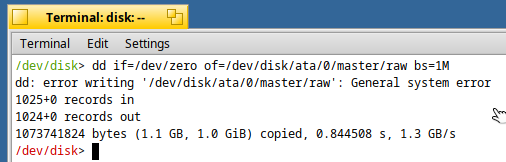
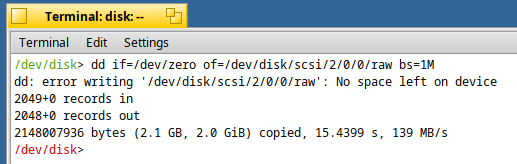
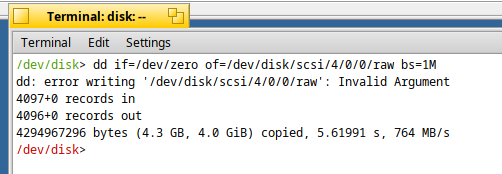
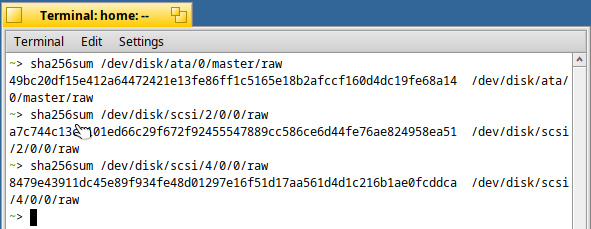
For ticket #17056 this is my progress replicating the errors this far:

ATA raw

SATA raw

image

It seems to me that SATA is working as expected.

Virtio-SCSI raw

These are the disk-specific arguments I passed to qemu: #!/usr/bin/env bashset -eBUILD_DIR="generated.x86_64"ISO="$BUILD_DIR/hai - Pastebin.com

If someone can confirm I didn’t mess up something with the SATA disk, I will go on and start debugging only the ATA & VSCSI drivers.

Matei

Hi,

While investigating this bug, I’ve been trying to understand the disk I/O stack in Haiku. I’ve looked at src/add-ons/kernel/drivers and src/add-ons/kernel/busses, but I’m still not fully clear on the complete layering and how an IO request is handled.

Could someone give am overview of how a disk write request is processed from the syscall layer down to the actual device driver?

Thanks,
Matei

In the case of disk devices this is pretty much direct.

The userspace code will call write() on the device. This is first handled by the VFS, which will compare the path with mountpoints and route it to the corresponding filesystem, in this case, the devfs which is mounted in /dev.

devfs will then identify the driver owning the particuliar device file, and forward the call to it (I’m skipping the case where you write to a partition and not to the disk device here, if there is a partition, that is converted to an access to the disk device by adding the partition offset).

Eventually the device file is mapped to a device hook structure, for example here is the one for USB:

https://cgit.haiku-os.org/haiku.git/tree/src/add-ons/kernel/drivers/disk/usb/usb_disk/usb_disk.cpp#n1988

This structure can implement things in two ways. If it doesn’t use the IO scheduler, the “read” and “write” hooks will be implemented. You can see in the example for USB that this isn’t the case. It uses the IO scheduler, which will intercept the requests from userspace, reorder and combine them as needed, before sending them to the device. So in this case the asynchronous IO hook is called, in the case of usb_disk that is usb_disk_io. This then adds the request to the IO scheduler, which is previously configured to use usb_disk_do_io for the actual disk access. This eventually calls OperationCompleted on the IO operation with the determined return code, which is what appears to be set in different ways inthe different drivers in this case.

In the case of USB, the driver itself appears to not have any bound checks. The eventual error code will come from executing an SCSI command on the device and getting a reply from that. The bound check could be added in the USB driver, before executing the requests, or maybe it could be done at the IO scheduler level, in that case it would work for all drivers using that.

Hello,

I think I have a better understanding of how everything fits together. I saw an example of bounds checking in the NVMe code here:
https://cgit.haiku-os.org/haiku.git/tree/src/add-ons/kernel/drivers/disk/nvme/nvme_disk.cpp#n730

I also noticed that NVMe doesn’t seem to use the IOScheduler class and instead has its own queue. I found it interesting that its do_io operation takes an io_request as an argument instead of an IOOperation, which appears to be the case for the usb_disk and scsi_disk drivers.

Regarding performing the bounds check at the IOScheduler level, I noticed that IOSchedulerSimple already has a field called fBlockSize, but it lacks a field that keeps track of the total block count. My idea is to add a new field called fBlockCount to the class and perform the bounds checking in the ScheduleRequest() method.

Edit: Thank you very much for your previous explanation of the IO stack!

Matei

Apparently the IOSchedulerSimple::Init() sets fBlockSize to fDMAResource->BlockSize(), which in turn is set by the IOScheduler constructor (its the sole argument it takes). DMAResource also doesn’t contain any field related to total block count. I think I would need to either change the DMAResource class to contain such a field or the constructor for the `IOScheduler`.

I am waiting for input to decide which one to go forward with. I think, maybe, you guys have a better idea.

Unfortunately it’s more complicated than that. We may not know the disk size at the time DMAResource is constructed, and it may change multiple times over the course of its lifetime, in the case of removable disks.

Do we really need bounds checks at all? In most instances, the partitioning system in the kernel will see how large the disk is, and then most accesses to the disk will happen through partitions, not to the raw disk itself. Trying to submit I/O requests outside the bounds of partitions will result in them being blocked higher up than disk drivers.

The easiest solution, if bounds checks are really needed here, is just to reject them at the I/O operation level inside each driver. It should be a single if test and an error return; no need to complicate things more than that.

If you mean that I should do something similar to what the nvme driver does in the link I previously provided then I get start working on it tmrw.

The NVMe driver is special because it doesn’t bother scheduling anything, it just sends all the I/O directly to the NVMe controller. So, you’ll notice it does work with IOOperations, but at a different spot than the other drivers do. Adding bounds checks at the point IOOperations are processed sounds like the right way to go to me.

Thanks for the help.

I will be looking more over the drivers tomorrow because its already midnight where I live.

The DMAResource block size is not directly related to the on-disk format. It represents constraints of the hardware DMA controller that is used to transfer data to and from the disk.

As Waddlesplash says, it may be easier to catch the out of bounds access after the IO scheduler then (I said the opposite in my previous message, but I didn’t know that the IO scheduler wouldn’t ahave access to the block size). So then, it can be done in each driver before executing the read or write operations.

NVMe is indeed different. That’s because the hardware already exposes an asynchronous interface and allows multiple operations in parallel. In that case, the io scheduler isn’t really needed, the hardware already handles that part of the work. For the other devices, we have to execute one operation at a time only, and the io scheduler will decide which one is next.