Hello,
The project is about eMMC devices which would correspond to this ticket:
I think all the other ones are about supporting different hardware controllers. You may hit hardware issues depending on what hardware (or emulated hardware) you test on.
In your logs you can see that the driver is doing the initialization sequence for an SD card. It starts with CMD0 (reset the card) then CMD8 (voltage check) and CMD5 (detection of SDIO cards) and ACMD41.
You can find the documentation for this command sequence in SD Host Controller Simplified Specification (Simplified Specifications - SD Association, part A2) as figure 3-9.
At this point the log says “Card did not enter ACMD mode”, which is expected since ACMD41 is a SD card specific command and does not exist for eMMC. If you compare this with the flowchart in the SDHC specification linked above, you see that we should end in the “Not SD card” block (numbered 17 in the diagram).
We should continue by checking if the device is compatible with MMC. Maybe a little backstory is helpful to understand the situation here. Initially the standard for memory cards was going to be MMC. Several companies were working together on that and they defined the electrical specifications, the physical card format and connector, and the basic command structure. However. at some point, some of the companies decided to “fork” that standardization effort, mainly to add DRM to the cards (hence the name “Secure Digital”). They preserved the same physical layer, but defined different commands for various things. The two camps don’t talk to each other anymore. So, the SD card specs never mention MMC, and the MMC spec doesn’t mention SD. It is up to us to merge the two together and identify the proper command sequence that allows us to find out what type of device we are dealing with.
Anyway, once we reach the “Not an SD card” step, the SD specification just stops telling us what to do. But we can look at the initialization sequence for MMC instead. You can find that in the MMC specification: https://vems.hu/files/mmc/mmcsys-version_3-1.pdf as figure 17 (this is an older specification for MMC, not eMMC, that means devices packaged as cards like SD and not as chips soldered directly to a motherboard. But I checked eMMC specifications I could find, and the command sequence for these steps did not change). We already did the CMD0 to reset the card, so we should likely continue with CMD1, CMD2 and CMD3. If you look at the diagram for SD cards, you can see that the two may converge again at this point, since the initialization for SD cards does not use CMD1, but it also ends with CMD2 and CMD3. That makes sense, since CMD2 and CMD3 are what allows to identify the card (read its unique ID) and then assign it a short address used to later send it commands. Initially MMC and SD supported multiple devices on the same bus. For eMMC, this option was removed, as it was getting in the way of allowing higher communication speeds.
It looks like the current driver takes a wrong turn after failing to send ACMD41. A little bit more detail about what ACMD means: this is for “Application commands” which allows to define extra command number specific to one type of cards (here, specific to SD cards). The implementation consists of sending CMD55, and then the next command will be handled as an application command instead of a normal command.
Looking closely at the diagram in the SD spec, ACMD41 can end up in 3 different ways. Looking at the corresponding text for step 13, these are:
- The command is succesful (OCR OK)
- The command returns an error (OCR fail)
- The card does not enter application mode (no response to CMD55 to enter ACMD mode)
According to your logs with eMMC connected, we should be in that last case. But this is not detected correctly and the driver continues on with the next steps for SD cards (steps 14-16 in the SDHC specification diagram) instead of going to MMC mode where it should send CMD1.
So that’s the first thing to change: fix the detection of failed CMD55, and make the mmc_bus manager switch to MMC initialization commands in that case.
Once we have that working and the eMMC is detected and initialized, there will be more work to do on:
- The commands for reading and writing to the card may be different. Study of the respective specifications will be needed
- With the current driver, data transfers will tend to be slow. Both SD and eMMC support a variety of ways to increase the speed. At the hardware bus level: switching to 4 bit or even 8 bit data bus to send more bits at a time, using higher clock rates, using bulk commands to read multiple sectors at a time. These will require negociation with the card because oldest cards may not support all of it. And at the SDHC controller level: “Advanced DMA”, “Auto CMD12”, and various other features allow the controller to perform more work on its own without so much control from the CPU, and make sure the SD or eMMC device is not spending much time idle, waiting for the CPU to handle interrupts and prepare the next command to send.
That was a lot of info 
I hope I did not make too much mistakes here. Obviously I have not really tested and confirmed all of this yet (otherwise the driver would already be working). I am not actively working on that driver at the moment, but I will happily provide help if you have more questions, and review patches when they are ready.
 i want to learn and contribute towards the " eMMC Storage Support " project.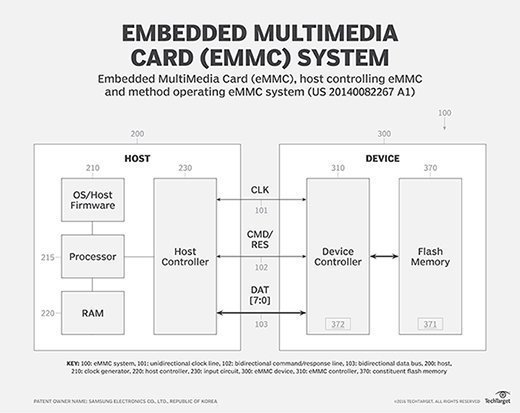


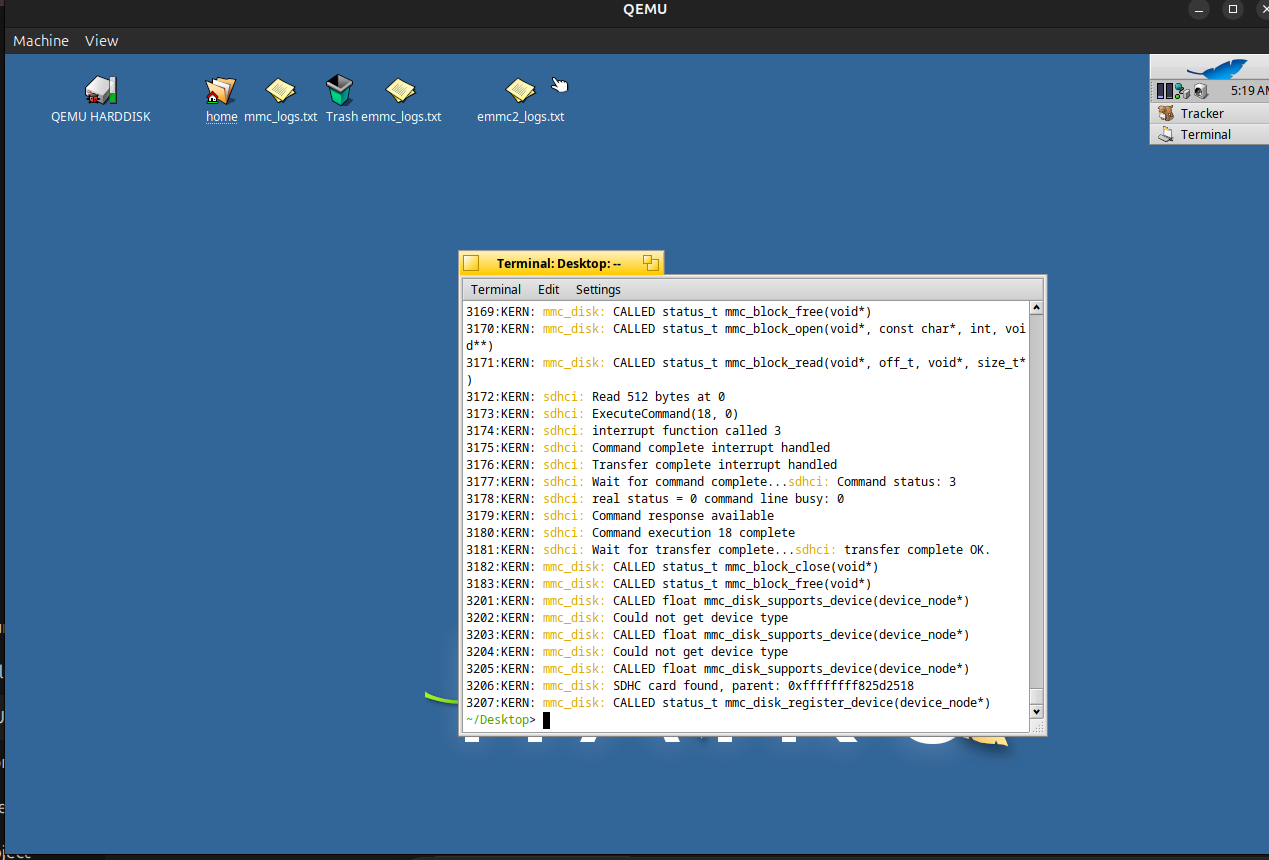
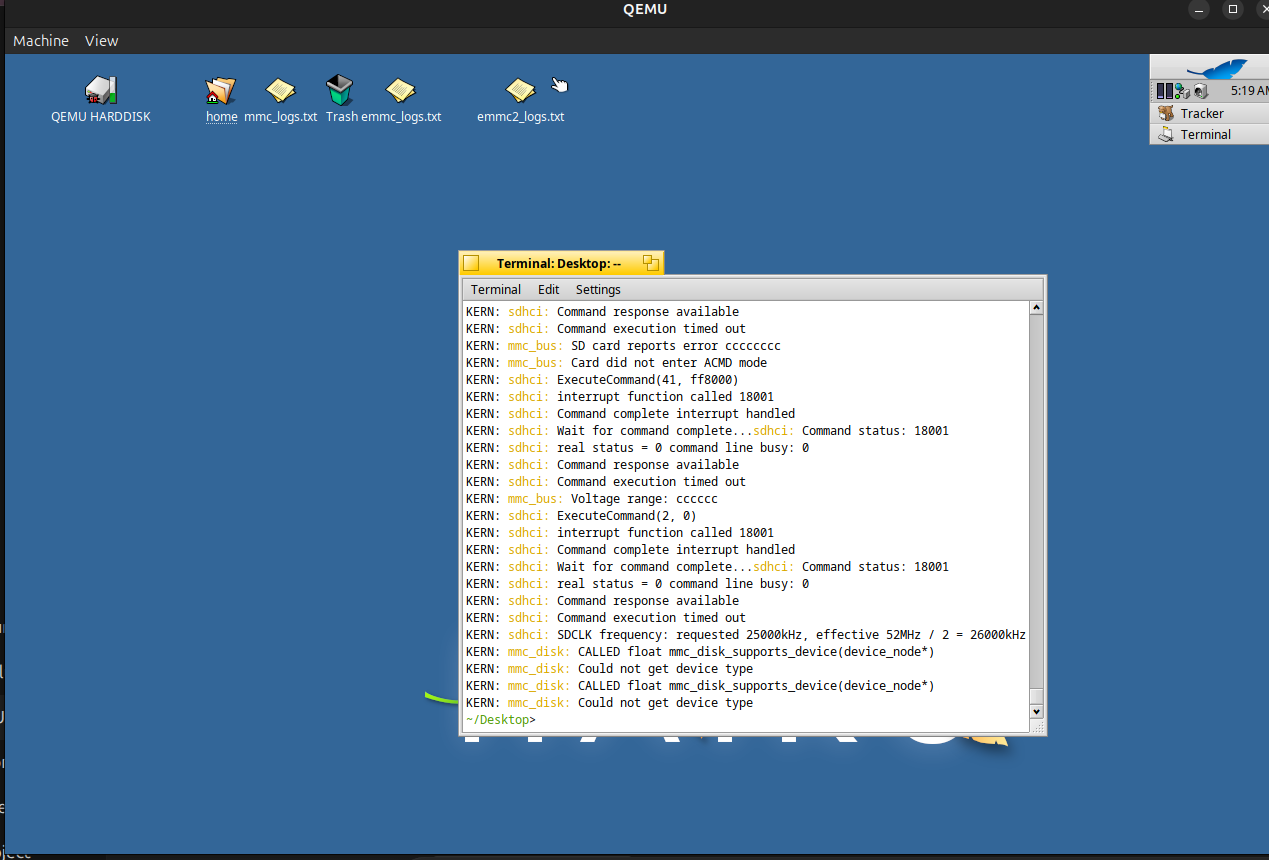
 !! for this , I will be going through the SD card and the MMC specification for further and update on this soon.