Yes. I came to the same conclusion. Here’s an updated mockup:
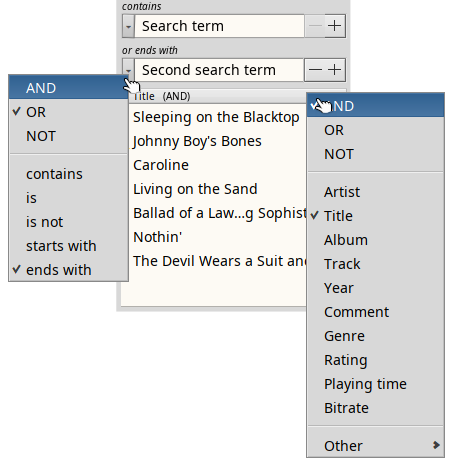
The +/- widgets to the right are straight from a BSpinner. Clicking “-” removes the current search-term-widget (if it’s not the last/only one), “+” adds another search-term-widget with the default “AND” and “contains”.
The left context menu of the mockup shows a click on the left widget.
The left widget lets you change to AND/OR/NOT and the various qualifiers which depend on the kind of attribute (in this example it’s a string attribute).
The right context menu of the mockup shows a click on header row of the BColumnListView.
This context menu lets you choose from the available attributes of that filetype and the “inter-attribute” combo AND/OR/NOT. The “inter”-combo always applies to the column the right of it, I suppose.
The “Other” submenu offers all available attributes, so we can query for any attribute, not just the ones registered under that filetype (see the Filetypes/Query workshop of the User Guide).
Not quite sure how to quickly build and sort the list of all attributes into a hierarchy… You figure it out. 