Hi @phoudoin 
Thank you for the tip. I will look into this!
Hi @phoudoin
Thank you for the tip. I will look into this!
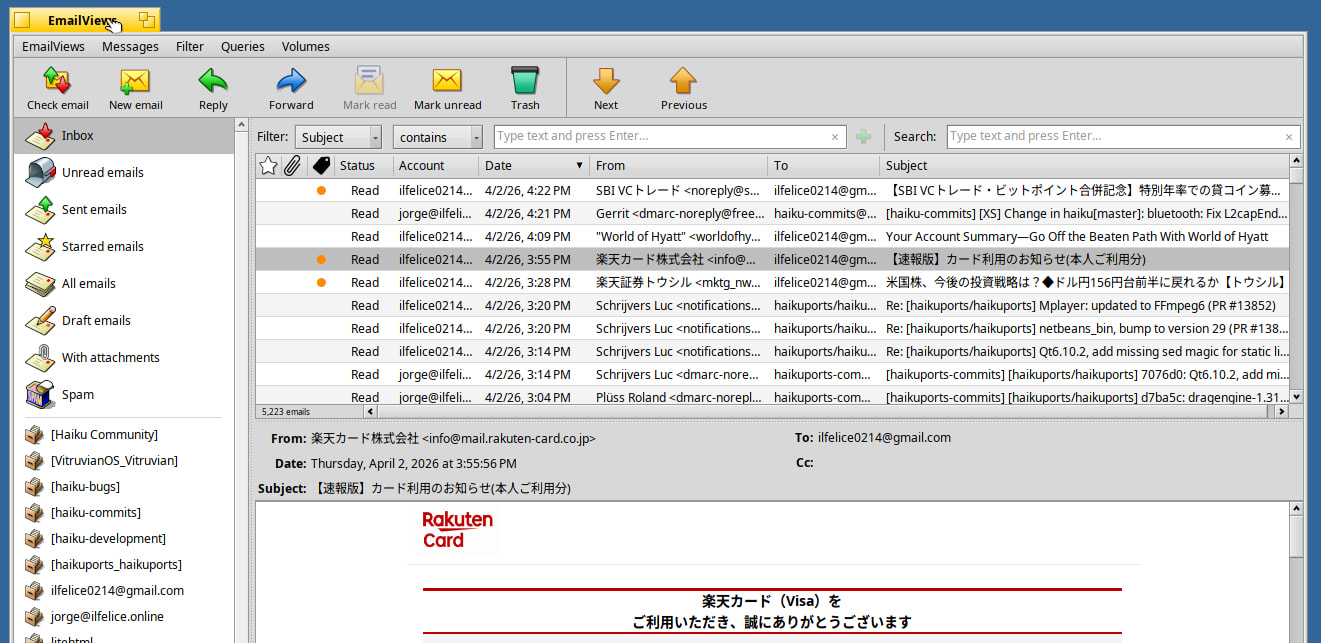
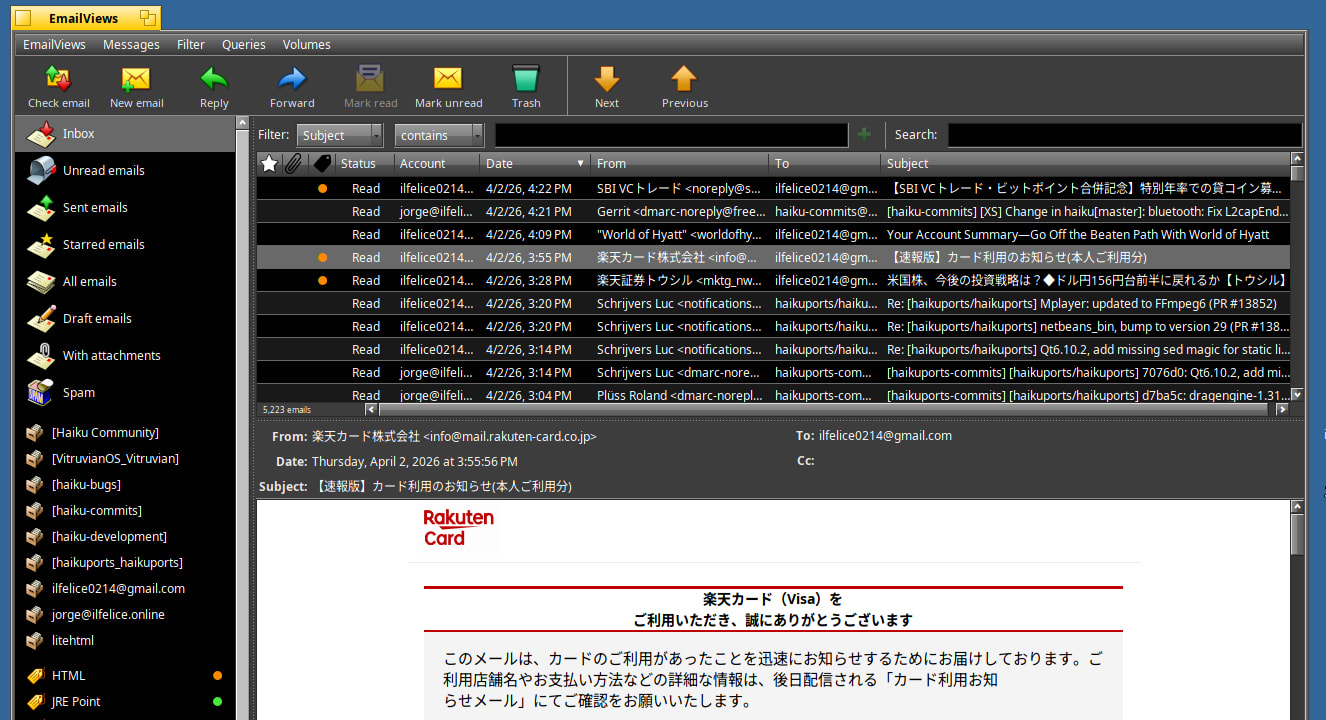
I followed your advise and swiched to tint_color() like in ColumnListView.cpp.
In dark theme mode:
I did keep the border, though. It makes the striping distinction more obvious.
Anyway, thank you for the feedback!
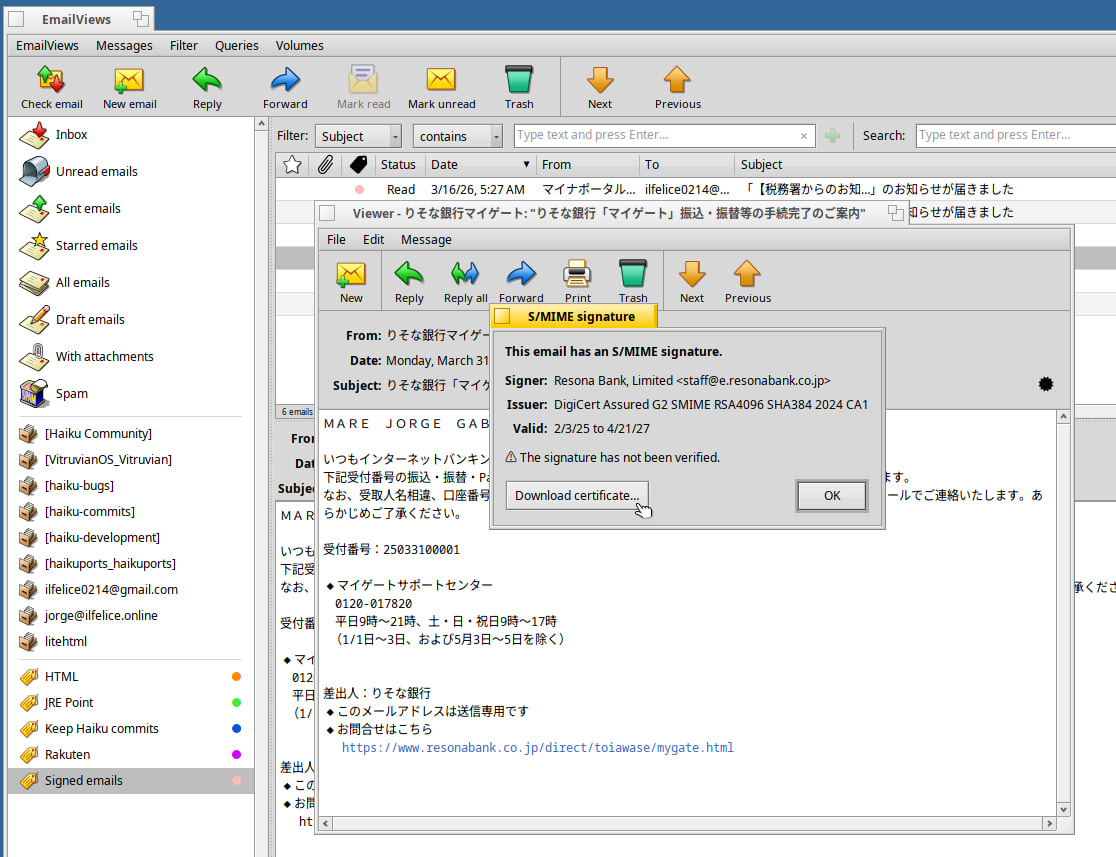
Added basic S/MIME signature detection. 
Edit: Changed screenshot to show signature download button in the S/MIME signature window.
Looks really good, love those icons. Does it support web auth. for gmail or outlook?
Hi @theokeist
Does it support web auth. for gmail or outlook?
Not at the moment. I have not done any research on this, so can’t tell if it will ever be implemented or not.
Thunderbird lets you choose which one you want to open.
That’s a feature I enjoy a lot.
Hi @smashIt
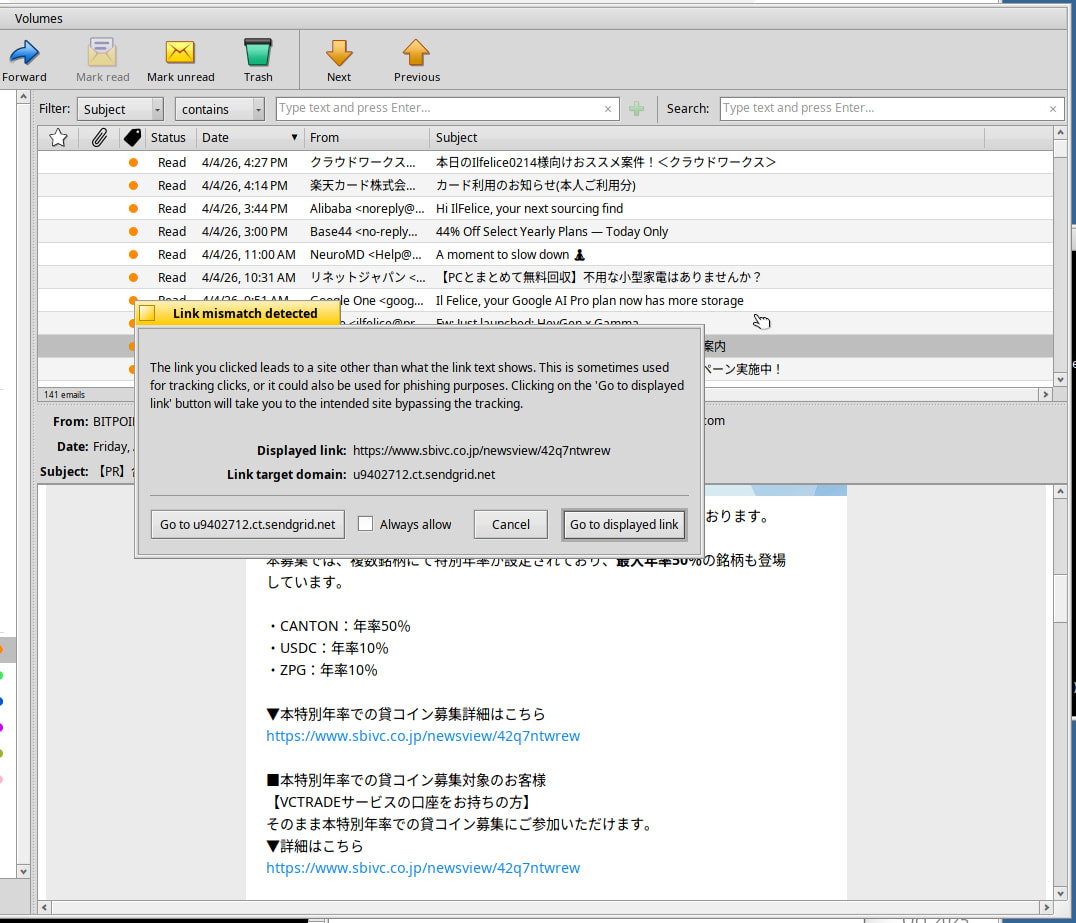
Yeah, I knew that, but I did not understand its usefulness. I must be missing something… What is the use case for such a button?
Privacy.
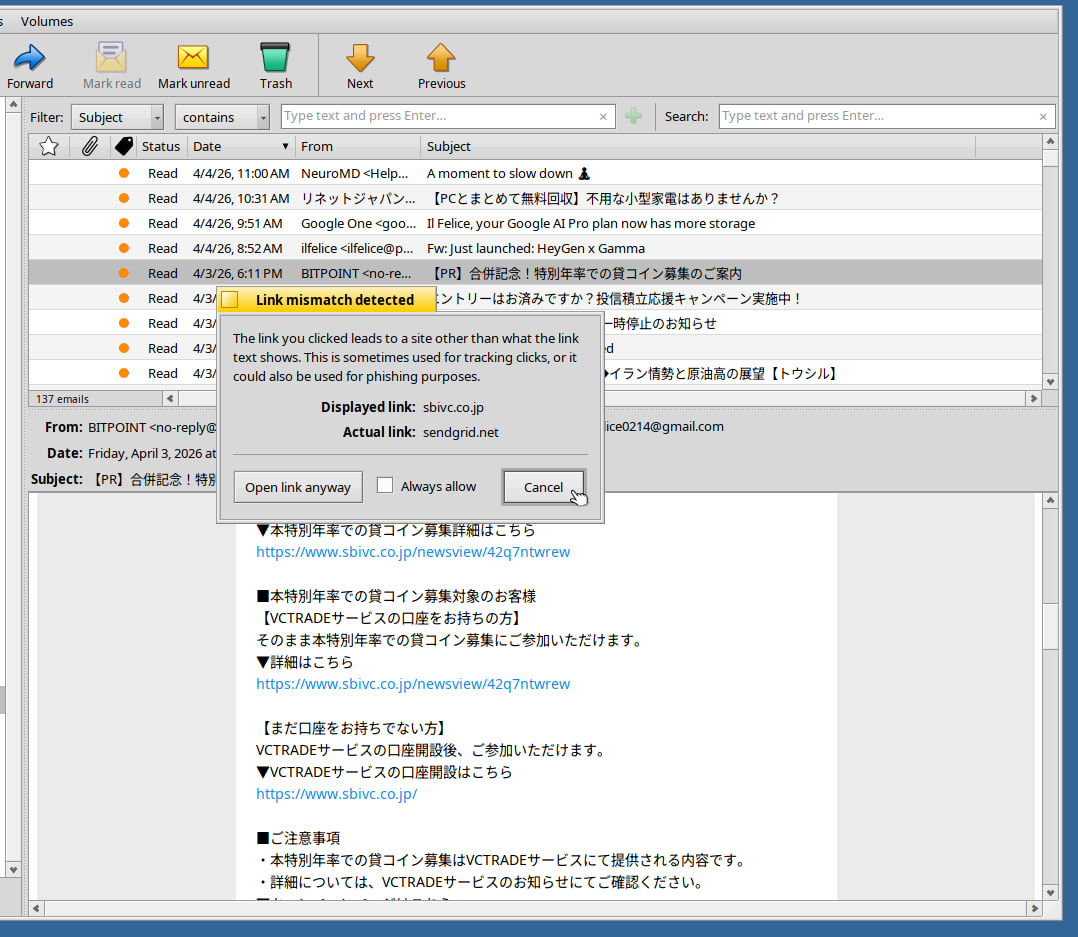
The displayed link is normaly the one you want, and the hidden one funnels you through some tracking-site.
Yes.
I think the “will take you to the intended site bypassing the tracking” is too much guessing, as both links can be actually not that genuine anyway, or not just to hide tracking purpose but a more scamming intention.
What matter is showing an alert warning the user of a potential security risk due to mismatch displayed vs actual links, stating that it could be a phishing attempt or just to hide privacy tracking intention, and let user decide.
I’m also for not proposing “always allow” option.
Because any case where the displayed link in an HTML mail is not the actual link should be considered as suspucious, just because someone made some effort to make the displayed link NOT actually linking to that link but another one. This is highly suspucious, and should always be a reason to warn the user. At best, it’s for tracking, but often it can turns into far more scam with higher consequences.
The default choice being the displayed link is the good choice, and making the most dangerous choice far away of the most secure choices is great design.
Maybe the title should be a bit less technical and a bit more semantically alarming. Something like “Link potential risk”, and the text starting by “The actual link you clicked mismatch the displayed link. Bla bla bla…”
The next security risk is when the link is behind an image, like a “Check delivery status” image button for instance. I think in such case a alert should also show up, displaying the actual link, asking for to confirm to open it.
tracking or phishing. The later being potentially even worse, and not for privacy concern but for the potential fraud activity, scamming, etc.
Hi @phoudoin
Thank you for the feedback!
Your points taken, especially as they relate to the fact that this warning pops up when links that show one URL but link to a different one are click on. Agreed that there are ulterior motives for doing this, either tracking or in the worst case phishing. So the wording should reflect that. Perhaps also it would help raise awareness if a warning icon were added.
By the way, I like the window title you proposed. I will use that if you don’t mind. 
With regards to the “Always allow” option, I am torn about this one. While I understand the risk you point to, there definitely are situations where the user can recognize the destination domain and trust it (I know I do), in which case the the constant nagging every time you click a link for this domain would be more of an annoyance than anything else. I will think about this.
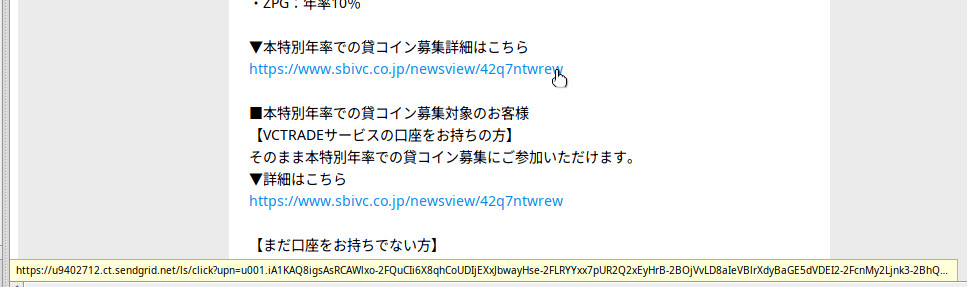
One feature that may be missed from the screenshots is that when you hover over a link in the HTML email preview, a status bar at the bottom of the viewport shows a status bar with the actual link.
This also serves as another way to verify whether the shown URL link actually leads to the displayed URL or not.
With regards to image links, this is out of scope at this point, but I will look into it in the future. I need to do more research (don’t even know if other email clients have that feature… Do they?).
Anyway, very useful input. Thank you!
I guess that when a project become too big, it’s harder to have a global vision.
Other mail clients also have this option of the real link in status bar but, next to the option to hide that same status bar. That’s crazy.
Hi @Starcrasher
Maybe it’s me, but I am having difficulty understanding what your point is. Can you be more specific as to what you think is wrong or how it (EmailViews) could be made better?
Thank you!
I didn’t knew about the actual link shown in tooltip on link hovering.
Maybe display a small warning icon when it mismatch the displayed link could improve the end user awarness.
Regarding the “always allow” option, I understand your point, which could make sense in some case indeed.
Sorry for the delay. I was about to answer but got a 404…
What is wrong, and that is also true for browsers, is that showing the real link is a security feature. Real link should always be visible, in a way or another, but on many projects they’re happy to hide the status bar without providing another way to see it. Actually, when the link is hidden behind an image that also the only way to see it. I think that mail apps and browsers are main entry points for system infections, fishing and scamming. Security there can’t be optional.
In the same spirit, did you think about the ability to scan attachments for viruses? Perhaps using clam like claws mail is doing?
Hi @Starcrasher
No problem! I did get that 404 too. 
What is wrong, and that is also true for browsers, is that showing the real link is a security feature. Real link should always be visible, in a way or another, but on many projects they’re happy to hide the status bar without providing another way to see it. Actually, when the link is hidden behind an image that also the only way to see it. I think that mail apps and browsers are main entry points for system infections, fishing and scamming. Security there can’t be optional.
I agree. That’s why in EmailViews there is no way to hide the link info bar. So I think we are on the safe side there.
Never thought of that. I guess it is theoretically possible for Haiku to be infected, but I don’t even know if there have been any Haiku virus reports yet. Will put this info down for future reference, though.
Anyway, thanks for clarifying!
Even if it’s higly unprobable that any virus scanning open source tools and databases may contains any Haiku virus detection rules due to the OS audience, being able to detect virus working on other, most used OS environment in mail attachment is still useful.
One could retains, then, to forward it or share this attachment with other people, helping to stop the virus spread.
Hi @phoudoin
This is an excellent point. I love the feedback I am getting. It’s very helpful!