does HP-t430 be haiku-box?
or similar thing?
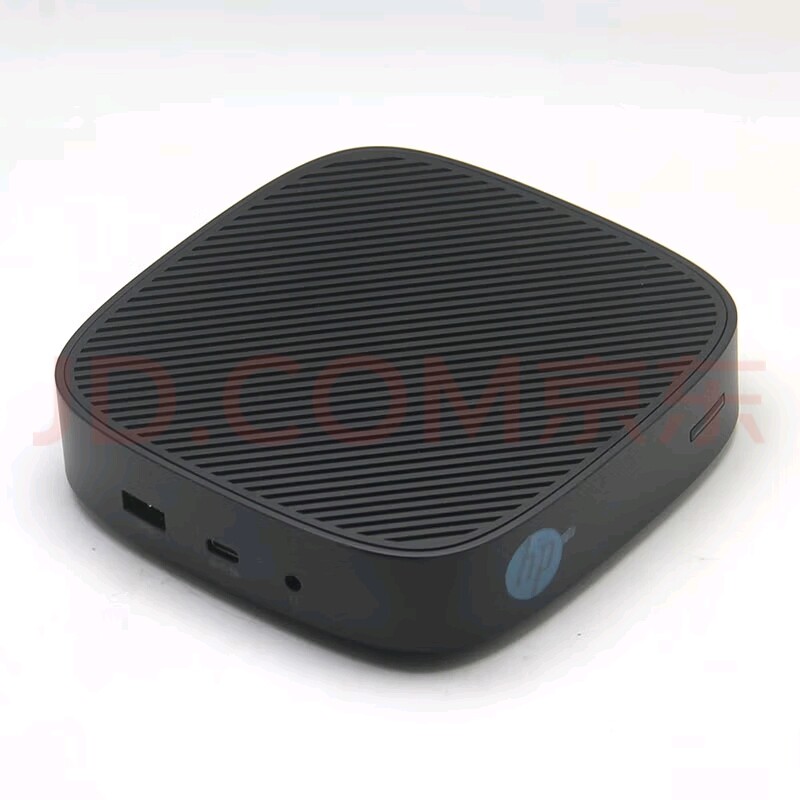
Intel N4000
DDR4L-1866 SDRAM 2Gb
disk 16Gb

I think a device to aspire to be a “Haiku Box” it should have all of its components with driver support. In addition, if required, “control panel” like software to control the hardware components if the Haiku preferences do not contain a native option for controlling that kind of hardware component.
After that, it would be nice to have it preinstalled with some more additional 3rd party native (as in “using Haiku APIs”) software to be more ready for normal user usage.
I don’t know exactly what parts does this device have, and how far is the driver support from Haiku side to say anything meaningful.
well, it’s the official word.
haiku may get all parts to work.
HP t430 Thin ClientThe versatile cloud-first device that’s intuitive for IT admins and usersOptimized for desktop virtualizationand cloud-based applications, theintuitive HP t430 Thin Client is easy forend users to understand and simplefor IT administrators to maintain.Refined from the inside outEverything from the user interface to the compact design and processing power delivers a modern computingexperience.Better connectedAlthough small in size, the HP t430 Thin Client is full of possibilities with USB-C™ for power and transfer of audioand data, a variety of video outputs, and Ethernet and Wi-Fi connections.
1Administration made easySimplify the complexity of setting up a virtual desktop or cloud device with a thin client pre-configured with yourchoice of the Linux®-based HP ThinPro or Windows 10 IoT Enterprise operating system and HP manageabilitysoftware.FeaturingWhether you choose the Linux® based HP ThinPro or Windows 10 IoT option, users will get an intuitive, naturalinterface and familiar navigation.Designed with a sleeker profile and built-in VESA mount, the HP t430 Thin Client can be mounted on the back of adisplay or placed discreetly on or under a desk or in a kiosk.Get more than enough performance for all your tasks with the latest-generation Intel® Celeron® processor withspeeds up to 2.8 GHz, DDR4 memory, solid-state storage, and support for a 4K display.Connect instantly with Citrix®, VMware®, Microsoft® RDP, P, and default web browsers right out of the box.Communicate and collaborate with support for Skype for Business® and Cisco VXME.Add your devices and displays and connect to your network with input/output ports that include USB-C™,DisplayPort™, HDMI, and LAN or optional Wi-Fi with integrated adapters and antennas.
1 Connect instantly with Citrix®, VMware®, Microsoft® RDP, P, and default web browsers right out of the box.Communicate and collaborate with support for Skype for Business® and Cisco VXME.Select the Linux®-based HP ThinPro or Windows 10 IoT Enterprise OS to drive your processing power, r, memory, andSSD and reliably run cloud applications or virtual desktops.Sometimes less is more. Each system comes with a simplified OS and essential applications for a fast and easyconfiguration and deployment.Built-in HP Device Manager software easily tracks, configures, and updates your devices. With HP Easy Shell, youcan customize the interface and level of protection to fit your needs.123with integrated adapters and antennas
1 1Data sheet | HP t430 Thin ClientHP t430 Thin Client Specifications TaTableAvailable Operating SystemsWindows 10 IoT Enterprise for Thin ClientsHP ThinProHP Smart Zero CoreBrowser Internet Explorer 11 (for models with Windows IoT Enterprise for Thin Clients); Mozilla Firefox 32Available Processors
Intel® Celeron® N4000 with Intel® UHD Graphics 600 (1.1 GHz base frequency, up to 2.6 GHz burst frequency, 4 MB L2 cache, 2 cores)
Itl® Cl® N4020 ith Itl® UHD Ghi600 (11 GHbft28 GHbt f4 MB L2 h2 )
1,9Intel® Celeron® N4020 with Intel® UHD Graphics 600 (1.1 GHz base frequency, up to 2.8 GHz burst frequency, 4 MB L2 cache, 2 cores)Maximum memory
4 GB DDR4 SDRAM
Transfer rates up tTransfer rates up to 2400 MT/T/s.Internal storage 16 GB up to 32 GB Flash memoryDisplay support Single or dual displays supported using one or two of the available video outputs.Available Graphics Intel® UHD Graphics 600Protocols
Citrix® HDX; Citrix® ICA; Microsoft RDP; Microsoft RFX; VMware Horizon® View™ through RDP/PCoIP,
(Ptlddt tititlld)P, and Blast Extreme(Protocols are dependent on operating system installed.)Audio Headphone/microphone mini-jack
4Ports and Connectors
Side: 1 headset connector; 1 USB 3.1 Gen 1; 1 USB Type-C™ (DisplayPort™ 1.2, USB 3.1, charging)
Bk1 DilPt™1 RJ452 USB 31 G11 HDMI tBack: 1 DisplayPort™; 1 RJ-45; 2 USB 3.1 Gen 1; 1 HDMI portAvailable Keyboards HP USB Slim Business Keyboard
5Available Pointing Devices HP USB Optical Mouse
5Communications
Integrated Realtek RTL8111HSH-CG GbE
Itl® WilAC 9260 80211/b///
3Intel® Wireless-AC 9260 802.11a/b/g/n/ac (2x2) Wi-Fi® and Bluetooth® 5 combo, non-vPro®Software HP Device Manager; HP Easy Shell; HP Smart Zero Client Services; HP ThinState; HP ThinUpdate
8Power 45 W, worldwide auto-sensing, 100-240 VAC, 50-60 Hz, energy saving automatic power-down, surge tolerant external adapterDimensions 5.3 x 5.3 x 1.3 in; 13.5 x 13.5 x 3.2 cmWeight 1.63 lb; 0.74 kg (Weight will vary depending on configuration.)Energy efficiency compliance ENERGY STA
6TAR® certified and EPEATAT® Gold registeredSustainable impact specifications Low halogen
7Warranty
3 year (3-3-0) limited warranty and service offering includes 3 year of unit exchange with no on-site repair. Certain restrictions and
exclusions applyexclusions apply.1,924553867Data sheet | HP t430 Thin ClientHP t430 Thin ClientMessaging FootnotesAll wireless options are sold separately or as optional features. For all 802.11 wireless, wireless access point and Internet service is required and is not included. Availability of public wireless access points is limited.Display and mounting hardware sold separately.Sold as a configurable option.TeTechnical Specifications FootnotesMulticore is designed to improve performance of certain software products. Not all customers or software applications will necessarily benefit from use of this technology. Performance and clock frequency will vary depending on applicationworkload and your hardware and software configurations. Intel’s numbering, branding and/or naming is not a measurement of higher performance.Graphics chipset uses part of the total system memory (SDRAM) for graphics performance. System memory dedicated to graphics performance is not available for other use by other programs.Wireless access point and Internet service required and sold separately. Availability of public wireless access points limited. The specifications for the 802.11ac WLAN are draft specifications and are not final. If the final specifications differfrom the draft specifications, it may affect the ability of the notebook to communicate with other 802.11ac WLAN devices.This product does not include an internal PC speaker. All audio must be produced using peripheral devices, i.e. headsets, headphones, speakers, connected to the system through the 3.5 mm headset jack.Optional or add-on feature.EPEATAT® registered where applicable. EPEAT AT registration varies by country. See http://www.epeat.net for registration status by country. Search keyword generator on HP’s 3rd party option store for solar generator accessories atwww.hp.com/go/options.External power supplies, power cords, cables and peripherals are not low halogen. Service parts obtained after purchase may not be low halogen.HP ThinUpdate available as an add-on only for configurations using Windows Embedded operating systems.Windows configurations with N4020 are compatible with Win 10 IoT 64 Enterprise LTLTSC 2019
Where did you get that text from? without any formatting it looked like spam at first. I guess you copied this from a website, but what is it supposed to tell us?
My take on the ever recurring HaikuBox topic:
There will be no “HaikuBox” in the same way there was a BeBox. It’s completely against the nature of an open source OS and community with very diverse computing needs.
Any computer that runs Haiku reasonalbly well is a HaikuBox.
And even the BeBox as a commercial product was arguably a failure. Not in a technical sense, but business wise. That’s why it was discontinued pretty quickly.
Even in a technical sense, in a way.
At the time Be started working, the “cool” machines around were things like the Amiga, where the OS and hardware worked together and the hardware was specifically designed for that purpose.
The first generation BeBox (the one based on the Hobbit CPU) planned to do something somewhat similar but using DSPs (digital signal processors). That would have been somewhat similar to the Atari Falcon. But, it turns out this approach would not work so well, because a DSP runs well only if you load it with specifically hand-tuned code for a given application. Great for a game console or a similar device where one application has entire control of the system. But not so much for a multitasking operating system running general purpose applications. And this wasn’t even discovered at that time: the Xerox Alto, for example, had siilar problems with its reconfigurable CPU microcode, 15 years earlier.
So, the second generation Be Box removed all of that, and when it was done, it was just a regular machine. Sure, it had a lot of IOs, and more interestingliy it had dual CPUs. But that only increased the cost, and in the end wasn’t really essential to getting the OS running well (as shown by later iterations of BeOS not needing such hardware). So, the hardware surely cost a lot more than reasonable to produce, it would sell at a too high retail price, and Be decided to become a software-only company. Thigs might have been very different if their first generation of hardware aimed at being a more low-cost PowerPC machine? Hard to say if it would be different in a good or a bad way, however.
Not all users are very good english speakers here. Communication is difficult sometimes. Accusing them of looking like spam does not help. Please keep the community welcoming to all Haiku users 
looked like ment that I thought it was spam at first, but then reconsidered. It was not an accusation. Regardless I don’t understand what the post is about, hence my question.
a good answer.
Let’s have a 3d-printed ATX/mATX BeBox styled case for everyone to install their motherboards in. Now it seems that only Rpi factor version exists.
It doesn’t have to be the exact way as it was BeBox before. It could just be a “spec” of how can a Haiku centric computer could be built, or a product with hardware 100% compatible with Haiku, and with Haiku preinstalled (if someone wants to take the risk of creating such product and market it). Having a box with Haiku preinstalled is a good way to boost the OS share.
And why creating that product could be against open source spirit?
I like that idea, but someone would have to be in charge of keeping it up to date as technology and Haiku move on. Just doing it once-off would be meaningless.