I’m moving away from Google and chose Mailbox.org as new provider.
Aside: Seems to be quite a nice service for 3€/month (30€/year) with mail, calender, contacts, cloud. The mail and calender web interface works nicely in Web+, their online office suite (word processor, spreadsheet etc.) to a varying degree, faster with Epiphany. Haven’t used the suite much at all. I prefer a local app exchanging files via WebDav - “cadaver” on Haiku works nicely for that (anyone up for a WebDav FS?  )
)
Back to my question:
I can set up a number of aliases at Mailbox.org. Is there a way to conveniently choose which alias to use when sending mail from Haiku?
Only way I found yet is to change “Real name” and “Return address” in the E-Mail preferences, close the preferences (an “Apply” is not enough!), compose and send my mail, and change those settings back.
Is there a better way?
2 Likes
Not really, sorry.
There would have to be a way to change the from header, maybe with a field. (and return adress and real name etc)
It’s a bit unfortunate because my mail server allows infinite adressed I could send from, with the smtp credentials I have configured now.
Webdav is a https based filesystem, what about nfs? 
Wouldn’t creating multiple accounts in the Mail app work?
Yes, kinda. But this is more difficult than the workaround already described and undoable with infinite aliases, it would also make mail_darmon download copied of all emails severall times.
I don’t think Mailbox.org’s cloud supports that.
WRT my alias problem, I guess I’ll hack a little script to switch between two sets of settings files in /boot/home/config/settings/Mail/accounts
Would it make sense to create an enhancement ticket to add “Profiles” or “Aliases” to the E-Mail preferences’ “Account settings”:
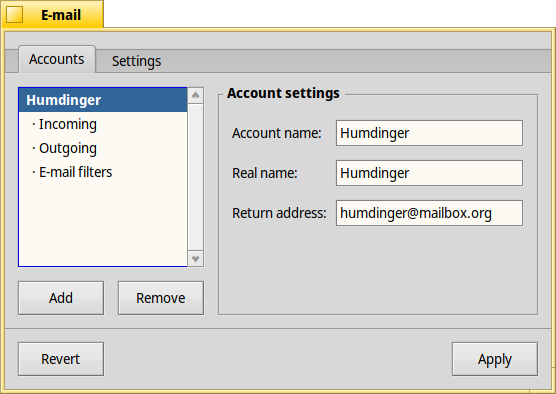
Maybe a pop-up menu at the top similar to e.g. Terminal’s colour schemes?
2 Likes
Sure.
I’d suggest a From: field to the email settings which is editable, has the same dropdown UI as the other fields and only appears when (atleast one) alias is configured.
As a bonus maybe it remembering if you used an alias once, and a setting to match the sender adress to the one it was received for. : )
It looks like there is a FUSE one: davfs2 - Summary [Savannah] that should be possible to get working with uerlandfs
2 Likes
Getting it build would be one thing, getting it to interact with userlandfs is another one and out of my skills. 
2 Likes
You can have a look at the sshfs recipe for an example. It is mostly about linking with -luserlandfs_fuse instead of -lfuse, I think?
Thanks on the pointer, will try to see if I can give it a look today, first openldap.
Problems:
- Add Haiku to supported OS’s (done)
- Fix not having sys/sysctl.h (done)
- Not fixed, Haiku doesn’t have fstab (didn’t find any fixes for that on haikuports)
1 Like
Resurrecting this thread as @ilfelice ‘s EmailViews may be an indication that more people give Haiku’s mail system a try.
As I mentioned further up, I created a little script to switch email accounts. Have been using it ever since and it’s a nice stop-gap until Haiku’s mail system learns how to do it properly.
This is how it’s done:
- Create your first account as usual (referred to here as “Humdinger”).
- Close the E-Mail preferences.
- Go to
/boot/home/config/settings/Mail and rename the folder “accounts” to “accounts_other”.
- Open the E-Mail preferences again - as you’ve renamed the accounts folder, the preference panel is empty - and create your second account (referred to here as “RealName”).
- Close the E-Mail preferences.
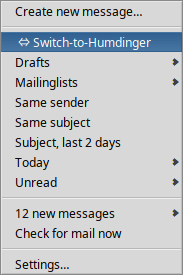
I usually use my “Humdinger” account, but when I want to write a mail from my “RealName” account, I invoke a ‘switching’ menu item from the context menu of the mailbox icon in the Deskbar before starting the Mail application. For that, I put a link to the script below into /boot/home/config/settings/Mail/Menu Links/ ⇔ Switch-to-RealName (I start the filename with a space so the entry appears first in the context menu):
The script:
#!/bin/sh

# Switches between two email account sets to use two
# aliases to the same email acount.

# Quit E-Mail preferences should they be running
quit application/x-vnd.Haiku-Mail
cd /boot/home/config/settings/Mail

mv accounts accounts_temp
mv accounts_other accounts
mv accounts_temp accounts_other

cd "Menu Links"

if [ -f " ⇔ Switch-to-RealName" ] ; then
	mv " ⇔ Switch-to-RealName" " ⇔ Switch-to-Humdinger"
else
	mv " ⇔ Switch-to-Humdinger" " ⇔ Switch-to-RealName"
fi
As you can see, it’s really just a simple switching of directories, accounts ↔ accounts_other.
2 Likes