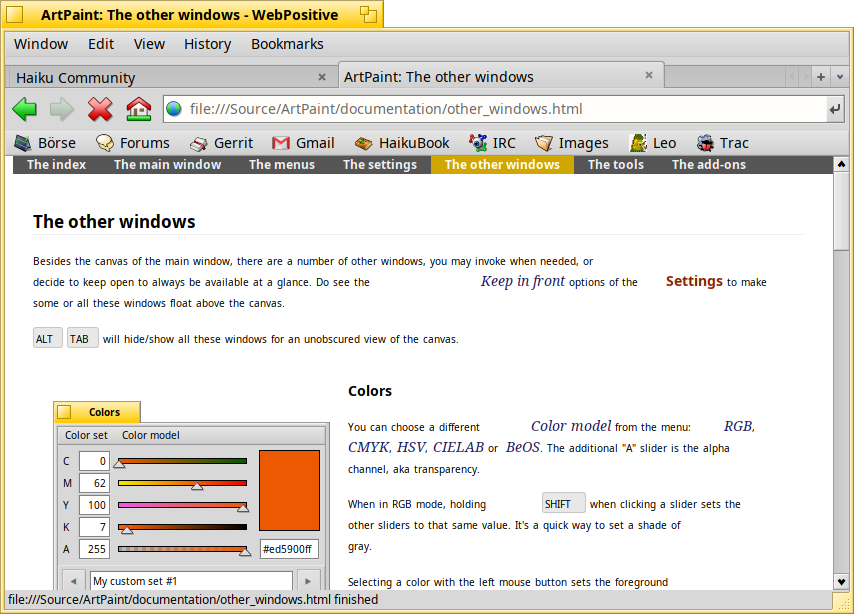
There’s something weird going on with one page of the ArtPaint documentation. It only happens when viewed with WebPositive. First off, can people reproduce this?
Open the ArtPaint user manual, and click through the pages e.g. with the navigation bar at the top. All is well until you reach “The other windows”. Here the text size is smaller and there’s some space in front of hyperlinks and special styling like menus, keys, etc. Sometimes you’ll have zoom in/out the page in Web+ (ALT+mousewheel).
When you return to one of the other pages, the font is still smaller, but at least the spaces are gone. So there appears to be some WebKit rendering issue, obviously. But what in the HTML code triggers it on that “Other Windows” page?
Here are the docs if you want to compare the code:
An old version of the UTF-8 wikipedia article also triggered this. Back then, I reduced it to using style font-variant-caps:all-small-caps. Didn’t have any luck looking at the source code, maybe it’s time to revisit.
There’s no all-small-caps in ArtPaint docs, but there is small-caps for the key class in _doc.css. Removing that avoids the problem, but it also changes the visuals, of course. And there’s more to the story, as other pages also use that class without triggering the issue. And it’s triggered when the text includes lowercase letters. So manually changing “Cursor”, “PageUp” and “PageDown” to all uppercase avoids the issue until we have a fix.
The funny thing is, I knew about this rendering bug and have adjusted the user guide a while back to only use all-caps for key combos. I’ve replaced all lowercase keys in this ArtPaint doc page, but must’ve missed one… Works now.