PureWriter & PureMail for Haiku

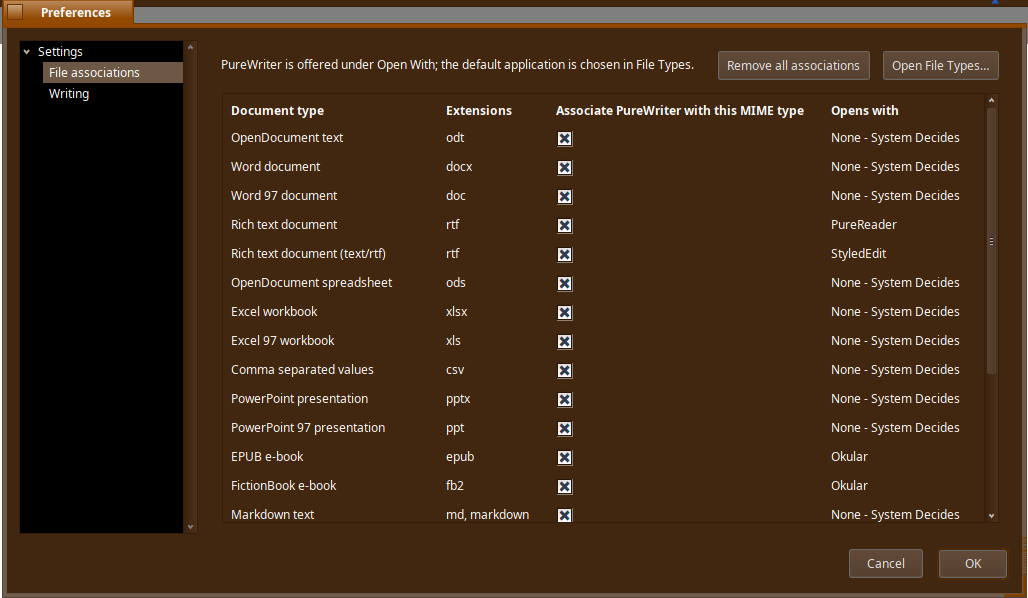
nephele : here are the amended application association rules, I hope this is a good compromise. Respects user choices and still allows to get rid of PureWriter associations (or register with the app) with mime-types at will at any point in time.

No Haiku mime-type sniffing rules are touched or changed.

PureWriter is never the default for any type. On first start it adds itself only to Open With for every supported format, including “All text files” (any text file).

Adding or removing an association never sets or clears a default.

Defaults left by older builds: where an earlier version had made PureWriter the default for a type, a one-time pass clears that, so the System decides again.

Markdown, LyX and FictionBook keep their own mime-subtypes. Only the file one opens is set to that type, and the type itself gets no default.

Preferences: the default/other/PureWriter dropdowns are gone. Each row now has a checkbox for the association and a label with the current default app, or “None - System Decides”. The top row has an “Associate all” / “Remove all associations” button next to the File Types button.

I expect nephele to find something to criticize constructively, so code / binary will be there on the next commit (maybe in the evening). just preempting :slight_smile:

Edit: Haiku treats dotx as Word document in mime-types. .ott, .dotx .dotm .dot are all templates, so deserve different mime-type by default (PureWriter will not correct anything, it will just use content sniffing anyway)

1 Like

Renamed & recategorized to go with @pamen 's desire to only have one thread for the two apps.

https://discuss.haiku-os.org/t/open-source-haiku-native-mail-calendar-contacts-document-viewer-application/20056/37

Hi @pamen, before anything else: thank you for your effort developing applications for Haiku! :+1: I was following both threads about PureWriter and PureEmail and they look really promising!

Just a quick question: do you know if is possible to compile the PureWriter or PureEmail for Haiku 32 bit version?

Thanks!!! :slight_smile:

1 Like

Not yet,
in principle it should be fine (not with GCC2 though).
fun things like 32 bit (or ARM or PPC) come when the engine passes main tests, which will take between a month and 3 months. There is no use of incomplete application which runs on all platforms in my opinion.

If following premise is fulfilled, then maybe yes:

display / edit word documents exactly like word - pages, text flow, objects, frames, graphics etc. (better than LibreOffice) and display and edit LibreOffice documents like LibreOffice.

Seems simple but it a a huge work. Features and portability are simple, especially if this app uses only few libs.

3 Likes

OK, the situation for 32 bit bit in some detail:

Generally it is perfectly fine for 32 Bit (after fixing hard-coded Makefile values) but

One but serious issue, I have to think how to resolve:

Some crazy nested complex HTML or XML (so Word and Libre Office and …) cause stack overflows in the window-thread stack.
This is solved by obviously capping the stack / recursion (which will inevitably break such nasty document, but not crash the application) but also by utilizing private implementation of big stack (BigStack.cpp) - this works fine on 64 bit, but cannot be used on 32 bit as far as I understand from other operating systems. Maybe I’m wrong.

Maybe someone here has a good idea ???

1 Like

Edit: actually also easy - just I don’t remember the x86 assembler, need to refresh/

1 Like

I will try to change it maybe by the end of this week. so one can compile on 32 Bit. I don’t have Haiku 32 bit so need to spin at least a VM to test it. And testing takes a bit of time.

1 Like

32 Bit - this is more work, an example would be 32 bit dates which cannot be used directly due to 2038 limit. Or floating point math for layout/pagination (hopefully compiler switches for sse2 will be enough). I will report when I read more and there is something to report. Thanks for the question un_spacyar !

1 Like

I finally gave both PureWriter and PureMail a try and my experience is quite positive.
Both have a nice native GUI and Haiku-like look and feel,and support for dark mode is also excellent.
I agree with previous replies that some icons in PureMail don’t look Haiku-like,but that’s a minor thing.
I also believe that your code is handwritten by looking at some of the source code files and checking a small number of samples with some AI Detector tools.
Of course I couldn’t deeply inspect everything (wow,that codebase is huge!).
Building the code worked without major issues,but a few build errors could have been avoided by mentioning required packages in the README.
I had to install libharu_devel and openjpeg_devel,maybe some others that I already had installed are also required.

4 Likes

This is very much appreciated nipos

Even if I judge apps usually first by stability and functionality, visuals are super easy, if a graphic designer does the images. UI logic is harder.

PureMail is my daily client for work , I use Writer as well to discover bugs while actually reading and writing documents at work - for me that shows me the threshold when an app is personally usable -PureMail passes that, Writer does not - mostly because of nuances in formatting (on the bright side LibreOffice is not always better at docx - I compare docx with word on windows, odt on Haiku / LibreOffice, KDE suite is out of question as it lacks a lot).

Icons are just svgs and at some point there must be a switch to different sets. I’ve never heard about an icon set that pleases every taste.

It is not huge. At work that would be less than half of a smaller module of our business app with 14 modules.

Thank you so much for trying!

edit: could have been avoided by mentioning required packages in the README

Will put in my todo.

4 Likes

nipos this will work, but the devil is always in the detail (said before - dates, possible buffer overruns, float calculations) it will be committed first when tested with all the other invisible improvements (document fidelity - a lot to test and a lot of small changes). Proof of concept only (only big stack implementation and some / long changes):

3 Likes

You probably wanted to inform @un_spacyar about the 32bit improvements,not me.

1 Like

Ooopsie. Apologies. Yup 32 bit question was from un_spacyar.
It is late where I am and it is late who I am at the same time.
And the topic is in slooow mode as well.

3 Likes

Wow, you put so much work into it since I last checked! Thank you, it is much appreciated. PureWriter is my new favourite thing on Haiku recently. Now that Philippe also fixed the IPP transfer driver, I can finally create and print pretty documents seamlessly from Haiku. And it is so nice to know that Haiku can now boast the superior version of your document engine among the other platforms. I have tested now both applications and hope you don’t mind if I came with a list of my newly discovered bugs.

1.) In the Edit Style window, if I try to edit a style which has space in its name, it is apparently replaced with some internal representation, for example “Heading 1” becomes “Heading_20_1” in an ODT or “Heading1” in a Word document. The Based on list is also populated with items in this format, and when I click Apply, the style gets renamed to this internal name, and sometimes, I suspect this breaks inheritance rules, and as a result the heading text becomes ridiculously large (98 pt, for example).

2.) There are a few issues around text selection:
2.a.) When text grid is set to lines and characters, the selection background doesn’t follow where the letters actually appear on the screen.

2.b.) Selection of right-to-left text looks wrong, marking the letters, within a word, leftward from the caret position, instead of the letters rightward from the caret position. For example, if the caret is between the letters 6 and 7 in the second word, the selection looks like: [987]65_[4321] rather than 987[65_4321]. Also, selecting RTL text with the mouse is not possible, apart from the first (rightmost) word. The algorithm probably stops at word1 when trying to translate click coordinates to word and letter position, assuming that consequent words must occupy a higher horizontal position, which is not the case for RTL text.

2.c.) Rendering of selected text doesn’t look correct. More specifically, it seems that once the selection background is drawn, the text is drawn over it twice: first using the original text colour, then once again with white. This makes the edges of characters fuzzy and selected text hard to read.

2.d.) Not a bug per se, but I noticed that PureMail uses the selected list item background colour for selection, while PureWriter uses this hard-coded blue colour. I don’t know which one is preferable. StyledEdit apparently uses inverted background, Pe and Genio use their own custom colours, so there doesn’t seem to be a right way to do it. In my opinion it would be nice to take the colour from Haiku system colours, but I’m not sure which one because a “selected document text” entry doesn’t exist.

2.e.) This is a weird one but when the zoom level is not exactly 100%, some text elements (letters, words) change their position depending on whether any text is selected or not. Especially letters of words near a soft-hyphen or NBSP. As if the width of these special characters were calculated differently when some text is selected.

3.) It is still possible to enter multiple consecutive spaces even with the prohibiting option enabled if we keep adding one space at a time but alternatively once after the last letter of the previous word, then another before the first letter of the next word. The extra spaces are not visible, they are not saved in the document or copied to the clipboard, but one knows they are there because it takes pressing the arrow key several times to advance to the next word.

4.) In the Page Properties window, the header and footer border settings seem to interfere with the page border settings, so changing for example the header’s bottom border turns on a border around the whole page, and if I try to remove that page border, it makes the header have a border all around it. At this point it starts to behave so erratically, I can’t figure how to get rid of all the borders anymore.

5.) Some fonts do not display properly. I think the problem is that the font face selector menu automatically trims font names of certain suffixes, such as Bold, Thin, Italic, etc. However, when a font doesn’t have a regular variant, the application can’t display the selected font because it doesn’t exist. For example Zeit font only has Zeit Light variant on my system, and the program lets me select Zeit font, but there is no way in the program to specifically select Zeit Light, and it ends up using the system default fall-back font instead.

6.) The caret keeps blinking even in an inactive window. I think you should hide the caret when the window is not active. This is what BTextView does and I think it is good practice because it has happened to me a few times that I tried to type in PureWriter because I saw the blinking caret, but turned out it wasn’t even the active window.

7.) It is possible to drop colours from other applications into PoorWriter’s custom colour selector, but if we do, the editable values in the dialog do not automatically change to reflect the new colour.

8.) Noticed something unusual about scrollbar behaviour. Mostly in the style panel on the side bar. Almost looks like the thumb position is only fetched periodically, and the control doesn’t react to every scroll message, so if we move the thumb to the top too quickly, the document (list) doesn’t follow all the way to the start but gets stuck at whatever position it last saw the scrollbar thumb at.

9.) The last one I noticed in PureMail. Rounded rectangles are rendered incorrectly if the provided corner radius is too large. The radius should be limited to half of the shorter dimension of the rectangle before rendering.

I really hope the list is not too overwhelming and won’t feel like nitpicking.
5 Likes

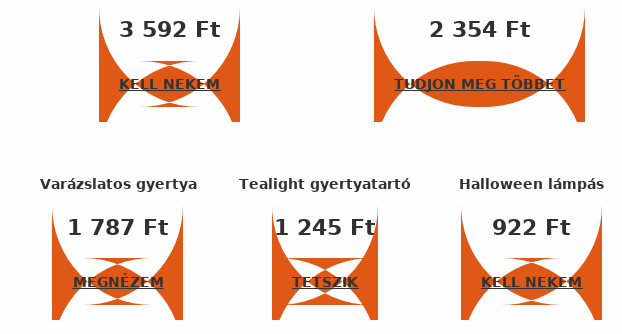
The list is perfect apart from Hungarian remarks in the image, which I do not understand (even if “Lengyel, magyar – két jó barát, együtt harcol, s issza borát” :-))

I know about 3/10 out of them, but did not pay attention to 7/10 so this is very much appreciated.
I will reply later to some, which are by design.

Thank you k32n13

1 Like

Thank You. :poland: :heart: :hungary:
Never mind the Hungarian text, it is just an online shop trying to sell me useless gadgets. I suspect it was machine-translated, so I don’t fully understand it either. Nonetheless, their spam helped us discover this glitch, so thank you spammers, too, I guess.

Have a pleasant one.

Full response, big thanks, as automated testing plus one-person reviews and hand-driven-tests are never enough.

Just to put it in a perspective: while code is written by hand, a lot of tests in PureMail are by Claude, according to a 18 page document with exact specifications for testing and reporting, this results by now in 18,780 “harness” test after every compilation. This obviously fails sometimes (regressions), so it never replaces human review (pity, wish it would).
Every week a corpus of 140K+ emails (just my mailboxes, so data is biased) + 17K documents is compared via scripts, simple image comparison plus LLM written C++ tests:
around ~4000 - 5000 out of 17K documents fail to pass currently. I have to spot-review those manually, decide which are real failures and which are simply different and why(so open in 3 programs on Haiku and Windows, check all pages) … Then adjust the corpus or the methodology for next testing batch or adjust the tests if a pattern emerges.
This is the slowest part of the work. Writing code is mostly easy, making any app that actually does the job correctly, smoothly, fast and relatively bug free is the actual job and one needs to be a cross between an accountant, auditor, security expert, business consultant, support guy, multiple personality (yes for testing from different points of view) and finally a psychologist to understand own massive biases and manage mentally with making 100 mistakes a day.

**** Your Tests ****

1.) edit a style which has space in its name - this is ODT internal name handling, I will see how to fix it for the UI and be consistent with Word and OO (which usually spells some trouble).

2.) text selection - this one is fixed in dev, will be pushed end of weeek (selection drawing text outlines, especially on comment selections)
2.a.) When text grid is set to lines and characters, the selection background doesn’t follow where the letters actually appear on the screen. to be fixed.

2.b.) Selection of right-to-left text - known (I studied Farsi not Arabic, you are still completely right on all points, I left it out to first work on document fidelity)

2.c.) Rendering of selected text doesn’t look correct. Known, fixed in dev already.

2.d.) Not a bug per se, selected list item background colour is fixed - I will postpone it for now, there is no dark mode in the document itself (as opposed to PureMail HTML display), so using Haiku selection color will not work in dark mode with light colored document background.

2.e.) some text elements (letters, words) change their position depending on whether any text is selected or not. - known, drawing issue under selection, does not affect the document, but annoying indeed.

3.) It is still possible to enter multiple consecutive spaces. My laziness shows - this was easier for the renderer than true space / enter block, put on the list for a non-lay day.

4.) the header and footer border settings seem to interfere with the page border settings - thanks, will check and fix.

5.) Some fonts do not display properly (no bold version substitutes wrongly). - This probably is a bit more work, font substitution is not an exact science, give me a day or two.

6.) The caret keeps blinking even in an inactive window. - thanks, correct, the timer ticks are not guarded by focus discovery indeed. TBD

7.) drop colours from other applications do not change values. Thanks. TBD.

8.) Noticed something unusual about scrollbar behaviour. Thanks, TDB.

9.) Noticed in PureMail (Rounded rectangles are rendered incorrectly). - this affects both, document surface is the same, thank for noticing, also HUngarian should be sensible and syntactically correct, not LLM - generated, I will see if that is also posisble :slight_smile:

1 Like

k32n13 and un_spacyar

All this will take more than few days.
Additionally I found a Gutenberg eBook example in my corpus (“Harrods_for_Everything.epub” - very interesting one) with 10,197 pages and enough images to expand to 3.8GB in memory - that means I have to rewrite parts of document handling (especially for 32 Bit) to a scrolling ram/file window over big documents like this, to be able to handle those without using up all the RAM. And at the same time not to screw up performance for normal documents, which is good so far.
Similar to early Photoshop / PhotoStyler if anyone remembers that, which could open a gigabyte image on a machine with 250MB RAM.

This takes time, quiet and thinking. So I’m off this place for a while, back when these 10 fixes and the huge document issues are solved.
Have a good Weekend ahead!

4 Likes

Just another wish, regarding saving the size and position of windows.
I like not to drag the windows always again if I reuse a program.
If the positions and size are the same after reopening makes work much faster and easier.

I recognized, that the main windows save/remember their last position, some sub-windows, not.
PureMail works perfect, not so PureWriter in this field. The preferences window is centered by opening it. Would be great if it would work like PureMail here.

Just a question, I am not aware about: Is it possible at all, to remember the window-tab its last position if horizontal moved?
So I could arrange a tab-view folder like view.

One thing I noticed, when editing a picture in PureWriter:
If you edit a picture the changes are only in preview visible, first.
After you deselect the picture in the canvas/paper the change will be fully visible/seen.
I just was wondering why not much happened if changed some values in the preview. But now, I know, no problem, so!

Btw: I like the visual effect when you change the language in PureWriter.

Thank you.

1 Like

Hi brunobastardi
I do not fully understand the above, can you elaborate - do you want to open several document at once and save which tab shows where???

As for window position saving - PureWriter is very BETA - this is on the Todo list, like around 25 other things.

1 Like