Linux or haiku? Test/survey

Right now if you need ____ program to do x, y or z and you can’t live without it? Or you want access to a, b or c AAA games or …

Right now there is a limited number of programs that are available to use on Haiku. Yes, there are programs but not a hundred thousand of them or even a number in the hundreds which is what I’m saying. So your choices on what you can do on Haiku is limited.

The question is, does Haiku have the programs that do what you want to do and you don’t care about brand names but just programs that do what you want them to do? Then Haiku could very well be THE perfect OS for you.

However, if there is anything that Haiku doesn’t have that you feel that you need then most likely, at least for now, Haiku isn’t for you.

But we can hope and pray that people are working on the programs that you and maybe I will be very happy to use that will be THE program that is missing from our lives and now we can live full time in Haiku land with no more needs to ever use another OS. Then Haiku could be the OS for you.

So … does that answer your question?

Or to put it another way, I LOVE how fast and secure Haiku is. Part of the Security is the lack of number of people using it so there isn’t much of a reason for bad people to create programs to try to steal our personal information and rob us. They are working on that so that is good.

I also love how Haiku looks. I hope some day that the (excuse my brain) menu at the top of each window can eventually stay where we put it AND have options where you can tell it to automatically fit between or at one end or the other of all of the menus on the other windows that you have connected together (hint, hint, hint to the developers of Haiku).

I was a programmer for 40 years but that was with a different compiler so it will take me time to be able to write programs in Haiku but I have plans to make tools that will make my life more enjoyable with Haiku. How complicated those programs will be I don’t know.

I’m also moving from MacOS to Arca Noae’s version of OS/2 ( https://www.arcanoae.com/ ) for my main OS until or maybe when Haiku has everything that I want or need.

However, as an OS to run retro DOS and Win 3.1 games I can’t find a better OS (not even FreeDOS) to run retro games (because FreeDOS can’t run Win 3.1 games) than OS/2 because you can set each and every DOS or Win 3.1 session’s memory settings. It AMAZING how much faster a DOS or Win 3.1 game will run by changing this or that or those memory settings in OS/2 until you get the perfect speed on your PC and then … well a grin that almost breaks your face.

Sure the graphics aren’t as good but there are games that existed back then where there are no games like it now because everything is always about connecting people together. Well for some games I DON’T WANT to compete against anyone else. Take DOOM for instance. It’s a single player game and I LOVE that. And the graphics aren’t great but hey, it is FUN! And yes, I used to play against other people in DOOM (rocket blast jumping physics works so that you can jump up into places that you would NEVER get to otherwise) and until they know to look for you there, you can peck them off and then move to another place they aren’t expecting and so on. HUGE SMILE.

Anyway, whether or not it is Linux or Haiku that is best for you? It depends on what is best for YOU. But speed? Haiku has Linux beat by a LOOOOOOOOOOOOOOONG shot. Haiku can do things that Linux can’t do. How many videos can Linux run at a time? Haiku can run HUNDREDS at a time and if the sound driver is good, you can rapidly click from one video to the other and the audio never skips but quickly jumps to the video that you clicked on with absolutely amazing speed.

Is that something that people normally do? No. But it shows how quick BeOS and now Haiku were/are.

I recently found a laptop that I had put into a closet around the year 2000 (were you born yet? :slight_smile: ) and recently found. BeOS 5 (for x86 & PowerPCs) was installed on it with GoBe Productive and while the number of programs I had on it were limited, what was installed was FAST even compared to todays standards because BeOS was built to be absolutely quick and do amazing things at the same time.

I still have the CDs (DVDs?) for BeOS 2.01 and BeOS 5 and Gobe Productive 2.01 and even gobe Productive 3.0 for Windows 98/ME/2000/XP that I installed on another partition that I had Windows ‘98 installed on because I was working on a program for a friend otherwise I NEVER would have installed anything MS on my computers.

At the time IBM was abandoning OS/2 and Be Inc was going bankrupt and I fixed the program for my friend and didn’t want to see Windows at home for any reason so I put the laptop in a closet and forgot about it since I had moved on from OS/2 to Mac at home. Sad, sad, sad, sad, (∞ ← infinity) days.

Haiku does not need a lot of game for this comparison it only need a overlap between the game of Linux and haiku but I hope this helps :face_savoring_food:

The majority of Linux game will never run on Haiku because they use game engines without Haiku support baked into the final product (exception those using translation layers like SDL). This is not like my game engine where the engine is “not” baked into the final product and thus can evolve independently of it.

1 Like

The thing is GNU/Linux operating systems use many packaging formats (rpm, deb, txz, xbps, etc) forcing developers to do one (or more) of the following:

  • release packages for the most popular formats,
  • just release the source code and hope packagers will bother build a package suitable for the distro they are working for,
  • use a “universal” utility for package management, such as flatpak,
  • release tarballs including the executable, its (static) dependencies, and everything else needed.

None of the above is ideal. Even flatpaks or tarballs can be problematic because of incompatible glibc versions.
Whenever I need GNU/Linux, I use distros with native package format being either txz or xbps - both not very popular formats, not to mention I avoid “cutting edge” distros. So sometimes I need to compile from source. I ended up being a packager for some distros for that very reason, and this is often another chore due to dependency hell and/or exotic building procedures nobody asked for.

There is no way this chaos will ever be fixed - with a “unified” package format for all GNU/Linux distros or something similar; it just won’t happen - not in a million years. So either use a “very popular” distro (they all suck one way or another) or hell it is. Oh, and if you don’t like all the above (I don’t), FreeBSD or Haiku it is.

Nowadays it’s actually worse than that. Even specific software basically have its own “package manager” (e.g., Julia, Rust, Python, and many others - even Fortran has its package manager, albeit not really necessary). This is not bad per se; for example Emacs has its own repository for its countless plug-ins (with el format), but it does that in a sane way that works everywhere (Haiku included), so I never felt this is a problem (in fact, it’s a convenience). However other software (with weird ambitions, I might add) essentially needs its own /lib, /bin, and /include trees for no real reason or due to constantly incompatible versions (I’m looking at you, Python). And voilá, enjoy just another hell nobody likes or asked for, even if a fixed OS package format is used.

2 Likes

I’m thinking that we don’t need a lot of games to run on haiku to compare the performance of specific games what we need is a overlap between Lennox and haiku to actually compare a very few games such games to be Minecraft Java, which spoiler alert in my test I did not use it because I couldn’t get my open Java to work, but things like minetest I actually get managed to get it to work, but you’ll have to see the results I got from each and tomorrow since the comparison was made a few days ago now I’m just finalizing it and adding a few details and I choose a game that both of them had so I choose up to three with one emulator

But architecture of a file format is the most important thing a person can do for OS what I’m doing for the oasis is saying how did their concept and file for my actual support the OS and actually improvement capabilities which was the next thing I compared in the actual finalization file format does not need to be universal, but the main reason why I choose the snap packages is because it was made by the same people who made Ubuntu making it very easy for me to compare a singular OS with a singular package without me having to go down the rabbit hole of Linux packages and a dependency hell just like how it was simply able to choose 64 bit haiku native file format over 32 bit BeOS software and Java haiku

The benchmark was conducted on an Acer Chromebook CB315 (4 GB RAM version). The device uses a low-power Intel Celeron processor with integrated Intel UHD Graphics, paired with 4 GB of LPDDR4 RAM and internal eMMC storage typical of Chromebook systems. The laptop features a 15.6-inch display at approximately 1920×1080 resolution and operates with a passive fanless cooling design. For this test, Ubuntu was run from the internal eMMC storage, while Haiku was executed from a high-endurance, high-speed SD card due to installation compatibility limitations with the internal disk. This setup allowed both operating systems to run on the same hardware platform while documenting the storage difference as part of the test conditions

Performance Board: Haiku R1/B5 vs. Ubuntu 25.10

Device: Acer Chromebook CB315 (Intel Celeron, 4GB RAM, Integrated Intel UHD, Fanless)

CATEGORY METRIC HAIKU R1/B5 (SD / .hpkg) UBUNTU 25.10 (eMMC / .snap)
BOOT/LOAD TIMES System Boot (Sec) 12 34
Game Boot: Minetest (Sec) 1.8 9.5
Game Boot: PPSSPP (Sec) 0.5 4.2
MINECRAFT (PSP) Average FPS 32 60
Chunk Load (Sec) 0.4 1.2
Chunk Distance 14 6
MINETEST (NATIVE) Average FPS 45 22
Chunk Loading (Sec) 0.2 2.1
Rendering Speed (ms) 22 45
PSP STRESS TEST GoW: Ghost of Sparta (FPS) 9 28
SoulCalibur (FPS) 18 45
Input Lag (ms) 65 22
SYSTEM TOTALS Idle RAM Usage 710 MB 1.1 GB - 1.5 GB
UI Responsiveness Near-Instant Stuttery
CPU Thermal Avg (°C) 36 48
OVERALL SUM Total Value 567.2 1,330.0

as shown the total sum reflects the leanness of haiku and the heaviness of Ubuntu but as shown in specific part of Ubuntu was able to almost alway beat haiku in fps while losing in chunk loading as haiku is able to rendering chunks a lot more faster than Ubuntu

Secondly, all of this was done with native packages so with Ubuntu snap and haiku’s hpgk so any flaws or FPS problems were purely because of the package and the way it was built, so we’re also looking from infrastructure and development to snap packages is like sealed box that contains the app and every single library it needs to run while haiku uses read only mount format which players a significant part in it having a faster app boot time

Another third point we should address is Ubuntu 25.10 runs significantly hotter (48°C), which is bad as this was likely due to the background overhead of GNOME 49 and the Linux kernel’s more aggressive power management. On this specific hardware, Ubuntu’s higher FPS comes at the cost of pushing the device closer to its thermal limits, which could lead to performance drops over extended play sessions compared to Haiku’s consistent cool operation.

Fourth point as we should finally Because Ubuntu 25.10 had to make up for the 4gb of ram it start a swap which took up a lot of space on the disk which didn’t really help it case as Ubuntu basically took up 20 gb of disk already which allowed haiku to have faster UI

  • Minetest (Native)

  • Minecraft (PSP Port via PPSSPP)

  • God of War: Ghost of Sparta (PSP)

  • SoulCalibur: Broken Destiny (PSP)

these were unused because I couldn’t get them to work

  • Minecraft: Java Edition (Unused) and I couldn’t get Java to download on my haiku

  • Lamecraft (Unused) to hard to uses on psp

  • Steam (unused) but there wasn’t a native app of steam for haiku and I tried every method I could think OS

and the last test that was made was the stress test They both being hit with bottleneck severely and this will be used for the stressed test as this is why the specific hardware I used to conduct would offer this indefinitely haiku will face this hardship of sd card and Ubuntu will have to survive the 4gb ram limit of the Chromebook both were desperate trying to keep up with the cpu but only one cause a lot of cpu overhead as disappointed as I was Ubuntu cause too much overhead and started swapping disc which made it have a lot of latency after a while Ubuntu’s background services and the Snapd daemon ate 1.2GB to 1.5GB on launch alone but this made the OS for both basically try to mask there limit

  • Ubuntu will try to use the eMMC to mask the 4GB RAM limit.

  • Haiku will use the extra RAM to mask the slow SD card

P.S haiku crashes multiple times when running certain game and I’m pretty sure this was because I had to find a alternative to run haiku on something since it doesn’t support emmC yet and lastly all result will vary based on hardware so this is not universal and does not reflect every hardware device for both but now thinking about this haiku crashing could be because of the fact I’m running it off of a sd card but it was the only way to run it on Chromebook beside live usb when haiku support emmc I will come back and update it

2 Likes

Running Haiku from SD card & Ubuntu from eMMC was vastly different, you should have run both from SD card to get real comparisons…. :wink:

2 Likes

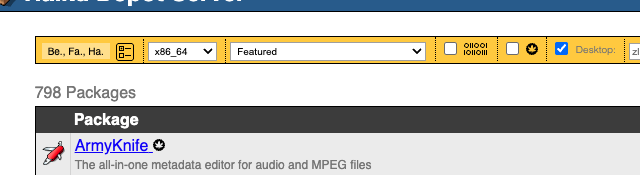
Actually, it is in the hundreds. Go to the Haiku Depot Server (the web interface) and check the box to show desktop apps only, in other words, no libraries, no CLI apps, just graphical desktop apps. That puts a number on it

798 programs. That is what you can access just by using pkgman. Apps in the Depot are the best ported, best vetted, best tested and most guranteed to run. Still …

Want more? Here are 93 Java applications for you. That brings us up to 891. Another 77 QT5/6 applications that are not (yet) available on HaikuDepot. We are now up to 968, just 32 short of a thousand. can we find another 32?

Yup, in the SDL and GTK sections of my site.

I think we need to just take a moment to appreciate how far we have come. There are 798 officially approved applications for Haiku. If you are prepared to trust some guy on the Internet, there are over a thousand.We have mainstream browsers, office suites and graphics editors.

Do we need more native apps? Yes. We are over-reliant on ports. But we have seen more new native apps coming through in the last year or so, not just old BeOS recompiles. We’re getting there.

3 Likes

This was one I was missing :wink:

Thanks!

1 Like

I’m happy to say you’ve proved me wrong.

1 Like

This is a idea I can actually try, or I can wait for emmc support to improve, it could’ve been more fair if I used a better sd card

I definitely can do a mini comparison for this if you want but can you also give me 2 more game I can also use

If Endless Sky is updated to 0.11.1 (I haven’t checked today), then in Endless Sky’s preferences, you’ll have the option to display CPU usage, GPU usage and memory usage. This could be very useful.

My guess is that even on Linux, Endless Sky seems to use the CPU for rendering, rather than the GPU. I’d of course have preferred if the ships were 3D instead of rotated pictures (even EV Nova has several pictures instead of a single one that rotates, so the light is correct in Nova).

This is good to know that mean, I can do a software rendering test for haiku and Linux

1 Like

Not sure what the goal would be to compare? With what? I only go by how things work out on my HW and don’t need values to tell me it would run better on …?

Also, plenty of games in the depot if you feel like you need to compare things (some might find them useful maybe?). :slight_smile:

You right but I guess I’m really trying to show people what they getting into and JSUT getting those beachmarks alone was very hard and time consuming with me struggling but I’m really trying to show people about haiku and Linux overall mainly just haiku so I’m basically doing another beachmark test

No one is stopping you from doing that :slight_smile: but for me personally I don’t need them, my gut feeling from working with Haiku (starting from BeOS R5) gives me enough reasons to stay on daily Haiku.

With disinformation everywhere you can’t trust your senses and AI is making it worse. Everything can be fake, photos, videos, sounds and voices, the taste of what you eat, etc. So, if you can’t trust what you read, nor your own feelings, you’re trying and testing yourself. I guess newer generations are needing more metrics.

1 Like

Classicube performance ratio for each

Statistic Haiku (LLVMpipe/Lavapipe) no Nvidia driver Ubuntu (Intel Mesa)
Rendering Method Software (CPU-emulated GPU) Hardware(Native Intel GPU)
Average FPS ~15 – 40 FPS (Highly variable) ~120 – 300+ FPS
CPU Utilization 90% – 100% (CPU doing all 3D math) 20% – 40%(CPU only handles logic)
Idle RAM Usage ~250MB – 400MB ~800MB – 1.2GB (Standard GNOME)
Boot Speed Fast (Under 15 seconds) Moderate (30+ seconds on eMMC)
Thermal Profile High Heat (Risk of throttling) Low/Moderate Heat
This was still done still Acer Chromebook CB315 which is why I’m using Intel_extreme and Integrated graphics

The intergrated graphics in my cpu made it look a lot better than it should and made my frame rate hover around 15-40 fps and the chunking loading was amazing 10 chunk per sec with 15 frame and as always Ubuntu beat it in performance best thing about this is haiku has better support for Intel

Haiku based off my experience with Intel, intel is fast and responsive very balanced and played a significant role in this comparison and along with this if intergrated graphic cpu gain better support then weaker intergrated graphic cpu it could performed even better

These were the limitations I got for my device different limitations will apply to different devices depending on if you’re using live, virtual machines and running it directly on hardware so I asked a few to please use this form as a way to benchmark or document the performance between linux and haiku as there’s a lot of similarities between the two and having these things documented ahead of time will apply to the world in the future