MAIL:Label ?
I think some program ( uTorrent maybe ) calls it as a mean for the user to define groups of items
MAIL:Label ?
I think some program ( uTorrent maybe ) calls it as a mean for the user to define groups of items
I see it as the user creating a number of flags, and then sets one of those for this email. So, indeed, radio button territory.
That works, too, I think. Thanks!
If I am not mistaken, Gmail uses labels for categorization. So this may be a good name if there were an IMAPFS in the horizon 
Would it be too crazy that Mail didn’t take that new attribute as something special? Say instead of adding a way to add that attribute it offered a way to set any visible and editable attribute that is assigned to the text/x-email type, except the ones it already treats specially (I see at least Subject is editable). It may even group all the booleans under Flags, or show the ones already set as a list of tags under the subject, or whatever. That way you may define your own categorization tags, and have several of them set for the same message. So, apart from the tag, label or whatisnamed that would serve new users to be aware of the possibility, you can also define your ‘4Later’ attribute as a boolean, and ‘project’ as a string and…
I must say that I like label.
Actually I liked META here, as this problem is not just about e-mail. 
I think that’s the right question: how does it work in the IMAP protocol? We should probably consider that as a starting point so we can someday sync these tags or labels with the online mailbox
I just looked in my Gmail account settings, and there are a “System labels”, “Categories” and “Labels”.
“System labels” has the following fixed labels. Each one has a “Show in IMAP” check box (except “Inbox”, which is always shown).
Categories has (no “Show in IMAP” setting for these):
“Labels” are the user created labels. These can all be shown or not in IMAP.
I also have a Proton Mail account, and it seems to only have user created custom labels (no Gmail style system labels).
Not that I preach for any of these in particular, but thought I would share as a reference.
From a very shallow websearch, it appears that IMAP doesn’t know about labels at all, only folders. These labels seem to be an invention of Google GMail, mapping their labels to IMAP folders, creating copies of email when there are multiple labels per email.
Not sure what this means for our needs. I just wanted to de-couple the user-set (local!) label from the email status.
I mentioned further above that I considered using a “Starred” status to mark certain emails. “Starred” is an actual IMAP flag (“Flagged” - 0x04), so it’s being sent with your mail.
However, while the mail_daemon does set the status to “Starred” for thus flagged mails when receiving a mail, it doesn’t seem to actually do so when I manually “star” and email and tell the deamon to check the mailbox.
BTW, it’s not enough to change “MAIL:status” to “Starred”, you also need to change " IMAP:flags" to “4”.
Emails with their flag set to 4 and status to Starred will not appear “starred” when I check on my phone. mail_daemon will, however, mark the email “Read” and keep the IMAP:flags on 4…
Is this a bug, or am I doing something wrong?)
This “Starred” flag should also move out of MAIL:status and into the new MAIL:label, right?
This is quickly getting more complicated than my meager skills can handle…
IMAP calls them keywords, with some details here: https://stackoverflow.com/questions/3632102/imap-custom-keywords
Some of the keywords are standardized (IMAP and JMAP Keywords) but it’s possible to add more.
GMail indeed doesn’t use them in their web interface, and uses folders in a strange way (where the same mail can be in multiple folders).
So, it’s just a list of words in IMAP. There is no key-value system as in BeOS attributes.
This is what makes mapping them to attributes a bit weird. What you suggest (a single attribute containing all the words, with a fixed name), is one way. Another way would be to use the words as attribute names, with no useful value (just check the presence or absence of the attribute). I’m not sure that’s any better?
I’m an old school emailer. I prefer to only use my phone to quickly check the mails now and then. But actually in-depth reading, re-reading threads, writing and replying, I do only on my Haiku computer.
Therefore I’m not interested in “official” keywords (which I BTW cannot apply to emails with my phone app, nor my provider’s webinterface), like “Promotions”, “Social”, “Business” etc.
I want to label a few mails with a custom tag that means something to me, and that I can query for. I’m not interested in categorizing every email and end up with thousands of mails in each category, which I have then to query for other attributes anyway.
Also, how would you build a query for those in the Find panel?
Better to use MAIL:label and if you wanna get fancy and need more labels, do like we already do for Person files’ emails, and add more attributes MAIL:label2, MAIL:label3…
The standardized IMAP keywords are more low-level than that, and are the ones we already reflect in specific attributes: forwarded, has attachment, new, and a few other things to help mail clients like “can unsubscribe” (assuming those spams are properly tagged for that to work in the first place…).
I want to label a few mails with a custom tag that means something to me, and that I can query for.
Yes, if you do it locally, what you suggested seems like the right thing. And it looks like we could, additionally, make it so these attributes are sent back to the online mailbox, which may allow to sync them with a phone, the web interface, or even between multiple Haiku machines. It probably won’t happen in the short term, but we can add it to the TODO list somewhere.
Perhaps a name like UserLabel or UserTag would allow people to distinguish it better and make obvious that it is the attribute they can modify?
I think that is a good idea. It also helps to clarify that this is not a closed enum (one (or many) value from a specific, predefined list). So META:UserLabel (or any spelling of it) sounds good to me. 
A standard attribute editor (maybe as an add-on) would be nice. CLI is not for everybody.
We do have Attrify. Perhaps this can become part of the standard tool set.
Useful info on working with attributes.
Thanks for the nod ilfelice 
A general META:tags for standardizing how we handle labels across the OS would be a huge win for Haiku and much more powerful than the 10 or so Color labels in macOS. I’d love to see this move forward, ideally using the plural META:tags to clearly signal that it’s a collection of markers rather than a single value - just like the “groups” attribute for People files.
From the perspective of SEN (Semantic Extensions Native), I’ve been thinking about a similar way for generic classification. In my system, I use separate, linked Labelfiles because they are rich Entities and not just flat Strings (following the data-centric vision of the original BeOS and extending that into semantic, stable linked data, implementing the mantra “Things, not Strings”), but the core goal is the same: making data discoverable and interconnected.
At this point we should really start thinking about a common attribute registry. If we can agree on a shared set of types and attributes - reusing things like Media:titlefor Audio, Movie and Book files, or CONTACT:name across different apps - it allows for a better, deeper interoperability across apps and also optimizes index usage, because only fewer, common attributes need to be indexed (note that BQuery allows secondary, non-indexed attributes for additional fitlering, so not every attribute in a query needs to be in the index).
So instead of every app ‘reinventing the wheel’ with its own custom metadata, a shared registry means a file’s relationship to a project, a person, or a topic becomes a native part of the filesystem that any app can understand. I remember a related discussion here and will link it later when I have found it.
I’m happy to share some of the logic of associations and ‘Labels’ I’ve been testing in SEN if it helps us build a robust standard that works for both simple tagging and deeper semantic linking!
PS: While SENta clause did not make it to your chimneys, he was hard at work to build a new /home at https://blog.sen-labs.org (preview!) and related stuff. Stay tuned, but don’t hold your breath;-)
What do you mean by a reigstry? A formal component of the OS with an api you have to register yourself with? or A list on the haiku site we maintain with stuff that makes sense to share between apps?
It can (and probably should, as a first step at least) be as simple as a Github hosted static Markdown page with a well defined table structure where you list common attribute names by internal name, short name (used as Display name in Tracker), attribute type, and some sample FileTypes where it is used.
Sooner or later, every semantic system needs a shared registry, so you know how to work with data in a system.
In SEN, I take it a step further and keep the actual resource definitions, so these types can be created on the fly. I have a work-in-progress LinkML schema approach where I generate native Haiku RDEF files on every build.
cf: SEN Ontology Native Interface (look in “ontologies”)
Cheating, lying, deceiving. Or, as most would call it, with a few UI hacks:
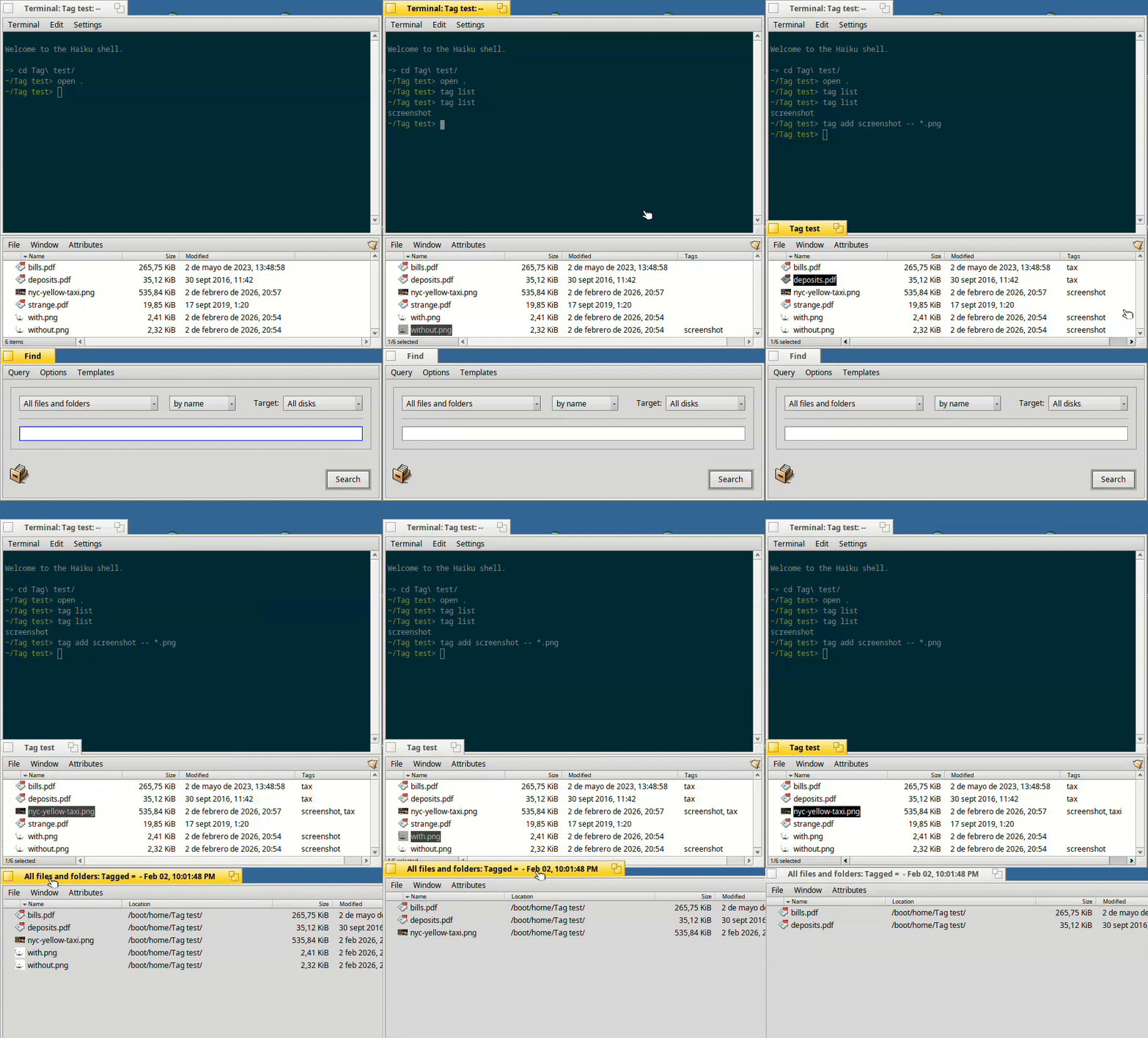
Nothing that you can’t do manually without those changes if you remember to create an index before using a new tag.