Depends on who’s going to be using it. If you see someone picking this up in the first week of the Haiku experience, then it has to support the official release (even if it’s named “beta”, it’s what we have.) If it’s more a die-hard fringe, maybe not as important.
(I don’t know anything you don’t know, but quite a while can elapse between releases. I wouldn’t hold my breath.)
The question is, when is R1/Beta5 coming out?
If it is coming in late 2024 or something, then we should try to support beta4.
But if beta5 is coming soon, we’ll just wait until then to support the latest beta.
The more “official” version is Beta4. A new beta may take a long to be released, so it would be better if the software is tested to run in the Beta4. The nightlies, as explained, are test releases and can break things any time.
Yes, the entire OS is in beta, which means mostly feature complete but with bugs.
The beta releases themselves get updates but only minor bugfixes, no big compatibility breaking changes.
The nightlies on the other have have no compatibility promises.
Haiku-PyAPI 0.2 has been released . In 0.1, pretty much the app kit and a little bit of the interface kit were available. Now, a good many other kits are available.
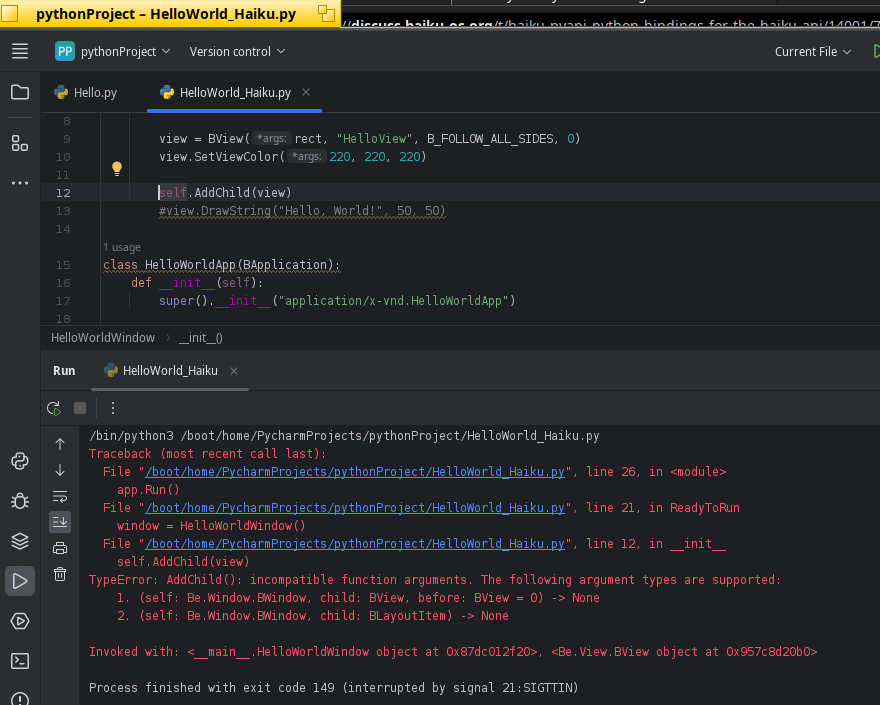
The documentation is mainly the C++ docs and code that has been written with it. For your particular problem, that should be self.AddChild(view, None). I have just added more links to example projects in the Haiku-PyAPI README.
Haiku-PyAPI 0.3 is here . Now, virtually all of Haiku’s API is supported. However, If you make an application, I wouldn’t be surprised if you run into a bug or two. And definitely, there are plenty of memory leaks left to fix!
Thanks to @coolcoder613 for spending the time to make the release and @TmTFx for adding support for the rest of the kits!
Yes, the API is used almost an exact copy of Haiku’s API. I improved the small example program in the repository. Hopefully that gives a good idea of how to use it.
Version 0.4 of Haiku-PyAPI has been released! @TmTFx did most of the work. I answered questions and made the release.
This release has
Built-in documentation for most/all functions in the App kit. Just use the Python help function!
Bug fixes. Surprise, surprise, Haiku-PyAPI still has plenty of bugs to be fixed.
The beginnings of Sphinx documentation. Currently, it’s not viewable on the web anywhere.
Versions of functions that are more natural to use in Python. We’re keeping the ones that stick as closely to the C++ API as possible, but there are also Pythonic variants available. For example, instead of doing status = message.FindString("key", outputString), you can do status, outputString = message.FindString("key").
We also have some applications that are made with Haiku-PyAPI on HaikuDepot. @TmTFx made all of them!
HaiQR – Generates QR codes.
FeedGator – RSS feed reader. The updated version hasn’t been released yet, so you’ll need to wait a bit for this one.
HaiPO – Edit PO files. Currently doesn’t work out of the box.
 . In 0.1, pretty much the app kit and a little bit of the interface kit were available. Now, a good many other kits are available.