That sounds like a lot ;””D good luck with the move and repainting!
I completely understand. Balancing open source with university and life can get hectic. I’m actually at university right now xD, just wanted to reply quickly.
I’ll continue working on the project today and keep you updated.
Thanks for clarification I’ll setup the development environment asap if there any issues I can’t handle through the process I’ll reach out
I already have some vim config and plugins I made helping me in edit/compile/test as we go if I feels like I need to add some modifications I’ll do.
I’ve almost finished setting up the development environment. I’ve installed all the prerequisite software, downloaded the source code, and successfully compiled it. I’ve also created a Gerrit account and nearly completed my GSoC proposal.
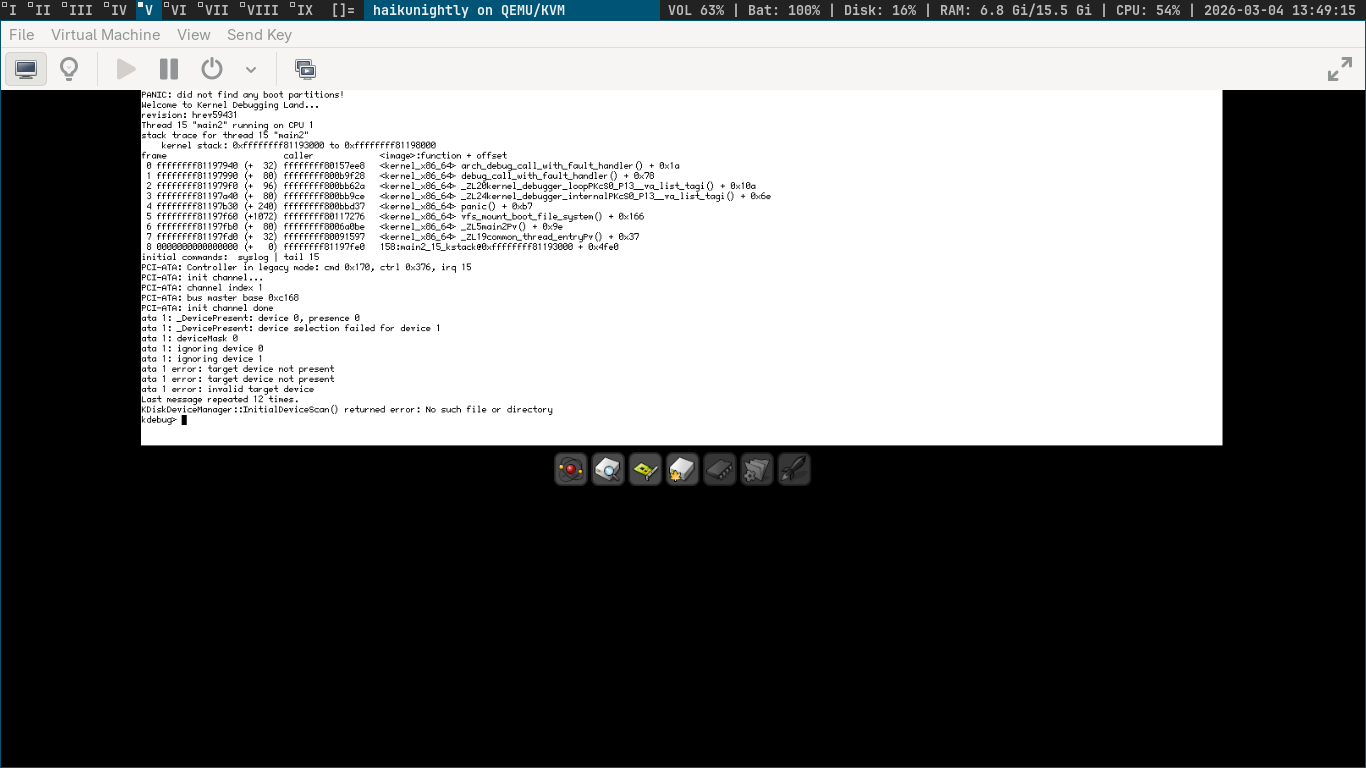
I tried running the Haiku nightly image on a VM, and after launching it, I got the attached screen. I just wanted to confirm whether this is the expected result or if something might be wrong :
Additionally, I’d like to share my proposal draft with you for feedback. Since it contains some personal information, where would you prefer that I send it privately?
Additionally, I’d like to share my proposal draft with you for feedback. Since it contains some personal information, where would you prefer that I send it privately?
It is always a good idea to share proposal publicly so that others can review it as well.
I tried running the Haiku nightly image on a VM, and after launching it, I got the attached screen.
From the logs it seems like it cannot find disk partition to boot, have you created and specified that partition before starting VM?
You can remove the personal info part from the version you share publicly for review. For the review we’re more interested in the technical part of the document.
Here is the draft version of my proposal, I would appreciate any feedback or suggestions, and I will thoughtfully consider all comments for improvement.
I think you can include a lot more details in the “project proposal” section. I would expect to see:
A short introduction to XFS and its main data structures and algorithms
An overview of the current state of Haiku XFS driver, what is already working and what is missing
More details about the functions that need to be implemented, starting with the fs_interface entry points and all the way to the needed algorithms (block allocation, releasing unused blocks, different inode formats, management of allocation groups, …). This for each of the operations you plan to implement: creating directories, creating files, modifying file content, modifying file size, …
Thank you for the feedback. All the points are clear. I will expand the “Project Proposal” section and include more details about XFS, the current state of the Haiku XFS driver, and the implementation plan for the required operations.
I’ll send an updated draft after making the revisions.
Here is the updated draft of my proposal after applying the modifications and including the points you mentioned. I hope it now addresses all of them.
I would greatly appreciate any further feedback or suggestions for improvement.
If there is any misunderstanding on my part regarding the filesystem design or architecture, or the implementation steps I plan to follow, I would greatly appreciate your clarification.
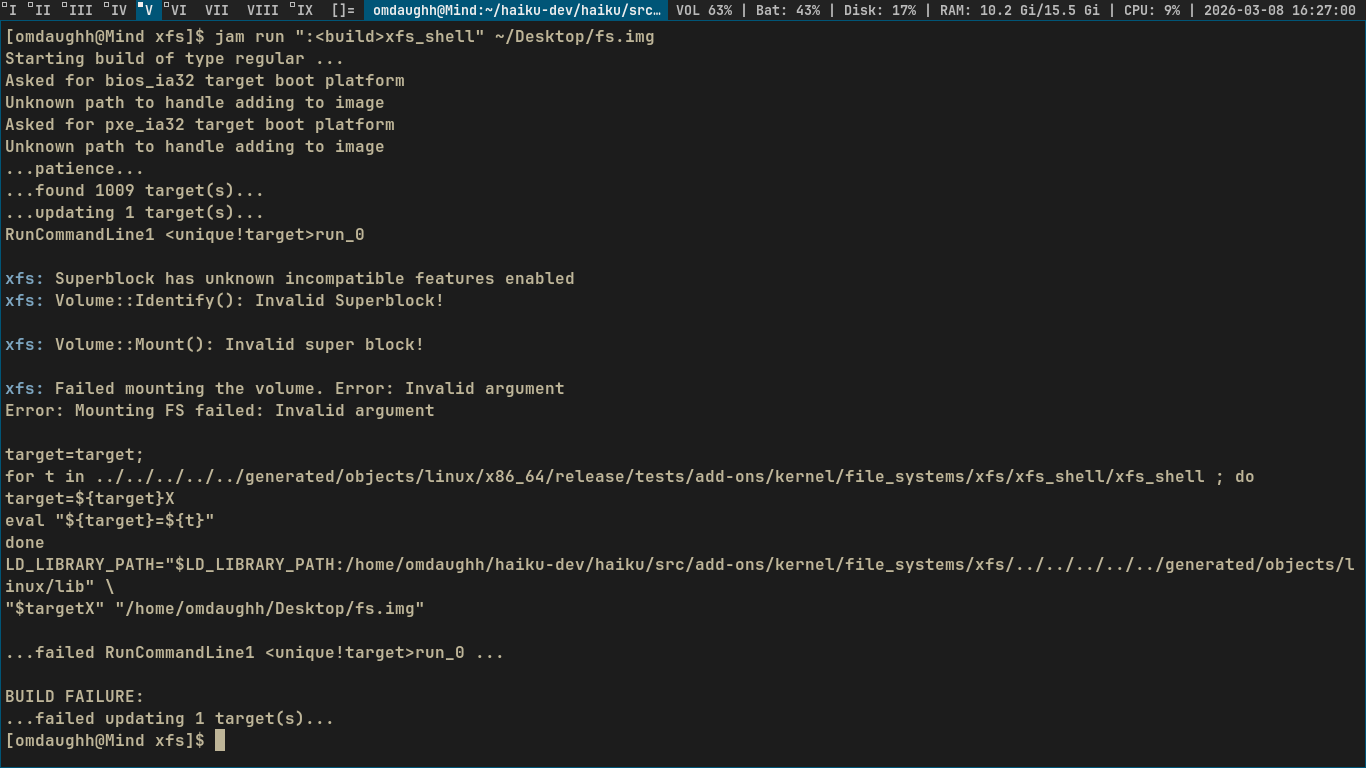
I was building xfs_shell and encountered an error. I tried several times to fix it, but unfortunately I couldn’t find a solution.
I moved the fs.img file from its original location and ran the command jam run "<build>xfs_shell" fs.img. I still received errors, even though I also tried specifying the full path to fs.img in the command.
If you have any suggestions or guidance on what I should try next, I would really appreciate it.
I hoped other mentors and other people would have a look, as I’m moving to a new appartment next week, I’ve been a bit busy packing all my stuff, making sure my server is moved to the new place without disruptions (I self host my email so this is kind of important), and so on.
I hope I will not be tasked with reviewing every draft from every student.
Anyways, I gave it another quick read, and I think it can be further improved. The main things I noticed:
Your “implementation plan” has journaling as a separate step at the end. However it mentions (rightfully so) that journalling is a prerequisite for all the other operations. So, wouldn’t it make sense to do it first, or incorporate it into the other steps?
The timeline seems not really matched to the “implementation plan”. You could merge them, or the timeline could refer to the numbered items in the implementation plan. The timeline could also include the expected outcome for each of the steps. For example, at the end of community bonding: having set up the build environment and tested read access to XFS both with the fs_shell and in Haiku. In the next steps, maybe being able to create an empty file, create an empty directory, writing data to an existing file could be possible goals. Or it may be split differently: first work on write to shortform files and directories, then add the more complex forms later.
You can start your timeline with the application period, tracking what was already accomplished with your proposal writing and first patches submitted. Some of the things you have listed in the community bonding period may already be done by then.
The first error message is “Superblock has unknown incompatible features enabled”. I don’t know how you created and formatted your fs,img, but if the error is correct, this could be caused by it using a newer version of XFS with some features that we don’t handle yet. Maybe you can look at the code that reads the superblock and see if you can improve the logging to print which feature bits are being set that we don’t understand, and investigate if Linux XFS developers made some changes there and introduced new features that we need to support.
Or maybe the error message is not right, and comes from some other underlying error (since afterwards it complains about an invalid superblock). So you may want to check that as well. Do we identify the superblock first and then check feature flags? Does the error come after reading some things from the image, or does finding fs.img fail altogether? (in which case it should probably fail with a different error message, and you can work on fixing that).
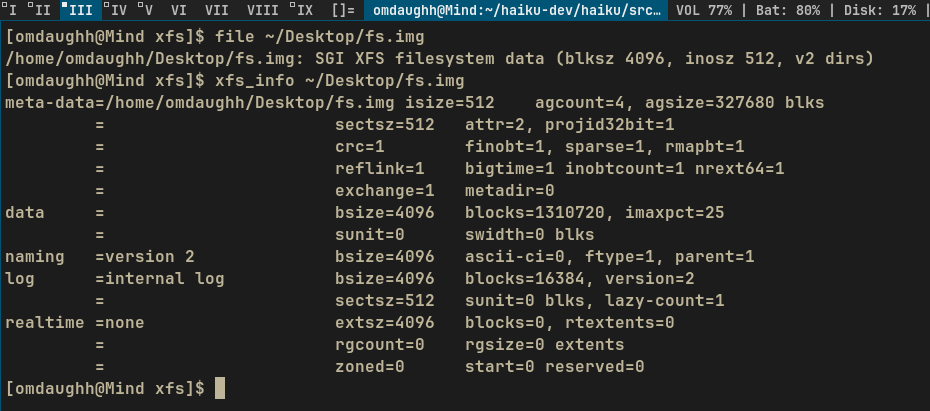
Before building/running xfs_shell over fs.img, did you first format this image file to XFS format using the Linux driver? The invalid superblock error suggests the image might not be properly formatted as an XFS filesystem. Can you confirm you ran something like mkfs.xfs fs.img in a Linux environment before attempting to mount it with xfs_shell?
You can use file fs.img to verify the fs of image or xfs_info fs.img to verify xfs superblock
Thank you for reviewing the proposal again, especially while you’re busy with the move.
I’ll restructure the implementation plan so journaling is implemented first or integrated with the other steps, and revise the timeline to better align with the plan. I’ll also start the timeline from the application period and mention the work already done.
Regarding the error, I’ll check how the superblock is read, improve the logging to show which incompatible feature bits are set, and verify whether the issue is due to unsupported XFS features or an earlier error when identifying or reading the superblock.
Yes, I formatted the image using mkfs.xfs fs.img in Linux before running xfs_shell. I also verified it using file fs.img and xfs_info fs.img, and both indicate that the image is formatted as XFS.
I’ve just submitted my first patch It’s a small one focused on some style cleanups.
I’d really appreciate any feedback or review whenever you have time. Thanks in advance!
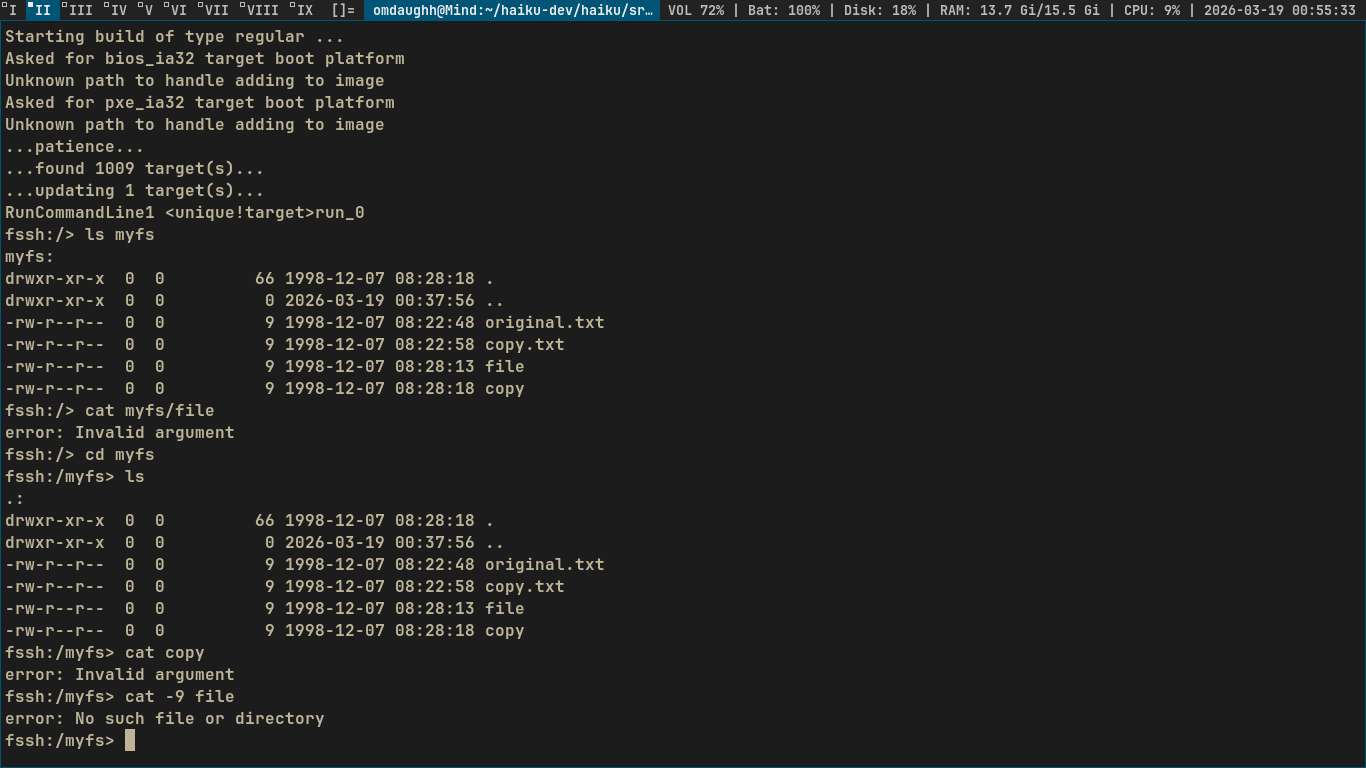
I’m almost done with the implementation. The code compiles without errors, and everything looked fine initially. However, when I started testing to ensure everything behaves as expected before submitting, I encountered an issue with the files.
Also, just to give more context on what I’ve done to implement this TODO, here are the steps I followed
Added the following definitions in xfs.h: #define XFS_DIFLAG2_REFLINK (1ULL << 1) #define XFS_DIFLAG2_BIGTIME (1ULL << 3)
Added these functions in xfs.h: uint32 FeaturesRoCompat() const { return sb_features_ro_compat; } uint32 FeaturesIncompat() const { return sb_features_incompat; }
Exposed them through Volume.h: inline uint32 FeaturesRoCompat() const { return fSuperBlock.FeaturesRoCompat(); } inline uint32 FeaturesIncompat() const { return fSuperBlock.FeaturesIncompat(); }
added the following code blocks in Inode.cpp:
// Reflink flag can only be set on reflink-capable filesystems if ((fNode->di_flags2 & XFS_DIFLAG2_REFLINK) != 0 && (fVolume->FeaturesRoCompat() & XFS_SB_FEAT_RO_COMPAT_REFLINK) == 0) { ERROR("Inode has reflink flag but filesystem does not support reflink"); return false; }
// Bigtime flag can only be set on bigtime-capable V3 filesystems if ((fNode->di_flags2 & XFS_DIFLAG2_BIGTIME) != 0 && (Version() < 3 || (fVolume->FeaturesIncompat() & XFS_SB_FEAT_INCOMPAT_BIGTIME) == 0)) { ERROR("Inode has bigtime flag but filesystem does not support bigtime"); return false; }
If there’s anything I misunderstood or if this approach looks off, I’d really appreciate any feedback.
It will be difficult to debug things from just the “Invalid argument” final error code. This could come from any place in the XFS code that returns EINVAL.
So, if you have not done it already, you should enable tracing by adding a #define TRACE_XFS in https://grok.nikisoft.one/opengrok/xref/haiku/src/add-ons/kernel/file_systems/xfs/Debug.h?r=afaeb2d45de94655cd9509d0dc3c975a98584b36#12 and recompiling the XFS code. This will activate all the TRACE() macro calls in the code and give you an idea which parts of the code are executing. Then you can add more TRACE() macros in other places if needed, until you identify which return EINVAL; is the source of the problem. Then you can probably find that some part of the implementation, possibly related to the new storage formats related to the new feature flags, is missing.