Dalmegnu and waddlesplash are still investigating some issues, progress is slow as this isn’t a full-time gsoc anymore.
The acceleration support is working for simple tests, but it is crashing when trying to boot haiku or other full-blown os in qemu. That makes it a bit difficult to debug, it would be easier if the simple test cases reproduced the crash.
Your suggestion would be a lot easier to read if you used a code block (``` before and after the code in a extra line) or a Paste service like https://bpa.st
I guess the lines with bullet points are the changes,but are they added or removed lines?
At last I sat down and reworked @dalmegnu’s code into a mergeable form, implementing AMD support and fixing a lot of bugs along the way, and merged it in hrev59768.
However, it’s not enabled yet. #20123 tracks the remaining problems. The short version is that while it works much better after my fixes and cleanups than it apparently did before, it still is not fully functional; a Haiku image boots to the rocket but then hits errors. (I did get Tiny Core Linux to boot all the way into a GUI at least.) So, it seems we have a handful more problems left to solve; but at least now that it’s merged, it’s easier to experiment with (you just have to uncomment two lines in the build configurations and then build a full image.)
Hardware virtualization will be great to have on Haiku, another feature that will be of enormous benefit and something I will definitely use when it is working fully. I was wondering what the state of it was after GSOC 2024, this is a wonderful update. Thanks to dalmegnu for starting the work on this and waddlesplash for working on getting it finished and merged into Haiku.
Did some investigation with @kallisti5: turns out the problems initializing on Intel hardware were due to a crazy oversight in the EFI loader’s initialization of non-boot CPUs. That might actually have caused some other open tickets, we’ll see…
After fixing that in hrev59772, I now get basically the same behavior on Intel as on AMD: “Mem Assist Failed”, userland crashes with NULL dereferences, etc. That’s actually good, as it means the problem is probably in common code somewhere. Where, I don’t know, and it’s going to take some work to try and unpack this further, probably.
Kudos to @sed4906 for uncovering the last remaining bug that was keeping Haiku guests from reaching the desktop. It turns out that Linux guests didn’t need the fix Haiku guests did; at some point in the past month the crashes that were preventing them from getting to the desktop got fixed (probably in the changes I made to FPU state management in the NVMM-Haiku glue code.)
Haiku guests need to enable the “Don’t call the BIOS” option for the moment, which means you’re stuck with whatever VESA resolution the bootloader picked. Not sure yet if this is a Haiku or a NVMM problem; there’s a behavior difference in QEMU between the two, and the cause isn’t sorted out yet (Linux can change resolutions just fine.) We’ll figure that out in time, I’m sure.
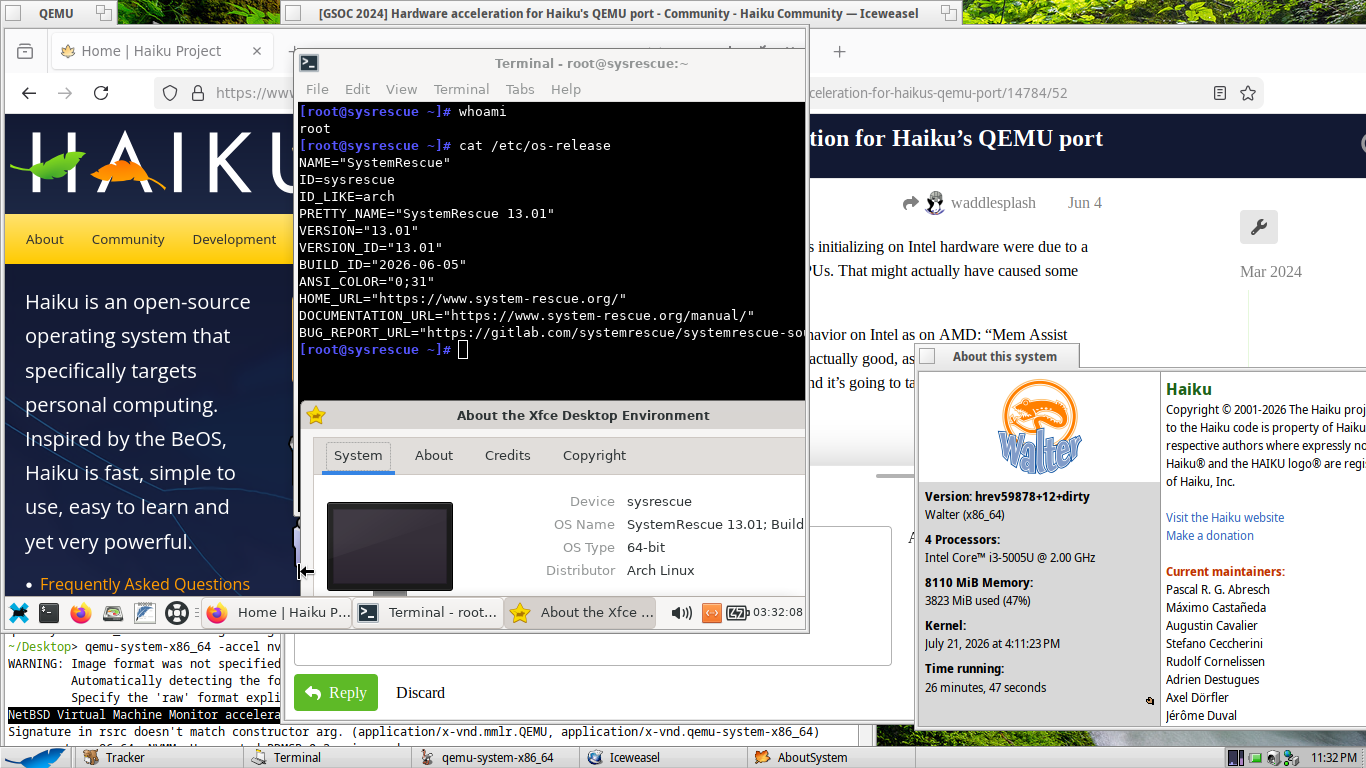
Meanwhile, SMP even works (the Linux VM in the screenshot is running with 2 cores)!
I’ve gone ahead and enabled NVMM in master and the beta6 branch already. However it’s going to take a few days to get QEMU builds with NVMM enabled in the depot; we’re in the middle of some rebuilds at HaikuPorts and the QEMU build looks broken at the moment. So for those of you who absolutely can’t wait … here’s a package. Just add -accel nvmm and look for the NetBSD Virtual Machine Monitor accelerator is operational print at QEMU startup.
I haven’t stress-tested it much, so don’t be surprised if you run into problems. It’s beta-quality software, after all
I’m guessing this needs an updated hrev? Getting the next error when launching:
~> haikuQemu.sh
runtime_loader: Cannot open file libnvmm.so (needed by /boot/system/bin/qemu-system-x86_64): No such file or directory
Crashes after hrev update:
S3: init_hardware() - no supported devices
radeon_hd: init_hardware
Radeon - init_hardware: Version: 5.1.6.0
Radeon - Radeon_CardDetect: no supported devices found
etherpci: init_driver init_driver: etherpci not found
nvidia: CALLED init_hardware
nvidia: init_hardware: no supported device found
intel_extreme: CALLED status_t init_hardware()
devfs: "intel_810" api_version missing
i810: init_hardware() - no supported devices
framebuffer: init_hardware()
ati: init_hardware() - no supported devices
assuming memory type 20000000 for overlapping 0xfc000000, 0x2000000 area 9036 from existing 0xfc000000, 0x240000 area 134
qemu-system-x86_64: NVMM: Mem Assist Failed [gpa=0xb0000]
qemu-system-x86_64: NVMM: Failed to execute a VCPU.
Abort
/boot/home/config/non-packaged/bin/haikuQemu.sh: line 27:  1007 Kill Thread                qemu-system-x86_64 "${args[@]}"
If that crash is trying to boot Haiku… remember you need to use the “Don’t call the BIOS” option from the bootloader (or set that in the kernel setting file, I guess) for the system you’re trying to boot (not on the host).
I’m getting the same error as Begasus, even with ‘Don’t call the BIOS’ set at boot. I’ve tried nightlies and R1beta5 ISOs, x86 and x86_64 versions. Gets to the rocket and that error happens. Are there any other specific qemu command line options apart from -accel nvmm to use NVMM that you used @waddlesplash ?
EDIT: Nevermind, I got it working. The latest nightly version for the guest is also needed to boot too, was looking at the notes for the ticket in Trac which mentioned it.
As of today, the QEMU builds available in HaikuPorts now have NVMM support compiled in for x86_64. Just upgrade and add -accel nvmm to your qemu-system-x86_64 arguments!