How exactly is the disk partitioned? What type of partition table is it?
Did you use DriveSetup?
Drive setup. Intel partition map (MBR).
It’s got a few partitions, and the boot manager installed to the MBR. Currently can only boot with the EFI in the EFIBOOT partition though. That is an Intel/Dell bios issue though, although maybe someone will develop a UEFI Haiku boot manager.
1 Like
That’s not going to happen since there’s rEFInd, and it works just fine to start Haiku boot loader.
If your EFI boots with the MBR partitions setup and transfers the control to EFIBOOT partition, then put refind there and it will be your boot manager which starts Haiku boot loader.
1 Like
Not to be nit-picky, but to clarify, you mean rEFInd starts the Haiku boot manager with the multi-color boot options (resides in MBR)? Or do you mean rEFInd starts the Haiku boot loader, which I believe is the haiku platform loader that gets renamed to BOOTX64.EFI during the Haiku install process.
1 Like
rEFInd itself provides a boot menu that allows to boot different systems,so there’s no need for the BIOS-only Haiku Boot Manager.
rEFInd starts the BOOTX64.EFI Haiku loader,not the BIOS one.
2 Likes
It does seem to not do what I want. I will try the CSM wrap project.
I could use rEFInd, but it’s kind of janky. Grub isn’t great but I’d sooner use that. I do want to use the Haiku Boot Manager though.
1 Like
reFind does exactly the same thing for efi the haiku boot manager does for bios boot. What problem do you have with it?
It’s slow, even after removing drivers and disabling probing, it’s ugly, and it’s not easy to modify. Haiku boot manager is perfect as is, except it can’t have entries from secondary drives and doesn’t work with EFI.
3 Likes
Wierd, not an experience I’ve shared.
As for the visual look, you can use the text mode of it or use my haiku refind theme (feedback welcome, haven’t updated it in a while though) nephele-user/rEFIndHaikuTheme: Haiku theme for rEFInd - Codeberg.org
Edit: as for easy to modify, do you take issue with the config file format? We can probably add a UI config for it at some point.
1 Like
Feedback would be screenshot on codeberg. Maybe it’s somewhere I can’t find. I’ll try it out though when I get a chance.
You could also try RefindPlus, maybe it would work faster on your machine: GitHub - RefindPlusRepo/RefindPlus: A Boot Manager for Mac and PC
1 Like
Just assume that when someone asks a question here, he or she already googled or asked ChatGPT before. There is no need to reproduce this content here.
2 Likes
What is counts is facts, true or false. And I definetely do not asume that everyone who writes here makes thorough research or follow good practice in communication.
Then don’t post verifiably wrong information your LLM imagined.
In any case, the forum rules were amended to make this clearer, not that this behaviour was okay beforehand:
Assume people have done basic research before turning to the forum. Posting easy to find search results or the output of a large language model (especially passing it as your own reply) is not helpful.
2 Likes
I indeed don’t have a screenshot there, for a good one I’d have to screenshot a VM and I’ve not bothered with that yet.
1 Like
First of all, this is not my LLM.
Second, not everything I published was AI-generated text.
Third, if I did not agree with the AI analysis, I would not publish the text.
AI is a good helper in translating the text. My knowledge of English is not sufficient for full-fledged communication in English. I often use Google Translate for the same purpose, of course, manual corrections are often needed.
Do not rush to judge a person as a villain at every opportunity, if you simply disagree with that person’s point of view or the topic raised. This is not good practice.
It should be added that you should also not presume that everything generated by AI is not based on real facts and is fabricated.
I’ve found the “AI” search results to be helpful for quick answers and avoiding sponsored results.
However, I did search for ways to have legacy boot on UEFI systems, but didn’t find CSMWrap. So the pointing to CSMWrap was helpful. It didn’t work on my system though. Not sure if it can be made to work.
I have since started using a GUID initialized disk. Until I can make Haiku’s boot manager work, I will try to make Grub or rEFInd work. I’ll try rEFInd plus as well. The speed of rEFInd hasn’t been an issue lately. It was quite slow the first couple tries, but is just as fast as MacOS boot picker now.
2 Likes
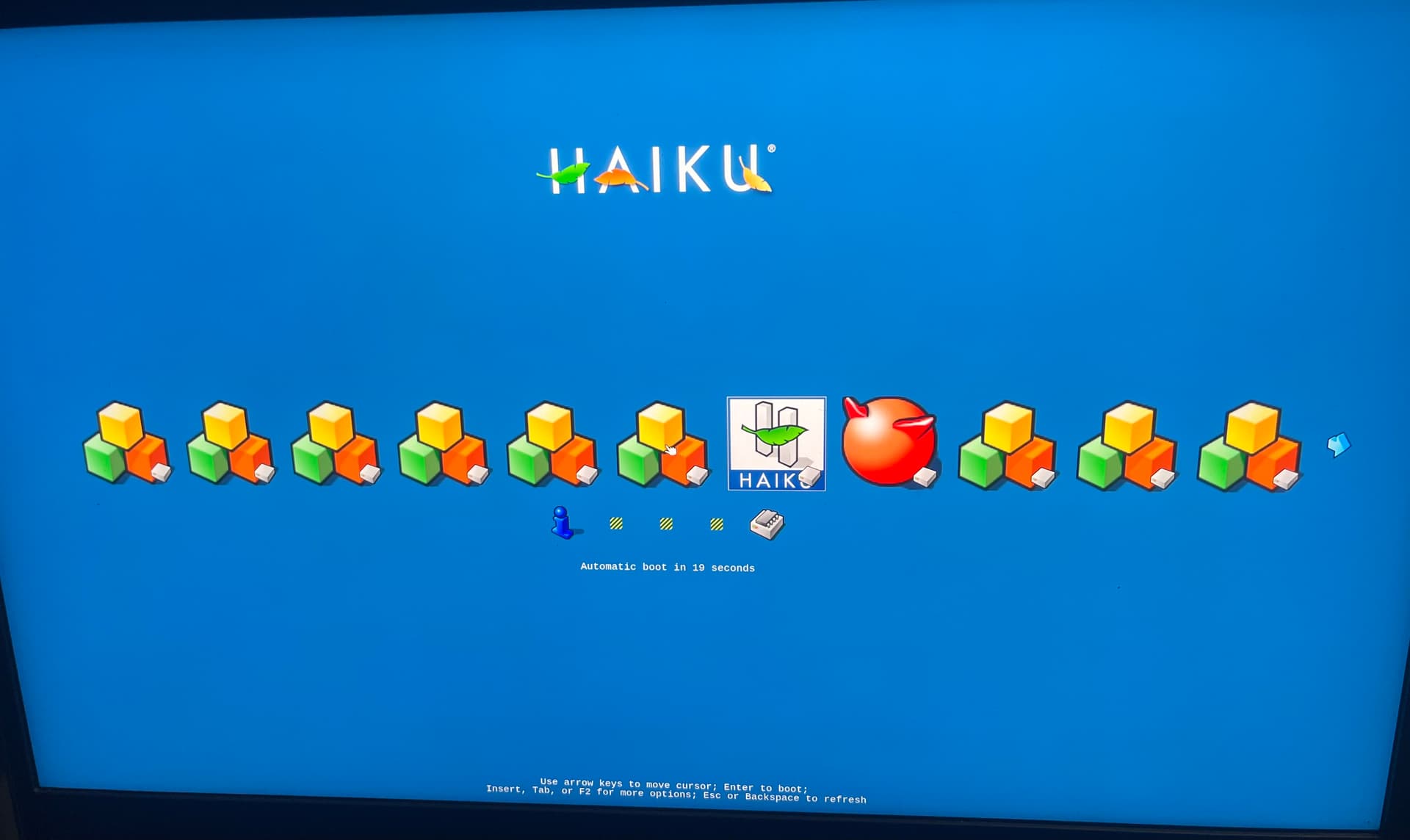
Very nice. Needs icons. I guess I have to figure out how to do that, and exclude extraneous icons for same OS. I see it picked up FreeBSD with no trouble. Also there are a few icons for the utilities there I forgot to check what they were.
Looks nice. Took several seconds between the banner and displaying the actual options. Maybe I can shorten that time by hard coding boot options and disabling scan?
1 Like
You can press Del or the “-” key to hide an unwanted icon. You can return them back later if you need via the Hidden Tags menu.
2 Likes
Maybe start by just not scanning on mediums you don’t want to boot from, so scan only on the internal drive for example.
3 Likes